
COLSUR S28-GRAY-NEW
COLSUR 3-in-1 Wireless Charging Station
Instruction Manual - Model S28-GRAY-NEW
Marca: COLSUR
Producte acabatview
The COLSUR 3-in-1 Wireless Charging Station is a versatile device designed to simplify your charging needs. It integrates a 15W wireless charger, a night light, and an alarm clock, providing a compact and efficient solution for your bedside table or desk. This station supports simultaneous fast charging for compatible iPhones, iWatch (series 2, 3, 4, 5, 6), and AirPods (1, 2).
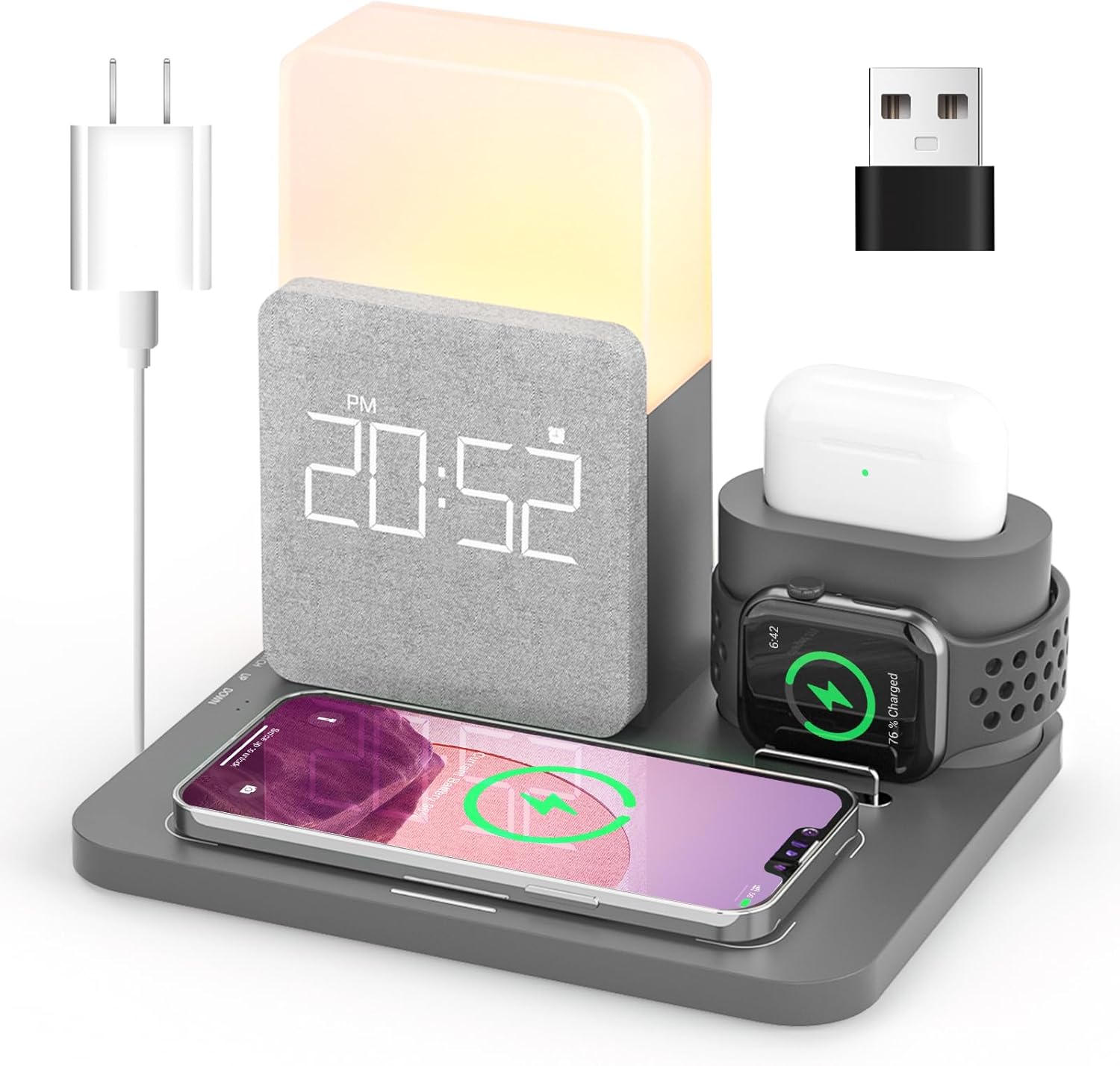
Image: The COLSUR 3-in-1 Wireless Charging Station in gray, showcasing its ability to charge a smartphone, smartwatch, and wireless earbuds simultaneously. It also features a digital clock display and an integrated night light.

Image: A visual comparison illustrating how the COLSUR 3-in-1 charging station helps declutter a desktop by consolidating multiple charging devices into one compact unit.
Característiques principals:
- Càrrega 3 en 1: Simultaneously charges iPhone, iWatch, and AirPods with the included QC3.0 adapter (9V/2A).
- Port USB addicional: Includes an extra USB port for charging other devices.
- Portable Cable Storage Box: A dedicated box for organizing iWatch or earphone cables, making it space-saving and portable.
- Llum nocturna regulable: Features three brightness levels (low, medium, high) and continuous dimming (10% to 100%) for eye care.
- Alarm Clock with Snooze & Memory: Digital alarm clock with a 5-minute snooze function and memory to recall the last set alarm time.
- Qi-Certified Safety: 15W wireless fast charger with overcurrent, overvoltage, i protecció contra el sobreescalfament.
Contingut del paquet
Si us plau, comproveu el contingut del paquet en desempaquetar-lo:
- COLSUR 3-in-1 Wireless Charging Station
- QC3.0 Power Adapter (9V/2A)
- Cable de càrrega USB
- Manual d'usuari (aquest document)
- Cable Storage Box (with different covers for Android/Apple)
Nota important: Earphone cables and iWatch cables are no inclòs. The product cable and adapter are provided as a gift. Ensure a firm connection when using.
Guia de configuració
- Connectar l'alimentació: Plug the provided USB charging cable into the charging station's input port and connect the other end to the QC3.0 power adapter. Plug the adapter into a wall outlet. Ensure the connection is firm.
- Place Devices:
- For wireless phone charging, place your Qi-compatible smartphone on the designated wireless charging pad.
- For iWatch charging, insert your iWatch charging cable (not included) into the dedicated slot and place your iWatch on the stand.
- For earphone charging, insert your earphone charging cable (not included) into the dedicated slot and place your AirPods (1, 2) on the earphone charging area.
- Gestió de cables: Utilize the portable cable storage box to neatly store your iWatch or earphone cables, reducing clutter. The box can be connected to the base or charged separately via its Type-C interface for travel.

Image: Illustration demonstrating the connection points for external watch and earphone charging cables within the station, emphasizing that these cables are user-provided.

Imatge: Una imatge detallada view of the independent input interfaces for the earphone and watch charging modules, highlighting their modular design.
Instruccions de funcionament
Funció de càrrega sense fil
Place your compatible smartphone, iWatch (series 2, 3, 4, 5, 6), or AirPods (1, 2) on their respective charging areas. The station will automatically detect and begin charging. Ensure devices are centered on the wireless charging pad for optimal performance.
Nota: The USB connectors are not compatible with iWatch Series 7 or newer AirPods (e.g., AirPods 3 and AirPods Pro) as the station uses USB-A connectors for these modules.
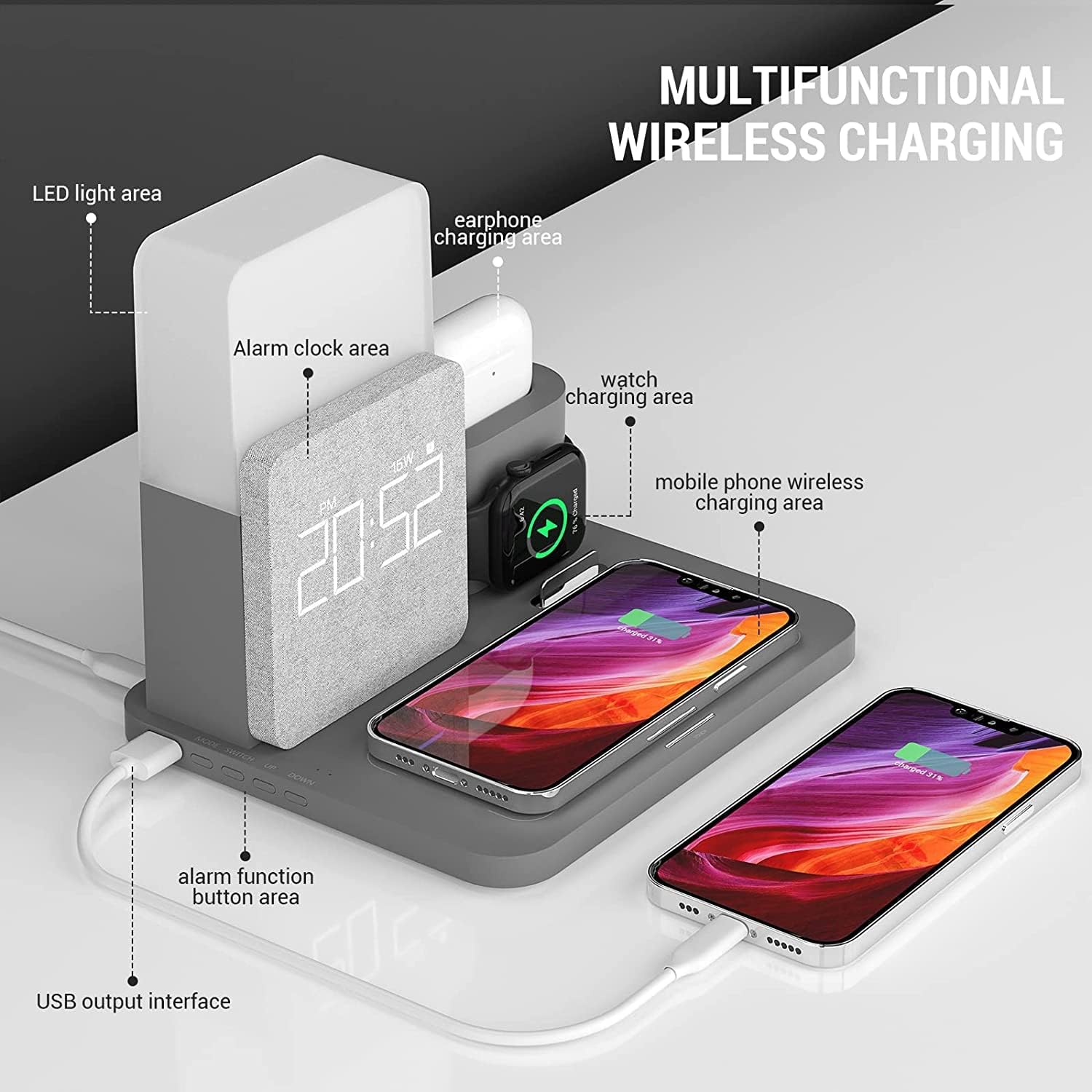
Image: An annotated diagram highlighting the various functional areas of the charging station, including the LED light, alarm clock, and dedicated charging zones for earphones, watches, and mobile phones.
Funcionament amb llum nocturna
The integrated night light offers adjustable brightness.
- Nivells de brillantor: The light has three preset levels: low, medium, and high.
- Atenuació contínua: Long press the light control button to continuously adjust brightness from 10% to 100%. Release the button when the desired brightness is reached.
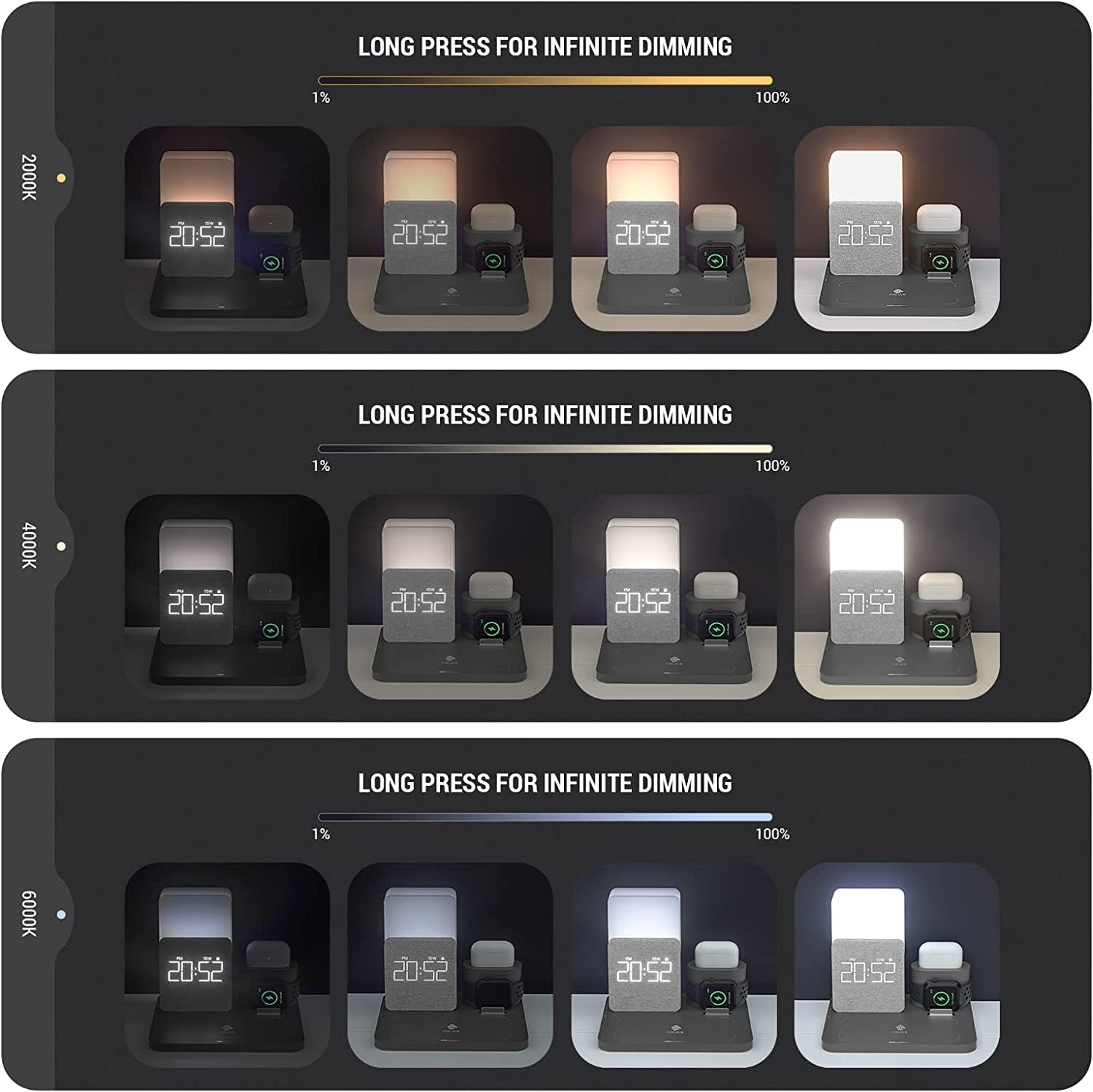
Image: Visual representation of the night light's adjustable brightness and color temperature settings, demonstrating its versatility from warm to cool light.
Funció de despertador
- Configuració de l'alarma: Refer to the specific buttons on the device (usually located near the clock display) to set the desired alarm time.
- Funció de posposar: When the alarm sounds, press the side of the watch area (or designated snooze button) to activate a 5-minute snooze. The alarm will sound again after 5 minutes.
- Funció de memòria: The alarm clock remembers the last set alarm time.
- Activació de l'alarma: After setting the alarm time, ensure the alarm icon appears on the screen. This indicates the alarm is successfully activated.
Additional USB Port
The station includes an additional USB output port. You can use this port to charge other USB-powered devices that are not compatible with the wireless charging areas.
Manteniment
- Neteja: Disconnect the power before cleaning. Use a soft, dry cloth to wipe the surface of the charging station. Do not use abrasive cleaners or solvents.
- Emmagatzematge: Quan no l'utilitzeu durant períodes prolongats, guardeu el dispositiu en un lloc fresc i sec, allunyat de la llum solar directa i de temperatures extremes.
- Eviteu líquids: Mantingueu el dispositiu allunyat de l'aigua i altres líquids per evitar danys.
Resolució de problemes
| Problema | Possible causa/solució |
|---|---|
| El dispositiu no es carrega sense fil. |
|
| iWatch/AirPods not charging. |
|
| Alarm clock not sounding or displaying time. |
|
| Night light not working or dimming. |
|
Especificacions
| Característica | Detall |
|---|---|
| Marca | COLSUR |
| Número de model | S28-GRAY-NEW |
| Color | Gris |
| Tecnologia de connectivitat | USB |
| Tipus de connector | USB Type C (for main power input) |
| Ports USB totals | 1 (additional output) |
| Entrada Voltage | 9 Volts |
| Ampedat | 2 A |
| Sortida de càrrega sense fils | Up to 15W (for compatible phones) |
| Dispositius compatibles | Qi-enabled smartphones (iPhone 13 Pro max/13/12/11/11 Pro/11 Pro Max/XS/XR/X/8, Samsung Galaxy Note 10/10 Plus/S10/S10 Plus/S10E/Note9/S9/S8, Huawei P30 Pro, Mate 20 Pro, Mate 20 RS), iWatch (series 2, 3, 4, 5, 6), AirPods (1, 2) |
| Night Light Brightness | 3 levels, 10%-100% continuous dimming |
| Alarm Snooze Time | 5 minuts |
Garantia i Suport
COLSUR is committed to providing high-quality products and excellent customer service.
- 3-Year Comprehensive Warranty: Your COLSUR 3-in-1 Wireless Charging Station comes with a 3-year comprehensive warranty.
- Personalized Customer Service: We offer personalized customer service to assist you with any inquiries or issues.
- 24-Hour Fast Response: Expect a quick response to your support requests within 24 hours.
- No Hidden Conditions: Our warranty and support terms are transparent, with no hidden conditions.
For support, please refer to the contact information provided with your purchase or visit the official COLSUR weblloc.
Ask a question about this manual
Ask about setup, troubleshooting, compatibility, parts, safety, or missing instructions. Manuals+ will review the question and use this page’s manual context to help answer it.