
Introducció
This manual provides instructions for the setup, operation, maintenance, and troubleshooting of your CHARGEWORX CX5278 4-in-1 Wireless Charging Alarm Clock. This device is designed to charge up to three devices simultaneously, including a smartphone, smartwatch, and earbuds, while also functioning as a digital alarm clock with a reflective display.
Les característiques clau inclouen:
- Simultaneous charging for smartwatch, smartphone, and earbuds.
- Fast 15W wireless charging capability.
- Three customizable alarm settings.
- Built-in charging indicator.
- Reflective screen that also functions as a mirror.
1. Configuració
1.1 Desembalatge i inspecció inicial
Traieu amb cura tots els components de l'embalatge. Verifiqueu que hi hagi els elements següents:
- CHARGEWORX CX5278 4-in-1 Wireless Charging Alarm Clock unit
- Cable de càrrega USB-C
- Manual d'usuari (aquest document)
Inspect the unit for any visible damage. If any components are missing or damaged, contact customer support.
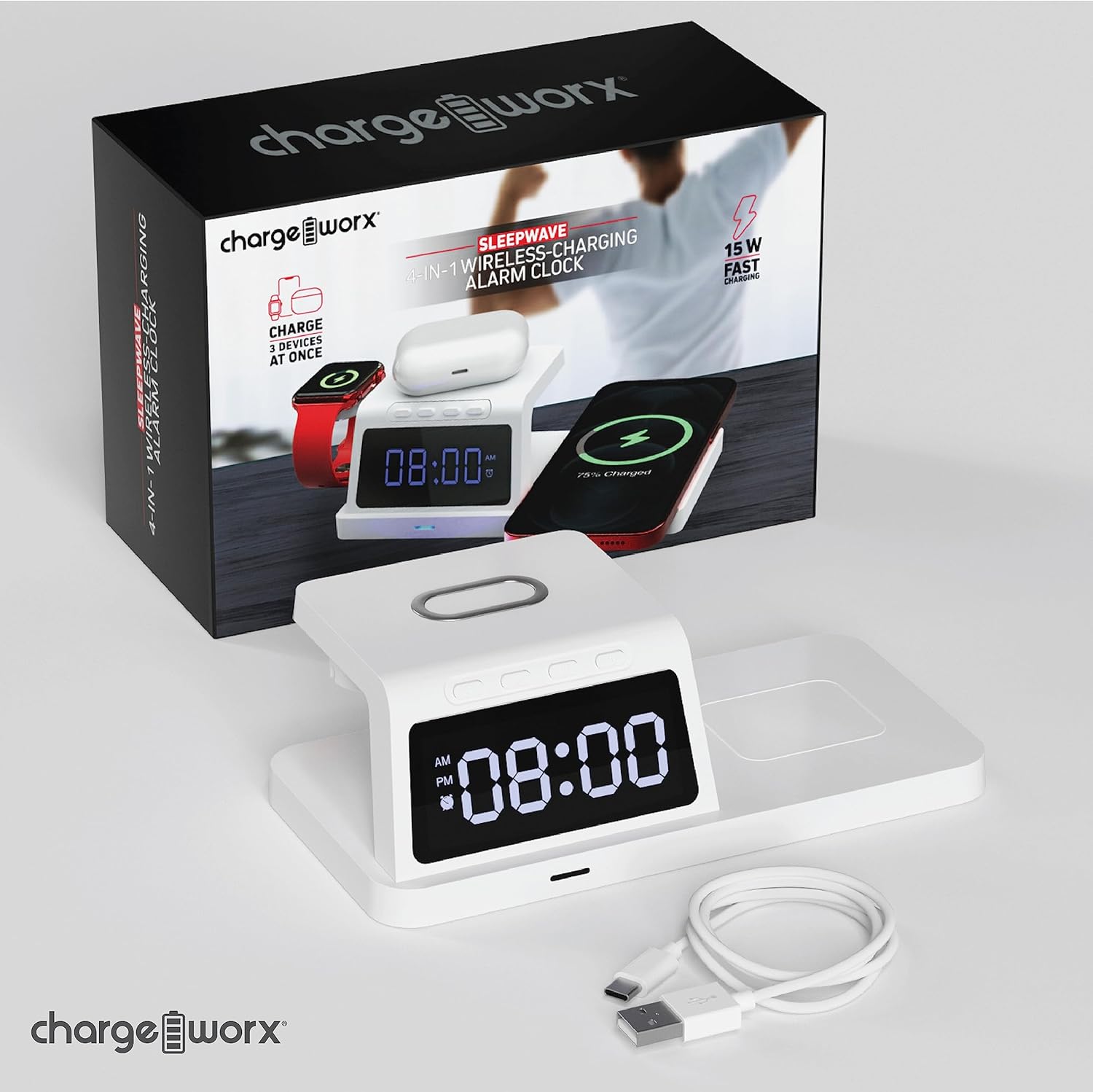
Image: The CHARGEWORX CX5278 unit shown with its retail packaging and included USB-C charging cable.
1.2 Connexió d'alimentació
- Connect the provided USB-C cable to the power input port on the back of the alarm clock.
- Connect the other end of the USB-C cable to a compatible USB power adapter (not included). A 15W or higher power adapter is recommended for optimal charging performance.
- Plug the power adapter into a wall outlet. The digital display will illuminate, indicating the device is powered on.

Image: The charging alarm clock placed on a nightstand, connected to a wall outlet via its power adapter and cable.
1.3 Configuració de l'hora
Refer to the control buttons located on the top of the unit.
- Manteniu premut el botó Temps establert button (often indicated by a clock icon) until the hour digits begin to flash.
- Utilitza el + i - botons per ajustar l'hora. Presteu atenció a l'indicador AM/PM.
- Premeu el botó Temps establert button again to move to the minute digits.
- Utilitza el + i - botons per ajustar els minuts.
- Premeu el botó Temps establert button one more time to confirm the time and exit time setting mode.
2. Instruccions de funcionament
2.1 Configuració d'alarmes
The device supports up to three independent alarms (Alarm 1, Alarm 2, Alarm 3).
- Premeu el botó Conjunt d'alarma button (often indicated by an alarm clock icon) once to select Alarm 1. The alarm icon and hour digits for Alarm 1 will flash.
- Utilitza el + i - buttons to adjust the hour for Alarm 1.
- Premeu el botó Conjunt d'alarma button again to move to the minute digits for Alarm 1.
- Utilitza el + i - buttons to adjust the minutes for Alarm 1.
- Premeu el botó Conjunt d'alarma button a third time to confirm Alarm 1 and move to Alarm 2 setting, or press the Temps establert botó per sortir.
- Repeat steps 1-5 for Alarm 2 and Alarm 3 as needed.
- Per activar o desactivar una alarma, premeu la tecla Activació / desactivació de l'alarma botó (o el Conjunt d'alarma button briefly after setting) until the corresponding alarm indicator appears or disappears on the display.
When an alarm sounds, press any button to snooze for 9 minutes, or press and hold the Activació / desactivació de l'alarma button to turn off the alarm for the day.
2.2 Càrrega sense fil
The CX5278 features dedicated wireless charging areas for your smartphone, smartwatch, and earbuds.
- Càrrega del telèfon intel·ligent: Place your Qi-compatible smartphone horizontally on the elevated charging pad. Ensure the phone is centered on the pad for optimal charging. The charging indicator on the device will illuminate to confirm charging.
- Càrrega del rellotge intel·ligent: Place your compatible smartwatch on the dedicated magnetic charging stand on the left side of the unit. The watch should snap into place and begin charging.
- Càrrega dels auriculars: Place your wireless charging compatible earbuds case on the flat charging area on the right side of the unit. Ensure the case is centered.
The device provides up to 15W fast charging for compatible smartphones. Charging indicators will confirm when a device is actively charging.

Image: The charging station actively charging a smartphone on the main pad, a smartwatch on the side stand, and wireless earbuds on the flat pad.
2.3 Reflective Display
The digital display features a reflective surface. In addition to showing the time and alarm status, it can be used as a mirror for quick checks.
3. Manteniment
3.1 Neteja
To clean the device, ensure it is unplugged from the power source. Use a soft, dry, lint-free cloth to wipe the surfaces. For stubborn marks, a slightly damp cloth can be used, followed by a dry cloth. Avoid using abrasive cleaners, solvents, or aerosol sprays, as these can damage the finish or internal components.
3.2 Emmagatzematge
When not in use for extended periods, store the device in a cool, dry place away from direct sunlight and extreme temperatures. It is recommended to keep the original packaging for storage.
4. Solució De Problemes
| Problema | Causa possible | Solució |
|---|---|---|
| Device not powering on / Display is off. | No hi ha connexió d'alimentació o l'adaptador/cable és defectuós. | Ensure the USB-C cable is securely connected to both the unit and a working power adapter. Try a different power outlet or adapter. |
| Wireless charging not working for a device. | Device not Qi-compatible, not properly aligned, or foreign objects present. |
|
| Smartwatch not charging. | Smartwatch not properly seated or incompatible. | Ensure the smartwatch is correctly placed on the magnetic stand. Some smartwatches may require specific charging modules not integrated into this unit. |
| Alarm not sounding or difficult to set. | Alarm not activated or incorrect setting procedure. | Review Section 2.1 "Setting Alarms" to ensure the alarm is correctly set and activated (alarm icon visible on display). |
| La pantalla és tènue o difícil de llegir. | Brightness setting or environmental lighting. | Check if there's a brightness adjustment button (refer to device controls). Ensure the room lighting is not too bright, overpowering the display. |
5. Especificacions
| Característica | Detall |
|---|---|
| Número de model | CX5278 |
| Marca | CHARGEWORX |
| Color | Blanc |
| Tipus de visualització | Digital |
| Característiques especials | Alarm, Charging Indicator, Wireless Charging |
| Dimensions del producte | 7.37 cm d'amplada x 2.44 cm d'alçada |
| Font d'alimentació | Electrical (via USB-C) |
| Material | Acrilonitril butadiè estirè (plàstic) |
| Pes de l'article | 6.9 unces |
| Sortida de càrrega sense fils | Up to 15W (for compatible devices) |
6. Informació de la garantia
CHARGEWORX products are designed and manufactured to the highest quality standards. This product is covered by a limited warranty from the date of purchase. For specific warranty terms and conditions, please refer to the warranty card included with your product or visit the official CHARGEWORX weblloc web. Conserveu el comprovant de compra per a reclamacions de garantia.
7. Atenció al client
If you encounter any issues or have questions regarding your CHARGEWORX CX5278 4-in-1 Wireless Charging Alarm Clock that are not addressed in this manual, please contact CHARGEWORX customer support. You can typically find contact information on the product packaging, the official CHARGEWORX weblloc web o a través del vostre distribuïdor.
Per a més informació, visiteu el CHARGEWORX Store on Amazon.