
ANYSECU HD 760
Anysecu HD-760 4G Network Radio User Manual
Model: HD 760 | Brand: ANYSECU
1. Introducció
The Anysecu HD-760 is a robust 4G network radio designed for reliable communication in various environments. Running on Android 7.1, it supports popular Push-to-Talk (PTT) applications like Zello and Real PTT, enabling efficient private, group, and all-call functionalities. Its IP67 waterproof rating ensures durability against dust and water ingress. This device is not equipped with a touch screen; all application installations and settings adjustments are performed by connecting the radio to a computer via a USB cable.
2. Què hi ha a la caixa
Upon unboxing your Anysecu HD-760, please verify that all the following components are included:
- Anysecu HD-760 Radio Unit
- Cable de carregador (tipus C)
- Bateria (ió de liti)
- Clip de cinturó
- Antena
- Manual d'usuari (aquest document)

Figure 2.1: Standard Accessories Included with the Anysecu HD-760
3. Producte acabatview
Familiarize yourself with the physical features and controls of your HD-760 radio.

Figura 3.1: Davant i darrere View with Key Components
The radio features a non-touch color display, a numeric keypad, and dedicated navigation keys. On the top, you will find the channel and power knobs, along with the antenna. The left side houses the Push-to-Talk (PTT) button and two programmable side keys. The right side includes a charging port and a port for an external headset or microphone.
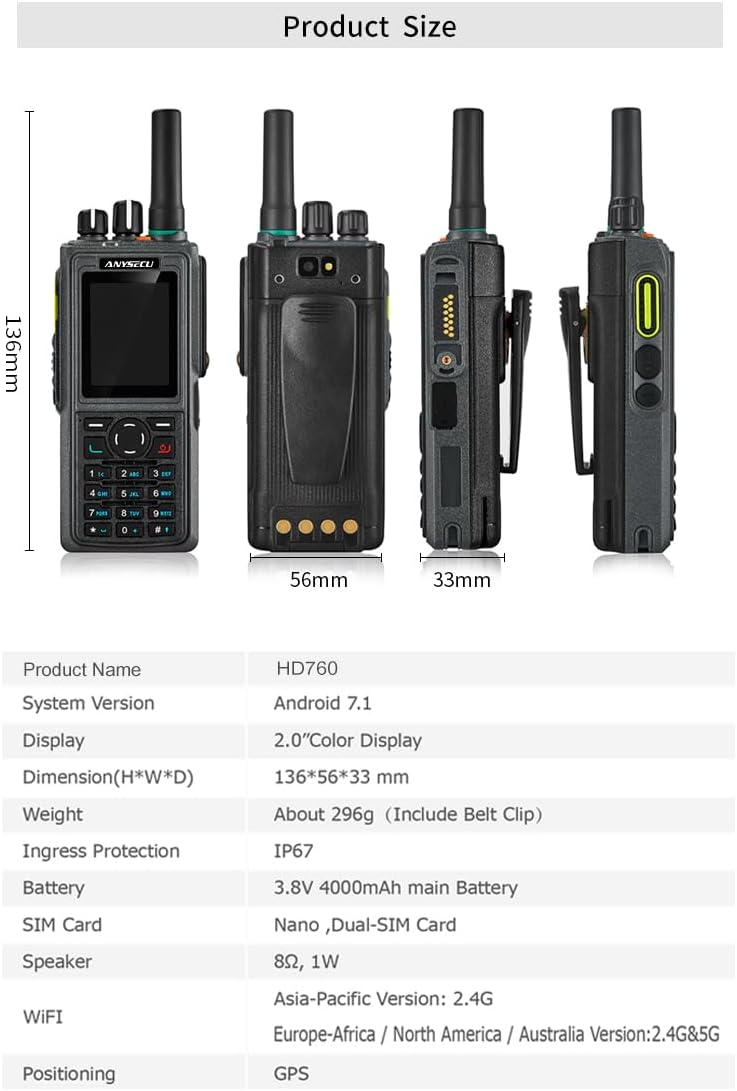
Figura 3.2: Dimensions del producte
The HD-760 supports dual Nano SIM cards, allowing for flexible network connectivity.
Figure 3.3: Dual-SIM Card Slots
4. Configuració inicial
4.1. Instal·lació i càrrega de la bateria
- Assegureu-vos que la ràdio estigui apagada.
- Align the battery with the compartment on the back of the radio and gently push until it clicks into place.
- Connect the Type-C charger cable to the charging port on the side of the radio.
- Plug the charger into a standard power outlet. The charging indicator will illuminate.
- Allow the battery to fully charge before first use (approximately 7 hours for full battery life).
4.2. Instal·lació de la targeta SIM
- Locate the SIM card slot(s) on the device (refer to Figure 3.3).
- Insert your Nano SIM card(s) into the designated slots, ensuring correct orientation.
- Secure the SIM card cover if applicable.
4.3. Initial Power On and Application Setup
- Turn the volume knob clockwise to power on the device.
- As the device is not touch screen, connect it to a computer using the provided USB cable.
- Access the device's storage from your computer to download and install necessary applications (e.g., Zello, Real PTT) in APK format.
- Follow the on-screen prompts on the radio's display for any initial setup or configuration within the installed applications.
5. Instruccions de funcionament
5.1. Connectivitat de xarxa
The HD-760 supports various cellular networks (2G/3G/4G) and Wi-Fi for stable communication.

Figure 5.1: Cellular Network and Wi-Fi Support
5.2. Comunicació Premeu per Parlar (PTT)
The primary method of communication is via the PTT button located on the left side of the radio. Once a PTT application (like Zello or Real PTT) is configured, press and hold the PTT button to transmit your voice. Release the button to listen.
5.3. Funcions de crida
The device supports the following call types through compatible PTT applications:
- Trucada privada: Direct communication with a single contact.
- Trucada de grup: Communication with a predefined group of users.
- Totes les trucades: Broadcast message to all users on the network/channel.
Channel selection is typically managed within the PTT application interface, navigated using the physical keys and the channel knob.
5.4. Funció de llanterna
The HD-760 is equipped with a built-in flashlight. To activate or deactivate the flashlight, long-press the designated side key (Side Key 2, as per Figure 3.1) for 3 seconds.

Figure 5.2: Activating the Flashlight
5.5. Non-Touch Screen Operation
As previously noted, the HD-760 does not have a touch screen. Interaction with the Android system and installed applications is done via the physical keypad and navigation buttons. For complex settings or application installations, screen casting to a computer or direct USB connection is required.

Figure 5.3: Non-Touch Screen Operation
6. Especificacions
| Característica | Descripció |
|---|---|
| Número de model | HD 760 |
| Sistema operatiu | Android 7.1 |
| RAM + ROM | 1 GB de RAM + 8 GB de ROM |
| Network Bands (US) | LTE FDD: B2/B4/B5/B7/B12/B13/B25/B26; WCDMA: B1/B2/B4/B5/B8; GSM: 850/1900MHz |
| Nivell de resistència a l'aigua | Impermeable IP67 |
| Tipus de bateria | 1 bateria de ions de liti (inclosa) |
| Durada de la bateria | 7 Hours (typical usage) |
| Pes de l'article | 1.1 lliures |
| Dimensions del paquet | 9.67 x 7.63 x 4.8 polzades |
| Nombre de canals | 2 (physical channels, software channels depend on app) |
| Interval de conversa màxim | 5 Miles (network dependent) |
| Dispositius compatibles | Android and iOS devices with Zello app support (for communication) |
7. Manteniment
7.1. Neteja
Per netejar la ràdio, utilitzeu un suau, damp cloth. Avoid using harsh chemicals, cleaning solvents, or strong detergents, as these can damage the device's surface and internal components. Ensure all ports are closed before cleaning.
7.2. Resistència a l'aigua i la pols (IP67)
The Anysecu HD-760 is rated IP67, meaning it is protected from dust ingress and can withstand immersion in water up to 1 meter for up to 30 minutes. While durable, avoid prolonged exposure to water or extreme conditions. Always ensure the charging port cover and any other port covers are securely closed to maintain water resistance.
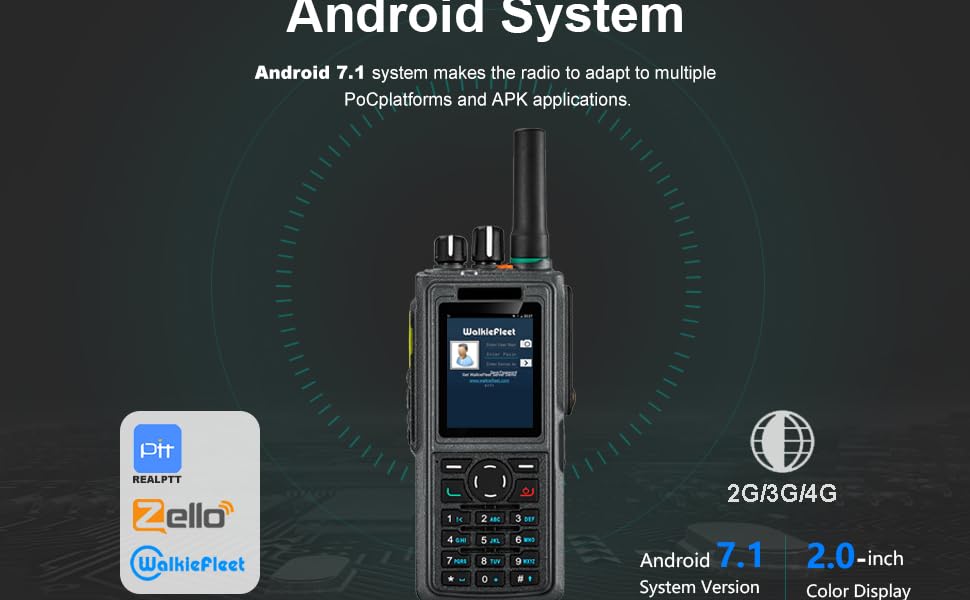
Figure 7.1: IP67 Water and Dust Protection
7.3. Emmagatzematge
Store the radio in a cool, dry place away from direct sunlight and extreme temperatures. If storing for an extended period, ensure the battery is partially charged (around 50%) to prolong its lifespan.
8. Solució De Problemes
| Problema | Causa possible | Solució |
|---|---|---|
| La ràdio no s'encén. | La bateria està esgotada o no està instal·lada correctament. | Carregueu la bateria completament. Assegureu-vos que la bateria estigui correctament col·locada al seu compartiment. |
| No es pot connectar a la xarxa. | No SIM card, incorrect SIM card installation, or out of network coverage. | Ensure SIM card(s) are correctly inserted. Check network coverage in your area. Verify APN settings if necessary (via PC connection). |
| PTT application not working. | Application not installed, not configured, or network issue. | Connect to PC to verify application installation. Ensure you are logged into the application and have an active network connection. Check application settings. |
| No audio from speaker or microphone. | Volume too low, speaker/mic port obstructed, or hardware issue. | Adjust volume knob. Check for debris in speaker/mic openings. If using external accessories, ensure they are properly connected. |
| No es poden instal·lar aplicacions. | Incorrecte file format (not APK), or connection issue with PC. | Assegureu-vos files are in .apk format. Verify USB connection and drivers on your PC. |
9. Garantia i Suport
9.1. Informació de la garantia
The Anysecu HD-760 typically comes with a 1-year manufacturer's warranty covering defects in materials and workmanship. Please retain your proof of purchase for warranty claims. The warranty does not cover damage caused by misuse, accidents, unauthorized repairs, or normal wear and tear.
9.2. Atenció al client
For technical assistance, troubleshooting beyond this manual, or warranty inquiries, please contact the manufacturer, ANYSECU, or your authorized dealer. Refer to the contact information provided on the product packaging or the official ANYSECU weblloc.
Ask a question about this manual
Ask about setup, troubleshooting, compatibility, parts, safety, or missing instructions. Manuals+ will review the question and use this page’s manual context to help answer it.