
Introducció
Thank you for choosing the HBN Remote Control Outlet Kit. This kit provides a convenient way to control your household appliances wirelessly. Please read this manual carefully before use to ensure proper operation and safety.

Imatge: Més deview of the HBN Remote Control Outlet Kit, showing the four plugs and the remote control.
Instruccions de seguretat
- Do not exceed the maximum load of 16A / 3680W.
- For indoor use only in dry environments.
- Do not connect multiple remote control outlets in series.
- Assegureu-vos que l'endoll estigui completament inserit a la presa de corrent.
- Mantenir fora de l'abast dels nens.
- No desmunteu ni modifiqueu el dispositiu.
Contingut del paquet
- 4 x HBN Remote Control Outlets (Model G89R)
- 1 x HBN Remote Control Transmitter
- 1 pila CR2032 (preinstal·lada al comandament a distància)
- 1 x Manual d'usuari
Característiques del producte
- Control sense fil: Operate appliances from up to 30 meters away.
- Estalvi d'energia: Easily cut power to devices to reduce standby consumption.
- Maridatge senzill: Self-learning function for quick setup.
- Individual or Group Control: Control each outlet separately or multiple outlets with one button.
- Alta capacitat de potència: Supports devices up to 16A / 3680W.
Components del producte

Imatge: Detallada view of the remote control outlet and transmitter, highlighting the LED indicator, ON/OFF switch, self-learning button on the outlet, and the control buttons on the remote.
- Presa de comandament a distància:
- Indicador LED: Illuminates when the outlet is powered ON.
- ON/OFF Switch & Self-Learning Button: S'utilitza per al control manual i l'emparellament.
- Endoll: Type F – 2 pins (Germany and Spain).
- Transmissor de control remot:
- ON/OFF Buttons (1-4): Control individual outlets.
- Master ON/OFF Button: Controls all paired outlets simultaneously.
- Compartiment de la bateria: Conté la pila CR2032.
Configuració i aparellament
The HBN remote control outlets are pre-programmed for immediate use. If you need to re-pair or change the pairing, follow these steps:
- Connecteu la presa de corrent: Insert the remote control outlet into a standard wall socket. The LED indicator on the outlet will flash slowly.
- Entra al mode d'aprenentatge: Press and hold the small ON/OFF & Self-Learning button on the side of the remote control outlet for approximately 3 seconds until the LED indicator starts flashing rapidly.
- Vincula amb el comandament a distància: Within 10 seconds of the LED flashing rapidly, press the desired "ON" button (e.g., "1 ON") on the remote control. The LED on the outlet will stop flashing and remain lit, indicating successful pairing.
- Test Pairing: Press the corresponding "OFF" button (e.g., "1 OFF") on the remote. The LED on the outlet should turn off. Press "ON" again, and the LED should light up.
- Repeat for Other Outlets: Repeat steps 1-4 for each additional remote control outlet, assigning them to different buttons (2, 3, 4) on the remote, or to the same button if you wish to control them as a group.
To clear all pairings: Press and hold the ON/OFF & Self-Learning button on the outlet for about 8 seconds until the LED flashes rapidly, then stops. This will reset the outlet to its default state.

Image: Illustration demonstrating the 30-meter range and the ability to control outlets individually or multiple outlets simultaneously with the remote.
Instruccions de funcionament
- Connexió d'un aparell: Plug your appliance into the HBN remote control outlet.
- Turning ON/OFF (Individual): Press the corresponding "ON" or "OFF" button (1-4) on the remote control to power the specific outlet and connected appliance.
- Turning ON/OFF (All): Press the "Master ON" or "Master OFF" button on the remote control to power all paired outlets simultaneously.
- Control manual: You can also manually turn the outlet ON or OFF by pressing the small ON/OFF & Self-Learning button on the side of the outlet.
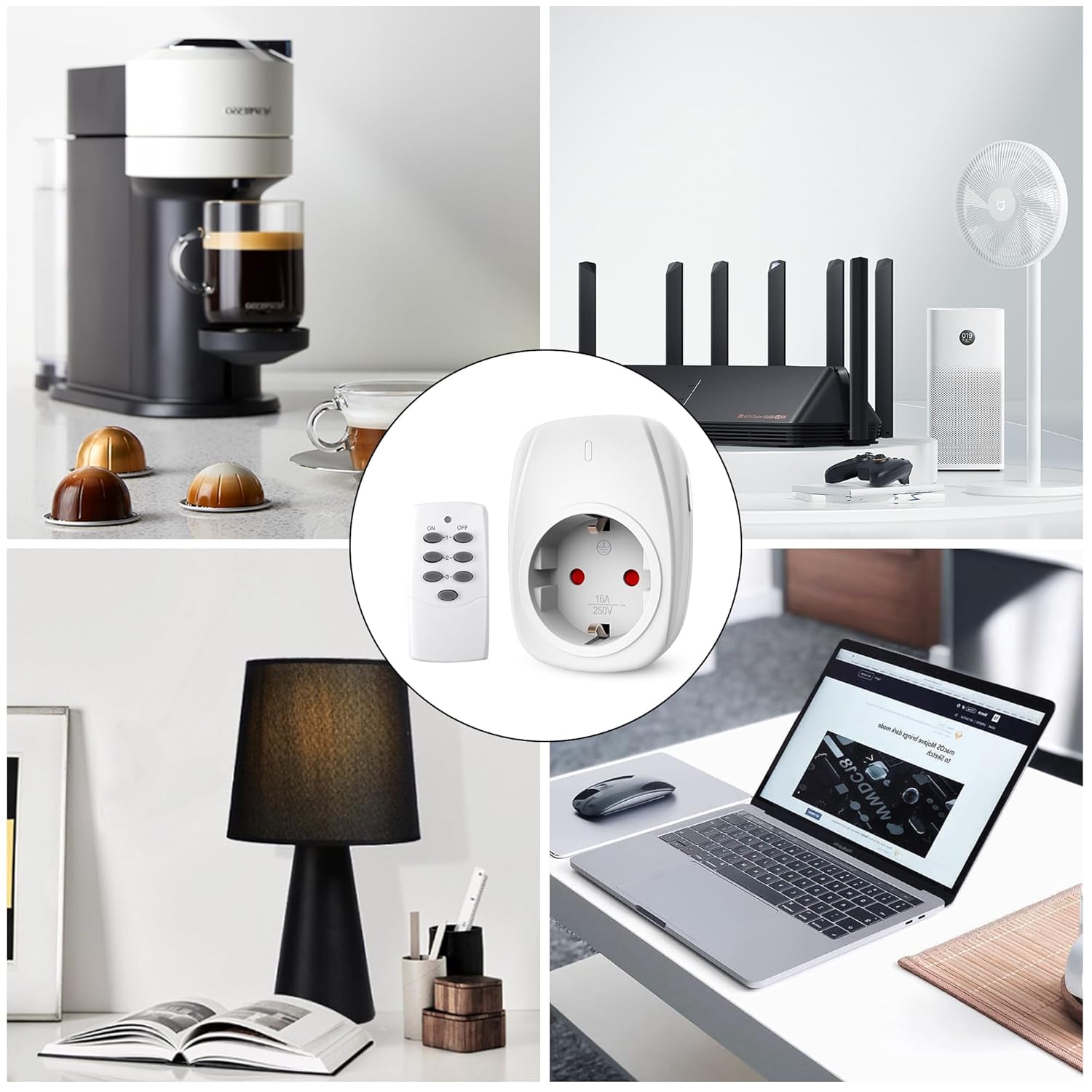
Imatge: Examples of common household appliances such as coffee makers, routers, fans, lamps, and laptops being controlled by the HBN remote control outlets.
Manteniment
- Neteja: Disconnect the outlet from the power supply before cleaning. Wipe with a dry, soft cloth. Do not use liquid cleaners or sprays.
- Substitució de la bateria: If the remote control's range decreases or it stops responding, replace the CR2032 battery. Open the battery compartment on the back of the remote, replace the old battery with a new one, ensuring correct polarity (+/-).
- Emmagatzematge: Store the outlets and remote in a cool, dry place when not in use for extended periods.
Resolució de problemes
| Problema | Causa possible | Solució |
|---|---|---|
| La presa de corrent no respon al comandament a distància. |
|
|
| L'aparell connectat a la presa de corrent no s'encén. |
|
|
| L'abast del comandament a distància és baix. |
|
|
Especificacions
| Característica | Detall |
|---|---|
| Número de model | G89R |
| Entrada Voltage | 230V CA, 50Hz |
| Corrent màxim | 16A |
| Potència màxima | 3680W |
| Freqüència sense fil | 433.92 MHz |
| Distància remota | Fins a 30 metres (zona oberta) |
| Tipus d'endoll | Type F – 2 pins (Germany and Spain) |
| Bateria a distància | 1 x CR2032 (inclòs) |
| Dimensions (Outlet) | Approx. 5.7 cm (W) x 7.7 cm (H) (excluding pins) |
| Fabricant | HBN |

Image: Dimensions of the HBN remote control outlet, highlighting its compact size and 16A maximum current capacity.

Imatge: Part posterior view of the HBN remote control outlet displaying its electrical ratings and model information.
Garantia i Suport
For warranty information or technical support, please refer to the contact details provided with your purchase or visit the official HBN weblloc web. Conserveu el comprovant de compra per a reclamacions de garantia.
Protecció del Medi Ambient
No llenceu els aparells elèctrics com a residus municipals sense classificar. Feu servir instal·lacions de recollida selectiva. Poseu-vos en contacte amb el vostre ajuntament per obtenir informació sobre els sistemes de recollida disponibles. Si els aparells elèctrics es llencen en abocadors o deixalles, les substàncies perilloses poden filtrar-se a les aigües subterrànies i entrar a la cadena alimentària, perjudicant la vostra salut i benestar.