
Introducció
The Tilta Nucleus Nano II Hand Wheel Controller is an advanced wireless lens control system designed for precise control over focus, iris, and zoom (FIZ) functions. Featuring a responsive touch screen and intuitive controls, it allows for seamless adjustment of camera settings and multiple motors, enhancing your filmmaking workflow.

Figura 1: Frontal view of the Nucleus Nano II Hand Wheel Controller, showing its touch screen interface.
Què hi ha a la caixa
Si us plau, verifiqueu que tots els articles estiguin inclosos al vostre paquet:
- 1x Nucleus Nano II Hand Wheel Controller (12009.00002.00.00)
- 1x USB-C Power Cable (30cm) (21114.00061.00.00)
- 1 x manual d'instruccions
Configuració
1. Càrrega del controlador
The Nucleus Nano II Hand Wheel Controller includes a built-in Lithium Ion battery. Before first use, fully charge the device using the provided USB-C cable. Connect the USB-C cable to the port on the controller and to a compatible USB power source.
2. Muntatge del controlador
The controller features a NATO mount and a tie-down mechanism for secure attachment to camera rigs or gimbals.
- Locate the NATO rail or mounting point on your camera rig or gimbal.
- Align the NATO mount on the back of the controller with the rail.
- Secure the controller by tightening the tie-down lever until it is firmly attached.

Figura 2: posterior view of the controller, highlighting the NATO mount and USB-C port.

Figure 3: Controller mounted on a camera setup.
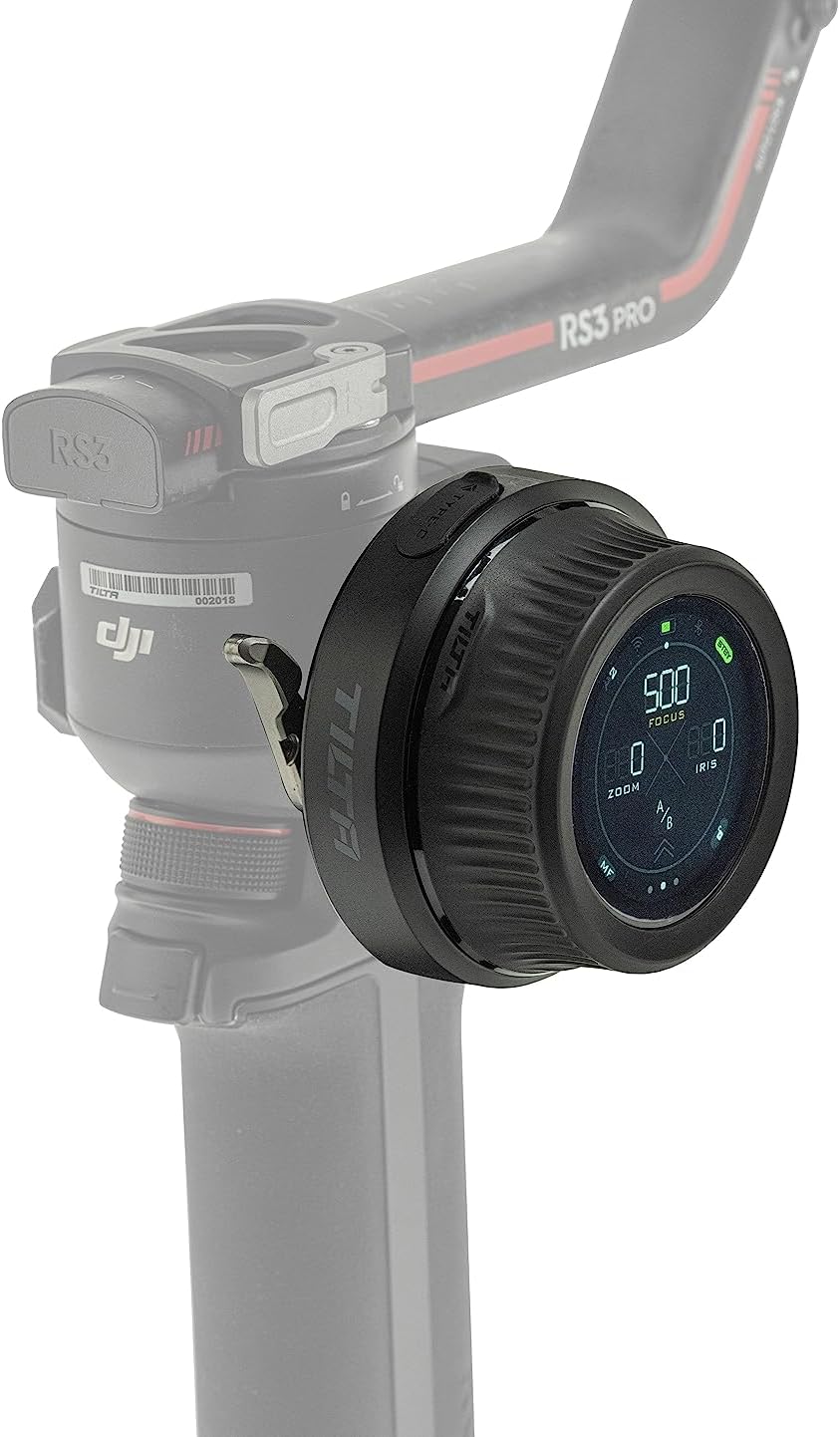
Figure 4: Controller mounted on a gimbal for remote control.
3. Connecting to Motors and Camera
The controller can connect to various motors and cameras via Wifi, Bluetooth, and USB-C for comprehensive control.
- Connexió del motor: The controller is compatible with Nucleus M & Nano motors, and DJI Focus Motors. Refer to the specific motor's manual for pairing instructions.
- Comunicació de la càmera: Connect to compatible Canon, Sony, and Black Magic Design cameras (selected models) to adjust settings like ISO, Shutter Speed, and Frame Rate. Consult your camera's manual for wireless control setup.
Instruccions de funcionament
1. Controls bàsics
The controller features a hand wheel, REC button, rocker switch, and FUNC button for intuitive operation.
- Roda de mà: Primarily used for precise focus pulling.
- Botó REC: Initiates and stops recording on compatible cameras.
- Interruptor basculant: Controls zoom or iris depending on the selected mode.
- Botó FUNC: Customizable function button for quick access to frequently used features.

Figure 5: Labeled diagram of the controller's components.
2. Interfície de pantalla tàctil
The integrated touch screen provides easy access to advanced features and streamlines on-set workflow. Tap and swipe to navigate menus and adjust settings.

Figure 6: User interacting with the touch screen for intuitive control.

Figure 7: The three main display modes on the touch screen.
3. Multi-Motor Control
The Hand Wheel Controller can control multiple motors simultaneously. With optional expansion, it supports up to 4 motors when used with the Tilta Control Handle.
4. Lens Mapping
The controller displays real-time focal distance information, enabling more accurate and repeatable focus pulling. This feature is particularly useful for precise cinematic work.
5. Compatibilitat
The Nucleus Nano II is compatible with a range of Tilta wireless lens control systems, including Nucleus M and Nucleus Nano, as well as DJI Ronin S series gimbals and DJI Focus Motors. It also supports communication with selected Canon, Sony, and Black Magic Design cameras.

Figure 8: High compatibility with various lens control systems and gimbals.
Manteniment
- Neteja: Use a soft, dry cloth to clean the controller. Avoid abrasive materials or harsh chemicals.
- Emmagatzematge: Guardeu el controlador en un lloc fresc i sec, allunyat de la llum solar directa i de temperatures extremes.
- Cura de la bateria: Per allargar la durada de la bateria, eviteu descarregar-la completament amb freqüència. Si la guardeu durant períodes prolongats, carregueu-la aproximadament al 50% i torneu-la a carregar cada pocs mesos.
Resolució de problemes
| Problema | Causa possible | Solució |
|---|---|---|
| El controlador no s'encén. | La bateria està esgotada. | Charge the controller using the USB-C cable. |
| Unable to control motors. | Motors are not paired or out of range. | Ensure motors are powered on and within range. Re-pair the motors if necessary. |
| Camera communication issues. | Incorrect camera settings or compatibility. | Verify camera compatibility and settings. Ensure Wi-Fi/Bluetooth is enabled on both devices. |
| La pantalla tàctil no respon. | Error temporal de programari. | Restart the controller. If the issue persists, contact customer support. |
Especificacions
| Característica | Detall |
|---|---|
| Número de model | WLC-T05-HWC |
| Dimensions | 6 x 5 x 4 polzades |
| Pes de l'article | 10.9 unces (0.68 lliures) |
| Tipus de bateria | 1 bateria de ions de liti (inclosa) |
| Color | Negre |
| Connectivitat | Wifi, Bluetooth, USB-C |
| Fabricant | Tilta |
| UPC | 810076276465 |
Garantia i Suport
For warranty information and technical support, please refer to the official Tilta weblloc web o contacteu directament amb el seu servei d'atenció al client. Conserveu el rebut de compra com a comprovant de compra per a qualsevol reclamació de garantia.
Tilta Official Weblloc: www.tilta.com


