
1. Introducció
Thank you for choosing the Newmen GM101 Mechanical Gaming Keyboard. This wired keyboard is designed for an enhanced gaming and typing experience, featuring RGB backlighting, anti-ghosting capabilities, and a durable aluminum panel. This manual provides detailed instructions for setup, operation, and maintenance to ensure optimal performance and longevity of your device.

Image: The Newmen GM101 Mechanical Gaming Keyboard, showcasing its full layout with RGB backlighting and integrated wrist rest.
2. Contingut del paquet
Si us plau, verifiqueu que tots els elements siguin presents al paquet:
- Newmen GM101 Mechanical Gaming Keyboard with Wrist Rest
- Manual d'usuari (aquest document)
3. Característiques clau
- Panell metàl·lic durador: The keyboard features a high-quality aluminum alloy panel, providing durability and scratch resistance, along with a sleek, streamlined design.
- Foldable Wrist Rest: An integrated foldable wrist rest offers ergonomic support during use and can be neatly stowed away to protect the keys from dust when not in use.
- Multiple RGB Backlighting Modes: Equipped with 20 LED backlighting modes and 10 color sidelights, allowing for extensive customization of the keyboard's illumination.
- Multimedia & Anti-Ghosting: Includes 12 dedicated multimedia keys for improved efficiency. 104 non-conflicting keys ensure simultaneous key presses are registered accurately at high speeds, ideal for gaming and typing.
- Macros totalment programables: All keys and keypress combinations can be remapped. Macros can be recorded via software for complex commands and personalized function keys.
- Interruptors intercanviables en calent: Allows for easy replacement of keycaps and switches to customize the typing feel and sound.

Image: The Newmen GM101 keyboard from an elevated angle, highlighting its design for a comfortable typing experience.

Image: A visual representation of the anti-ghosting feature on the Newmen GM101 keyboard, showing multiple key presses being registered simultaneously.

Image: Close-up of the Newmen GM101 keyboard demonstrating hot-swappable switches, with some keycaps and switches removed to show the mechanism.
4. Configuració
Follow these steps to set up your Newmen GM101 Mechanical Gaming Keyboard:
- Descomprimir el teclat: Carefully remove the keyboard and any packaging materials from the box.
- Connecta't al dispositiu: Locate the USB-A cable attached to the keyboard. Plug the USB-A connector into an available USB port on your computer (PC or Mac).
- Instal·lació del controlador: The keyboard is plug-and-play and typically does not require additional drivers for basic functionality. Your operating system should automatically recognize the device.
- Posicionament: Place the keyboard on a stable, flat surface. If desired, deploy the integrated wrist rest for ergonomic support.

Image: The Newmen GM101 keyboard set up on a desk next to a gaming mouse, connected to a computer, illustrating a typical user setup.
5. Instruccions de funcionament
5.1 Funcions bàsiques del teclat
The Newmen GM101 functions as a standard 104-key keyboard. All keys perform their labeled functions by default.
5.2 Tecles multimèdia
The keyboard features 12 multimedia keys, accessible via the Fn key in combination with the F1-F12 keys. These shortcuts enhance productivity and control over media playback.
- Fn+F1: El meu ordinador
- Fn+F2: Cerca
- Fn+F3: Calculadora
- Fn+F4: Reproductor multimèdia
- Fn+F5: Pista anterior
- Fn+F6: Pista següent
- Fn+F7: Reproduir/Pausa
- Fn+F8: Atureu-vos
- Fn+F9: Silenciar
- Fn+F10: Baixa el volum
- Fn+F11: Puja el volum
- Fn+F12: Bloquejar el teclat
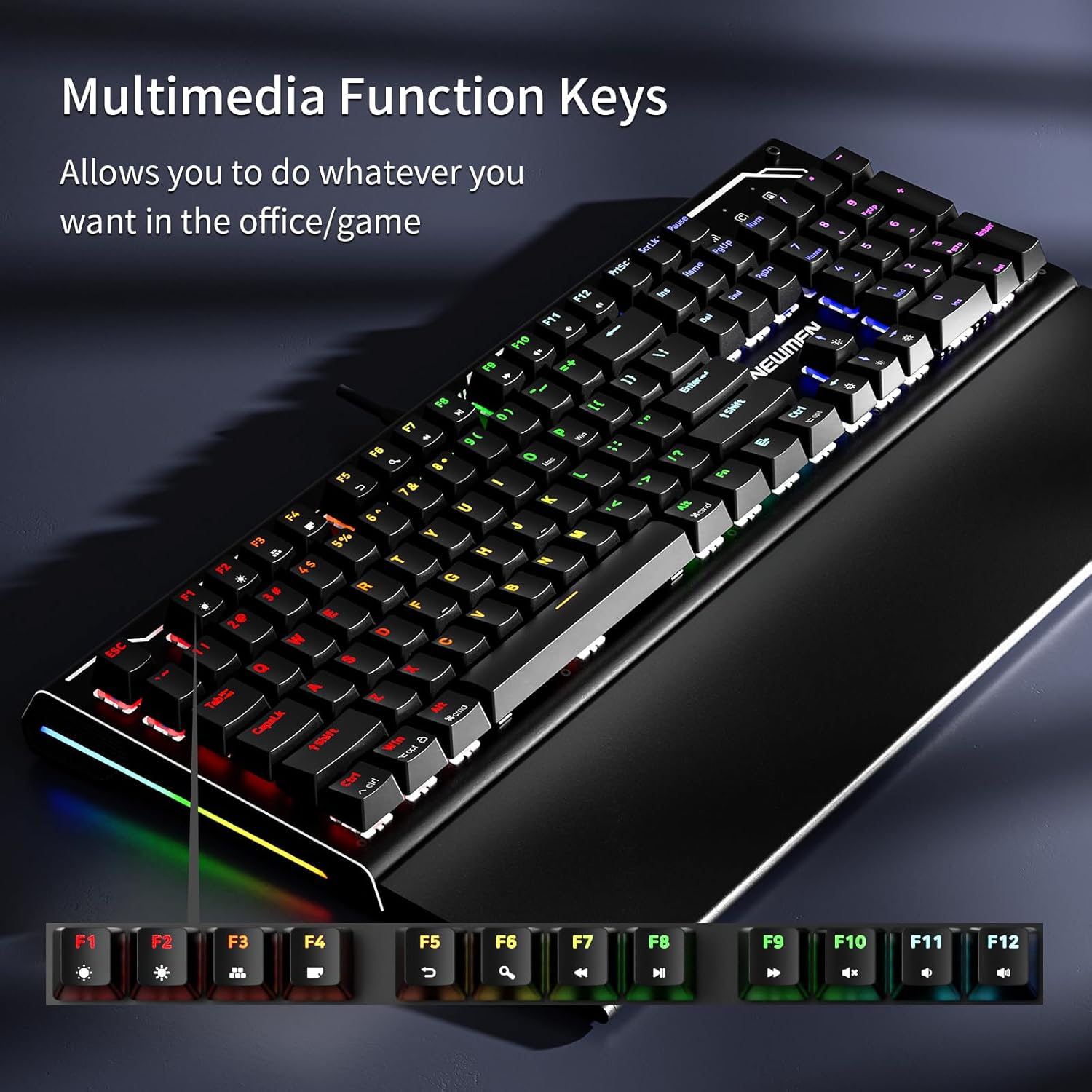
Image: The Newmen GM101 keyboard highlighting the F-keys with their corresponding multimedia functions, such as volume control and media playback.
5.3 Control de retroil·luminació RGB
The GM101 keyboard offers extensive RGB backlighting customization. Use the following Fn key combinations to control the lighting effects:
- Fn + Ins: Canvia entre 20 modes de retroiluminació diferents.
- Fn + Inici: Adjust backlight brightness (typically 5 levels).
- Fn + PgAp: Ajusta la velocitat de la retroiluminació (per als modes dinàmics).
- Fn + Supr: Cycle through 10 different side light modes.
- Fn + Final: Adjust side light brightness.
- Fn + PgDn: Adjust side light speed.
- Fn + Fletxa amunt/avall: Ajusteu la brillantor de la llum de fons.
- Fn + Fletxa esquerra/dreta: Ajusta la velocitat de la retroiluminació.

Imatge: Tres diferents views of the Newmen GM101 keyboard, each displaying a unique RGB backlighting pattern, illustrating the variety of available modes.

Imatge: Un primer pla view of the Newmen GM101 keyboard's side, showcasing the vibrant RGB side lights with their various switching modes.
6. Personalització
6.1 Programació de macros
The Newmen GM101 keyboard supports full macro programming through dedicated software. This allows you to remap keys and create complex command sequences for gaming or productivity.
- Descàrrega de programari: Visit the official Newmen website to download the latest GM101 keyboard software.
- Enregistrament de macro: Follow the software's instructions to record and assign macros to any key.
- Profile Gestió: Crea i desa diversos professionalsfiles per a diferents aplicacions o jocs.

Image: A computer screen displaying the Newmen GM101 keyboard's customization software interface, showing options for key assignment, macros, and advanced features.
6.2 Commutadors intercanviables en calent
The GM101 features hot-swappable switches, allowing users to easily change switches without soldering. This enables customization of typing feel and sound.
- Eliminació del commutador: Use a switch puller tool (not included) to gently remove the existing switch from the PCB.
- Instal·lació del commutador: Alineeu els pins del nou interruptor amb els forats de la placa de circuit imprès i premeu fermament fins que encaixin al seu lloc. Assegureu-vos que els pins estiguin rectes per evitar que es dobleguin.
- Substitució de la tapa de les tecles: Simply pull off the old keycap and press the new one onto the switch stem.
7. Manteniment
Un manteniment adequat garanteix la longevitat i el rendiment del teclat:
- Neteja:
- Use a soft, dry cloth to wipe down the keyboard surface regularly.
- Per a la pols i les restes entre les tecles, feu servir aire comprimit.
- For stubborn grime, slightly dampen a cloth with isopropyl alcohol (do not spray directly onto the keyboard).
- Cura del reposacanell: When not in use, fold the wrist rest over the keys to protect them from dust and spills.
- Eviteu líquids: Do not expose the keyboard to excessive moisture or liquids. In case of a spill, immediately unplug the keyboard and allow it to dry completely before reconnecting.
- Gestió de cables: Eviteu doblegar bruscament o estirar excessivament el cable USB per evitar danys.
8. Solució De Problemes
| Problema | Causa possible | Solució |
|---|---|---|
| El teclat no respon | Connexió USB fluixa, port USB defectuós, problema amb el controlador. |
|
| La retroiluminació no funciona o és incorrecta | Backlight mode off, brightness too low, software conflict. |
|
| Keys not registering or ghosting | Debris under keycap, faulty switch, software issue. |
|
| Les macros no funcionen | Incorrect macro setup, software not running, profile no activa. |
|
9. Especificacions
| Característica | Detall |
|---|---|
| Número de model | GM101 |
| Marca | Els nous |
| Connectivitat | Cablejat (USB-A) |
| Tipus de teclat | Teclat de joc mecànic |
| Tipus de canvi | Linear Red Switches (as per product title) |
| Il·luminació de fons | RGB (20 modes, 10 side light modes) |
| Anti-fantasma | Rollover de 104 tecles |
| Material | Aluminum (panel) |
| Repòs de canell | Integrated, Foldable |
| Dispositius compatibles | Laptop, PC, Smartphone (via adapter if needed) |
| Pes de l'article | 3.19 lliures |
| Dimensions del paquet | 17.8 x 7.99 x 2.2 polzades |
10. Garantia i Suport
Newmen products are manufactured to high-quality standards. For warranty information and technical support, please refer to the warranty card included with your product or visit the official Newmen weblloc web. Conserveu el rebut de compra com a comprovant de compra per a reclamacions de garantia.
Fabricant: NOVETATS
For further assistance, please contact Newmen customer support through their official channels.