
1. Introducció
Welcome to the instruction manual for your new Sunstech CELT23 flip phone. This phone is specifically designed for ease of use, featuring large keys, a clear display, and essential functions like an SOS button for emergencies. Please read this manual carefully to understand how to operate your device safely and efficiently.
2. Producte acabatview
The Sunstech CELT23 is a clamshell-style mobile phone, offering simplicity and security. Its design prioritizes user comfort and accessibility.
Característiques principals:
- Flip Design: Protects the screen and keypad when closed.
- Tecles grans: Oversized buttons for easy dialing and texting.
- Botó SOS: Located on the back for emergency calls and SMS.
- Pantalla de 2.4 polzades: Clear screen for easy viewing.
- Quick Dial: Assign contacts to speed dial keys.
- Loud Sound: Enhanced audio for calls and ringtones.
- Ràdio FM: Built-in radio for entertainment.
- Bateria de 1100 mAh: Provides reliable battery life.
Phone Components:
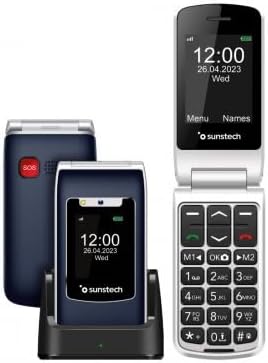
Descripció de la imatge: This image displays the Sunstech CELT23 flip phone in two states: open, showing the screen and large keypad, and closed, resting in its charging dock. The back of the closed phone, featuring the red SOS button, is also visible. This illustrates the phone's compact design and user-friendly interface.

Descripció de la imatge: This image shows the Sunstech CELT23 flip phone in its charging dock, with the phone in a closed position. The prominent red SOS button on the back of the phone is clearly visible, highlighting a key safety feature. The phone's external display is also visible, showing the time and date.

Descripció de la imatge: This image presents a collection of Sunstech CELT23 flip phones, showcasing different color options (blue and black) and configurations. Some phones are open, displaying their keypads and screens, while others are closed and placed in their charging docks. This provides a comprehensive view of the product's design and available variations.
3. Configuració
3.1. Inserció de la targeta SIM i la bateria
- Open the Phone: Gently open the back cover of the phone.
- Insereix la targeta SIM: Locate the SIM card slot. Carefully insert your activated SIM card into the designated slot, ensuring the gold contacts face downwards and the cut corner aligns correctly.
- Insereix la bateria: Place the provided Lithium-ion battery into the battery compartment, aligning the contacts.
- Tancar la coberta: Torneu a col·locar la coberta posterior fins que sentiu un clic i que quedi ben fixada al seu lloc.
3.2. Carregant el telèfon
- Ús de la base de càrrega: Place the phone into the charging dock, ensuring it sits firmly and the charging indicator light (if present) illuminates.
- Direct USB Charging: Alternatively, connect the USB Type C cable to the phone's charging port and the other end to a compatible power adapter.
- Primer càrrec: Per a un rendiment òptim de la bateria, carregueu completament el telèfon abans del primer ús.
3.3. Encès / apagat
- Per encendre: Mantingueu premut el botó d'engegada/finalització de trucada (normalment vermell) fins que la pantalla s'il·lumini.
- Per apagar: Press and hold the Power/End Call button until the power-off options appear, then select "Power Off".
4. Instruccions de funcionament
4.1. Fer i rebre trucades
- Per fer una trucada:
- Open the phone.
- Dial the number using the large keypad.
- Premeu el botó verd de trucada per iniciar la trucada.
- Per rebre una trucada:
- When the phone rings, open the flip or press the Green Call button.
- Per finalitzar una trucada, premeu el botó vermell Finalitzar trucada.
4.2. Sending SMS Messages
- From the main menu, navigate to "Messages".
- Select "Write Message" or "New SMS".
- Introduïu el número del destinatari o seleccioneu-lo dels contactes.
- Escriviu el vostre missatge amb el teclat.
- Premeu "Enviar".
4.3. SOS Emergency Function
The SOS button is designed for emergencies. When pressed, it will activate an audible warning signal and automatically dial up to 5 pre-set emergency contacts. It will also send a customizable emergency SMS message to these contacts.
- Configuració dels contactes SOS:
- Go to "Settings" > "SOS Settings".
- Add up to 5 emergency contact numbers.
- Customize the emergency SMS message if desired.
- Using the SOS Button:
- In an emergency, press and hold the red SOS button on the back of the phone for a few seconds.
- The phone will emit an alarm and begin dialing your emergency contacts sequentially until one answers.
- An emergency SMS will also be sent to all pre-set contacts.
4.4. Marcatge ràpid
Assign frequently called numbers to specific keys for quick dialing.
- Go to "Contacts" or "Settings" > "Speed Dial".
- Select an available key (e.g., M1, M2, or number keys 2-9).
- Assign a contact from your phonebook or enter a new number.
- To use, simply press and hold the assigned speed dial key.
4.5. Ràdio FM
To listen to the FM radio, ensure headphones are connected (they act as an antenna).
- Connect 3.5mm headphones to the phone's audio jack.
- Navigate to "Multimedia" or "Tools" > "FM Radio".
- Feu servir les tecles de navegació per cercar emissores o sintonitzar-les manualment.
5. Manteniment
- Neteja: Use a soft, dry cloth to clean the phone's screen and body. Avoid liquid cleaners.
- Cura de la bateria:
- Eviteu temperatures extremes.
- No deixeu la bateria completament descarregada durant períodes prolongats.
- Utilitzeu només el carregador i la bateria originals.
- Emmagatzematge: Guardeu el telèfon en un lloc fresc i sec, allunyat de la llum solar directa i de la humitat.
6. Solució De Problemes
| Problema | Possible causa/solució |
|---|---|
| El telèfon no s'encén. | Battery is discharged. Charge the phone. Battery not inserted correctly. Reinsert the battery. |
| No es poden fer ni rebre trucades. | No SIM card inserted or SIM card not activated. Check SIM card. Out of network coverage. Move to an area with better signal. |
| No hi ha so durant les trucades. | Volume is too low. Adjust the call volume using the side keys. Speaker/earpiece might be blocked. Clean gently. |
| El botó SOS no funciona. | SOS contacts not set up. Configure emergency contacts in SOS settings. |
7. Especificacions
- Marca: Sunstech
- Model: CELT23
- Tipus de producte: Telèfon Flip
- Sistema operatiu: RTOS
- Mida de la pantalla: 2.4 polzades
- Resolució: 240 x 320
- Connexions: USB Type C, 3.5 mm Jack
- Característiques especials: SOS Button, FM Radio
- Composició de la bateria: Ió de liti
- Capacitat de la bateria: 1100 mAh (inferred from product description)
- Mida de la memòria RAM: 48 MB
- Capacitat d'emmagatzematge: 128 GB (Note: This capacity is typically for external memory card support in basic phones)
- Velocitat de la CPU: 800 MHz
- Fabricant: SUNSTECH
- País d'origen: Xina
8. Garantia i Suport
This product is manufactured by SUNSTECH. For specific warranty details, please refer to the warranty card included with your purchase or contact Sunstech customer support.
- Disponibilitat de peces de recanvi: 10 Years (as per manufacturer information).
- Actualitzacions de programari: Informació no disponible.
For further assistance, please visit the official Sunstech weblloc o poseu-vos en contacte amb el seu departament d'atenció al client.