1. Introducció
Aquest manual proporciona instruccions detallades per a la configuració, el funcionament, el manteniment i la resolució de problemes de la impressora de codis de barres tèrmica Xprinter XP-233B. La XP-233B està dissenyada per a la impressió tèrmica eficient de codis de barres i etiquetes, utilitzant paper sensible a la calor sense necessitat de tinta ni cintes.
2. Instruccions de seguretat
- Assegureu-vos que la impressora estigui connectada a una font d'alimentació amb el volum correctetage tal com s'especifica a l'adaptador de corrent.
- No exposeu la impressora a l'aigua ni a una humitat excessiva.
- Eviteu col·locar la impressora sota la llum solar directa o a prop de fonts de calor.
- Mantingueu la impressora allunyada de la pols i les deixalles per evitar danys als components interns.
- No intenteu desmuntar ni reparar la impressora vosaltres mateixos. Poseu-vos en contacte amb personal de servei qualificat per obtenir ajuda.
- Feu servir només els rotlles d'etiquetes tèrmiques recomanats per garantir una qualitat d'impressió òptima i una major durabilitat de la impressora.
3. Contingut del paquet
Verifiqueu que tots els elements siguin presents al paquet:
- Impressora de codi de barres tèrmica Xprinter XP-233B
- Adaptador d'alimentació
- Cable USB
- Guia d'inici ràpid (si s'inclou)
- CD de controladors (si s'inclou, els controladors també es poden descarregar en línia)
4. Producte acabatview
Familiaritzeu-vos amb els components principals de la impressora XP-233B.

Figura 4.1: Frontal view de la Xprinter XP-233B, que mostra l'interruptor d'alimentació, el panell de control i la ranura de sortida d'etiquetes.

Figura 4.2: posterior view de la Xprinter XP-233B, destacant els ports USB, Ethernet i d'entrada d'alimentació.
Funcions del tauler de control:
- Botó FEED: Premeu per alimentar una etiqueta en blanc. Mantingueu premut per realitzar una impressió d'autoprova.
- Botó PAUSA: Posa en pausa o reprèn la impressió.
- Botó CANCEL·LA: Cancel·la la tasca d'impressió actual.
- Indicadors LED: Mostra l'estat de la impressora (per exemple, Engegada, Error, Sense paper). Consulteu la resolució de problemes per conèixer els patrons de llums específics.
5. Configuració
5.1 Connexió de la impressora
- Connecteu l'adaptador de corrent al port d'entrada d'alimentació de la impressora i, a continuació, endolleu-lo a una presa de corrent.
- Connecteu el cable USB de la impressora a l'ordinador. Per a la connectivitat Ethernet, connecteu un cable Ethernet de la impressora al vostre encaminador o commutador de xarxa.
- Engegueu la impressora amb l'interruptor que es troba al lateral.
5.2 Càrrega d'etiquetes
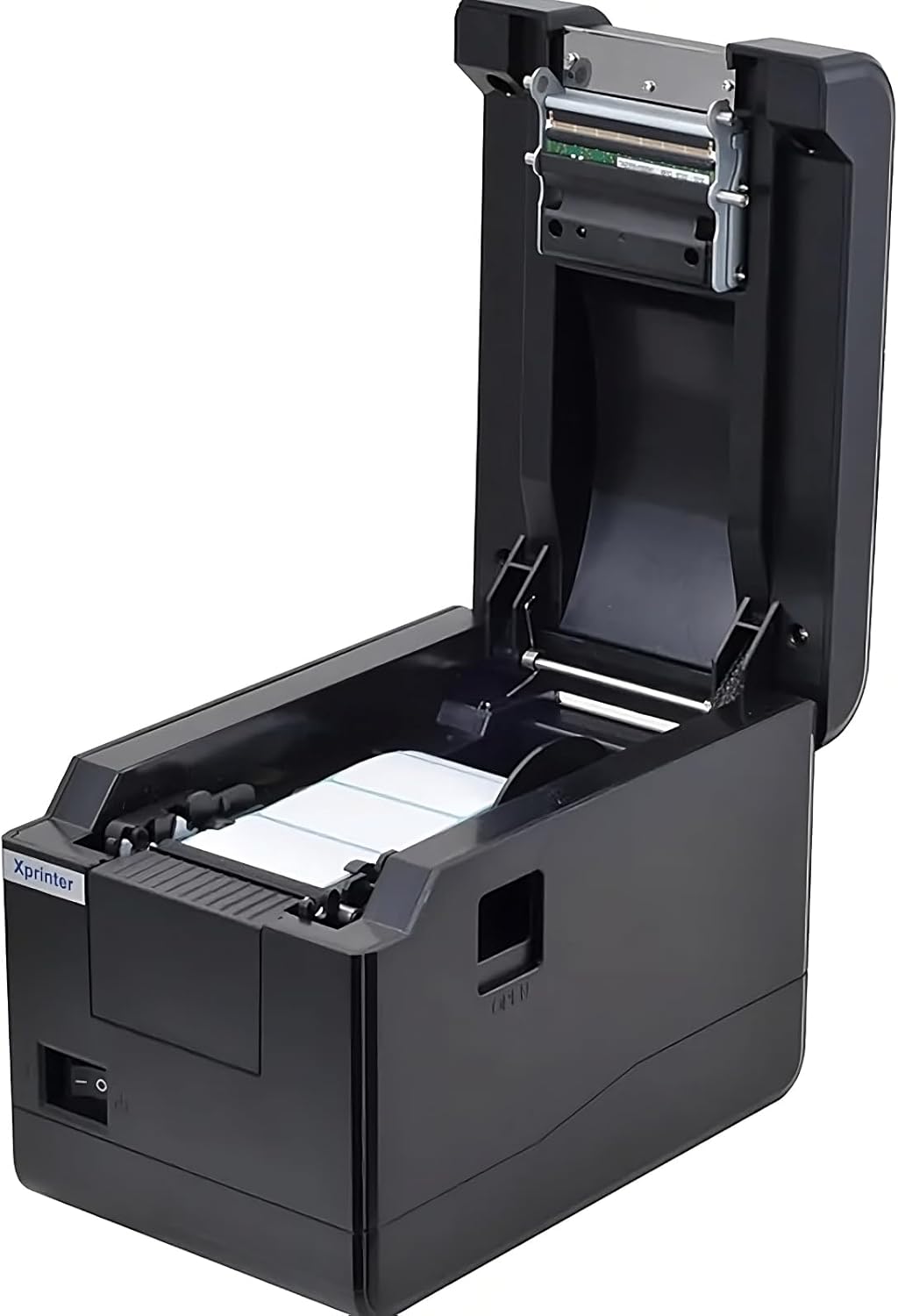
Figura 5.1: De dalt a baix view de la Xprinter XP-233B amb la coberta oberta, que il·lustra la zona de càrrega d'etiquetes.
- Premeu el botó "OBRIR" que es troba al lateral de la impressora per obrir la coberta superior.
- Col·loqueu el rotlle d'etiquetes tèrmiques al compartiment d'etiquetes, assegurant-vos que les etiquetes s'alimentin des de la part inferior del rotlle i que la cara imprimible estigui cap amunt.
- Ajusteu les guies mòbils d'etiquetes perquè s'adaptin perfectament a l'amplada del rotlle d'etiquetes, sense pessigar les etiquetes.
- Estireu unes quantes etiquetes per sobre del capçal d'impressió i traieu-les per la ranura frontal.
- Tanqueu la coberta superior fermament fins que encaixi al seu lloc.
- La impressora calibrarà automàticament i introduirà unes quantes etiquetes per detectar l'espai entre etiquetes.
5.3 Instal·lació del controlador
Instal·leu els controladors de la impressora a l'ordinador. Normalment, els controladors es troben al CD inclòs o es poden descarregar des de la versió oficial de Xprinter. weblloc. Seguiu les instruccions que apareixen a la pantalla per a la instal·lació.
6. Funcionament de la impressora
6.1 Impressió bàsica
Un cop configurada la impressora i instal·lats els controladors, podeu imprimir etiquetes des de l'aplicació (per exemple, programari de disseny d'etiquetes, programari d'enviament). Assegureu-vos que el model d'impressora correcte (Xprinter XP-233B) estigui seleccionat a la configuració d'impressió de l'aplicació.
6.2 Impressió d'autoprova
Per realitzar una impressió d'autoprova:
- Assegureu-vos que la impressora estigui engegada i que les etiquetes estiguin carregades.
- Manteniu premut el botó ALIMENTACIÓ durant aproximadament 3-5 segons fins que la impressora comenci a imprimir.
- La impressió d'autoprova mostrarà informació de la impressora i un patró de prova, confirmant el funcionament bàsic.
7. Manteniment
7.1 Neteja del capçal d'impressió
La neteja regular del capçal d'impressió garanteix una qualitat d'impressió òptima i allarga la vida útil de la impressora. Netegeu el capçal d'impressió quan la qualitat d'impressió es degradi o després de cada pocs rotlles d'etiquetes.
- Apagueu la impressora i desconnecteu el cable d'alimentació.
- Obriu la coberta superior.
- Netegeu suaument la superfície del capçal d'impressió amb un bastonet de cotóampenriquit amb alcohol isopropílic (70% o més).
- Deixeu que el capçal d'impressió s'assequi completament (aproximadament 2-3 minuts) abans de tancar la tapa i engegar la impressora.
7.2 Neteja de l'exterior
Netegeu l'exterior de la impressora amb un drap suau i secamp tela. No utilitzeu productes químics aggressivs ni netejadors abrasius.
8. Solució De Problemes
| Problema | Causa possible | Solució |
|---|---|---|
| La impressora no s'encén | Cable d'alimentació fluix; presa de corrent defectuosa; adaptador de corrent danyat. | Comproveu les connexions d'alimentació; proveu una presa de corrent diferent; substituïu l'adaptador de corrent si cal. |
| Sense alimentació d'etiquetes | Etiquetes carregades incorrectament; paper fora; guies d'etiquetes massa ajustades. | Torneu a carregar les etiquetes correctament; substituïu el rotlle d'etiquetes; ajusteu les guies d'etiquetes. |
| Mala qualitat d'impressió (descolorit, línies) | Capçal d'impressió brut; etiquetes de baixa qualitat; capçal d'impressió danyat. | Netegeu el capçal d'impressió (vegeu la secció 7.1); utilitzeu les etiquetes tèrmiques recomanades; contacteu amb el servei d'assistència si el capçal d'impressió està danyat. |
| La impressora no respon a les ordres d'impressió | Controlador incorrecte instal·lat; cable USB/Ethernet fluix; impressora en pausa. | Torneu a instal·lar els controladors; comproveu les connexions dels cables; premeu PAUSA botó per reprendre. |
| Etiquetes que salten o estan desalineades | Calibratge incorrecte del sensor d'etiquetes; guies d'etiquetes no col·locades correctament. | Feu una impressió d'autoprova per recalibrar; ajusteu les guies d'etiquetes. |
9. Especificacions
| Característica | Especificació |
|---|---|
| Nom del model | Xprinter - Impressora tèrmica de codis de barres |
| Número de model de l'article | XP-233B |
| Tecnologia d'impressora | Tèrmica |
| Tecnologia de connectivitat | Ethernet, USB |
| Sortida de la impressora | Monocrom |
| Mitjans impresos | Etiquetes |
| Capacitat màxima de fulls | 100 (típic per a la capacitat del rotlle, la capacitat real del full depèn de la mida de l'etiqueta) |
| Dimensions del producte (P x A x A) | 26.8 x 18 x 17.2 cm |
| Pes de l'article | 1.2 kg |
| Color | Negre |
10. Informació de la garantia
Els productes Xprinter solen incloure una garantia limitada del fabricant. Consulteu la targeta de garantia inclosa amb el producte o visiteu el lloc web oficial de Xprinter. weblloc web per conèixer els termes i condicions específics de la garantia, inclosa la durada de la cobertura i els procediments del servei. Conserveu el rebut de compra com a comprovant de compra per a reclamacions de garantia.
11. Atenció al client
Per obtenir assistència tècnica, descàrregues de controladors o més consultes sobre la vostra Xprinter XP-233B, visiteu el servei d'assistència oficial de Xprinter. weblloc web o poseu-vos en contacte amb el seu departament d'atenció al client. Normalment podeu trobar la informació de contacte a la Xprinter weblloc web o a la documentació que s'inclou amb la impressora.