
1. Introducció
This manual provides essential instructions for the safe and effective operation of your Dpofirs 8K Digital Camera. Please read this manual thoroughly before using the camera and retain it for future reference.
The Dpofirs 8K Digital Camera is a compact device designed for high-resolution photography and videography. It features an 8K video recording capability, 68MP image resolution, a 2.7-inch display, 16X digital zoom, and various built-in beauty filters. Its dual-screen design supports convenient vlogging and selfies.

Image 1.1: Dpofirs 8K Digital Camera showcasing its features like 8K HD Video, 68MP, 2.7-inch screen, anti-shake, 16X zoom, auto delayed photography, filters, and connect & print.
2. Contingut del paquet
Verifiqueu que tots els elements que s'enumeren a continuació s'inclouen al vostre paquet:
- 1 x càmera digital
- 1 cable de dades (USB)
- 1 x Manual d'usuari
- 1 x Lithium Battery (BL-5B, 750mAh)
- 1 x bossa d'emmagatzematge
- 1 x Corretja de canell

Image 2.1: The camera comes with a wrist strap, USB data cable, BL-5B lithium battery, and a grey storage pouch.
3. Components de la càmera
Familiaritzeu-vos amb les parts principals de la vostra càmera:

Imatge 3.1: posterior view of the camera, highlighting the display screen, navigation buttons (OK/FUNC, Up, Down, Left, Right), Menu button, Filter button, Playback button, and Zoom (W/T) buttons.
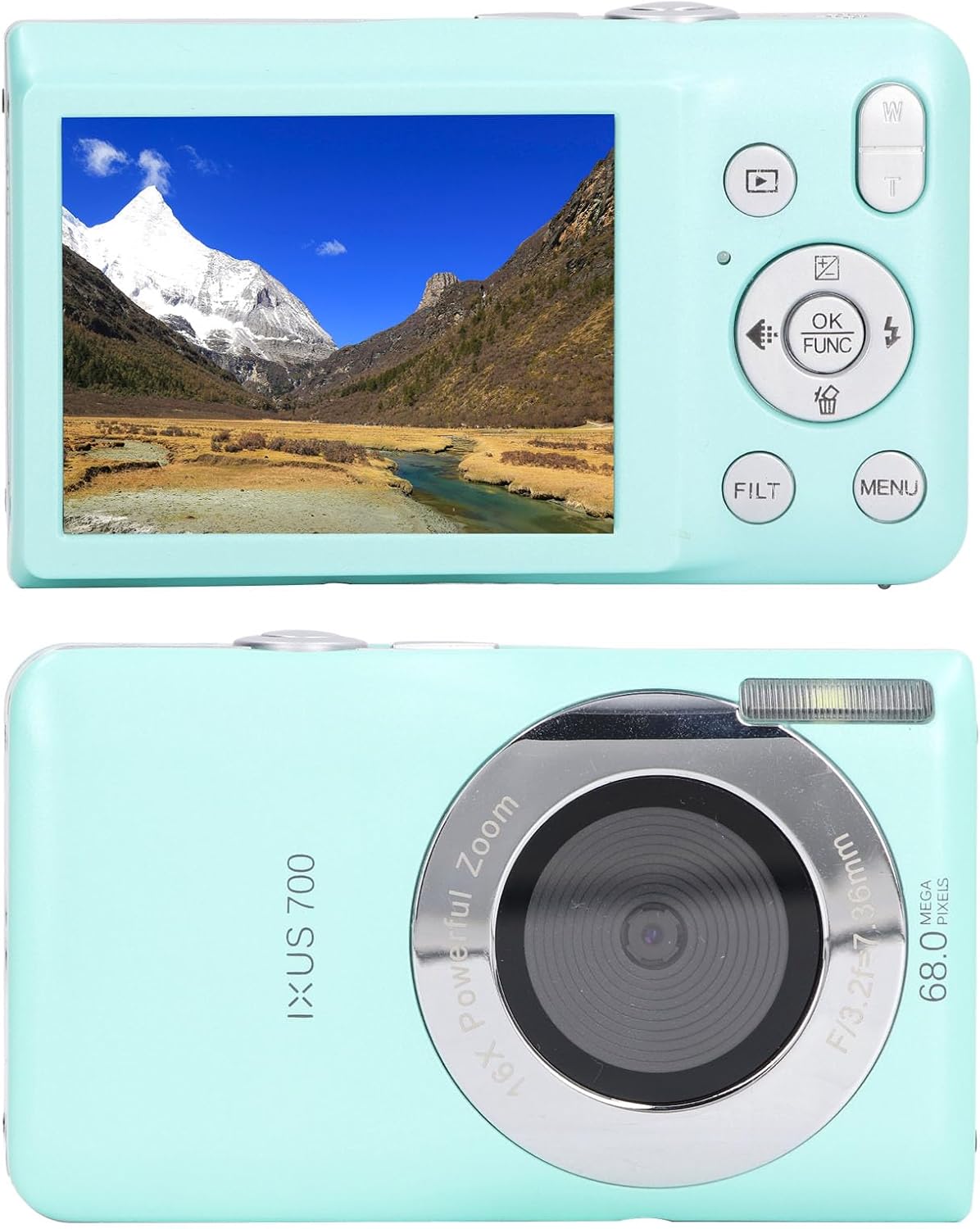
Imatge 3.2: Frontal view showing the camera lens, flash, and microphone. Rear view shows the screen and control buttons.
4. Configuració
4.1. Instal·lació de la bateria
- Obriu la tapa del compartiment de la bateria que es troba a la part inferior de la càmera.
- Insert the BL-5B lithium battery, ensuring the correct polarity (+/-) as indicated inside the compartment.
- Tanqueu la tapa del compartiment de la bateria fins que faci clic de manera segura.
4.2. Storage Card Installation
The camera supports up to a 32GB storage card (not included).
- Localitza la ranura de la targeta de memòria, normalment al costat del compartiment de la bateria.
- Insert the storage card with the metal contacts facing the correct direction until it clicks into place.
- Per treure-la, premeu suaument la targeta fins que surti disparada.

Image 4.1: The bottom of the camera features a USB port, a tripod mount, and the access panel for the battery and storage card.
4.3. Carregant la bateria
Connect the camera to a power source using the provided USB data cable. The charging indicator light will show the charging status.
5. Instruccions de funcionament
5.1. Encendre/apagar
Press and hold the power button (usually located on the top or side) to turn the camera on or off.
5.2. Modes de foto i vídeo
The camera supports both still photography and 8K high-definition video recording.
- Canvi de modes: Use the mode button (if available) or navigate through the menu to select between photo and video modes.
- Fent fotos: In photo mode, frame your shot and press the shutter button to capture an image. The 68MP resolution ensures exquisite image quality.
- Gravació de vídeos: In video mode, press the shoot button to start recording. Press the M key to temporarily pause recording, and press it again to resume. Press the shoot button to stop recording.

Image 5.1: The camera supports HD video recording.

Image 5.2: Capture vivid pictures with 68MP resolution.
5.3. Zoom digital
The camera features 16X digital zoom. Use the T (Telephoto) button to zoom in and the W (Wide) button to zoom out. This is useful for capturing both close-up and distant scenes.
5.4. Portrait and Selfie Functions
The camera automatically detects facial expressions for accurate focusing. It supports auto-delayed photography with options for 2s, 5s, and 10s delays. Face recognition and smile detection features help capture optimal moments. Two shutter release buttons allow for comfortable operation with either hand.

Image 5.3: Features like self-timer, compact design, continuous shooting, and fill light enhance the photography experience.
5.5. Beauty Filters
Enhance your photos with 20 built-in beauty filters. Access these filters via the "FILT" button or through the camera menu to adjust beauty and selfie effects, adding a unique touch to your images.
5.6. Connecting to a Computer and Printing
Easily connect the camera to a computer using the provided USB data cable. Once connected, you can transfer photos for instant printing. The camera also allows for cropping or rotating photos before printing.

Image 5.4: The camera offers versatile connectivity options, including a 4-in-1 interface for connecting to computers.
6. Manteniment
- Neteja: Feu servir un drap suau i sec per netejar el cos de la càmera. Per a l'objectiu, feu servir un drap i una solució especials per a la neteja d'objectius. Eviteu productes químics agressius.
- Emmagatzematge: Store the camera in a cool, dry place away from direct sunlight and extreme temperatures. If storing for extended periods, remove the battery.
- Cura de la bateria: Do not expose the battery to high temperatures. Charge the battery regularly, even if not in use, to maintain its lifespan.
7. Solució De Problemes
| Problema | Causa possible | Solució |
|---|---|---|
| La càmera no s'encén. | Battery is low or not inserted correctly. | Carregueu la bateria o torneu-la a inserir correctament. |
| No es poden fer fotos/gravar vídeos. | Storage card is full or not inserted. | Insert a storage card or delete unnecessary files. |
| Les imatges són borroses. | Lens is dirty or insufficient lighting. | Clean the lens. Ensure adequate lighting or use flash if available. |
| La càmera es congela. | Error de programari. | Remove and re-insert the battery to reset the camera. |
8. Especificacions
| Característica | Detall |
|---|---|
| Resolució d'imatge | 68MP, 56MP, 48MP, 30MP, 24MP, 20MP, 18MP, 16MP, 12MP, 8MP, 7MP, 5MP |
| Resolució de vídeo | 7680x4320 8K, 3840x2160 4K, 1920x1080 FHD, 1280x720 HD |
| Mida de la pantalla | 2.7 polzades |
| Zoom digital | 16X |
| Bateria | BL-5B 750mAh Lithium Battery |
| Emmagatzematge | Supports up to 32GB storage card (not included) |
| Format d'imatge | JPEG |
| Format de vídeo | AVI |
| Enfocament automàtic | Admet |
| Pes | Aprox. 250 g / 8.8 oz |
| Número de model | Dpofirsydte0i1qw2-13 |
| Marca | Dpofirs |
9. Vídeo oficial del producte
Video 9.1: An official product video demonstrating the Dpofirs 8K Digital Camera, showcasing el seu disseny i les seves característiques.
10. Garantia i Suport
For warranty information and customer support, please refer to the documentation included with your product or visit the official Dpofirs weblloc web. Conserveu el rebut de compra com a comprovant de compra.
Informació de contacte: Consulteu l'embalatge del producte o el del fabricant weblloc web per obtenir les dades de contacte d'assistència més actualitzades.