
1. Introducció
The PRIOS Helinova is a versatile device designed to enhance your daily routine with its multi-functional capabilities. It combines a wake-up light, alarm clock, FM radio, and mood lighting, all integrated into a sleek, user-friendly design. This manual provides detailed instructions for the proper setup, operation, and maintenance of your Helinova device.

Figura 1.1: The PRIOS Helinova Wake-Up Light Alarm Clock. This image shows the front view of the device, highlighting its minimalist design and touch-sensitive control buttons at the base.
2. Instruccions de seguretat
Please read these safety instructions carefully before using the device to ensure safe and proper operation.
- No exposeu el dispositiu a l'aigua ni a una humitat excessiva.
- Eviteu col·locar el dispositiu a prop de fonts de calor o sota la llum solar directa.
- Use only the provided USB charging cable for power.
- No intenteu desmuntar ni reparar el dispositiu vosaltres mateixos. Poseu-vos en contacte amb personal de servei qualificat.
- Mantenir fora de l'abast dels nens.
3. Contingut del paquet
Verifiqueu que tots els elements siguin presents al paquet:
- PRIOS Helinova Wake-Up Light Alarm Clock
- Cable de càrrega USB
- Manual d'usuari (aquest document)

Figura 3.1: The USB charging cable included with the PRIOS Helinova. This cable is used to power and charge the device.
4. Producte acabatview
Familiarize yourself with the components and controls of your Helinova device.
4.1 Controls del panell frontal
- Time/Alarm Button: Used to set time and alarm functions.
- Botó Menys (-): Decreases values, volume, or brightness.
- Botó de llum: Activates and adjusts the light functions.
- Botó més (+): Increases values, volume, or brightness.
- Radio/Bluetooth Button: Controls FM radio and Bluetooth functions.
4.2 Ports del panell posterior
- Micro-USB Charging Input (DC 5V): Per connectar el cable d'alimentació.
- USB Charging Output (Output: 5V 1A): Per carregar dispositius externs.
- Ranura per a targeta MicroSD: Per reproduir àudio des d'una targeta MicroSD.

Figura 4.1: posterior view of the PRIOS Helinova Wake-Up Light Alarm Clock. This image displays the USB output port and the device's stable stand.

Figura 4.2: Close-up of the DC 5V input and USB output ports on the PRIOS Helinova. This shows where to connect the power cable and external devices.
5. Configuració
5.1 Encès inicial
- Connect the provided USB charging cable to the Micro-USB input port on the back of the Helinova.
- Connecteu l'altre extrem del cable USB a un adaptador de corrent USB compatible (no inclòs) o a un port USB amb alimentació.
- The device will power on, and the LED display will illuminate.
5.2 Configuració de l'hora
- Manteniu premut el botó Time/Alarm Button until the hour display starts flashing.
- Utilitza el A més (+) or Minus (-) Buttons per ajustar l'hora.
- Premeu el botó Time/Alarm Button again to switch to minute setting.
- Utilitza el A més (+) or Minus (-) Buttons per ajustar els minuts.
- Premeu el botó Time/Alarm Button una vegada més per confirmar i sortir del mode de configuració de l'hora.
6. Funcionament
6.1 Basic Light Functions
- Activar/Desactivar: Premeu breument Botó de llum per encendre o apagar la llum.
- Adjust Brightness (Touch Dimmer): Quan la llum estigui encesa, premeu i manteniu premut el botó Botó de llum. The brightness will cycle through levels. Release the button at your desired brightness. Alternatively, use the A més (+) or Minus (-) Buttons to adjust brightness in steps.
- Llum d'humor: Premeu el botó Botó de llum multiple times to cycle through different mood light colors.

Figura 6.1: The PRIOS Helinova Wake-Up Light Alarm Clock displaying various LED mood light colors. This collage shows the device emitting yellow, green, pink, and blue light, demonstrating its mood lighting capabilities.
6.2 Configuració del despertador
- Establir hora d'alarma: Premeu el botó Time/Alarm Button once to enter alarm setting mode. The alarm hour will flash. Adjust with A més (+) or Minus (-) Buttons. Premeu Time/Alarm Button again for minutes, adjust with A més (+) or Minus (-) Buttons. Press again to confirm.
- Activa / desactiva l'alarma: After setting the alarm, press the Time/Alarm Button briefly to toggle the alarm on or off. An alarm icon will appear/disappear on the display.
- Funció de posposar: When the alarm sounds, press any button (except the Time/Alarm button) to activate snooze. The alarm will sound again after a set interval (e.g., 9 minutes).
- Atura l'alarma: To completely stop the alarm, press the Time/Alarm Button quan sona.

Figura 6.2: The PRIOS Helinova Wake-Up Light Alarm Clock in use, displaying time and emitting warm light. This image shows the device on a bedside table, indicating its function as a wake-up light.

Figura 6.3: The PRIOS Helinova Wake-Up Light Alarm Clock on a bedside table, unlit, displaying time. This image provides a view of the device in a typical bedroom setting when the light function is not active.
6.3 Funcionament de la ràdio FM
- Activar/Desactivar: Premeu el botó Radio/Bluetooth Button briefly to turn the FM radio on or off.
- Escaneig automàtic: Manteniu premut el botó Radio/Bluetooth Button per escanejar i desar automàticament les emissores de FM disponibles.
- Canvi d'estació: Utilitza el A més (+) or Minus (-) Buttons to cycle through saved stations.
- Ajustar el volum: While the radio is playing, press and hold the A més (+) or Minus (-) Buttons per ajustar el volum.
6.4 Sunrise Simulation
The Helinova can simulate a sunrise to gently wake you up. This function typically starts gradually increasing light intensity before your set alarm time.
- When setting an alarm, the sunrise simulation will automatically activate a set time (e.g., 30 minutes) before the alarm sounds, gradually brightening the light.
- Refer to the on-screen indicators or specific alarm settings for customization options regarding the duration or intensity of the sunrise simulation.
6.5 Sunset Simulation (Sleep Timer)
The sunset simulation helps you fall asleep by gradually dimming the light over a set period.
- Activate the sleep timer function (often by pressing a dedicated button or holding the light button in a specific mode).
- Select the desired duration for the dimming process (e.g., 15, 30, 60 minutes).
- The light will gradually dim until it turns off completely.
6.6 Funció Bluetooth
The Helinova features a hands-free Bluetooth function for audio playback.
- Manteniu premut el botó Radio/Bluetooth Button to enter Bluetooth pairing mode. The display will indicate 'BT'.
- On your smartphone or other Bluetooth-enabled device, search for 'Helinova' in the Bluetooth settings and pair.
- Once paired, you can play audio from your device through the Helinova speaker.
- Utilitza el A més (+) or Minus (-) Buttons per ajustar el volum.
7. Manteniment
To ensure the longevity and optimal performance of your PRIOS Helinova, follow these maintenance guidelines:
- Neteja: Use a soft, dry cloth to wipe the surface of the device. Do not use abrasive cleaners, solvents, or harsh chemicals.
- Emmagatzematge: Quan no l'utilitzeu durant períodes prolongats, guardeu el dispositiu en un lloc fresc i sec, allunyat de la llum solar directa.
- Potència: Always disconnect the power cable before cleaning or if the device will not be used for a long time.
8. Solució De Problemes
If you encounter any issues with your Helinova, refer to the following common problems and solutions:
| Problema | Causa possible | Solució |
|---|---|---|
| El dispositiu no s'encén. | No hi ha connexió elèctrica o cable defectuós. | Assegureu-vos que el cable USB estigui ben connectat i que la font d'alimentació estigui activa. Proveu un altre port USB o adaptador. |
| La llum no funciona. | Light function is off or brightness is set to minimum. | Premeu el botó Botó de llum to turn on. Adjust brightness using the A més (+) or Minus (-) Buttons or the touch dimmer function. |
| L'alarma no sona. | Alarm is deactivated or volume is too low. | Check if the alarm icon is displayed. If not, activate the alarm. Increase alarm volume. |
| FM radio has poor reception. | Senyal feble o interferències. | Reposition the device. Perform an auto-scan for stations again. |
| L'aparellament de Bluetooth falla. | Device not in pairing mode or too far from source. | Ensure the Helinova is in Bluetooth pairing mode ('BT' displayed). Keep the paired device within range. |
9. Especificacions
Technical details of the PRIOS Helinova Wake-Up Light Alarm Clock:
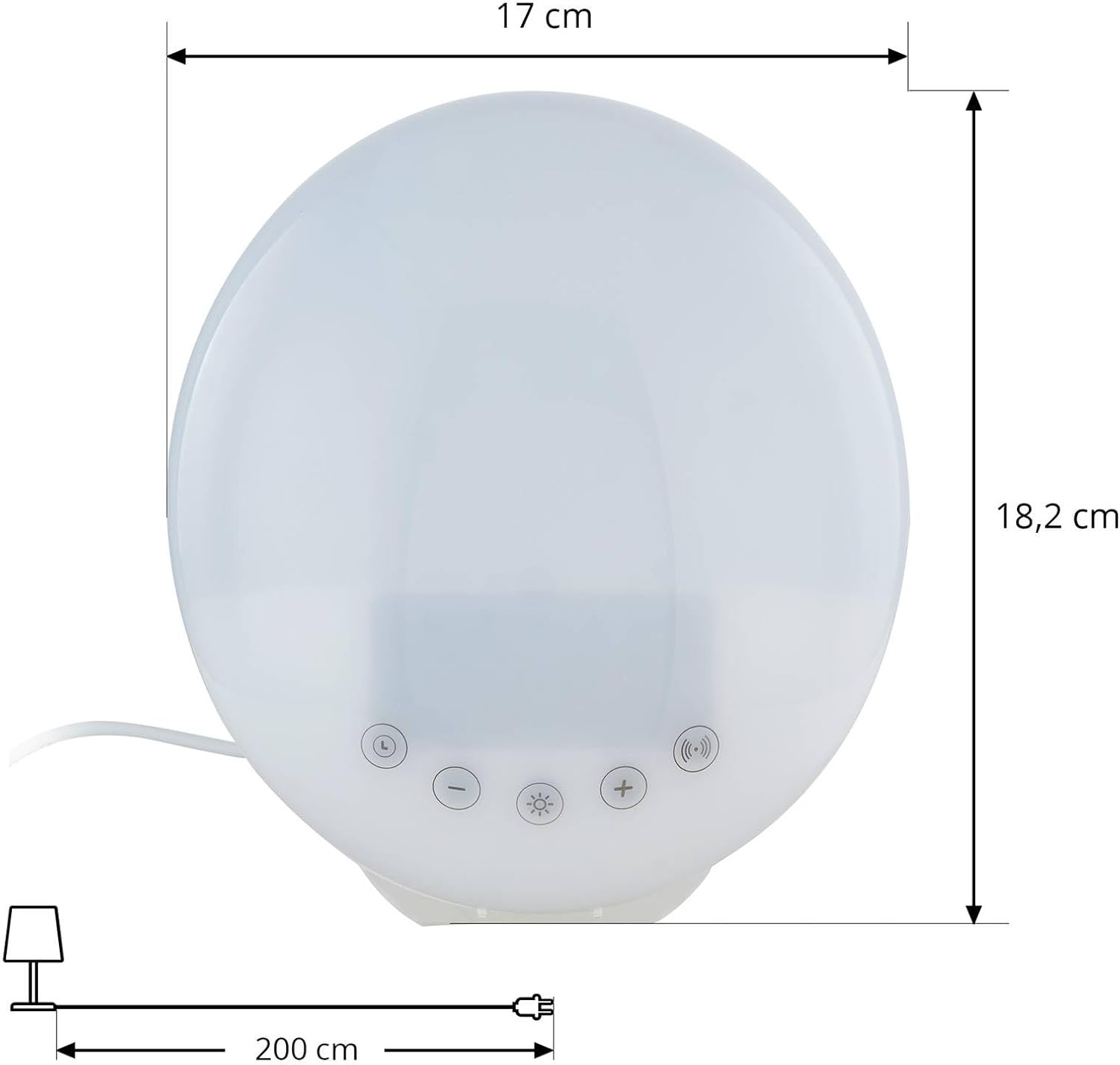
Figura 9.1: Dimensions of the PRIOS Helinova Wake-Up Light Alarm Clock. This image provides a visual representation of the device's width (17 cm) and height (18.2 cm), along with the cable length (200 cm).
- Model: Helinova
- Referència del fabricant: 9933013
- Material: Plàstic
- Color: Blanc
- Amplada: 17 cm
- Alçada: 18.2 cm
- Font de llum: LED integrat
- Total LED Wattage: 2 W
- Entrada d'alimentació: DC 5V (via Micro-USB)
- Sortida USB: 5V 1A
- Codi IP: IP20 (Not protected against water)
- Classe de protecció: II
- Funcions: FM Radio, Alarm Clock, Light Alarm, Snooze, Sleep Timer, LED Mood Light (Dimmable), LED Display (Dimmable), Sunrise Simulation, Sunset Simulation, Hands-free Bluetooth, MicroSD Playback
10. Garantia i Suport
PRIOS products are manufactured to high-quality standards. For warranty information or technical support, please refer to the documentation provided at the time of purchase or contact your retailer. Keep your proof of purchase for warranty claims.