
1. Introducció
The FIDECO M.2 NVMe SATA to USB Adapter (Model M118) is a versatile external docking station designed for M.2 NVMe and SATA SSDs. It provides high-speed data transfer capabilities, allowing users to easily access, backup, and transfer data from M.2 solid-state drives via a USB connection. Its robust aluminum alloy construction ensures efficient heat dissipation, contributing to optimal performance and extended SSD lifespan. This manual provides essential information for setting up, operating, and maintaining your FIDECO M.2 SSD adapter.

Figure 1: FIDECO M.2 NVMe SATA to USB Adapter (Model M118) with USB-C to USB-C and USB-C to USB-A cables.
2. Característiques clau
- Àmplia compatibilitat amb SSD: Supports M.2 PCIe NVMe SSDs with M Key or B+M Key, and M.2 SATA SSDs with B+M Key. Compatible SSD sizes include 2230, 2242, 2260, 2280, and 22110.
- Supervelocitat de 10 Gbps: Features USB 3.2 Gen 2 PCIe NVMe data bridge, offering data transfer speeds up to 10Gbps. Supports UASP for faster read and write speeds compared to conventional USB 3.1.
- Dissipació de calor eficient: Constructed from aluminum with a unique toaster design, aiding in maintaining a cooler operating environment for optimal performance and extended SSD lifespan. Includes heatsink and thermal pad for enhanced cooling.
- Tool-free Installation: Designed for easy plug-and-unplug of SSDs without requiring tools.
- Àmplia compatibilitat del sistema operatiu: Widely compatible with Windows, Mac OS, and Linux. Plug and play functionality, no drivers required.
- Disseny portàtil: Compact and mini design for easy portability.
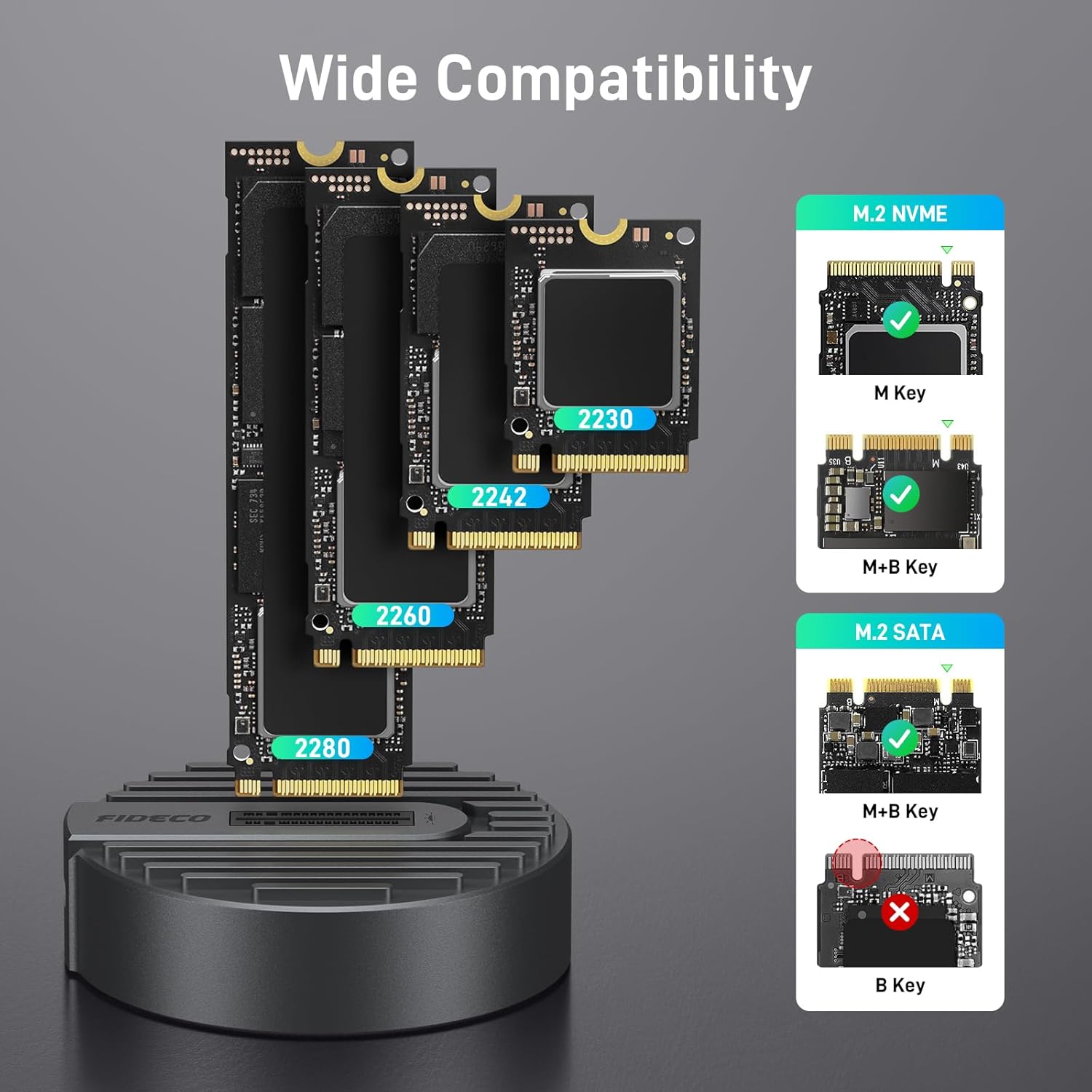
Figura 2: Compatibilitat sobreview for M.2 NVMe (M Key, M+B Key) and M.2 SATA (M+B Key) SSDs, excluding B Key SATA SSDs.
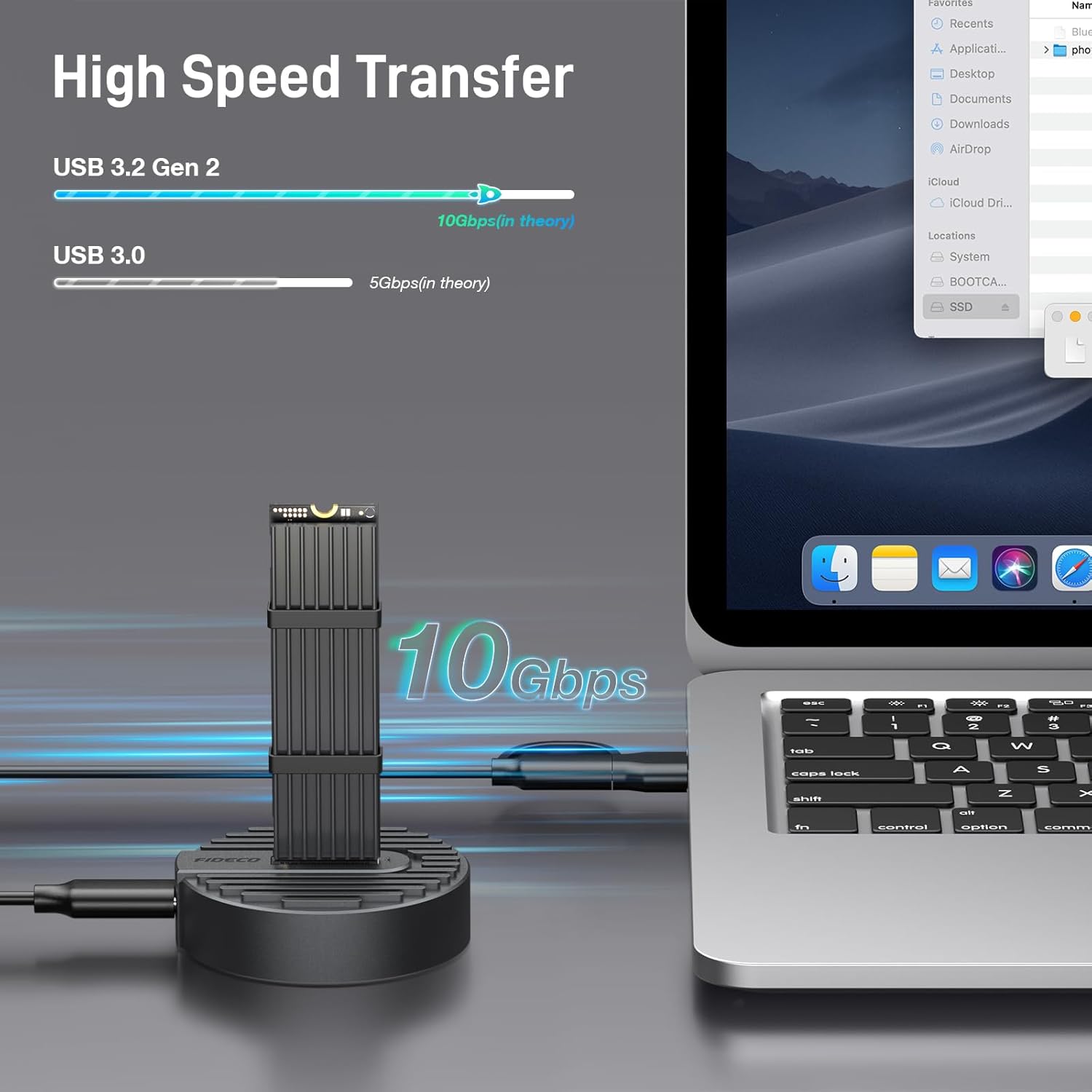
Figure 3: High-speed data transfer capabilities of the FIDECO M.2 SSD adapter, illustrating 10Gbps performance.
3. Contingut del paquet
Si us plau, comproveu que tots els articles siguin presents i en bon estat en obrir el paquet.
- FIDECO M.2 NVMe SATA to USB Adapter (Model M118)
- USB-C to USB-C Cable (with USB-A adapter)
- Heatsink (cooling vest)
- Coixinet tèrmic
- Rubber Bands (for securing heatsink)
4. Guia de configuració
Follow these steps to install your M.2 SSD into the FIDECO adapter:
- Prepareu l'SSD: If using the included heatsink, peel off the protective film from the thermal pad and carefully stick it onto your M.2 SSD.
- Attach Heatsink: Place the heatsink over the thermal pad on the SSD. Use the provided rubber bands to securely fasten the heatsink to the SSD. This ensures optimal heat dissipation.
- Inseriu SSD: Gently insert the prepared M.2 SSD into the slot on the FIDECO docking station. Ensure it is fully seated. The tool-free design allows for easy insertion.
- Connexió a l'ordinador: Connect the FIDECO SSD docking station to your computer using the provided USB-C to USB-C cable, or the USB-C to USB-A adapter if your computer only has USB-A ports.

Figure 4: Visual guide for the easy, tool-free installation of an M.2 SSD into the FIDECO docking station.
5. Instruccions de funcionament
Once connected, the FIDECO M.2 NVMe SATA to USB Adapter operates on a plug-and-play basis, requiring no additional drivers for most operating systems.
- Reconeixement automàtic: Your computer should automatically detect the connected SSD. The SSD will appear as an external drive in your file explorer (Windows) or Finder (Mac OS).
- Transferència de dades: Ara podeu arrossegar i deixar anar files, copy, paste, or perform any data transfer operations as you would with any other external storage device.
- Rendiment: For optimal performance, ensure your computer's USB port supports USB 3.2 Gen 2 (10Gbps). While compatible with older USB standards, speeds will be limited to the maximum supported by the port.
- Llum indicadora: The adapter features an indicator light that typically illuminates when powered and blinks during data transfer activity.

Figure 5: The FIDECO adapter offers driver-free, plug-and-play functionality across various operating systems.

Figure 6: The FIDECO M.2 SSD adapter can be used with a wide range of devices, including desktops, laptops, tablets, and smartphones.
6. Manteniment
Proper maintenance ensures the longevity and optimal performance of your FIDECO M.2 NVMe SATA to USB Adapter.
- Gestió de la calor: M.2 SSDs can generate significant heat during high-speed data transfers. The aluminum design and included heatsink are designed to dissipate this heat. It is normal for the SSD to become warm during operation.
- Precaucions de manipulació: Avoid touching the SSD directly during operation, as it may be hot. Always handle the adapter and SSD with care to prevent physical damage.
- Neteja: Feu servir un drap suau i sec per netejar l'adaptador. Eviteu utilitzar netejadors líquids o dissolvents.
- Emmagatzematge: Quan no l'utilitzeu, emmagatzemeu l'adaptador en un lloc fresc i sec, lluny de la llum solar directa i de temperatures extremes.
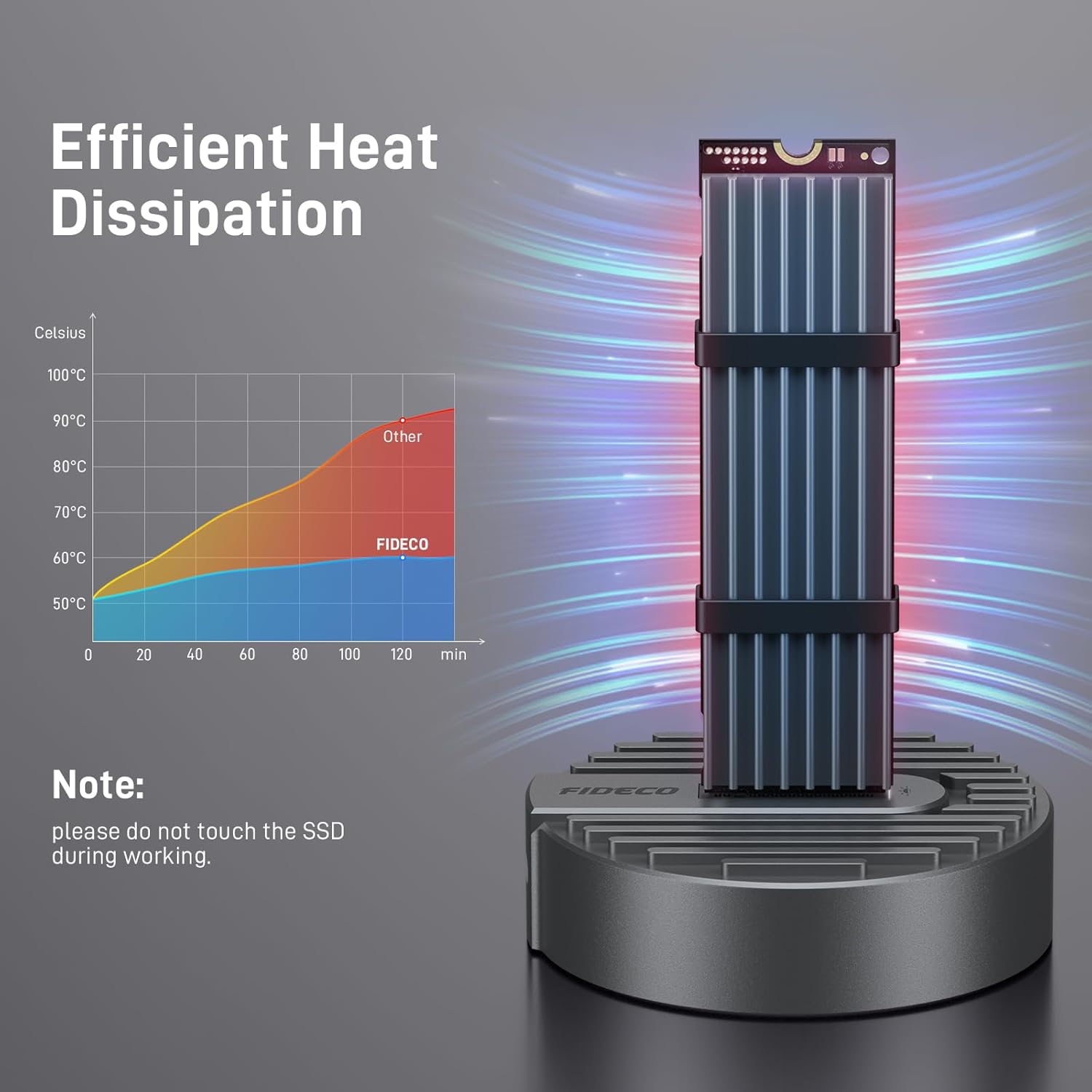
Figure 7: The FIDECO adapter's design promotes efficient heat dissipation, keeping the SSD cooler during operation.
7. Solució De Problemes
If you encounter issues with your FIDECO M.2 NVMe SATA to USB Adapter, refer to the following common solutions:
| Problema | Possible causa/solució |
|---|---|
| SSD not recognized by computer. |
|
| Velocitats de transferència de dades lentes. |
|
| Adapter or SSD feels hot. |
|
8. Especificacions
| Atribut | Detall |
|---|---|
| Model | M118 |
| Marca | FIDECO |
| Interfície del maquinari | USB 3.2 Gen 2 |
| Velocitat de transferència de dades | 10 gigabits per segon |
| Tipus d'SSD compatibles | M.2 PCIe NVMe (M Key, B+M Key), M.2 SATA (B+M Key) |
| Mides SSD compatibles | 2230, 2242, 2260, 2280, 22110 |
| Material | Alumini |
| Color | Plata |
| Dimensions del producte | 6.6 x 1.5 x 0.8 cm |
| Pes de l'article | 80 grams |
| Nombre de Ports | 1 (USB) |
| Piles necessàries | No |
9. Garantia i Suport
FIDECO products are designed for reliability and performance. For any technical support, questions, or concerns regarding your FIDECO M.2 NVMe SATA to USB Adapter, please contact FIDECO customer service. We are committed to providing prompt assistance and effective solutions.
Please refer to the product packaging or the official FIDECO weblloc web per obtenir la informació de garantia i les dades de contacte més actualitzades.
Weblloc: www.fideco-it.com