
1. Introducció
This manual provides essential information for the safe and efficient operation of your HYUNDAI Smart TV 42-inch Full HD. Please read this manual thoroughly before using the television and retain it for future reference. This television features a 42-inch Full HD (1920x1080p) display, VIDAA operating system, and integrated smart applications such as Netflix, YouTube, and Prime Video. It also supports Screencast functionality for content sharing from mobile devices.
2. Informació de seguretat
Always follow basic safety precautions when using this television to reduce the risk of fire, electric shock, and injury. Ensure the television is placed on a stable surface. Do not block ventilation openings. Avoid exposing the television to rain or moisture. Disconnect the power cord during lightning storms or when unused for long periods. Refer to the full safety guidelines in the included safety sheet.
3. Configuració
3.1 Desembalatge i instal·lació del suport
Carefully remove the television from its packaging. Attach the included stands to the bottom of the television using the provided screws. Ensure the stands are securely fastened before placing the TV upright.

Davant view of the HYUNDAI 42-inch Smart TV with its stand, displaying the VIDAA smart interface.
3.2 Connexió de dispositius externs
Your television is equipped with multiple ports for connecting various devices:
- Ports HDMI (3x): Connecteu reproductors de Blu-ray, consoles de jocs o descodificadors.
- Ports USB (2x): Connecteu dispositius d'emmagatzematge USB per a la reproducció de contingut multimèdia.
- Ranura CI+: Insert a CI+ module for encrypted digital channels.
- RJ45 (Ethernet): Connect to your home network for internet access.
- Sortida òptica: Connect to an external audio system.
- Sortida d'auriculars: Connecteu els auriculars per a una escolta privada.

lateral view of the HYUNDAI 42-inch Smart TV, showing various input and output ports including HDMI and USB.
3.3 Assistent de configuració inicial
Upon first power-on, the TV will guide you through an initial setup process. This includes selecting your language, connecting to a Wi-Fi network, and scanning for available channels.
4. Funcionament
4.1 Funcions bàsiques del televisor
- Potència: Premeu el botó d'engegada del comandament a distància per encendre o apagar el televisor.
- Volum: Feu servir els botons VOL +/- per ajustar el nivell del so.
- Canals: Use the CH +/- buttons to change channels or the number buttons for direct channel selection.
- Font d'entrada: Press the SOURCE button to select between HDMI, USB, TV, and other inputs.
4.2 Funcions de Smart TV (VIDAA OS)
Your HYUNDAI Smart TV runs on the VIDAA operating system, providing access to a variety of applications and features.

The HYUNDAI Smart TV displaying the VIDAA smart interface with various streaming app icons like Netflix, YouTube, Prime Video, and Disney+.
- Aplicacions preinstal·lades: Accedeix a serveis de streaming populars com Netflix, YouTube i Prime Video directament des de la pantalla d'inici.
- App Store: Explore and download additional applications from the VIDAA App Store.
- Projecció de pantalla: Use the Screencast feature to mirror content from your compatible smartphone or tablet to the TV screen.

A smartphone displaying a city skyline next to the HYUNDAI Smart TV, which is mirroring the same image, illustrating the Screencast feature.
5. Manteniment
5.1 Neteja del televisor
Abans de netejar, desendolleu el cable d'alimentació de la presa de corrent. Feu servir un drap suau i sec per netejar la pantalla i la carcassa. Per a marques difícils, netegeu suaument.ampen the cloth with water or a mild, non-abrasive cleaner specifically designed for electronics. Never spray liquid directly onto the screen or cabinet.
5.2 Actualitzacions de programari
The television may receive software updates to improve performance and add new features. Ensure your TV is connected to the internet to receive automatic updates. You can also check for updates manually through the TV's settings menu.
6. Solució De Problemes
Si teniu problemes amb el televisor, consulteu les solucions habituals següents:
- Sense energia: Check if the power cord is securely plugged into both the TV and the wall outlet. Ensure the power outlet is functional.
- Sense imatge/so: Verify the correct input source is selected. Check all cable connections (HDMI, antenna). Try another channel or input device.
- Sense connexió a Internet: Ensure your Wi-Fi router is on and functioning. Reconnect to the Wi-Fi network in the TV settings. For wired connections, check the Ethernet cable.
- El control remot no funciona: Substituïu les piles del comandament a distància. Assegureu-vos que no hi hagi cap obstacle entre el comandament a distància i el sensor d'infrarojos del televisor.
- Problemes de qualitat d'imatge: Ajusteu la configuració de la imatge (brillantor, contrast, nitidesa) al menú del televisor. Assegureu-vos que la font d'entrada proporciona un senyal d'alta qualitat.
If problems persist, consider performing a factory reset through the TV's settings menu (note: this will erase all personalized settings and data). For further assistance, contact customer support.
7. Especificacions
| Característica | Especificació |
|---|---|
| Número de model | HY-TV42SFHD-001 |
| Mida de la pantalla | 42 polzades (105 cm) |
| Resolució | Full HD (1920 x 1080p) |
| Sistema operatiu | VIDAA |
| Ports HDMI | 3 (version 1.4, 1x ARC) |
| Ports USB | 2 (version 2.0) |
| Connectivitat | Wi-Fi, RJ45 (Ethernet) |
| Característiques especials | Smart TV, Netflix, YouTube, Prime Video, Screencast, CI+ |
| Voltage | 230 Volts |
| Dimensions del producte (W x D x H) | 96.8 x 23.1 x 62.2 cm (amb suport) |
| Pes | 6.15 kg |
| Classe d'eficiència energètica | E |
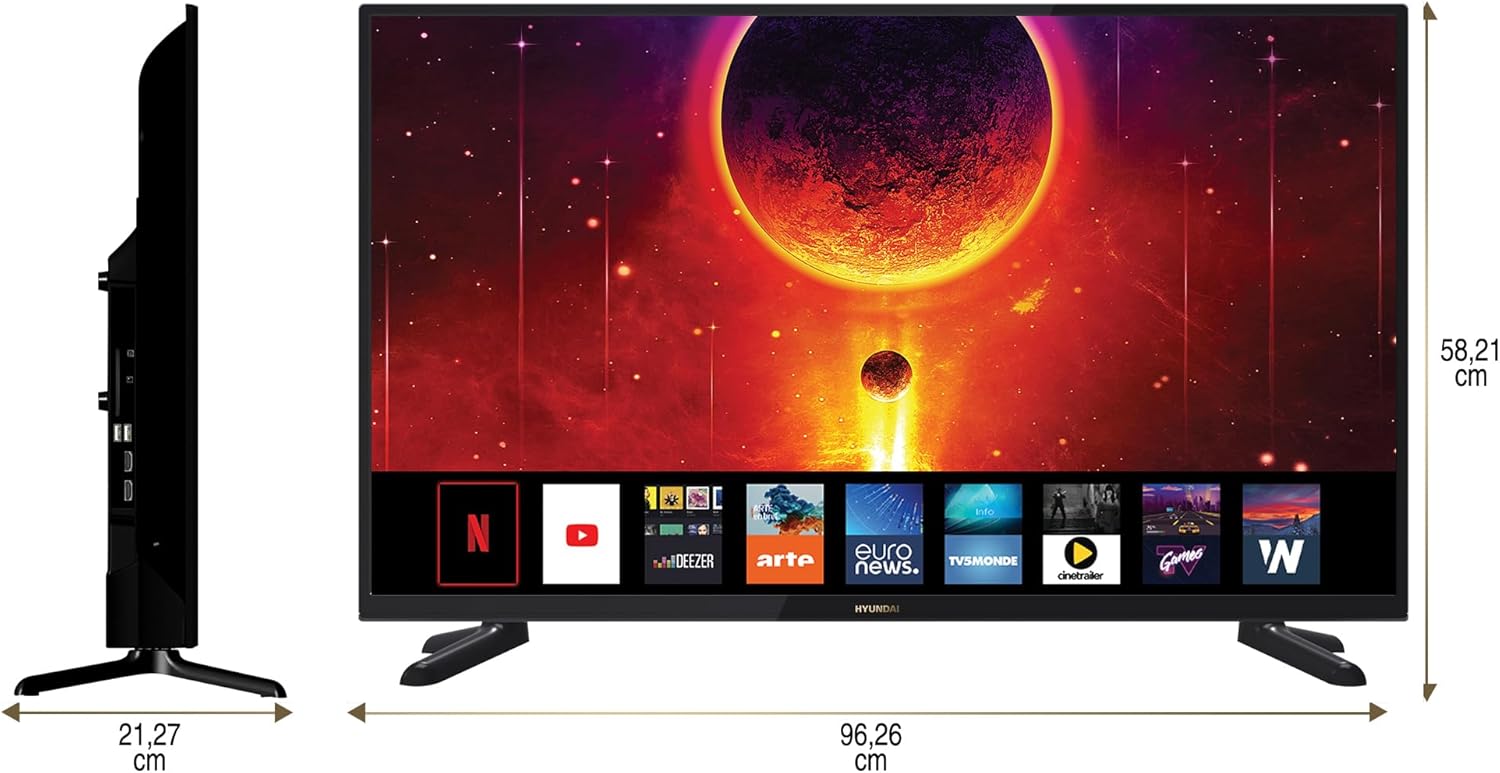
Diagram showing the dimensions of the HYUNDAI 42-inch Smart TV, with a width of 96.26 cm and a height of 58.21 cm.
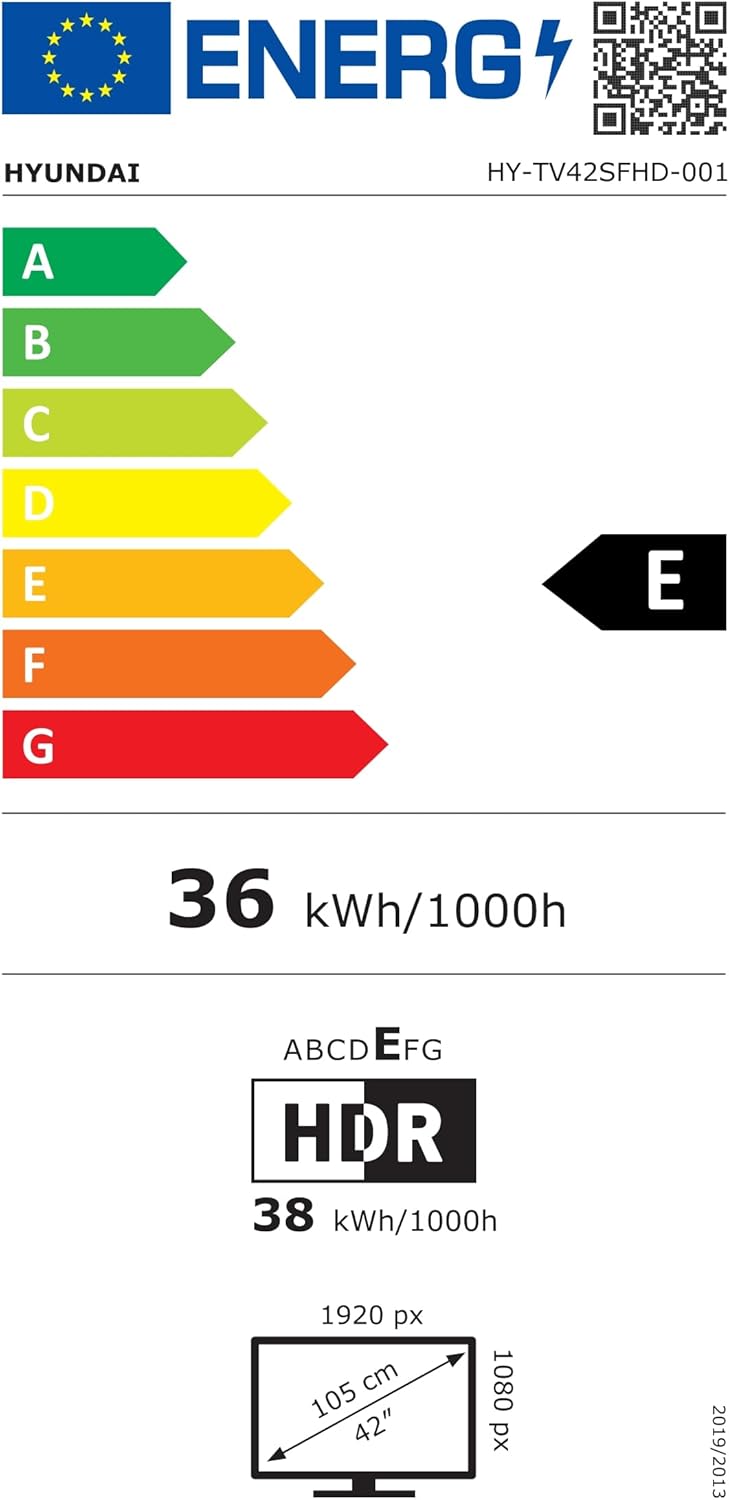
EU Energy Label for the HYUNDAI HY-TV42SFHD-001 television, showing an energy efficiency class of E and energy consumption of 36 kWh/1000h. For more details, visit eprel.ec.europa.eu/qr/1598831.
8. Garantia i Suport
8.1 Informació de la garantia
Your HYUNDAI Smart TV is covered by a manufacturer's warranty. The specific terms and duration of the warranty may vary by region. Please refer to the warranty card included with your product or visit the official HYUNDAI weblloc per obtenir informació detallada sobre la garantia.
8.2 Atenció al client
For technical assistance, troubleshooting not covered in this manual, or warranty claims, please contact HYUNDAI customer support. Contact details can typically be found on the official HYUNDAI website or in the documentation provided with your television.