
Amazon Echo Show 21
Manual d'usuari d'Amazon Echo Show 21
Model: Echo Show 21
1. Introducció
Welcome to your new Amazon Echo Show 21. This smart display is designed to be the central hub for your home, offering a large Full HD screen for entertainment, organization, and communication. With built-in Fire TV and Alexa, you can stream content, manage your smart home, make video calls, and keep your family organized with customizable widgets.

Figure 1.1: Amazon Echo Show 21 Overview
The Echo Show 21 integrates seamlessly into your daily life, providing a visual and interactive experience for all your Alexa commands.
2. Introducció: Configuració
2.1 Què hi ha a la caixa
- Dispositiu Echo Show 21
- Alexa Voice Remote with batteries (2 AAA included)
- Power adapter (30W) and 5 ft. cord (white)
- Wall mount, anchors, screws, mounting template
- Guia d'inici ràpid
2.2 Configuració inicial
The Echo Show 21 is designed for simple setup. You will need a Wi-Fi connection.
- Encès: Connecta l'adaptador de corrent al teu Echo Show 21 i endolla'l a una presa de corrent. El dispositiu s'encén automàticament.
- Connexió Wi-Fi: Follow the on-screen instructions to connect your device to your Wi-Fi network. Amazon Wi-Fi simple setup can automatically connect your device if you are a Prime member and have previously saved your Wi-Fi credentials.
- Inici de sessió al compte d'Amazon: Log in with your Amazon account credentials.
- Personalització: Customize your home screen, set up profiles, and configure your preferred settings.
- Vinculació remota: The included Alexa Voice Remote should pair automatically. If not, follow the on-screen instructions or refer to the quick start guide for manual pairing.
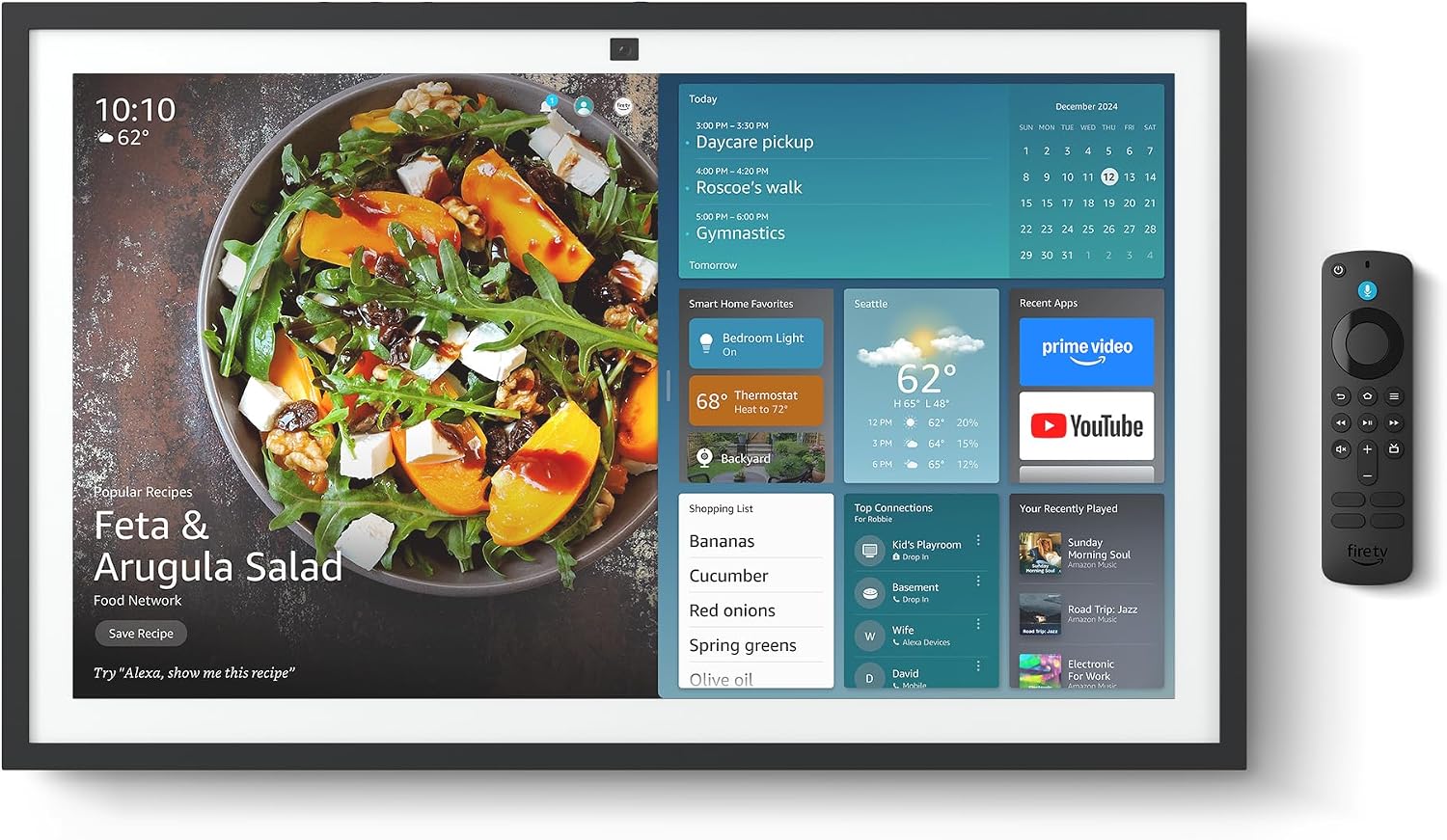
Figure 2.1: Echo Show 21 with Alexa Voice Remote
2.3 Opcions de muntatge
The Echo Show 21 can be wall-mounted using the included hardware or placed on a stand (sold separately). Wall mounting requires an electric drill.
3. Funcionament del vostre Echo Show 21
3.1 Control per veu amb Alexa
Your Echo Show 21 is primarily controlled by voice using Alexa. Simply say the wake word "Alexa" followed by your command or question.
- Ordres generals: "Alexa, what's the weather?", "Alexa, set a timer for 10 minutes."
- Música i àudio: "Alexa, play pop music," "Alexa, play my morning playlist."
- Video & Entertainment: "Alexa, open Prime Video," "Alexa, play The Boys on Netflix."
3.2 Fire TV Integration
Enjoy endless entertainment with built-in Fire TV. Use the included Alexa Voice Remote or voice commands to navigate.

Figure 3.1: Fire TV Interface
- Access thousands of apps like Prime Video, Netflix, YouTube, Apple TV.
- Stream movies, TV shows, and live content.
- The Fire TV remote allows for traditional navigation and playback control.
3.3 Home Screen & Widgets
The 21-inch display is ideal for organizing your day with customizable widgets.

Figure 3.2: Customizable Home Screen Widgets
- Keep important information like calendars, shopping lists, and weather in view.
- Personalize your home screen with family photos.
3.4 Control de la llar intel·ligent
Control compatible smart devices using your voice or the smart home dashboard.

Figure 3.3: Smart Home Dashboard
- Turn lights on/off, adjust thermostats, or view transmissions de càmera en directe.
- Supports Zigbee, Matter, and Thread Border Router for broad compatibility.
3.5 Video Calling
Connect with family and friends using the 13 MP camera with auto-framing, wide field of vision, 3.3x zoom, and noise reduction.

Figure 3.4: Echo Show 21 as a Digital Photo Frame
The camera can also be used to display your favorite memories as a digital photo frame.
4. Manteniment
Per garantir la longevitat i el rendiment òptim del vostre Echo Show 21, seguiu aquestes pautes de manteniment:
- Neteja de la pantalla: Feu servir un drap suau i sense borrissol per netejar suaument la pantalla. Per a taques difícils, fregueu lleugeramentampen the cloth with water. Avoid abrasive cleaners or sprays directly on the screen.
- Neteja del cos del dispositiu: Wipe the exterior surfaces with a dry, soft cloth. Do not use harsh chemicals or solvents.
- Ventilació: Ensure the device's ventilation openings are not blocked to prevent overheating.
- Actualitzacions de programari: Your Echo Show 21 receives automatic software security updates. Ensure your device is connected to Wi-Fi to receive these updates.
5. Solució De Problemes
If you encounter issues with your Echo Show 21, try the following common solutions:
- El dispositiu no respon: Try saying "Alexa" again clearly. If unresponsive, unplug the power adapter for a few seconds and then plug it back in to restart the device.
- Sense connexió Wi-Fi: Check your router and modem to ensure they are working correctly. Restart your router. On the Echo Show 21, go to Settings > Network to re-select your Wi-Fi network and re-enter the password.
- Problemes d'àudio: Ensure the volume is not muted or too low. Say "Alexa, turn up the volume." Check audio settings in the device menu.
- La càmera no funciona: Ensure the physical camera shutter is open and the mic/camera-off button is not activated (red light indicates off).
- El comandament a distància no respon: Check the batteries in the Alexa Voice Remote. If necessary, replace them. Re-pair the remote if it becomes disconnected.
6. Especificacions tècniques
| Característica | Especificació |
|---|---|
| Mida | 21.4" d'amplada x 13.2" d'alçada x 1.5" de profunditat |
| Pes | 10.7 lliures |
| Mostra | 21” with 1920 x 1080 resolution (landscape or portrait) |
| Càmera | 13 MP + Shutter |
| Àudio | Two 2” woofers + two 0.6” tweeters |
| Connectivitat Wi-Fi | Wi-Fi 6E (802.1ax), Tri-band, dual-antenna (MIMO). Supports 802.11a/b/g/n/ac. |
| Smart Home Hub | Zigbee + Matèria + Router de vores de fils |
| Processador | Octa-core SoC with Amazon AZ2 neural network engine |
| Sensors | ALS RGB + Accelerometer |
| Llengua | Anglès i castellà |

Figure 6.1: Echo Show 15 vs. Echo Show 21 Dimensions
7. Privacy Features
L'Echo Show 21 està dissenyat amb múltiples capes de controls de privadesa:
- Mic/Camera-Off Button: A physical button to electronically disconnect the microphones and camera.
- Obturador de la càmera: A built-in physical shutter to cover the camera lens.
- Tecnologia de Wake Word: Alexa devices only begin recording and sending audio to the cloud after detecting the wake word.
- Indicadors de transmissió: Visual indicators show when audio or video is being streamed to the cloud.
- Voice Recording Control: Capacitat de view i suprimir les gravacions de veu.

Figure 7.1: Mic/Camera-Off Button and Camera Shutter
For more details, visit the Alexa Privacy Hub.
8. Característiques d'accessibilitat
The Echo Show 21 includes various accessibility features to personalize Alexa to your abilities:
- Toca per a Alexa: Accedeix a Alexa mitjançant el tacte a través de les tessel·les a la pantalla o un teclat.
- Escolta adaptativa: Dóna més temps per acabar de parlar abans que Alexa respongui.
- Tarifa de parla preferida: Controla la rapidesa o la lentitud amb què parla Alexa.
- Captioning: Alexa Captioning, Call Captioning, and Closed Captioning provide text for supported content.
- Mostra i explica: Helps users who are blind or visually impaired identify products.
- veuView Lector de pantalla: Enables access for customers who are blind or visually impaired.
- Lupa de pantalla: Apropar/reduir i desplaçar-se per la pantalla.
- Lectura en veu alta al Kindle: Have Alexa read your Kindle books aloud.
- Text en temps real: Escriu text en directe en una videotrucada.
These features can be enabled via Settings > Accessibility on your device.
9. Garantia i Suport
9.1 Garantia del producte
Your Echo Show 21 comes with a Servei i garantia limitada de 1 anys. Optional 1-year, 2-year, and 3-year extended warranties are available for U.S. customers, sold separately.
Use of Echo Show 21 and Fire TV on Echo Show 21 is subject to their respective terms of service.
9.2 Atenció al client
For further assistance, troubleshooting, or to learn more about your device, please visit the Amazon support weblloc web o contacteu amb el servei d'atenció al client d'Amazon.
Documents relacionatsEcho Show 21


Ask a question about this manual
Ask about setup, troubleshooting, compatibility, parts, safety, or missing instructions. Manuals+ will review the question and use this page’s manual context to help answer it.