
1. Introducció
The CALEX Smart Home Indoor Ambiance Aroma Diffuser 590100500 is designed to enhance your indoor environment by improving air quality, diffusing pleasant aromas, and providing ambient lighting. This smart device integrates seamlessly into your smart home ecosystem, offering control through the Calex app, voice commands, and programmable features.
Les característiques clau inclouen:
- Aroma diffusion with essential oils.
- Realistic flame effect for ambiance.
- Adjustable ambient lighting with 16 million color options.
- Smart control via Calex app (timers, programmable scenarios).
- Voice control compatibility with Google Assistant, Siri, and Amazon Alexa.
- 300ml water tank capacity with automatic shut-off.
2. Informació de seguretat
Please read all safety instructions before using the device to prevent injury or damage.
- Always place the diffuser on a stable, flat surface away from direct sunlight, heat sources, and electronic devices.
- Do not exceed the maximum water fill line (300ml) to prevent overflow.
- Feu servir només aigua neta de l'aixeta o aigua destil·lada. No feu servir aigua calenta.
- Only use 100% pure, water-soluble essential oils. Other oils or corrosive liquids may damage the device.
- Mantingueu el dispositiu fora de l'abast dels nens i les mascotes.
- Do not cover the mist outlet during operation.
- Unplug the device from the power outlet before cleaning or refilling.
- The device features an automatic shut-off function when the water tank is empty, and sends a notification to your phone.
- A built-in safety configuration will cause the diffuser to flash if the remaining water in the tank needs to cool down after a maximum of 72 hours of continuous operation.
- No intenteu reparar o modificar el dispositiu vosaltres mateixos. Poseu-vos en contacte amb el servei d'atenció al client per obtenir ajuda.
3. Contingut del paquet
Verifiqueu que tots els elements siguin presents al paquet:
- CALEX Smart Home Indoor Ambiance Aroma Diffuser (Model 5901000500)
- Adaptador d'alimentació
- Manual d'usuari
4. Producte acabatview
Familiarize yourself with the components of your aroma diffuser.
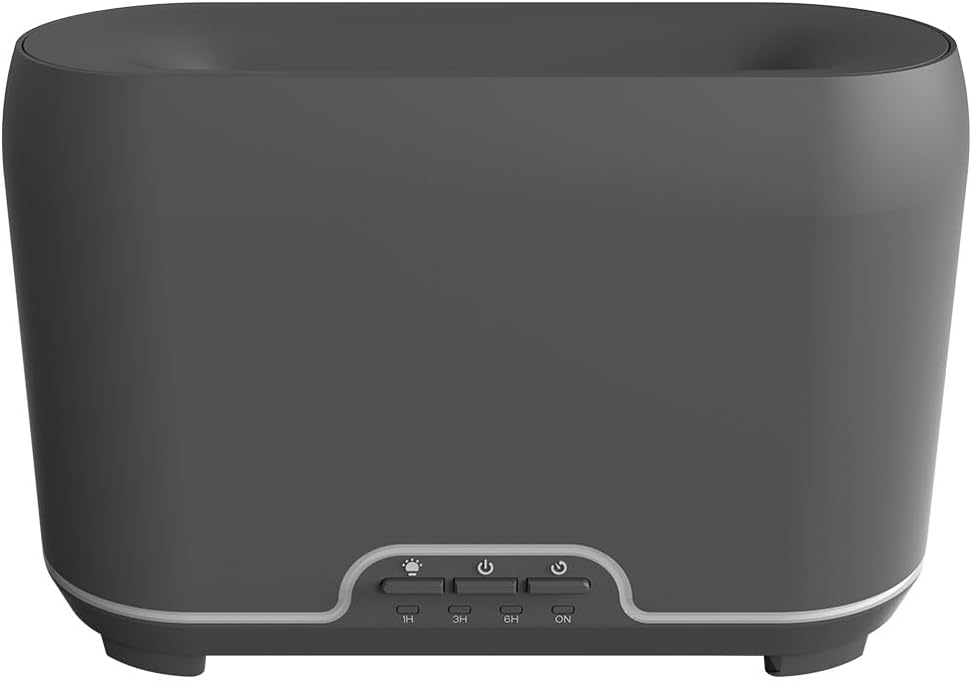
Imatge: Frontal view of the CALEX Smart Home Aroma Diffuser, showing the control panel with buttons for light, power, and timer settings (1H, 3H, 6H, ON).

Image: The CALEX Smart Home Aroma Diffuser operating on a wooden table, displaying its ambient flame effect and mist output.
The diffuser typically consists of a water tank, an ultrasonic plate, a mist outlet, and a control panel with buttons for power, light, and timer functions. The power input port is usually located at the back or bottom of the device.
5. Configuració
Seguiu aquests passos per a la configuració inicial:
- Col·locació: Col·loqueu el difusor sobre una superfície plana i estable.
- Tapa oberta: Traieu suaument la tapa superior del difusor.
- Omplir el dipòsit d'aigua: Fill the water tank with clean water up to the 300ml maximum fill line. Do not overfill.
- Afegeix oli essencial: Afegiu unes gotes del vostre oli essencial preferit directament al dipòsit d'aigua.
- Tanca la tapa: Col·loqueu la coberta superior de manera segura.
- Connectar l'alimentació: Plug the power adapter into the diffuser's power input port, then plug the adapter into a wall outlet.
- Download Calex App: Download the free Calex Smart app from your smartphone's app store (available for iOS and Android).
- Connecteu-vos a WiFi: Follow the in-app instructions to connect your diffuser to your home WiFi network. Ensure your WiFi is 2.4GHz.
6. Instruccions de funcionament
The CALEX Smart Home Aroma Diffuser can be operated via the Calex app or its integrated control buttons.
6.1 Using the Calex Smart App
The Calex app provides full control over your diffuser's functions:
- Encès/apagat: Turn the diffuser on or off remotely.
- Control de la boira: Adjust the mist output level.
- Control de la llum: Change the ambient light color from over 16 million options, adjust brightness, and select lighting modes.
- Efecte de flama: Activate or deactivate the flame effect.
- Temporitzadors: Set schedules for the diffuser to turn on or off automatically.
- Programmable Scenarios: Create custom scenarios based on time, weather, or other smart home triggers.
- Notificacions: Receive alerts when the water tank is empty.
6.2 Control de veu
Integrate your diffuser with voice assistants for hands-free control:
- Assistent de Google: Link your Calex account in the Google Home app. Use commands like "Hey Google, turn on the diffuser."
- Siri: Create custom shortcuts in the Apple Home app or through the Calex app for Siri commands.
- Amazon Alexa: Enable the Calex skill in the Alexa app. Use commands like "Alexa, set diffuser light to blue."
6.3 Manual Control Buttons
The control panel on the diffuser allows for basic operation:
- Botó d'encesa: Press once to turn on/off the mist and flame effect.
- Botó de llum: Press to cycle through light colors or turn the light on/off.
- Timer Buttons (1H, 3H, 6H, ON): Select a desired operating duration. The diffuser will automatically shut off after the selected time. 'ON' typically means continuous operation until water runs out or manually turned off.
7. Manteniment
Una neteja regular garanteix un rendiment òptim i allarga la vida útil del difusor.
- Neteja diària: After each use, empty any remaining water from the tank. Wipe the inside of the tank with a clean, soft cloth.
- Neteja setmanal: For a more thorough clean, unplug the device. Add a small amount of white vinegar (about 10ml) to the water tank and let it sit for 10-15 minutes to dissolve mineral buildup. Gently wipe the ultrasonic plate with a cotton swab or soft brush. Rinse the tank thoroughly with clean water, avoiding the air outlet.
- Neteja exterior: Netegeu l'exterior del difusor amb un drap suau iamp tela. No utilitzeu netejadors abrasius ni dissolvents.
- Ensure the device is completely dry before refilling or storing.
8. Solució De Problemes
Si teniu problemes, consulteu els següents problemes i solucions habituals:
| Problema | Causa possible | Solució |
|---|---|---|
| Sense boira ni boira feble | Nivell baix de l’aigua Placa d'ultrasons bruta Sortida de boira bloquejada | Refill water to the appropriate level. Netegeu la placa ultrasònica segons les instruccions de manteniment. Ensure the mist outlet is clear. |
| El dispositiu no s'encén | Sense poder Dipòsit d'aigua buit Mal funcionament del dispositiu | Comproveu la connexió elèctrica i la presa de corrent. Ompliu el dipòsit d'aigua. Contacteu amb el servei d'atenció al client si el problema persisteix. |
| Problemes de connexió de l'aplicació | Contrasenya WiFi incorrecta Router too far 2.4GHz vs 5GHz WiFi | Verifica la contrasenya del Wi-Fi. Move diffuser closer to the router. Ensure your router is broadcasting a 2.4GHz network and connect to it. |
| L'efecte flama no funciona | Feature deactivated in app Mal funcionament del dispositiu | Check app settings to ensure flame effect is enabled. Contacta amb l'assistència al client. |
9. Especificacions
| Característica | Especificació |
|---|---|
| Número de model | 5901000500 |
| Marca | CALEX |
| Capacitat | 300 mil·lilitres |
| Material | Plàstic |
| Apagat automàtic | Sí |
| Connectivitat | WiFi (2.4 GHz) |
| Mètodes de control | Calex Smart App, Voice Control (Google Assistant, Siri, Amazon Alexa), Manual Buttons |
| Opcions de llum | 16 milions de colors |
| Àrea d'ús recomanada | Medium space |
| Codi Internacional d'Articles (EAN/UPC) | 08712879157090 |
10. Garantia i Suport
Per obtenir informació sobre la garantia o assistència tècnica, consulteu la documentació que s'inclou amb la compra o poseu-vos en contacte directament amb el distribuïdor/fabricant. Conserveu el comprovant de compra per a reclamacions de garantia.


