
Introducció
This manual provides detailed instructions for the safe and efficient use of your Blow Portable Bluetooth Speaker, Model 30-391. Please read this manual thoroughly before operating the device and retain it for future reference.
The Blow 30-391 is a versatile portable Bluetooth speaker designed for universal use with smartphones, tablets, computers, and other audio devices. It features Bluetooth 5.0 connectivity, AUX input, Micro USB port, and an integrated microphone for various audio applications.
Contingut del paquet
Verifiqueu que tots els elements que s'enumeren a continuació siguin presents al vostre paquet:
- Blow Portable Bluetooth Speaker (Model 30-391)
- Cable de càrrega USB
- Cable de micròfon
- Manual d'usuari (aquest document)
- Control remot

Imatge: Frontal view of the Blow Portable Bluetooth Speaker 30-391, showcasing its RGB lighting, included remote control, and wired microphone.

Image: The USB charging cable and the microphone cable that come with the speaker.
Característiques del producte
- Connectivitat: Bluetooth 5.0, AUX-in (3.5mm), Micro USB, USB port, MicroSD card slot.
- Sortida d'àudio: 10 Watts maximum speaker output.
- Bateria: Integrated 4500 mAh rechargeable battery.
- Característiques especials: Integrated microphone, RGB lighting effects, voice control capability.
- Portabilitat: Compact design with a handle for easy transport.
- Compatibilitat: Universal compatibility with desktop computers, laptops, smartphones, and tablets.
Configuració
1. Carregant l’altaveu
Before first use, fully charge the speaker. Connect the supplied USB charging cable to the Micro USB port on the speaker and the other end to a standard USB power adapter (not included) or a computer's USB port. The charging indicator light will illuminate during charging and turn off when fully charged.
2. Encès / apagat
Locate the power switch on the top panel of the speaker. Slide the switch to the "ON" position to power on the speaker. Slide it to the "OFF" position to power off the speaker.

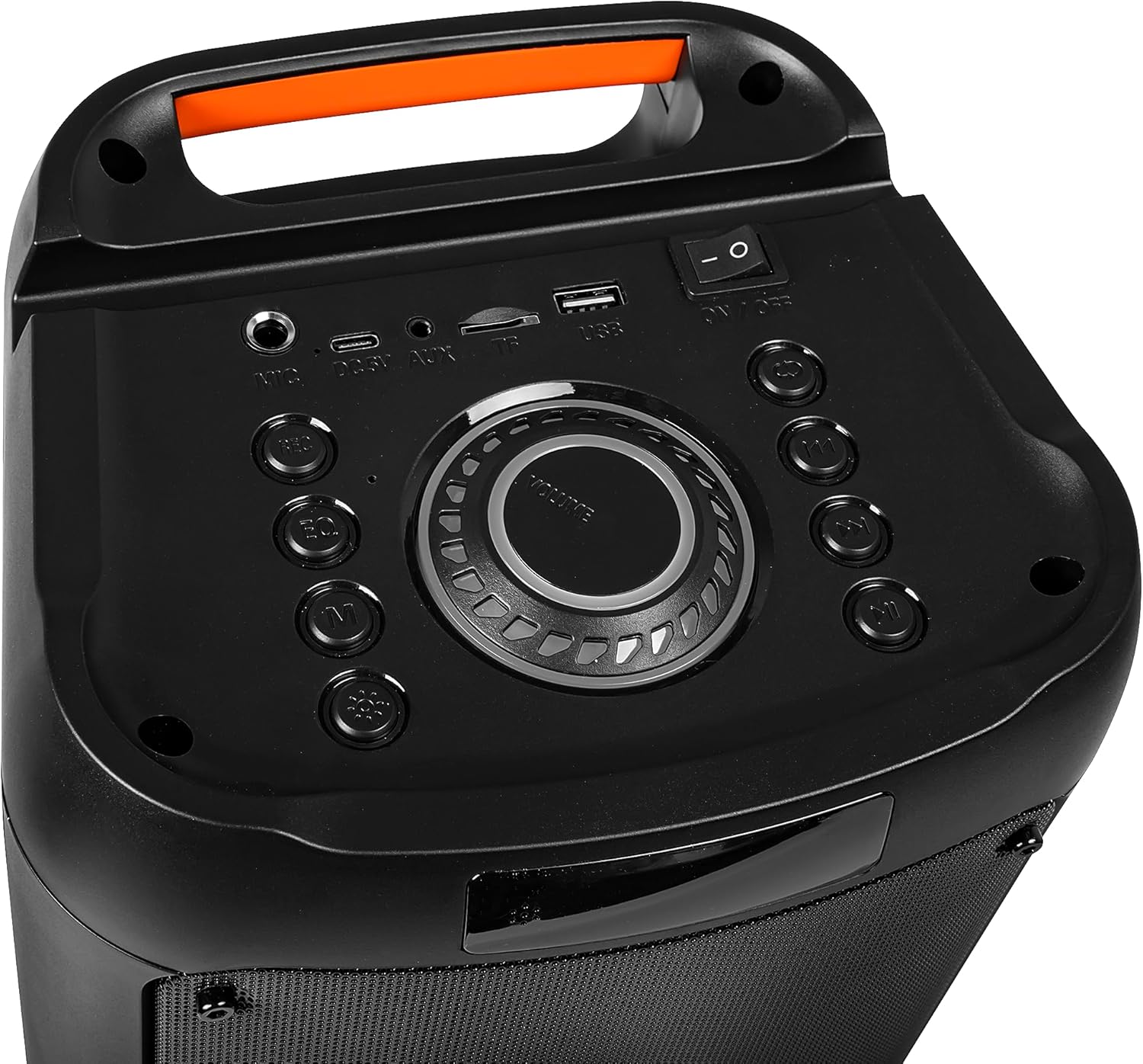
Image: Close-up of the speaker's top control panel, showing the power switch, volume knob, and various input ports.
3. Emparellament Bluetooth
- Engegueu l'altaveu. Entrarà automàticament en mode d'emparellament Bluetooth, cosa que s'indicarà amb un llum LED intermitent.
- Al dispositiu mòbil (telèfon intel·ligent, tauleta, etc.), activeu el Bluetooth i cerqueu els dispositius disponibles.
- Select "Blow 30-391" from the list of devices.
- Un cop emparellat, l'altaveu emetrà una confirmació audible i el llum LED deixarà de parpellejar.
- L'altaveu es tornarà a connectar automàticament al darrer dispositiu emparellat quan s'engegui, si el dispositiu es troba dins del rang i el Bluetooth està habilitat.
4. Connexió AUX
To connect an external audio device via AUX, use a 3.5mm audio cable (not included). Plug one end into the AUX-in port on the speaker and the other end into the headphone jack or audio output of your device. The speaker will automatically switch to AUX mode.
5. Reproducció USB/MicroSD
Insert a USB flash drive or a MicroSD card (up to 32GB) containing MP3 audio files into the respective port on the speaker. The speaker will automatically detect the storage device and begin playing music. Use the control buttons to navigate tracks.
Instruccions de funcionament
1. Controls sobreview
The speaker features a control panel on the top for easy operation. Refer to the image in the "Setup" section for button layout.
- Interruptor d'alimentació: ON/OFF.
- Pom de volum: Rotate to adjust master volume.
- Botó de mode: Press to switch between Bluetooth, AUX, USB, and MicroSD modes.
- Botó Reproduir/Pausa: Premeu per reproduir o posar en pausa l'àudio.
- Botons de pista anterior/següent: Premeu per saltar a la pista anterior o següent.
- Botó EQ: Press to cycle through equalizer presets.
- Botó del mode de llum: Press to change RGB lighting effects.
- Entrada de micròfon: Connect the wired microphone here.
2. Ús del micròfon
Connect the supplied wired microphone to the microphone input port on the speaker. Adjust the microphone volume using the dedicated control (if available) or the main volume knob. The integrated microphone allows for voice control and hands-free calling when connected via Bluetooth.
3. Efectes d'il·luminació RGB
The speaker features dynamic RGB lighting. Press the "Light Mode" button on the control panel or remote control to cycle through different lighting patterns or to turn the lights off.
Manteniment
- Neteja: Feu servir un drap suau i sec per netejar l'exterior de l'altaveu. No utilitzeu productes de neteja abrasius ni dissolvents.
- Cura de la bateria: Per allargar la durada de la bateria, eviteu descarregar-la completament amb freqüència. Carregueu l'altaveu regularment, fins i tot si no l'utilitzeu durant períodes prolongats.
- Emmagatzematge: Guardeu l'altaveu en un lloc fresc i sec, allunyat de la llum solar directa i de temperatures extremes.
- Resistència a l'aigua: Aquest altaveu NO és impermeable. Eviteu l'exposició a l'aigua o a una humitat excessiva.
Resolució de problemes
| Problema | Possible solució |
|---|---|
| L'altaveu no s'encén. | Ensure the battery is charged. Connect the speaker to a power source using the USB cable. Check the power switch position. |
| No es pot emparellar per Bluetooth. | Ensure the speaker is in pairing mode (flashing LED). Make sure your device's Bluetooth is enabled and within range (up to 10 meters). Forget previous pairings on your device and try again. |
| Sense so. | Check the volume level on both the speaker and your connected device. Ensure the correct input mode (Bluetooth, AUX, USB, MicroSD) is selected. Check cable connections for AUX mode. |
| Mala qualitat de so. | Ensure the speaker is not too far from the Bluetooth device. Avoid obstacles between the speaker and the device. Try a different audio source or file. |
| El micròfon no funciona. | Ensure the microphone is securely connected to the input port. Check microphone volume settings. |
Especificacions
| Número de model | 30-391 |
| Marca | Cop |
| Tecnologia de connectivitat | Bluetooth 5.0, Auxiliary (3.5mm), Micro USB, USB |
| Mode de sortida d'àudio | AUX, Bluetooth |
| Potència màxima de sortida de l'altaveu | 10 watts |
| Capacitat de la bateria | 4500 mAh |
| Max Memory Card Size | 32 GB (MicroSD) |
| Característiques especials | Integrated Microphone, RGB Lighting, Voice Control |
| Font d'alimentació | Funciona amb bateria |
| Dimensions del producte (L x A x A) | 26 x 46 x 24 cm (aproximadament) |
| Pes del producte | 3.67 kg (aproximadament) |
| Color | Black (with multicolor RGB lighting) |

Imatge: Lateral view of the Blow Portable Bluetooth Speaker 30-391, showing its vertical orientation.
Imatge: Enrere view of the Blow Portable Bluetooth Speaker 30-391, highlighting the integrated carrying handle.
Imatge: Detallada view of the top control panel, including the power switch, volume knob, and various input ports.

Image: The retail packaging for the Blow Portable Bluetooth Speaker 30-391, showing product features and accessories.
Garantia i Suport
The Blow Portable Bluetooth Speaker 30-391 comes with a limited warranty. Please refer to the warranty card included in your package for specific terms and conditions. For technical support, troubleshooting assistance, or warranty claims, please contact your retailer or the manufacturer directly. Contact information can typically be found on the product packaging or the manufacturer's official weblloc.
Fabricant: Cop
ASIN: B0CDXQRT9Q