
1. Introducció
Thank you for choosing the ACEMAGICIAN AM07 Mini PC. This compact and powerful computer is designed for various tasks, from office work and multimedia entertainment to light gaming. This manual provides essential information for setting up, operating, and maintaining your device to ensure optimal performance and longevity. Please read this manual thoroughly before using your Mini PC.
2. Contingut del paquet
Carefully unpack your ACEMAGICIAN AM07 Mini PC and verify that all items listed below are included:
- 1 x ACEMAGICIAN AM07 Mini PC
- 1 x adaptador de corrent
- 1 x User Manual / Documentation
If any items are missing or damaged, please contact your retailer or ACEMAGICIAN customer support immediately.
3. Producte acabatview
The ACEMAGICIAN AM07 Mini PC features an AMD Ryzen 5 5500U processor, 16GB DDR4 RAM, and a 512GB SSD, offering robust performance in a small form factor. It supports 4K UHD output and includes modern connectivity options like WiFi 5 and Bluetooth 4.2.

Figura 3.1: Mésview of the ACEMAGICIAN AM07 Mini PC's core components and features, including the AMD Ryzen 5 5500U processor, 16GB DDR4 RAM, 512GB SSD, WiFi 5, Bluetooth 4.2, and integrated cooling system.
3.1 Processor Details
The AM07 is powered by an AMD Ryzen 5 5500U processor, featuring 6 cores and 12 threads, with a base frequency of 2.1 GHz and a turbo frequency up to 4.0 GHz. This 7nm lithography processor ensures efficient and powerful performance for various applications.

Figure 3.2: Close-up of the AMD Ryzen 5 5500U processor, highlighting its key specifications for performance.
3.2 Connectivitat
The Mini PC supports ultra-fast wireless connectivity with WiFi 5 (dual-band 2.4GHz and 5.0GHz) and Bluetooth 4.2, ensuring stable and high-speed connections for your network and peripherals.

Figure 3.3: The AM07 Mini PC demonstrating its wireless capabilities, including WiFi 5 and Bluetooth 4.2, for seamless connectivity.
3.3 Emmagatzematge i memòria
Equipped with 16GB of dual-channel DDR4 RAM (2x8GB) and a 512GB M.2 2280 SSD, the AM07 provides fast data access and multitasking. The storage can be expanded up to 2TB by adding an additional hard drive.

Figure 3.4: Illustration of the AM07 Mini PC's internal storage and memory configuration, highlighting its expandability.
3.4 Display Capabilities
The Mini PC supports a triple 4K display setup (HDMI+DP+Type-C), allowing you to connect up to three monitors simultaneously for enhanced productivity and an immersive visual experience.

Figure 3.5: The AM07 Mini PC configured with a triple monitor setup, showcasing its advanced display output options.
3.5 Disseny de ports
The AM07 Mini PC offers a comprehensive set of ports for connecting various peripherals and devices:
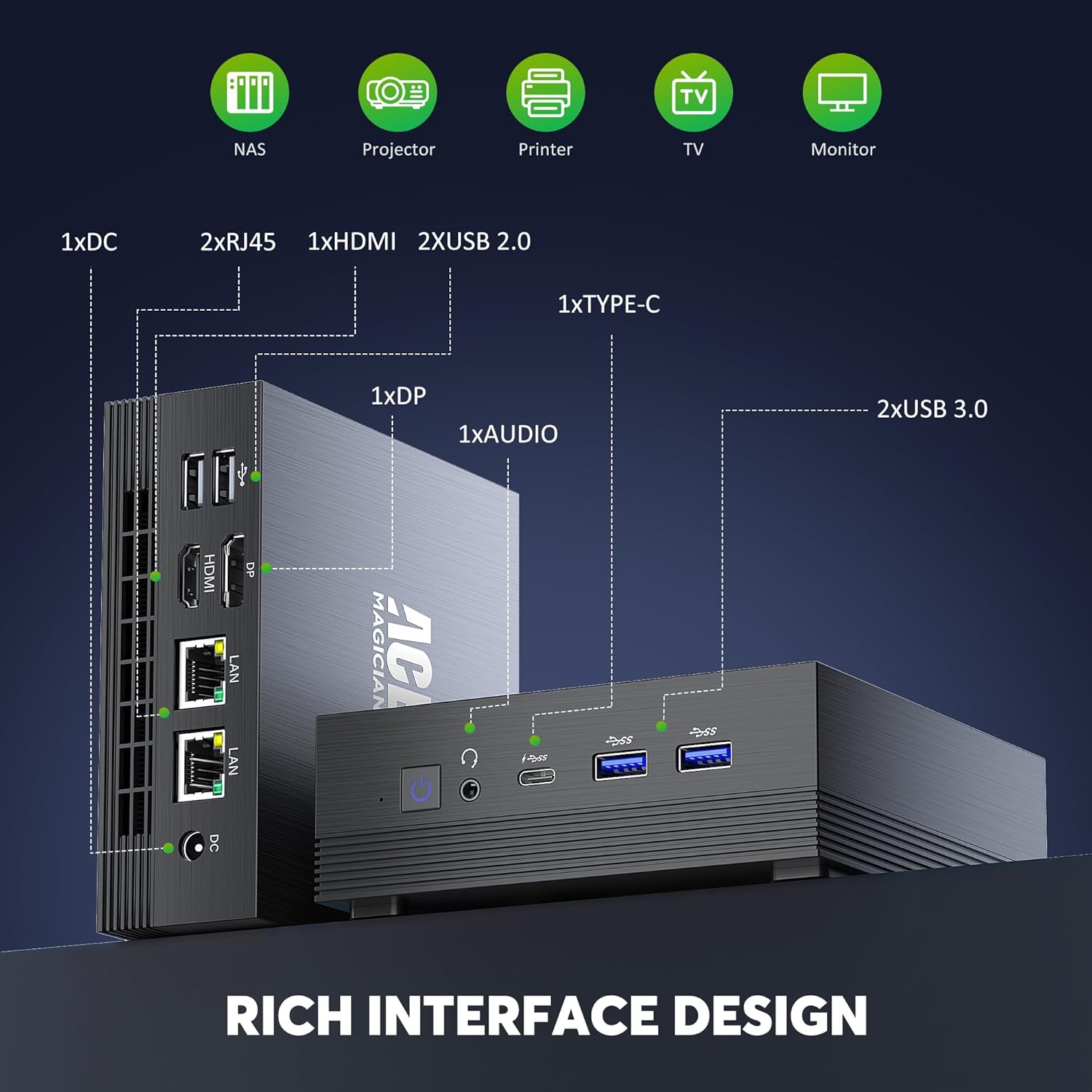
Figure 3.6: Detailed diagram of the AM07 Mini PC's front and rear ports, illustrating its connectivity options.
- Ports frontals: 2 x USB 3.0, 1 x Type-C, 1 x Audio Jack (Headphone/Microphone Combo), Power Button
- Ports posteriors: 1 x DC Power Input, 2 x RJ45 (Gigabit LAN), 1 x HDMI, 1 x DisplayPort (DP), 2 x USB 2.0
4. Guia de configuració
Follow these steps to set up your ACEMAGICIAN AM07 Mini PC:
- Connecteu els perifèrics: Connect your monitor(s) to the HDMI, DisplayPort, or Type-C ports. Connect your keyboard and mouse to the available USB ports.
- Connectar l'alimentació: Connecteu l'adaptador de corrent al port d'entrada de CC del Mini PC i, a continuació, connecteu l'adaptador a una presa de corrent.
- Encès: Press the power button located on the front of the Mini PC. The power indicator light will illuminate.
- Configuració inicial de Windows: Upon first boot, follow the on-screen instructions to complete the Windows 11 Pro setup, including language, region, network connection, and user account creation.
5. Instruccions de funcionament
5.1 Connexió de xarxa
- Wi-Fi: During Windows setup or via the Windows Settings, select your Wi-Fi network and enter the password.
- Ethernet: Connect an Ethernet cable from your router or modem to one of the RJ45 ports on the Mini PC. The connection will be established automatically.
5.2 Bluetooth Devices
To connect Bluetooth devices (e.g., keyboard, mouse, headphones):
- Assegureu-vos que el dispositiu Bluetooth estigui en mode de vinculació.
- On your Mini PC, go to Configuració > Bluetooth i dispositius > Afegeix dispositiu.
- Seleccioneu Bluetooth and choose your device from the list to pair.
5.3 Múltiples pantalles
To configure multiple displays:
- Connect your monitors to the available HDMI, DisplayPort, or Type-C ports.
- Feu clic amb el botó dret a l'escriptori i seleccioneu Configuració de visualització.
- Windows will detect the connected monitors. You can arrange them, set their resolution, and choose display modes (e.g., Extend, Duplicate) from this menu.
6. Manteniment
6.1 Neteja
Regularly clean the exterior of the Mini PC with a soft, dry cloth. For dust accumulation in vents, use compressed air. Ensure the device is powered off and unplugged before cleaning.
6.2 Actualitzacions de programari
Mantingueu el sistema operatiu i els controladors de Windows actualitzats per garantir un rendiment i una seguretat òptims. Podeu accedir a l'actualització de Windows a través de Configuració > Actualització de Windows.
6.3 Expansió d'emmagatzematge
The ACEMAGICIAN AM07 Mini PC supports storage expansion up to 2TB. Refer to the detailed instructions provided by ACEMAGICIAN for safely installing an additional 2.5-inch SATA SSD/HDD or upgrading the M.2 SSD.
7. Solució De Problemes
If you encounter issues with your Mini PC, refer to the following common solutions:
- Sense energia: Ensure the power adapter is securely connected to both the Mini PC and a working power outlet. Try a different outlet.
- Sense pantalla: Verify that the monitor is powered on and correctly connected to the Mini PC. Try a different display cable or monitor. Ensure the correct input source is selected on your monitor.
- Sense connexió de xarxa: For Wi-Fi, check your router and ensure the Wi-Fi password is correct. For Ethernet, ensure the cable is properly connected and your router is functioning.
- Rendiment lent: Tanqueu les aplicacions innecessàries. Comproveu si hi ha processos en segon pla al Gestor de tasques. Assegureu-vos que hi hagi prou espai d'emmagatzematge lliure.
- Perifèric no detectat: Ensure USB or Bluetooth devices are properly connected or paired. Try a different port or re-pair the Bluetooth device.
For persistent issues, consult the ACEMAGICIAN support weblloc o contacteu amb el servei d'atenció al client.
8. Especificacions
Below are the technical specifications for the ACEMAGICIAN AM07 Mini PC:
| Característica | Especificació |
|---|---|
| Marca | ACEMAGICA |
| Número de model | AM07 |
| Sistema operatiu | Windows 11 Pro |
| Marca del processador | AMD |
| Tipus de processador | Ryzen 5 5500U |
| Velocitat del processador | 4 GHz (Turbo màxim) |
| Nombre de nuclis | 6 |
| RAM | 16 GB DDR4 |
| Memòria màxima | 64 GB |
| Mida del disc dur | 512 GB SSD (Expandable to 2 TB) |
| Tecnologia de disc dur | SSD |
| Marca de chipset gràfic | AMD |
| GPU | AMD Radeon Vega 7 |
| Graphics Card RAM | 16 MB (Shared) |
| Tipus de tecnologia sense fil | Bluetooth 4.2, WiFi 5 (2.4G + 5G) |
| Interfície del maquinari | Ethernet, HDMI, DisplayPort, USB 2.0, USB 3.0, Type-C |
| Nombre de ports HDMI | 1 |
| Nombre de ports USB 2.0 | 2 |
| Dimensions del producte (L x A x A) | 12.9 x 13.7 x 5.5 cm |
| Pes de l'article | 870 grams |
| Resolució màxima de pantalla | 3840 x 2160 (4K UHD) |
9. Garantia i Suport
ACEMAGICIAN products come with a standard warranty. For detailed warranty terms and conditions, please refer to the warranty card included with your product or visit the official ACEMAGICIAN website. If you require technical assistance or have questions not covered in this manual, please contact ACEMAGICIAN customer support through their official channels. When contacting support, please have your product model (AM07) and purchase information ready.