
1. Introducció
The WANGCL V8 Finder BT05 is a compact and portable satellite finder meter designed to assist in the precise adjustment of satellite antennas. It features DVB-S2 multi-standard demodulation and decoding, Bluetooth connectivity for app control, and a built-in lithium battery for convenience. This manual provides essential information for setting up, operating, and maintaining your device.
2. Característiques del producte
- DVB-S2 Multi-standard demodulation and decoding for accurate signal detection.
- Bluetooth connectivity for seamless control via a dedicated mobile application.
- Supports comprehensive satellite selection for various regions and services.
- Integrated 2200mAh lithium battery for extended portable use.
- LNB short-circuit protection with prompt to prevent damage.
- Compact and portable design for easy handling and transport.
3. Contingut del paquet
Marqueu la casella per als elements següents:
- 1 x WANGCL V8 Finder BT05 Unit
- 1 x cable mini USB
- 1 x Power Adapter (EU plug type)

Image: The V8 Finder BT05 unit, mini USB cable, and power adapter.
4. Configuració
4.1 Càrrega del dispositiu
Before first use, ensure the V8 Finder BT05 is fully charged. Connect the mini USB cable to the device's DC 5V-2A input port and the other end to the provided power adapter. Plug the adapter into a wall outlet. The charging indicator light will show the charging status.
4.2 Connecting to the LNB
Connect the satellite dish's LNB cable to the F-connector input on the V8 Finder BT05. Ensure the connection is secure to prevent signal loss.

Imatge: Lateral view of the V8 Finder BT05, highlighting the F-connector for LNB connection and the DC 5V-2A input port.
4.3 Bluetooth Connection for APP
To utilize the full features of the V8 Finder BT05, download the "V8 Finder" application from Google Play Store (for Android) or Apple App Store (for iOS). Once installed, enable Bluetooth on your smartphone and open the app. The app will guide you through connecting to the V8 Finder BT05 device.
5. Instruccions de funcionament
5.1 Engegada/apagada
Locate the ON/OFF switch on the side of the device. Slide the switch to the "ON" position to power on the V8 Finder BT05. The indicator lights will illuminate. To power off, slide the switch to the "OFF" position.

Imatge: Una imatge detallada view of the power switch and the battery and Bluetooth indicator lights on the V8 Finder BT05.
5.2 Satellite Antenna Adjustment
With the device powered on and connected to your LNB, use the "V8 Finder" app on your smartphone to select the desired satellite. The app will display signal strength and quality readings, guiding you to adjust your satellite dish for optimal reception. Follow the app's instructions for fine-tuning.
5.3 LNB Short-Circuit Protection
The V8 Finder BT05 is equipped with LNB short-circuit protection. If a short circuit is detected in the LNB connection, the device will provide a prompt or indication to prevent damage to the unit or the LNB. Disconnect the LNB and check for any wiring issues before reconnecting.
6. Manteniment
To ensure the longevity and optimal performance of your V8 Finder BT05, follow these maintenance guidelines:
- Mantingueu el dispositiu net i lliure de pols i brutícia. Feu servir un drap suau i sec per netejar-lo.
- Eviteu exposar el dispositiu a temperatures extremes, humitat o llum solar directa.
- Guardeu el dispositiu en un lloc fresc i sec quan no l'utilitzeu.
- Charge the battery regularly, even if the device is not used frequently, to maintain battery health.
- No intenteu desmuntar ni reparar el dispositiu vosaltres mateixos. Per a qualsevol reparació, consulteu personal de servei qualificat.
7. Solució De Problemes
If you encounter issues with your V8 Finder BT05, refer to the following common problems and solutions:
- El dispositiu no s'encén: Assegureu-vos que la bateria estigui carregada. Connecteu el dispositiu a l'adaptador de corrent i torneu-ho a provar.
- No signal reading: Check all cable connections, especially the LNB cable. Ensure the LNB is powered and functioning correctly. Verify that the correct satellite is selected in the app.
- Problemes de connexió Bluetooth: Ensure Bluetooth is enabled on your smartphone and the V8 Finder BT05 is powered on. Restart both the device and the app.
- LNB short-circuit prompt: Disconnect the LNB cable and inspect it for any damage or short circuits. Replace the cable if necessary.
Si el problema persisteix, poseu-vos en contacte amb l'atenció al client.
8. Especificacions
The following table outlines the technical specifications of the WANGCL V8 Finder BT05:
| Característica | Especificació |
|---|---|
| Número de model | BT05 (Item Model Number: CP024862) |
| Tipus de bateria | 18650 Bateria de liti |
| Voltage | 3.7 V |
| Capacitat de la bateria | 2200 mAh (8.14 Wh) |
| Entrada de CC | 5V - 2000mA |
| Dimensions del producte (L x A x A) | 3 x 15 x 11 cm (aproximadament 1.18 x 5.91 x 4.33 polzades) |
| Pes de l'article | 150 grams (aproximadament 0.33 lliures) |
| Característiques | Portàtil |
| Fabricant | WANGCL |
| País d'origen | Xina |

Image: The back of the V8 Finder BT05, displaying its model number, battery specifications, DC input, and regulatory marks.
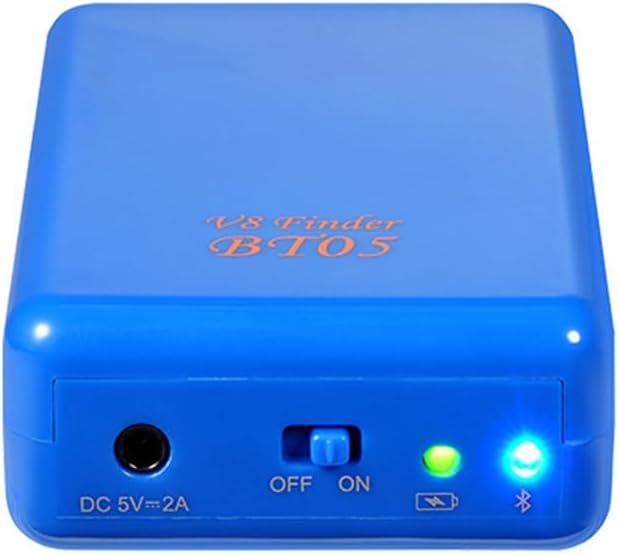
Image: The V8 Finder BT05 positioned next to a ruler, providing a visual reference for its dimensions.
9. Garantia i Suport
Specific warranty information for the WANGCL V8 Finder BT05 is not available in the provided product data. For warranty claims, technical support, or further inquiries, please contact the seller or manufacturer directly.
You may also find additional information and support resources on the manufacturer's weblloc: http://www.freesat.cn
The serial number for this unit, if required for support, is FDBT51900995.