
Introducció
This manual provides essential instructions for the safe and efficient operation of your Sanyo PLC-WXU700A 3LCD Projector. The PLC-WXU700A is a WXGA conference room projector featuring 3LCD technology, delivering 3,800 lumens brightness and a native resolution of 1280x800. Please read this manual thoroughly before using the projector and retain it for future reference.
Contingut del paquet
Verifiqueu que tots els elements siguin presents al vostre paquet:
- Sanyo PLC-WXU700A 3LCD Projector
- Control remot
- Cable d'alimentació
- Cable HDMI
- Manual d'usuari (aquest document)
Configuració
1. Col·locació del projector
Position the projector on a stable, flat surface or mount it securely. Ensure adequate ventilation around the projector to prevent overheating. The projector is designed to be portable, allowing for flexible placement in various environments.
2. Potència de connexió
- Connect the supplied power cable to the AC inlet on the rear of the projector.
- Connecteu l'altre extrem del cable d'alimentació a una presa de corrent amb connexió a terra.
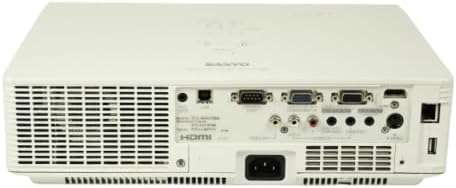
Image: Rear panel of the Sanyo PLC-WXU700A projector, highlighting the power input and connectivity ports.
3. Connexió de fonts d'entrada
The Sanyo PLC-WXU700A offers multiple connectivity options:
- HDMI: Connect the supplied HDMI cable from your source device (e.g., laptop, Blu-ray player) to the HDMI input port on the projector.
- VGA (D-Sub 15-pin): For analog computer connections, use a VGA cable to connect to the D-Sub 15-pin input ports.
- Vídeo compost: Use RCA cables for composite video input.
- Entrades d'àudio: Separate audio input jacks are available for various sources.

Image: Side-rear perspective of the projector, illustrating the array of input ports and side ventilation grilles.
Instruccions de funcionament
1. Encès / apagat
- Per encendre: Premeu el botó PODER button on the projector's control panel or the remote control. The power indicator light will illuminate.
- Per apagar: Premeu el botó PODER button twice. The projector will enter a cooling down cycle before completely shutting off. Do not unplug the projector during the cooling cycle.
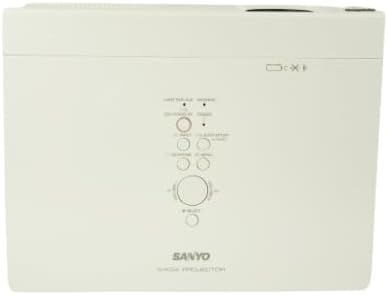
Imatge: De dalt a baix view of the projector, displaying the integrated control panel with various buttons for power, menu navigation, and input selection.
2. Selecció de la font d'entrada
Premeu el botó ENTRADA or FONT button on the projector or remote control to cycle through available input sources (HDMI, VGA, Video). Select the input corresponding to your connected device.
3. Adjusting Image
- Anell de focus: Rotate the focus ring on the projector lens to achieve a sharp image.
- Palanca de zoom: Adjust the zoom lever on the projector lens to change the image size without moving the projector.
- Correcció Keystone: If the image appears trapezoidal, use the keystone correction function (usually found in the projector's menu or via dedicated buttons on the remote) to square the image.
Manteniment
1. Neteja del projector
- Exterior: Netegeu el projector casinamb un drap suau i sec. Per a la brutícia resistent, utilitzeu un drap lleugerament sec.amp drap amb un detergent suau i després eixugueu-lo.
- Lent: Gently clean the projector lens with a lens cleaning cloth or lens paper. Avoid using abrasive materials.
- Filtres d'aire: Regularly check and clean the air filters to ensure proper ventilation and prevent overheating. Refer to the full service manual for filter replacement instructions.
2. Lamp Substitució
The Sanyo PLC-WXU700A uses a lamp-based illumination system. The lamp has a finite lifespan and will eventually need replacement. When the lamp indicator light illuminates or the image brightness significantly decreases, it is time to replace the lamp.
- Ensure the projector is powered off and completely cooled down before attempting lamp substitució.
- Localitza la lamp cover (often on the top or bottom of the projector).
- Desenrosqueu la lamp tapeu i retireu amb cura la l antigaamp mòdul.
- Install a new, genuine Sanyo replacement lamp mòdul, assegurant-vos que estigui ben col·locat.
- Substituïu la lamp tapeu i premeu els cargols.
- Restableix la lamp timer in the projector's OSD (On-Screen Display) menu.
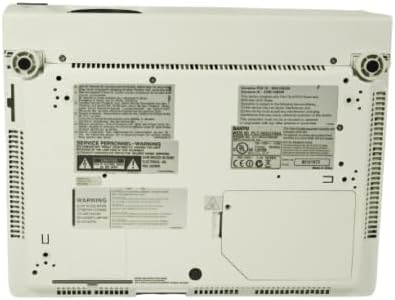
Image: Underside of the projector, displaying product labels, warning information, and potential access panels for maintenance like lamp substitució.
Resolució de problemes
Si teniu problemes amb el projector, consulteu els problemes i solucions més comuns següents:
- No es mostra cap imatge:
- Assegureu-vos que el projector estigui encès i que el cable d'alimentació estigui connectat correctament.
- Verify that the input source is correctly selected on the projector.
- Check the connection cable (HDMI, VGA) between the source device and the projector. Try a different cable if possible.
- Ensure the source device is outputting a signal.
- La imatge està borrosa:
- Ajusteu l'anell de focus de la lent del projector.
- Ensure the projector is at an appropriate distance from the screen.
- La imatge és trapezoïdal:
- Adjust the keystone correction setting in the projector's menu.
- Ensure the projector is placed perpendicular to the screen as much as possible.
- Projector Overheats or Shuts Down:
- Ensure all ventilation vents are clear and not obstructed.
- Netegeu els filtres d'aire.
- Feu funcionar el projector en una zona ben ventilada.
- El control remot no funciona:
- Reviseu i substituïu les piles del comandament a distància.
- Assegureu-vos que no hi hagi obstacles entre el comandament a distància i el receptor d'infrarojos del projector.
Especificacions
| Característica | Detall |
|---|---|
| Marca | Sanyo (Tekswamp) |
| Model | PLC-WXU700A |
| Tecnologia de visualització | 3LCD |
| Brillantor blanc | 3,800 lúmens ANSI |
| Resolució nativa | 1280x800 (WXGA) |
| Relació de contrast | 500:1 |
| Tecnologia de connectivitat | HDMI, VGA |
| Dimensions del producte | 10 x 13.1 x 3.1 polzades |
| Característica especial | Portàtil |
| Usos recomanats | Negocis |
Garantia i Suport
For warranty information and technical support, please refer to the documentation provided at the time of purchase or contact your vendor. Keep your purchase receipt as proof of purchase for warranty claims.