
1. Introducció
The JONSBO C6 Handle Mini MATX Mesh PC Case is a compact and versatile chassis designed for building small form factor desktop computers. Its mesh panel design on all sides ensures optimal airflow, while the tool-free disassembly feature simplifies component installation and maintenance. The integrated handle provides convenient portability for users who frequently move their systems.

Figura 1: Frontal view of the JONSBO C6 Handle Mini MATX Mesh PC Case.
2. Característiques del producte
- Disseny compacte: Micro ATX mesh chassis with a small footprint, ideal for desktop setups.
- Flux d'aire òptim: All sides feature a mesh design to promote efficient heat dissipation.
- Accés sense eines: Upper cover and side panels can be opened without tools for easy assembly and maintenance.
- Compatibilitat de la placa base: Supports ITX and M-ATX motherboards.
- Emmagatzematge versàtil: Accommodates one 3.5-inch HDD or two 2.5-inch SSDs.
- Ports d'E/S frontals: Includes 1x Type-C (20PIN), 1x USB 3.0, and 1x Audio+MIC (2-in-1) for convenient connectivity.
- Suport de components: Supports ATX PSUs up to 185mm, CPU coolers up to 75mm, and GPUs between 200-255mm.
- Fan Positions: Dedicated fan mounts on the top (120mm/140mm*1), bottom (120mm/140mm*1), and front (120mm*1 or HDD).
- Mànec portàtil: Equipped with an adjustable carrying handle for easy transportation.

Figure 2: The adjustable handle on the top of the C6 Handle case.
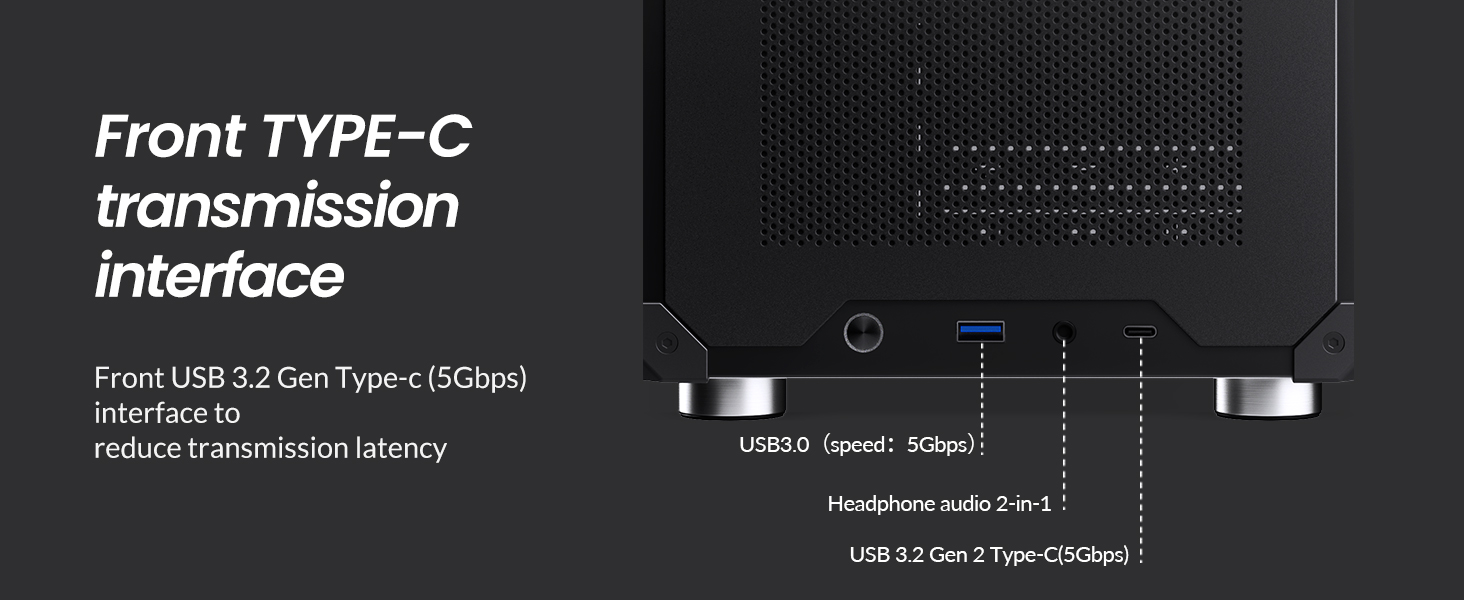
Figure 3: Front I/O panel with USB 3.0, USB Type-C, and audio ports.
3. Especificacions
| Especificació | Detall |
|---|---|
| Model núm. | C6 mànec |
| Dimensions (L x P x A) | 202mm x 266mm x 295.2mm (including footpad) |
| Material | Placa d'acer de 0.7 mm |
| Placa base compatible | ITX / M-ATX |
| Drive Bays | 1 HDD de 3.5" o 2 SSD de 2.5" |
| Interfície frontal | 1x Type-C (20PIN), 1x USB 3.0, 1x Audio + 1x MIC (2-in-1) |
| Longitud màxima de la PSU | ATX ≤ 185mm |
| Alçada màxima del refrigerador de la CPU | ≤ 75 mm |
| Longitud màxima de la GPU | 200-255mm (Note: If GPU is in 2nd slot and thickness exceeds 48mm, length limit is 200mm) |
| Suport dels fans | Top: 1x 120mm or 1x 140mm (Optional) Bottom: 1x 120mm or 1x 140mm Front: 1x 120mm or HDD |
| Pes net | 2.30 kg (5.07 lliures) |
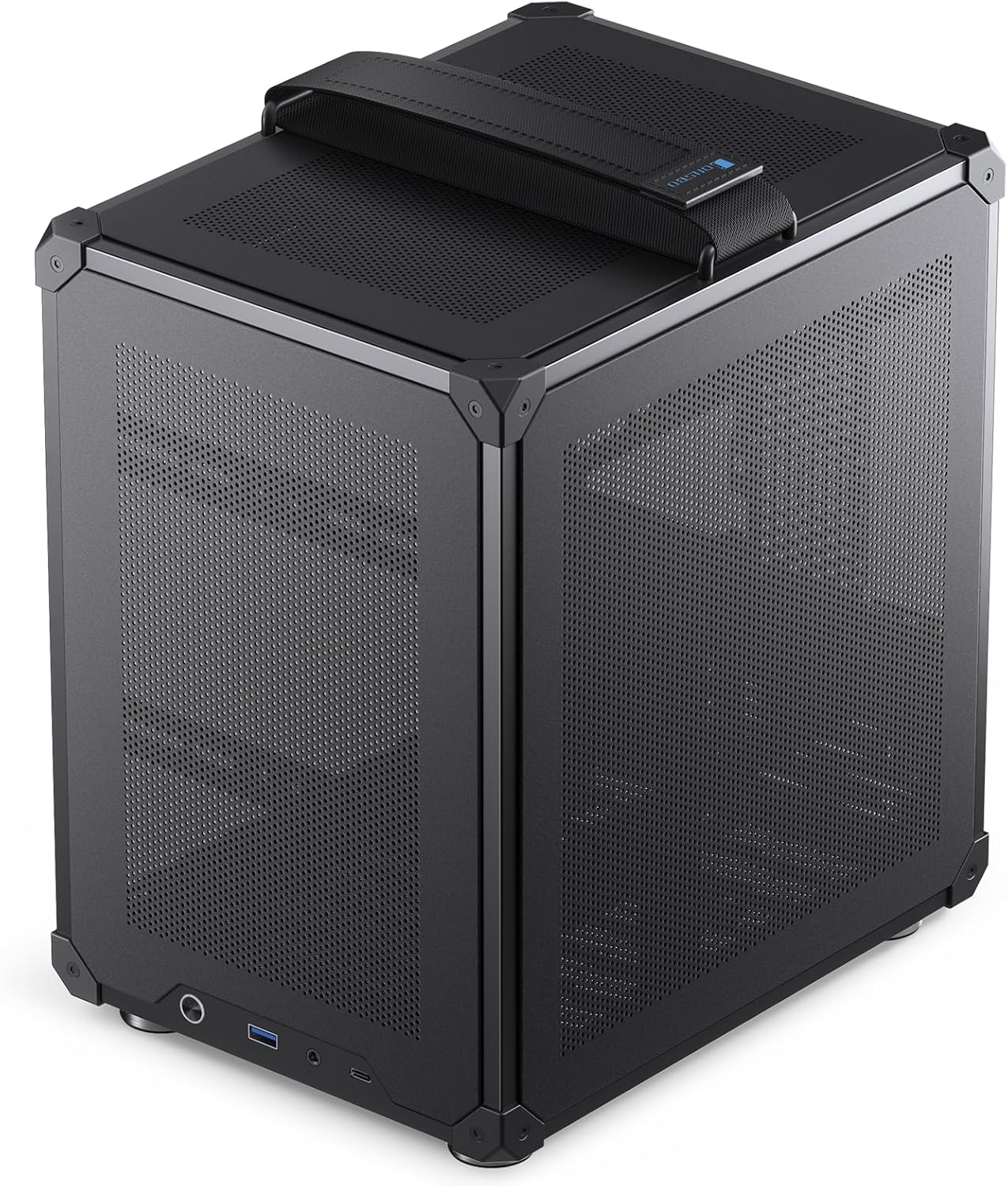
Figure 4: Case dimensions (10.5" W x 8" D x 11.6" H).

Figure 5: Summary of JONSBO C6 Handle specifications.
4. Guia de configuració
This section provides instructions for installing components into your JONSBO C6 Handle PC Case. Ensure all power is disconnected before beginning installation.
4.1. Tool-Free Disassembly
The C6 case features a tool-free design for easy access to internal components.
- Traieu la coberta superior: Press the clip at the rear of the top cover to automatically pop it up.
- Traieu els panells laterals: Once the top cover is removed, the front panel and left/right side panels can be easily detached from the inside of the case.

Figura 6: Explotat view demonstrating tool-free panel removal.

Figure 7: Instructions for opening the upper cover and side panels, and accessing the bottom air filter.
4.2. Instal·lació de la placa base
The C6 case supports both ITX and M-ATX motherboards.
- Align your ITX (170x170mm) or M-ATX (245x245mm) motherboard with the standoffs inside the chassis.
- Fixeu la placa base amb els cargols adequats.
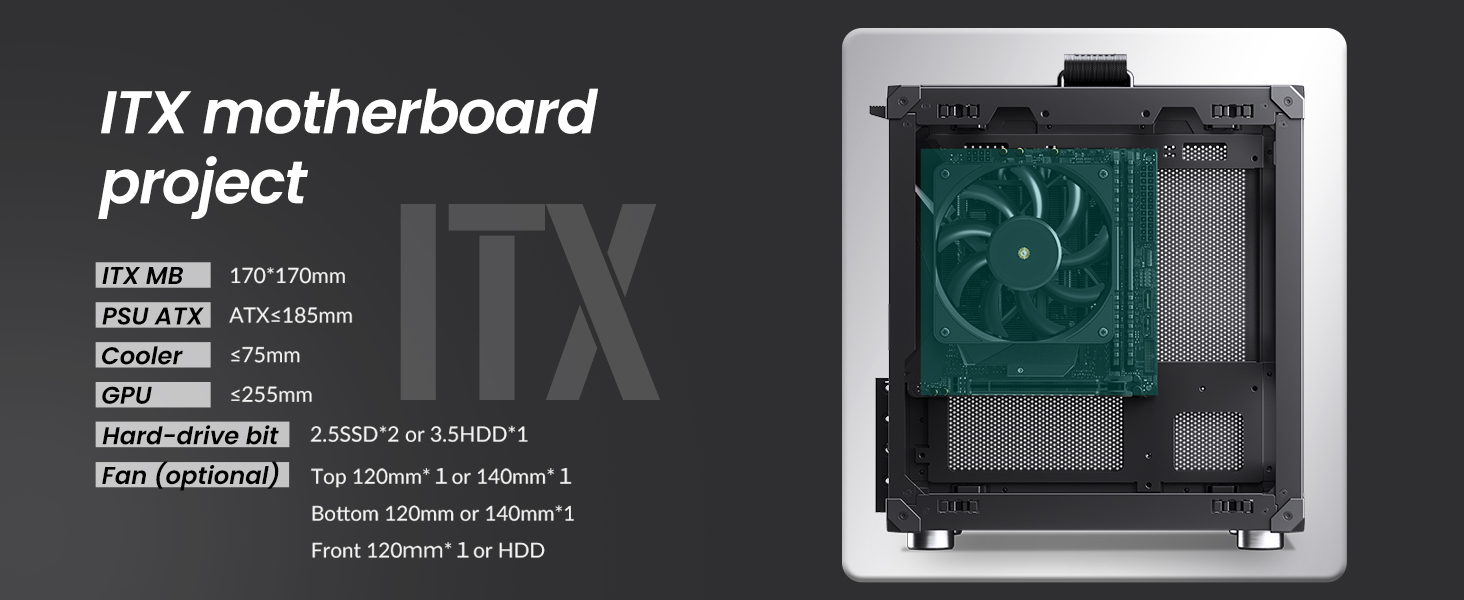
Figure 8: ITX motherboard installation reference.
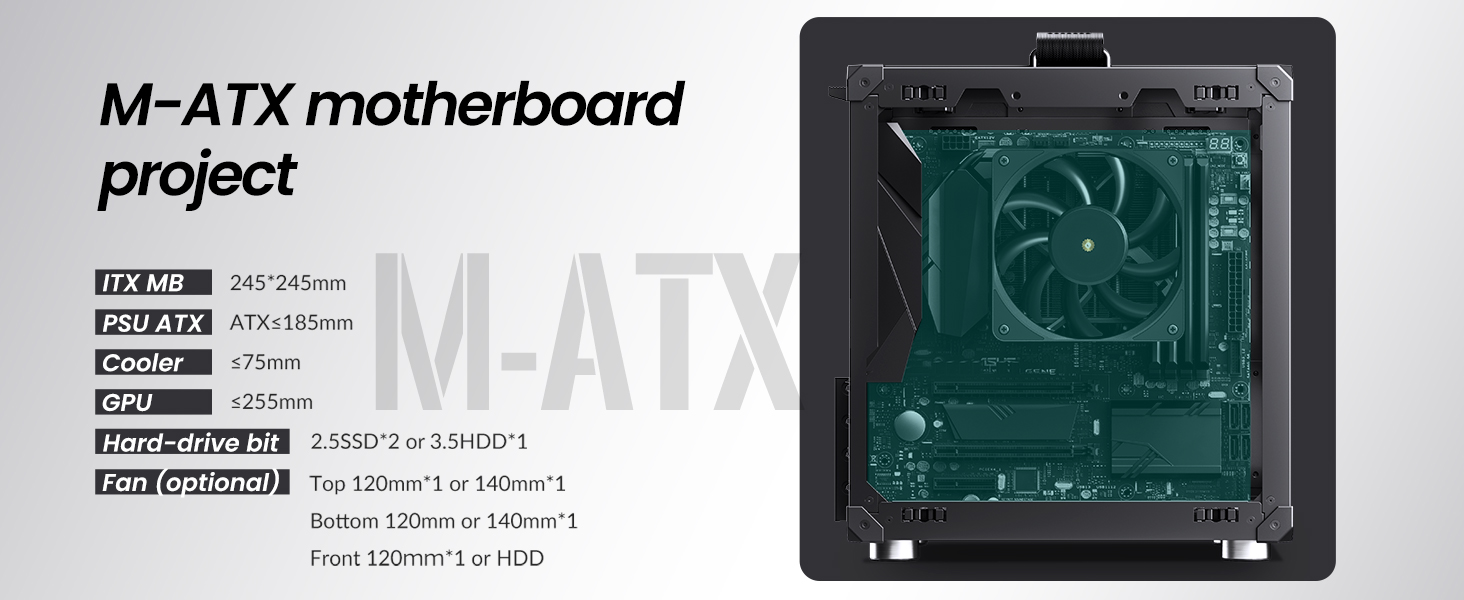
Figure 9: M-ATX motherboard installation reference.
4.3. Instal·lació de la font d'alimentació (PSU)
The case supports standard ATX PSUs with a maximum length of 185mm.
- Slide the ATX PSU into its designated bay at the top-front of the chassis.
- Fixeu la font d'alimentació amb els cargols de la part posterior de la carcassa.
4.4. Instal·lació de la targeta gràfica (GPU)
Install your graphics card into the PCI-E slot. The case supports GPUs with lengths between 200mm and 255mm. Note that if the GPU is installed in the second PCI-E slot and its thickness exceeds 48mm, the maximum supported length is 200mm.
4.5. Instal·lació del refrigerador de CPU
Ensure your CPU cooler has a maximum height of 75mm to fit within the chassis.
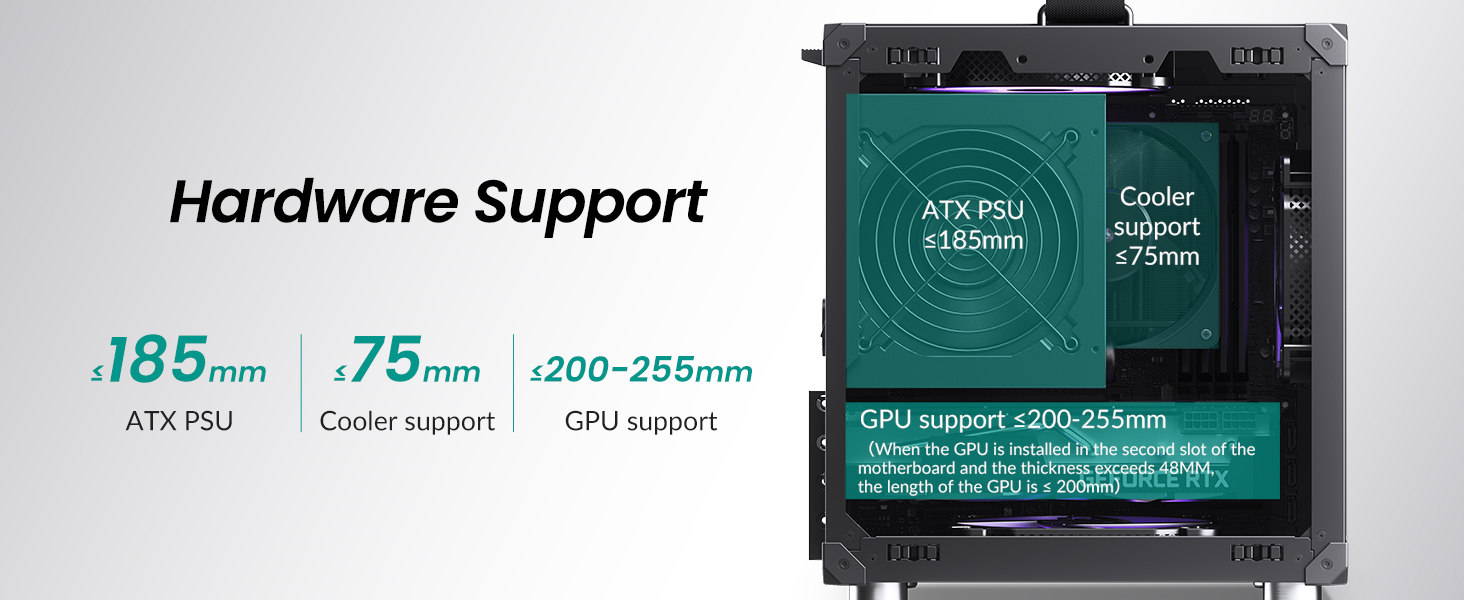
Figure 10: Hardware support limits for PSU, CPU cooler, and GPU.
4.6. Instal·lació de la unitat d'emmagatzematge
The case supports either one 3.5-inch HDD or two 2.5-inch SSDs.
- For 3.5" HDD: Install the drive in the designated front position.
- For 2.5" SSDs: Mount up to two SSDs in the designated locations.

Figure 11: Hard drive installation options.
4.7. Instal·lació del ventilador
Install cooling fans in the following positions:
- A dalt: 1x 120mm or 1x 140mm fan (optional).
- A baix: 1x 120mm or 1x 140mm fan.
- Davant: 1x 120mm fan or a 3.5" HDD.
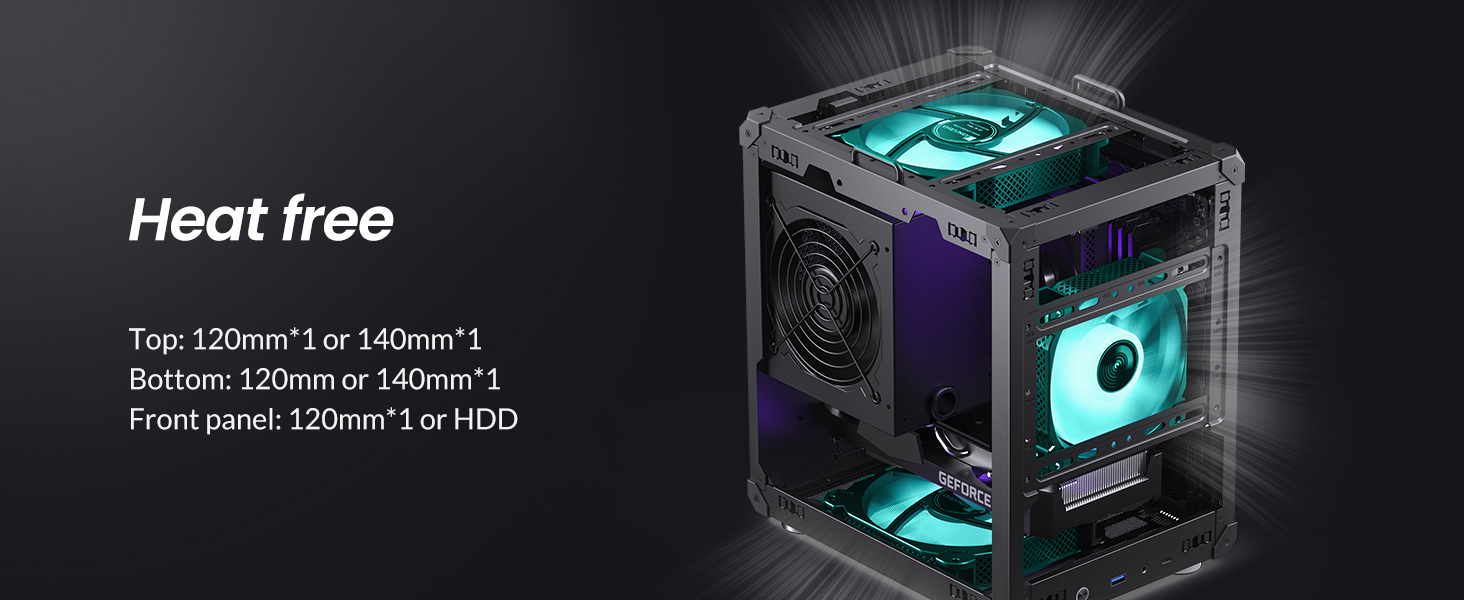
Figure 12: Recommended fan positions for effective cooling.
4.8. Guia de vídeo de muntatge
Video 1: An official JONSBO video demonstrating the features and assembly process of the C6 mini MATX mesh case, including tool-free panel removal and component installation.
5. Instruccions de funcionament
After successfully assembling your PC within the JONSBO C6 Handle case, connect all necessary peripherals (monitor, keyboard, mouse, power cable). Press the power button on the front I/O panel to start your system. The mesh design ensures continuous airflow during operation, contributing to stable component temperatures.
6. Manteniment
Regular maintenance helps ensure the longevity and performance of your PC. The C6 case is designed for easy cleaning.
- Eliminació de pols: Periodically remove the top and side panels (refer to Section 4.1) to clean accumulated dust from internal components and fan filters. A soft brush or compressed air is recommended.
- Bottom Air Filter: The bottom panel includes a convenient air filter that can be disassembled and cleaned to maintain optimal intake airflow.
7. Solució De Problemes
Si teniu problemes amb la configuració del vostre PC, tingueu en compte els passos generals següents per resoldre problemes:
- Sense energia: Ensure the PSU is properly connected to the wall outlet and the motherboard. Check the power switch on the PSU.
- Sense pantalla: Verify that the monitor is connected to the graphics card (not the motherboard's integrated graphics, unless intended) and that the GPU is seated correctly.
- Component no detectat: Re-seat the component (RAM, GPU, storage drives) and check all power and data cables.
- Sobreescalfament: Confirm all fans are spinning correctly and are oriented for proper airflow. Ensure the CPU cooler is securely mounted.
- Connexions soltes: Double-check all internal cables, including front panel connectors, for secure connections.
8. Garantia i Suport
Per obtenir informació sobre la garantia i assistència tècnica, consulteu la pàgina oficial de JONSBO. weblloc web o poseu-vos en contacte amb el vostre distribuïdor local. Conserveu el comprovant de compra per a reclamacions de garantia.