
1. Introducció
Gràcies per la compraasing the BLOW 4625FHD DVB-T2 H.265 Digital Terrestrial TV Tuner. This device allows you to receive digital terrestrial television broadcasts (DVB-T2) with H.265 (HEVC) compression, offering high-definition video quality. This manual provides essential information for the safe and efficient setup, operation, and maintenance of your new tuner. Please read it thoroughly before use and retain it for future reference.
2. Informació de seguretat
- Seguretat elèctrica: Per evitar descàrregues elèctriques, no obriu la casing. Demaneu totes les tasques de manteniment a personal qualificat.
- Font d'alimentació: Feu servir només l'adaptador de corrent especificat. Assegureu-vos que el volumtage coincideix amb els requisits del dispositiu.
- Ventilació: No bloquegeu les obertures de ventilació. Assegureu-vos que hi hagi un flux d'aire adequat al voltant del dispositiu per evitar el sobreescalfament.
- Humitat: Keep the device away from water, rain, and excessive humidity.
- Neteja: Desconnecteu l'alimentació abans de netejar. Feu servir un drap suau i sec. No utilitzeu netejadors líquids ni aerosols.
- Col·locació: Place the device on a stable, flat surface. Avoid placing it near heat sources or in direct sunlight.
3. Contingut del paquet
En obrir el paquet, comproveu que tots els components hi siguin presents i que estiguin en bon estat:
- BLOW 4625FHD DVB-T2 Tuner Unit
- Control remot
- Power Adapter (integrated cable)
- Manual d'usuari (aquest document)

Image 3.1: Retail packaging of the BLOW 4625FHD DVB-T2 Tuner, showing the tuner unit and remote control.
4. Producte acabatview
4.1. Tauler frontal
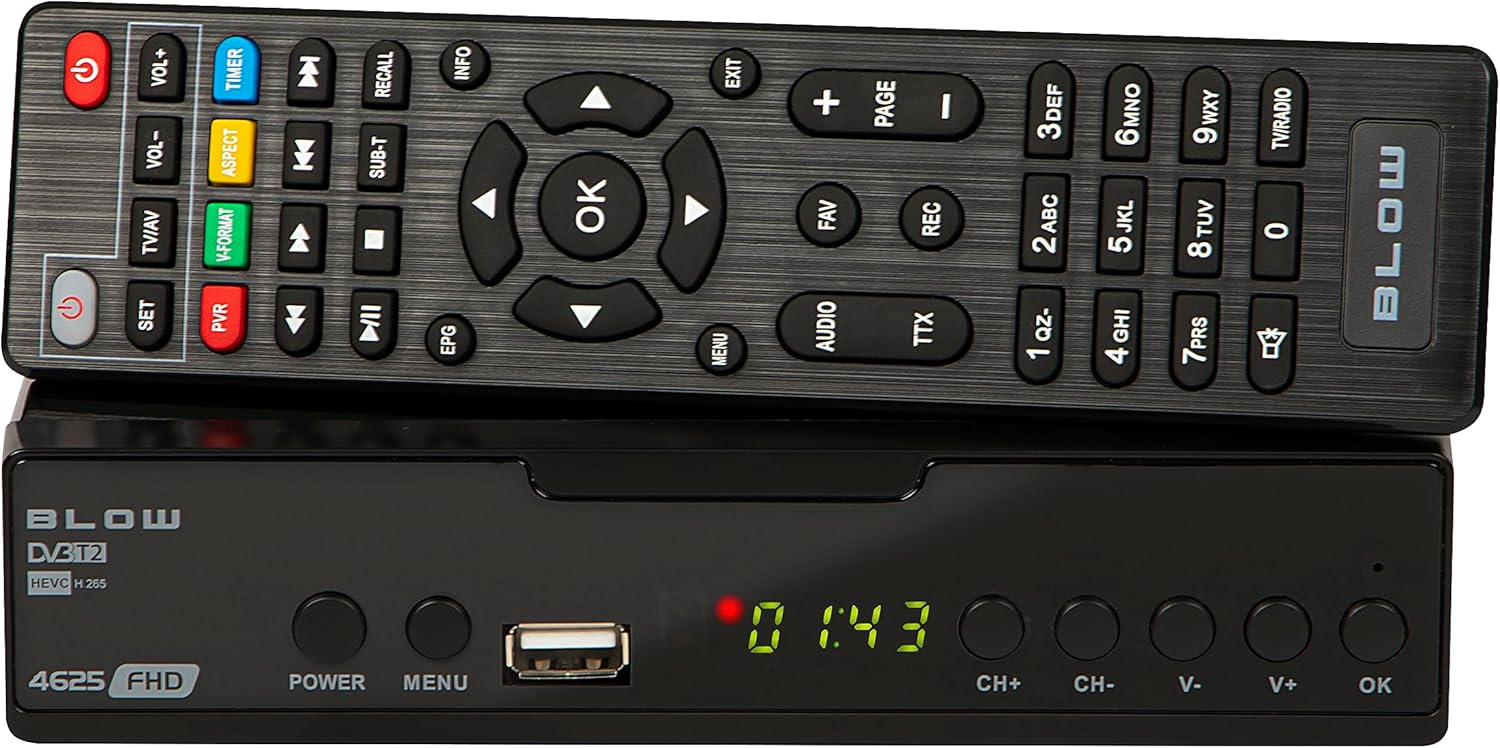
Imatge 4.1: Frontal view of the BLOW 4625FHD DVB-T2 Tuner with its remote control.
The front panel features a digital display, a USB port for media playback and PVR functions, and essential control buttons:
- Visualització: Shows channel number, time, or menu information.
- POTÈNCIA: Encén o apaga el dispositiu (mode d'espera).
- MENÚ: Accedeix al menú principal.
- Port USB: Per connectar dispositius d'emmagatzematge USB.
- CH+/CH-: Canvia de canal amunt o avall.
- V+/V-: Ajusta el volum amunt o avall.
- D'ACORD: Confirma les seleccions del menú.
4.2. Panell posterior

Image 4.2: Rear panel of the BLOW 4625FHD DVB-T2 Tuner, showing various input and output ports.
El panell posterior proporciona tots els ports de connexió necessaris:
- RF IN: Connects to your terrestrial antenna.
- SORTIDA RF: For looping the antenna signal to another device (e.g., another TV or tuner).
- COAXIAL: Sortida d'àudio digital.
- HDMI: High-Definition Multimedia Interface output for connecting to modern TVs.
- SCART: Analog video and audio output for connecting to older TVs.
- AC IN: Entrada d'alimentació per al dispositiu.
4.3. Control remot
The remote control provides full functionality for operating the tuner. Familiarize yourself with its buttons for easy navigation and control.
- POTÈNCIA: Activa/desactiva el sintonitzador.
- VOL + / VOL-: Ajusta el volum.
- CH+/CH-: Canvi de canals.
- D'ACORD: Confirma les seleccions.
- Botons de navegació (amunt/avall/esquerra/dreta): Navega pels menús.
- MENÚ: Obre el menú principal.
- SORTIDA: Surt del menú o la pantalla actuals.
- EPG: Mostra la Guia electrònica de programes.
- PVR: Accesses Personal Video Recorder functions.
- REC: Starts recording the current program.
- FAV: Accedeix a la llista de canals preferits.
- TV/AV: Switches between TV and AV input modes on the tuner.
- FORMAT V: Changes video output format.
- ÀUDIO: Selects audio track (if available).
- TTX: Funció de teletext.
- Botons numèrics (0-9): Selecció directa de canals.
5. Configuració
5.1. Connecting the Tuner
- Connexió d'antena: Connect your terrestrial antenna cable to the RF IN port on the rear panel of the tuner.
- TV Connection (HDMI): For best picture quality, connect an HDMI cable from the HDMI port on the tuner to an available HDMI input on your television.
- TV Connection (SCART): If your TV does not have an HDMI input, connect a SCART cable from the SCART port on the tuner to the SCART input on your television.
- Connexió d'alimentació: Connecteu l'adaptador d'alimentació a AC IN port on the tuner, then plug the adapter into a wall outlet.
5.2. First Time Installation and Channel Scan
- Turn on your television and select the correct input source (HDMI or SCART) corresponding to where you connected the tuner.
- Premeu el botó PODER button on the tuner or remote control to turn on the device.
- The first time you power on the tuner, a "First Time Installation" wizard will appear. Follow the on-screen prompts.
- Select your preferred language, country, and other initial settings.
- Initiate the "Auto Scan" or "Channel Search" function. The tuner will automatically search for available DVB-T2 channels in your area. This process may take several minutes.
- Once the scan is complete, the tuner will save the channels and display the first available channel.
6. Funcionament
6.1. Basic TV Viewing
- Canvi de canals: Utilitza el CH + / CH- buttons on the remote or front panel, or enter the channel number directly using the number buttons.
- Ajust de volum: Utilitza el VOL + / VOL- botons del comandament a distància.
- Silenciar: Premeu el botó Silenciar button on the remote to mute/unmute audio.
- Information Bar: Premeu el botó INFO button on the remote to display current program information.
6.2. Guia electrònica de programes (EPG)
Premeu el botó EPG button on the remote control to access the Electronic Program Guide. This displays program schedules for all available channels. Use the navigation buttons to browse through channels and programs. Press OK a view details or set a reminder/recording.
6.3. Reproducció multimèdia (USB)
The BLOW 4625FHD supports media playback from a USB storage device. Insert a USB drive into the front USB port. Navigate to the "Multimedia" or "USB" section in the main menu to browse and play supported audio (MP3, WMA) and video files.
6.4. Personal Video Recorder (PVR)
To use the PVR function, connect a USB storage device (e.g., USB flash drive or external hard drive) to the USB port. The device must be formatted correctly (usually FAT32 or NTFS). You can record live TV programs by pressing the REC button on the remote. Scheduled recordings can be set via the EPG or the PVR menu.
- Enregistrament instantani: While watching a program, press REC per començar a gravar. Premeu STOP per acabar.
- Enregistrament programat: In the EPG, select a program and press OK, then choose the option to schedule a recording.
- Enregistraments de reproducció: Access recorded content through the PVR or Multimedia menu.
7. Manteniment
- Neteja: Ensure the device is unplugged before cleaning. Use a soft, dry, lint-free cloth to wipe the exterior. Do not use abrasive cleaners, waxes, or solvents.
- Ventilació: Comproveu regularment que les ranures de ventilació no estiguin obstruïdes per pols o deixalles.
- Actualitzacions de programari: Reviseu periòdicament el fabricant website for any available software updates. Follow the instructions provided with the update carefully.
8. Solució De Problemes
| Problema | Possible causa/solució |
|---|---|
| Sense imatge ni so |
|
| Missatge "Sense senyal" |
|
| El comandament a distància no funciona |
|
| Picture freezes or pixelates |
|
9. Especificacions
| Model | BLOW 4625FHD (77-048) |
| Dimensions (L x A x A) | 9D x 9B x 2.5H cm |
| Pes | 428 grams |
| Connectivitat | HDMI, USB, SCART, Coaxial, RF IN/OUT |
| Resolució de sortida de vídeo | 1080p |
| Estàndards suportats | DVB-T2, H.265 (HEVC), H.264 |
| Interval de freqüència | VHF: 170-230MHz, UHF: 470-860MHz |
| Formats d'àudio | MP3, WMA |
| Mode de sortida d'àudio | Estèreo, Envoltant |
| Font d'alimentació | 12 Volt, 43 Milliampere (Operating) |
| Consum d'energia en espera | <0.5W |
| Ús recomanat | Digital terrestrial TV viewenregistrament i gravació |
| Fabricant | Cop |
10. Garantia
The BLOW 4625FHD DVB-T2 H.265 Digital Terrestrial TV Tuner comes with a 2 any de garantia del fabricant from the date of purchase. This warranty covers defects in materials and workmanship under normal use. It does not cover damage caused by misuse, accident, unauthorized modification, or external causes. Please retain your proof of purchase for warranty claims.
11. Suport
If you encounter any issues that cannot be resolved using the troubleshooting guide, or if you require further assistance, please contact your retailer or the manufacturer's customer support. Refer to the product packaging or the manufacturer's official weblloc per obtenir dades de contacte.