1. Introducció
Thank you for choosing the Nureva NPSi-1 Home Theatre Projector. This manual provides essential information for the safe and efficient operation of your projector. Please read it thoroughly before use and retain it for future reference. The NPSi-1 is designed to deliver a high-quality viewing experience with Full HD 1080p resolution and versatile connectivity options.
2. Informació important de seguretat
- Seguretat elèctrica: Always connect the projector to a grounded power outlet. Do not expose the projector to rain or moisture. Disconnect power during lightning storms or when unused for long periods.
- Calor i ventilació: Ensure adequate ventilation around the projector. Do not block ventilation openings. Avoid placing the projector on soft surfaces that may block airflow.
- Lamp Seguretat: El projector lamp operates at high temperatures. Allow the projector to cool down before moving it or performing maintenance. Never look directly into the projector lens when the lamp està activat, ja que pot causar lesions oculars.
- Manipulació: Manipuleu el projector amb cura. Eviteu deixar-lo caure ni sotmetre'l a impactes forts.
- Neteja: Use a soft, dry cloth for cleaning. For the lens, use a lens cleaning cloth and solution specifically designed for optical surfaces.
3. Contingut del paquet
Si us plau, comproveu que tots els elements siguin presents i en bon estat:
- Nureva NPSi-1 Projector
- Control remot
- Cable HDMI
- Cable d'alimentació
- Manual d'usuari (aquest document)
4. Producte acabatview
4.1 Davant i superior View

Figura 4.1: A dalt view of the Nureva NPSi-1 projector, showing the lens assembly on the left and the integrated control panel on the top surface. The control panel includes navigation buttons and indicator lights.

Figura 4.2: Davant view of the Nureva NPSi-1 projector, highlighting the projection lens. This view shows the primary output component of the projector.
The top surface features an intuitive control panel for direct operation, including power, menu navigation, and input selection buttons. The front houses the projection lens, which can be adjusted for focus and zoom.
4.2 Panell posterior i connectivitat
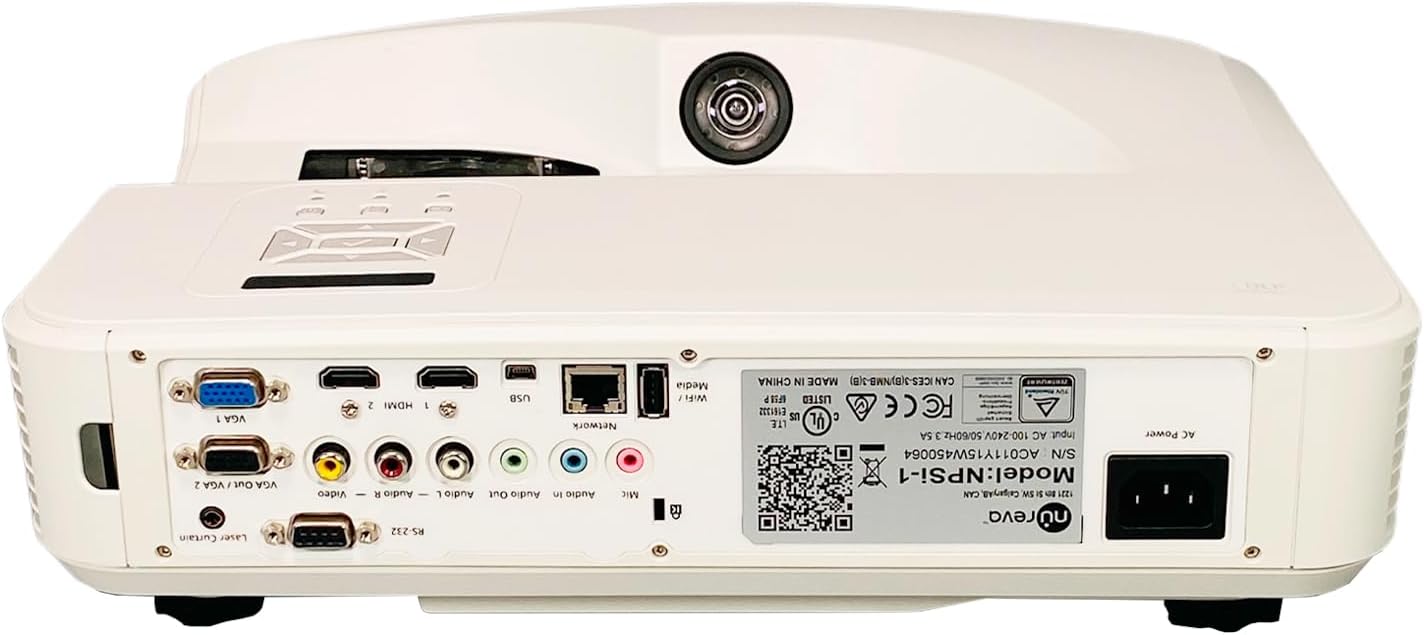
Figura 4.3: Rear panel of the Nureva NPSi-1 projector, displaying a comprehensive array of connectivity ports including HDMI, VGA, USB, audio inputs/outputs, and network connections.

Figura 4.4: Detailed close-up of the Nureva NPSi-1 projector's rear connectivity panel, showing individual ports such as VGA 1, HDMI 1, HDMI 2, USB, Network (RJ45), Audio In/Out, Composite Video, and RS-232.
The rear panel provides extensive connectivity options for various devices:
- HDMI 1 / HDMI 2: For connecting high-definition digital sources like Blu-ray players, gaming consoles, or computers.
- VGA 1 / VGA Out / VGA 2: For connecting computers or other analog video sources.
- USB: For media playback or firmware updates.
- Xarxa (RJ45): Per al control i la monitorització de la xarxa.
- Audio In / Audio Out: Per connectar dispositius d'àudio externs.
- Vídeo compost (RCA): Per a fonts de vídeo de definició estàndard.
- EL-232: Per al control en sèrie.
- Alimentació CA: Per connectar el cable d'alimentació.
4.3 Etiqueta del producte

Figura 4.5: Primer pla view of the product label on the Nureva NPSi-1 projector, showing the model number (NPSi-1), serial number (AC011Y15W450064), and input power requirements (AC 100-240V, 50/60Hz, 3.5A). This label also includes regulatory compliance marks.
The product label, typically located on the underside or rear of the projector, contains important information such as the model number, serial number, and electrical specifications. For support, please refer to the model number NPSi-1 i número de sèrie AC011Y15W450064.
4.4 Lateral i inferior Views

Figura 4.6: lateral view of the Nureva NPSi-1 projector, showing the extensive ventilation grilles necessary for heat dissipation during operation.
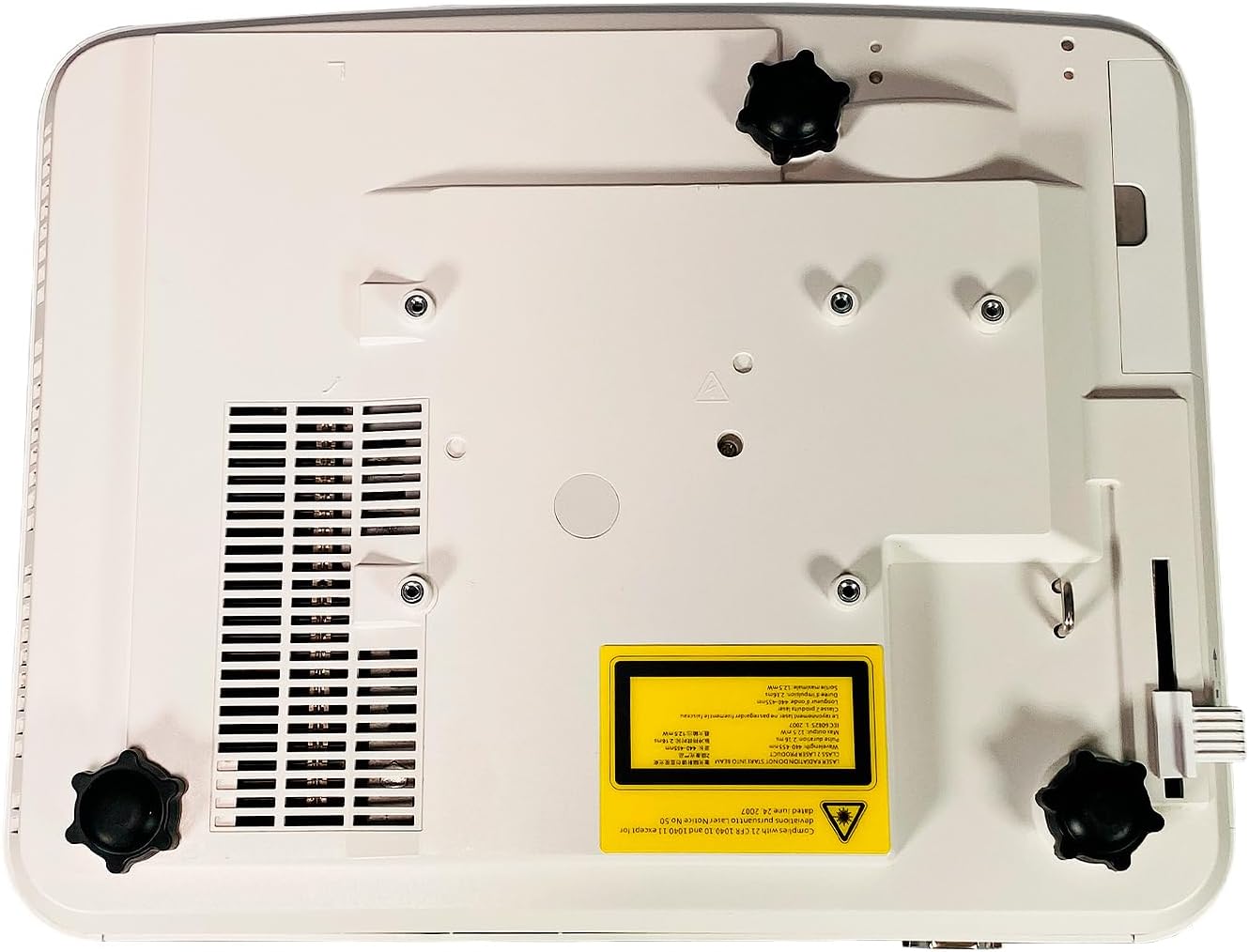
Figura 4.7: A baix view of the Nureva NPSi-1 projector, featuring adjustable feet for leveling and stability, along with mounting points for ceiling installation.
The sides of the projector feature ventilation grilles to ensure proper airflow and prevent overheating. The bottom panel includes adjustable feet for precise leveling and mounting points for ceiling or rear projection setups.
5. Configuració
5.1 Col·locació
Consider the following when placing your projector:
- Superfície de projecció: Project onto a flat, white, or light-colored surface for best results. A dedicated projector screen is recommended.
- Distància: Adjust the projector's distance from the screen to achieve the desired image size. Refer to the projection distance chart (not provided, consult product specifications for typical throw ratios).
- Angle: Position the projector as perpendicular to the screen as possible to minimize keystone distortion.
- Ventilació: Assegureu-vos que hi hagi almenys 30 cm (12 polzades) d'espai lliure al voltant de les obertures de ventilació del projector.
- Muntatge: The projector supports Table Top, Ceiling Projection, and Rear Projection. Use appropriate mounting hardware for ceiling installations.
5.2 Connexió de potència
- Connect the supplied power cord to the AC Power inlet on the rear of the projector.
- Connecteu l'altre extrem del cable d'alimentació a una presa de corrent amb connexió a terra.
5.3 Connexió de fonts d'entrada
Connect your video and audio sources to the appropriate ports on the rear panel (refer to Figure 4.3 and 4.4).
- HDMI: Use the provided HDMI cable to connect your source device (e.g., Blu-ray player, laptop) to either HDMI 1 or HDMI 2 port.
- VGA: Connect a computer to the VGA 1 or VGA 2 port using a VGA cable.
- USB: Insert a USB drive for media playback into the USB port.
- Àudio: If using analog video inputs (VGA, Composite), connect separate audio cables to the Audio In ports. Use Audio Out to connect to external speakers.
6. Instruccions de funcionament
6.1 Engegada/apagada
- Per encendre, premeu el botó Poder button on the projector's control panel or the remote control. The power indicator light will change.
- Per apagar, premeu el botó Poder button again. A confirmation message may appear. Confirm to shut down. Allow the projector to cool down before unplugging.
6.2 Ajust de la imatge
- Anell de focus: Gireu l'anell d'enfocament al voltant de l'objectiu per augmentar la nitidesa de la imatge.
- Anell de zoom: Rotate the zoom ring (if available) to adjust the image size without moving the projector.
- Correcció Keystone: If the image appears trapezoidal, use the keystone correction function (usually found in the OSD menu or via dedicated buttons on the remote) to square the image.
- Projection Tilt: Use the adjustable feet on the bottom of the projector to fine-tune the vertical angle.
- Correcció de color: Access the OSD menu to adjust color settings such as brightness, contrast, saturation, and color temperature.
6.3 Selecció de la font d'entrada
Premeu el botó Font or Entrada button on the projector or remote control to cycle through available input sources (HDMI 1, HDMI 2, VGA 1, VGA 2, USB, Composite Video, etc.).
6.4 Menú de visualització en pantalla (OSD)
Premeu el botó Menú button on the projector or remote to access the OSD menu. Use the navigation buttons (up, down, left, right) to browse options and the OK or Entra botó per seleccionar. Premeu Menú de nou o Sortida per tancar el menú.
7. Manteniment
7.1 Neteja del projector
- Exterior: Netegeu el projector casing with a soft, lint-free cloth. For stubborn marks, dampen the cloth slightly with water, then wipe dry. Avoid abrasive cleaners or solvents.
- Lent: Gently clean the lens with a professional lens cleaning cloth and lens cleaning fluid. Do not use abrasive materials or excessive force, as this can scratch the lens.
- Vendes d'aire: Use a soft brush or a can of compressed air to remove dust from the air intake and exhaust vents. Ensure the projector is off and unplugged before cleaning vents.
7.2 Lamp Substitució
El projector lamp té una vida útil finita. Quan la lamp life indicator appears or the image brightness significantly decreases, the lamp may need replacement. Refer to the specific lamp instruccions de reemplaçament proporcionades amb el vostre recanvi lamp or consult a qualified service technician. Always ensure the projector is unplugged and completely cooled down before attempting lamp substitució.
8. Solució De Problemes
| Problema | Causa possible | Solució |
|---|---|---|
| No hi ha imatge a la pantalla |
|
|
| La imatge és borrosa |
|
|
| Image is trapezoidal (keystone effect) |
|
|
| Sense àudio |
|
|
9. Especificacions
| Característica | Detall |
|---|---|
| Marca | Nureva |
| Model | NPSi-1 |
| Brillantor | 3000 lúmens ANSI |
| Relació de contrast | 1800:1 |
| Resolució nativa | 1920x720 (Full HD 1080p compatible) |
| Tecnologia de connectivitat | HDMI, USB, VGA In (Dsub-15pin), Composite (RCA), RS232 (DB-9pin), USB B, Composite video, RS232C, RJ45, LAN |
| Característiques especials | Built-in Speakers, Ceiling Projection, Color Correction, HD Ready, Projection Tilt, Rear Projection, Table Top Projection, Portable |
| Usos recomanats | Home Cinema |
| Potència d'entrada | CA 100-240V, 50 / 60Hz, 3.5A |
10. Garantia i Suport
For warranty information, technical support, or service inquiries, please refer to the documentation provided at the time of purchase or visit the official Nureva website. When contacting support, please have your model number (NPSi-1) and serial number (AC011Y15W450064) readily available.
You can find more information about Nureva products and support at www.nureva.com