
1. Introducció
The DROK Digital Control Step-Down Module is a high-quality power module designed for reliable power supply across a wide range of electronic devices and projects. This manual provides essential information for safe and effective use of the product.
2. Característiques clau
- Digital Control and Easy Operation: Allows precise voltage and current settings. Converts a wide input voltage range of 10V to 100V to an adjustable output of 0V to 60V. Supports a maximum output capacity of 720W and current control from 0 to 12A, ensuring stable power supply for various applications.
- High-Quality Construction and Advanced Control Technology: Utilizes high-quality power devices and precision operational amplifiers, combined with CV and CC loops, to achieve superior module performance. Advanced microprocessor control allows for simple and quick parameter adjustment using buttons and an encoder.
- Excellent Heat Dissipation Design: Features a built-in cooling fan and external protective MOSFETs to enhance cooling performance, ensuring stable operation even under high load conditions. The LCD1602 display clearly shows output status.
- Precise Output Adjustment: Volum de sortidatage and current can be precisely adjusted via button operation, catering to diverse needs. Its compact design offers high output and efficiency, providing stable and reliable power for projects.
- Múltiples funcions de protecció: Equipped with multiple protection features including Input Low Voltage Protection (LVP), Output Over Voltage Protection (OVP), and Output Over Current Protection (OCP), providing comprehensive safety for connected devices.
3. Especificacions del producte
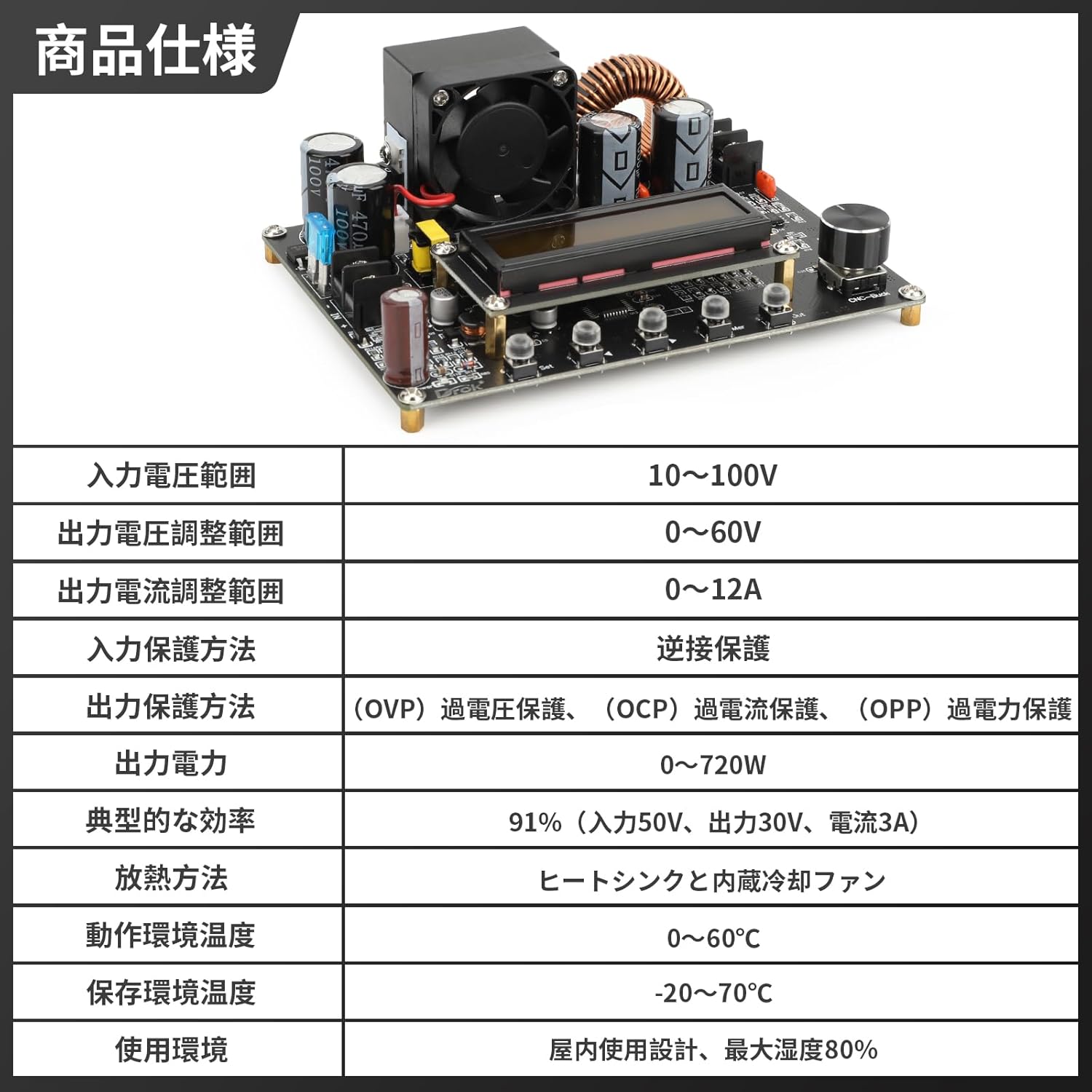
Figura 3.1: Especificacions detallades del producte
| Especificació | Valor |
|---|---|
| Entrada Voltage Rang | 10V ~ 100V |
| Vol. De sortidatage Interval d'ajust | 0V ~ 60V |
| Rang d'ajust del corrent de sortida | 0A ~ 12A |
| Input Protection Method | Protecció de connexió inversa |
| Output Protection Methods | Més del voltage Protection (OVP), Over Current Protection (OCP), Over Power Protection (OPP) |
| Potència de sortida | 0W ~ 720W |
| Eficiència típica | 91% (Input 50V, Output 30V, Current 3A) |
| Mètode de dissipació de calor | Heat Sink and Built-in Cooling Fan |
| Temperatura de l'entorn de funcionament | 0 °C ~ 60 °C |
| Temperatura de l'entorn d'emmagatzematge | -20 °C ~ 70 °C |
| Entorn d'ús | Indoor use, maximum humidity 80% |
4. Producte acabatview

Figura 4.1: Principal view of the DROK DC-DC Step-Down Converter.

Figure 4.2: Front and side dimensions of the converter module.

Figura 4.3: Detallada view of the module display, input/output ports, encoder knob, and operation buttons.

Figure 4.4: Visual representation of the multiple protection functions including reverse connection, output over-voltage, sortida sota-voltage, and output over-current protection.

Figure 4.5: The LCD1602 display provides clear real-time output status and facilitates precise digital control.

Figura 4.6: Examples of various application scenarios for the converter, including laboratory and research environments, electronic device repair, industrial automation and testing, and education and training.
5. Configuració
Before connecting the module, ensure all power sources are disconnected. Observe proper polarity when making connections to prevent damage to the module or connected devices.
- Connexió d'entrada: Connect your DC power source (10V-100V) to the 'IN+' and 'IN-' terminals on the module. Ensure the input voltage està dins de l'interval especificat.
- Connexió de sortida: Connect your load to the 'OUT+' and 'OUT-' terminals.
- Engegada inicial: After verifying all connections, apply power to the input. The LCD display will illuminate, showing the current settings.
6. Instruccions de funcionament
The module features an LCD display, an encoder knob, and several buttons for operation.
6.1. Modes de visualització
Press the 'SW' button to cycle through different display modes:
- Entrada Voltage / Sortida Voltage
- Output Current / Output Power
- Vol. De sortidatage / Output Current
- Temperature / Accumulated Capacity (Ah)
6.2. Ajustar el volum de sortidatage i Actual
- Voltage Ajust: Rotate the encoder knob clockwise to increase the output voltage, and counter-clockwise to decrease it. The display will show the adjusted voltage.
- Ajust actual: To adjust the output current, press the 'U/I' button. The display will switch to current adjustment mode. Rotate the encoder knob to set the desired current limit.
- Sortida ON/OFF: Press the 'ON/OFF' button to enable or disable the output.
7. Manteniment
To ensure optimal performance and longevity of your DROK DC-DC Step-Down Converter, follow these maintenance guidelines:
- Mantenir net: Regularly clean the module, especially the heat sink and fan, to prevent dust accumulation which can hinder heat dissipation. Use a soft, dry cloth.
- Ventilació: Ensure adequate ventilation around the module during operation. Do not obstruct the cooling fan.
- Eviteu la humitat: Keep the module away from moisture and corrosive environments.
- Inspeccionar connexions: Periodically check all input and output connections for tightness and signs of wear.
8. Solució De Problemes
If you encounter issues with your converter, refer to the following common problems and solutions:
| Problema | Causa possible | Solució |
|---|---|---|
| No display/No output | No input power, incorrect wiring, or input voltage fora de l'abast. | Check input power supply, verify wiring polarity, ensure input voltage és 10-100V. |
| Volum de sortidatagi inestable | Loose connections, excessive load, or faulty input power. | Secure all connections, reduce load, or test with a stable input power source. |
| Sobreintensitat/sobrevoltagprotecció electrònica activada | Load drawing too much current, or output voltage set too high for the load. | Reduce load, adjust output current limit, or verify output voltagConfiguració. |
| Sobreescalfament del mòdul | Insufficient ventilation, excessive load, or fan malfunction. | Ensure proper airflow, reduce load, clean fan/heat sink, or replace fan if faulty. |
9. Garantia i Suport
DROK products are designed for reliability and performance. For any technical support or warranty inquiries, please contact your retailer or the manufacturer directly. Keep your purchase receipt as proof of purchase.