
1. Introducció
Thank you for choosing the ERAY WD11 Portable Karaoke Machine. This device is designed to provide an enjoyable and interactive karaoke experience for children and families. It features two wireless microphones, Bluetooth connectivity, voice-changing effects, and dynamic LED lights, making it suitable for various occasions such as parties, birthdays, and family gatherings.
Please read this manual carefully before using the product to ensure proper operation and to maximize your enjoyment.

Image 1.1: ERAY WD11 Portable Karaoke Machine with two wireless microphones.
2. Contingut del paquet
Assegureu-vos que tots els elements siguin presents al paquet:
- 1 x ERAY WD11 Karaoke Machine (Speaker)
- 2 x micròfons sense fil
- 1 x cable de càrrega USB
- 1 x Manual d'usuari

Image 2.1: Illustration of the ERAY WD11 package contents and dimensions.
3. Producte acabatview
3.1. Speaker Controls and Ports
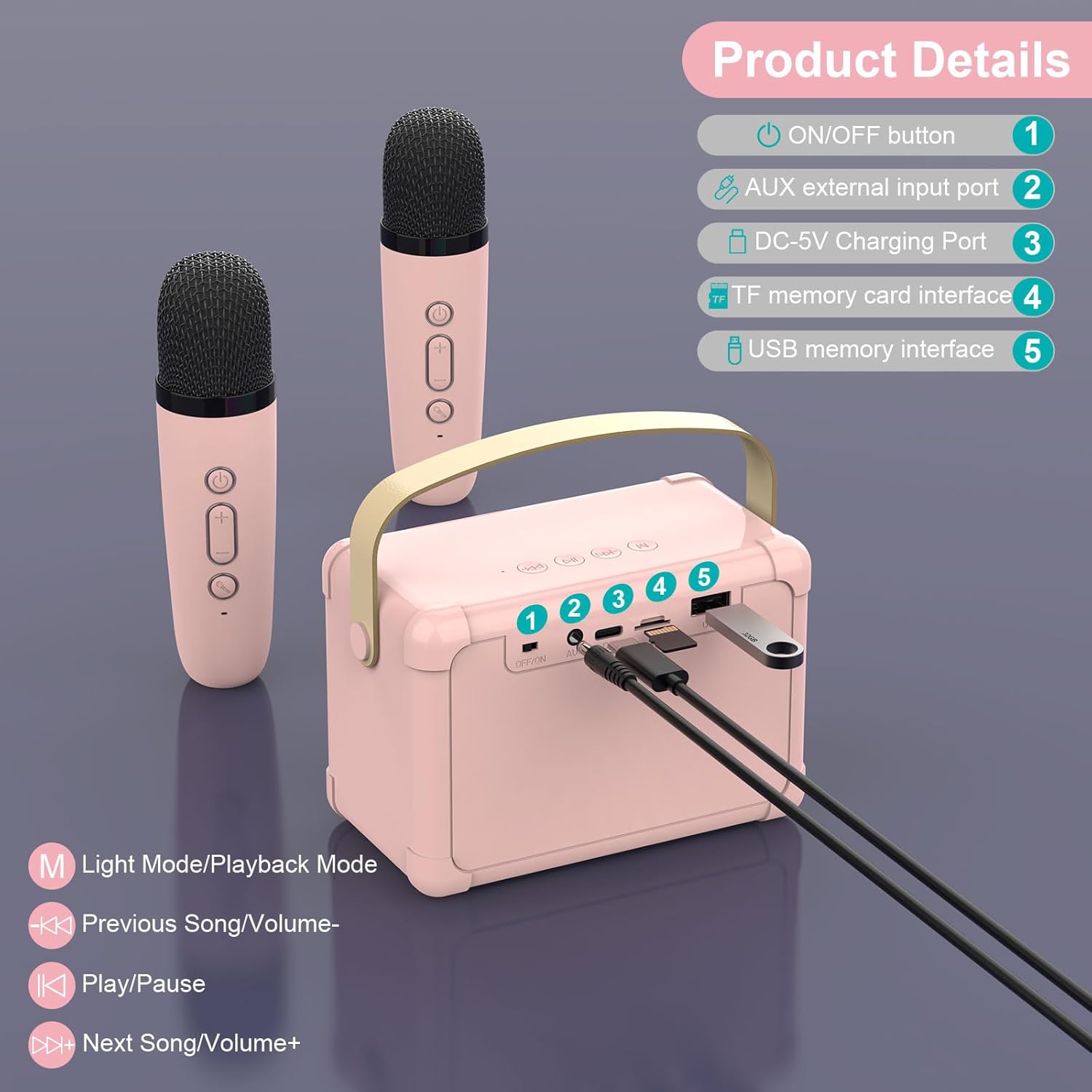
Image 3.1: Speaker controls and ports diagram.
- Botó ON/OFF: Encén o apaga l'altaveu.
- AUX External Input Port: For connecting external audio devices via a 3.5mm audio cable (not included).
- Port de càrrega DC-5V: Per carregar l'altaveu amb el cable USB inclòs.
- TF Memory Card Interface: Per reproduir música directament des d'una targeta TF (MicroSD).
- USB Memory Interface: For playing music directly from a USB flash drive.
Speaker Playback Controls:
- M (Light Mode/Playback Mode): Short press to change LED light modes; Long press to switch between playback modes (Bluetooth, TF Card, USB, AUX).
- Previous Song/Volume-: Short press for previous song; Long press to decrease volume.
- Reproduir/pausa: Reprodueix o posa en pausa la pista actual.
- Next Song/Volume+: Short press for next song; Long press to increase volume.
3.2. Controls del micròfon

Image 3.2: Microphone controls and voice effects.
- Botó d'encesa: Press and hold to turn the microphone on or off.
- Botons de volum +/-: Ajusta el volum del micròfon.
- Voice Change Button:
- Premsa curta: Cycles through voice effects: Male Voice, Female Voice, Baby Voice, Monster Voice, KTV Mode.
- Feu doble clic: Activates or deactivates the original vocal cancellation (for karaoke tracks).
4. Configuració i connexió
4.1. Càrrega del dispositiu
Before first use, fully charge the karaoke machine speaker and both microphones.
- Connect the USB charging cable to the DC-5V Charging Port on the speaker and to a standard USB power adapter (not included).
- Connect the USB charging cable to the charging port on each microphone.
- The charging indicator light will show charging status (e.g., red for charging, off when fully charged).

Image 4.1: Battery capacities for speaker and microphones.
4.2. Powering On and Automatic Pairing
- Press and hold the ON/OFF button on the speaker to turn it on. The LED lights will illuminate.
- Press and hold the Power button on each wireless microphone to turn them on.
- The microphones will automatically connect to the speaker. A confirmation sound may be heard.
4.3. Connexió Bluetooth
To play music from your smartphone, tablet, or computer:
- Ensure the speaker is powered on and in Bluetooth mode (indicated by a voice prompt or LED light pattern). If not, short press the 'M' button on the speaker until it enters Bluetooth mode.
- Al dispositiu, activa el Bluetooth i cerca els dispositius disponibles.
- Select "ERAY WD11" (or similar name) from the list to pair.
- Once connected, you can play music from your device through the karaoke machine speaker.

Image 4.2: Multiple connection options for the ERAY WD11.

Image 4.3: Bluetooth range of up to 10 meters.
4.4. Reproducció de targeta TF / USB
To play music directly from a TF card or USB flash drive:
- Insert a TF card (with MP3 songs) into the TF Memory Card Interface or a USB flash drive into the USB Memory Interface.
- The speaker should automatically detect the storage device and begin playing music.
- If not, short press the 'M' button on the speaker to cycle through playback modes until TF Card or USB mode is selected.
4.5. Entrada AUX
To connect an external audio source via AUX cable:
- Connect one end of a 3.5mm audio cable (not included) to the AUX External Input Port on the speaker.
- Connect the other end to the audio output jack of your external device (e.g., MP3 player).
- Short press the 'M' button on the speaker to cycle through playback modes until AUX mode is selected.
5. Instruccions de funcionament
5.1. Ajust de volum
- Volum dels altaveus: Use the "Volume-" and "Volume+" buttons on the speaker (long press) to adjust the overall music playback volume.
- Volum del micròfon: Use the "Volume-" and "Volume+" buttons on each microphone to adjust the individual microphone's output volume.
5.2. Using Voice Changing Effects
Each microphone features multiple voice-changing effects:
- Premeu breument Botó de canvi de veu on the microphone to cycle through the available effects: Male Voice, Female Voice, Baby Voice, Monster Voice, and KTV Mode.
- Experiment with different effects to enhance your performance.
5.3. Vocal Cancellation (KTV Mode)
To remove vocals from a song and sing along:
- While music is playing, double-click the Botó de canvi de veu on the microphone. This feature attempts to reduce or remove the original vocals from the track, allowing you to sing over the instrumental.
- Double-click again to reactivate the original vocals.
5.4. Modes de llum LED
The speaker features dynamic LED lights that can be adjusted:
- Premeu breument Botó 'M' on the speaker to cycle through different LED light modes.
- The lights will beat to the rhythm of the music, creating an engaging atmosphere.

Image 5.1: Dynamic RGB LED lights on the speaker.
6. Manteniment i cura
- Neteja: Netegeu el dispositiu amb un drap suau i sec. No utilitzeu productes de neteja abrasius ni dissolvents.
- Emmagatzematge: Store the karaoke machine in a cool, dry place away from direct sunlight and extreme temperatures.
- Cura de la bateria: To prolong battery life, avoid fully discharging the device frequently. Charge regularly, even if not in use for extended periods.
- Exposició a l'aigua: Aquest dispositiu no és impermeable. Eviteu l'exposició a l'aigua o a una humitat elevada.
7. Solució De Problemes
| Problema | Causa possible | Solució |
|---|---|---|
| No hi ha so de l'altaveu |
|
|
| El micròfon no funciona |
|
|
| Connexió Bluetooth inestable |
|
|
8. Especificacions
| Característica | Detall |
|---|---|
| Número de model | WD11 |
| Marca | ERAY |
| Dimensions (L x A x A) | 20 x 16 x 8.5 cm (Speaker) |
| Pes | 650 grams |
| Material | Acrilonitril butadiè estirè (ABS) |
| Font d'alimentació | Alimentat per bateria (1 bateria de liti-ió inclosa) |
| Capacitat de la bateria de l'altaveu | 1200 mAh |
| Capacitat de la bateria del micròfon | 500 mAh |
| Tecnologia de connectivitat | Bluetooth 5.0, USB, targeta TF, AUX |
| Dispositius compatibles | Smartphones, PCs, Laptops, other music applications |
| Característiques especials | Voice changing effects, LED lights |
| Factor de forma del micròfon | Portàtil |
| Color | Rosa |
9. Garantia i Suport
For warranty information and customer support, please refer to the product packaging or contact the seller directly. Keep your purchase receipt for any warranty claims.
For further assistance, please visit the official ERAY weblloc o poseu-vos en contacte amb el seu departament d'atenció al client.