
Introducció
This manual provides detailed instructions for setting up, operating, and maintaining your Lenovo ThinkCentre Tiny-in-One 24-inch Touchscreen Monitor. Please read this manual thoroughly before using the product to ensure proper functionality and to maximize your user experience.

Figura 1: Frontal view of the Lenovo ThinkCentre Tiny-in-One 24-inch monitor.
The ThinkCentre Tiny-In-One (TIO) 24 Gen 5 Touch is a 23.8-inch borderless In-Plane Switching (IPS) Full HD (1920 x 1080) display. It features 99% sRGB color support, a 1080p RGB webcam with noise-cancellation microphone, integrated 3W speakers, and 10-point capacitive touch capability. Designed for efficient remote collaboration and a clutter-free workspace, it supports modular attachment with Lenovo ThinkCentre and ThinkStation Tiny PCs.
Instruccions de configuració
1. Desembalatge i contingut
Traieu amb cura tots els components de l'embalatge. Assegureu-vos que hi hagi els elements següents:
- ThinkCentre Tiny-In-One 24 Inch Gen 5 Touch Monitor
- Suport de monitor
- 1 x Power Adaptor (90W)
- 1 x cable d'alimentació (1 m)
- Guia de configuració ràpida
2. Muntatge del suport
Attach the monitor to its stand according to the instructions provided in the Quick Setup Guide. Ensure all connections are secure.
3. Connexió a una font d'alimentació
- Connect the power cable to the 90W power adaptor.
- Plug the power adaptor into the monitor's power input port.
- Connecteu l'altre extrem del cable d'alimentació a una presa de corrent.

Figure 2: Rear ports of the monitor, showing power input and connectivity options.
4. Connexió a un ordinador
El monitor ofereix diverses opcions de connectivitat:
- HDMI: Connect an HDMI cable from your computer's HDMI output to the monitor's HDMI 1.4 port.
- DisplayPort (DP): Connect a DisplayPort cable from your computer's DP output to the monitor's DP 1.2 port.
- USB: Use the USB 3.2 Gen 1 Type-B port to connect the monitor to your computer for touchscreen functionality and to enable the integrated USB ports on the monitor.

Figura 3: posterior view highlighting connectivity ports.
5. Integrating a ThinkCentre Tiny PC
The monitor features a dedicated slot at the back for seamlessly integrating a Lenovo ThinkCentre or ThinkStation Tiny PC (4th Gen or newer). This modular design allows for a cable-free desk setup. Follow the specific instructions provided with your Tiny PC for installation into the monitor's housing.
Instruccions de funcionament
1. Encendre/apagar
Press the power button, usually located on the bottom right or rear of the monitor, to turn the display on or off.
2. Característiques de la pantalla
- Full HD IPS Panel: Enjoy clear visuals with a 1920x1080 resolution and wide viewangles d'ajust.
- Natural Low Blue Light: This technology reduces harmful blue light emissions without color distortion, promoting eye comfort during extended use.
- Pantalla tàctil: The 10-point capacitive touch display allows for intuitive interaction using your fingers or a compatible pen (sold separately).
3. Integrated Webcàmera i àudio
- 1080p RGB Weblleva: Located at the top of the monitor, ideal for video conferencing.
- Noise-Cancellation Microphone: Ensures clear audio capture during calls.
- Integrated 3W Speakers: Provide audio output for meetings and multimedia.
- ThinkShutter: A physical privacy shutter for the webcam. Slide the shutter to cover the lens when the webcam is not in use for enhanced privacy and security.
- VoIP Buttons: Dedicated buttons for easy control of meeting functions such as mute and volume adjustment.
- Smart Traffic Light Indicator: Indicates the status of an ongoing interaction or meeting, helping to avoid distractions.
4. Adjusting Monitor Settings
Use the on-screen display (OSD) menu buttons, typically located on the bottom bezel, to adjust settings such as brightness, contrast, color, and input source. Refer to the Quick Setup Guide for specific button functions.
For advanced display settings and customization, install the ThinkColour Software. This software is compatible with Windows 10 and Windows 11 operating systems.
Manteniment
Neteja del monitor
- Apagueu i desendolleu sempre el monitor abans de netejar-lo.
- Utilitzeu un drap suau i sense pelusa dampRenteu-ho amb aigua o un netejador de pantalles no abrasiu.
- No ruixeu el netejador directament sobre la pantalla.
- Avoid using harsh chemicals, solvents, or abrasive materials, as these can damage the screen and casing.
Resolució de problemes
Problemes comuns i solucions
- Sense energia:
- Assegureu-vos que el cable d'alimentació estigui connectat correctament al monitor i a una presa de corrent que funcioni.
- Verify the power adaptor is correctly connected.
- Sense senyal:
- Check that the video cable (HDMI or DisplayPort) is securely connected to both the monitor and your computer.
- Assegureu-vos que la font d'entrada correcta estigui seleccionada al monitor mitjançant el menú OSD.
- Verify your computer is powered on and outputting a signal.
- La pantalla tàctil no respon:
- Ensure the USB cable connecting the monitor to your computer is properly connected.
- Reinicieu l'ordinador.
- Verify that touchscreen drivers are correctly installed on your operating system (Windows 10/11).
- WebLa càmera/micròfon no funciona:
- Check if the ThinkShutter is open.
- Ensure the USB cable connecting the monitor to your computer is properly connected.
- Verify privacy settings in your operating system and applications allow access to the webcàmera i micròfon.
Per obtenir més ajuda, consulteu el suport oficial de Lenovo. weblloc o contacteu amb el servei d'atenció al client.
Especificacions
| Característica | Detall |
|---|---|
| Marca | Lenovo |
| Número de model | Tiny-In-One |
| Mida de la pantalla | 23.8 polzades |
| Resolució | Full HD (1920 x 1080 píxels) |
| Relació d'aspecte | 16:9 |
| Freqüència d'actualització | 60 Hz |
| Temps de resposta | 4 mil·lisegons |
| Tipus de visualització | LED, LCD (IPS Technology) |
| Brillantor | 250 Nit (typical) |
| Relació de contrast | 1,000:1 |
| Viewangle ing | 178 graus |
| Gamma de colors | 99% sRGB |
| Pantalla tàctil | 10-point Capacitive Touch |
| Weblleva | 1080p RGB with ThinkShutter |
| Altaveus | 2 x 3W Integrated |
| Connectivitat | 1 x HDMI 1.4, 1 x DisplayPort 1.2, 2 x USB 3.2 Gen 1 (Type-B for upstream) |
| Consum d'energia | 34 watts |
| Dimensions de l'article (D x W x H) | 2.9 "P x 21.3" W x 14.5" H |
| Pes de l'article | 8.2 lliures |
| Dispositius compatibles | Windows 10, Windows 11 |
| Característiques especials | Natural Low Blue Light, Eye Comfort Technology, IPS Technology, Height/Swivel/Tilt Adjustment, VoIP Controls, Cable Lock Slot |
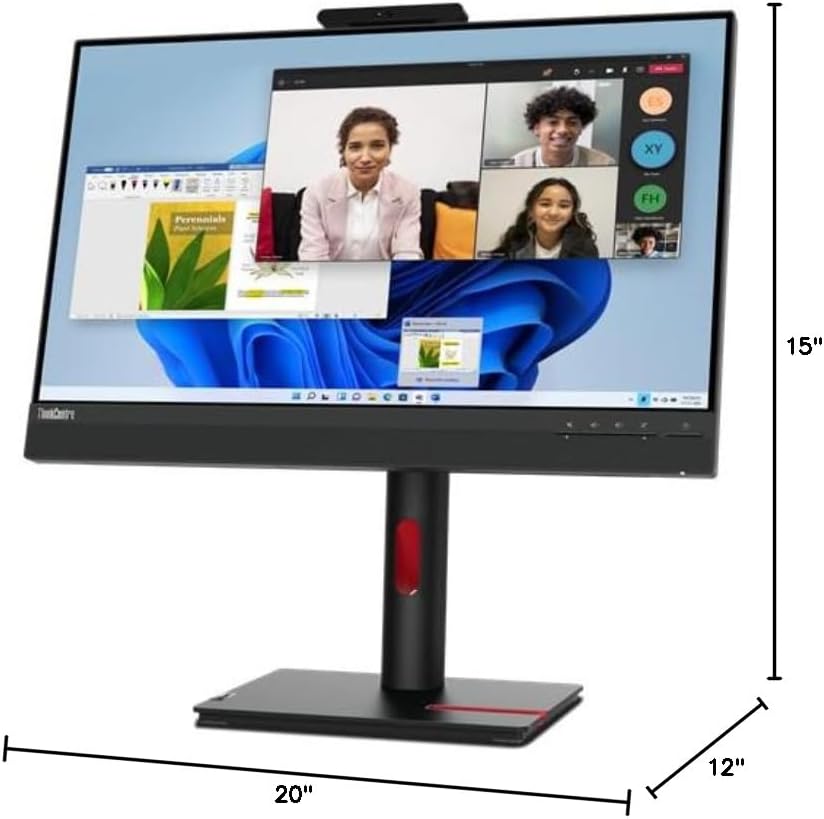
Figura 4: Dimensions del monitor.
Informació de la garantia
Warranty information for this product is not explicitly available in the provided details. Please refer to the documentation included with your purchase or visit the official Lenovo weblloc web per consultar els termes i condicions de garantia més actualitzats.
Atenció al client
For technical support, product registration, or additional resources, please visit the official Lenovo support weblloc:
You may also find helpful information and drivers on the Lenovo weblloc.


