
1. Primers passos
1.1 Contingut del paquet
Abans de començar, assegureu-vos que tots els elements estiguin presents al paquet:
- 2 x QCY T13X Earbuds
- 1 x funda de càrrega
- 3 x Pairs of Eartips (Small, Medium - pre-installed, Large)
- 1 x cable de càrrega USB-C
- 1 x Manual d'usuari
1.2 Càrrega inicial
The earbuds must be fully charged before first use. Place both earbuds into the charging case. Connect the USB-C cable to the charging case and a power source. A full charge takes approximately 120 minutes. If the earbuds are not used for more than two weeks, charge them regularly to maintain battery health.
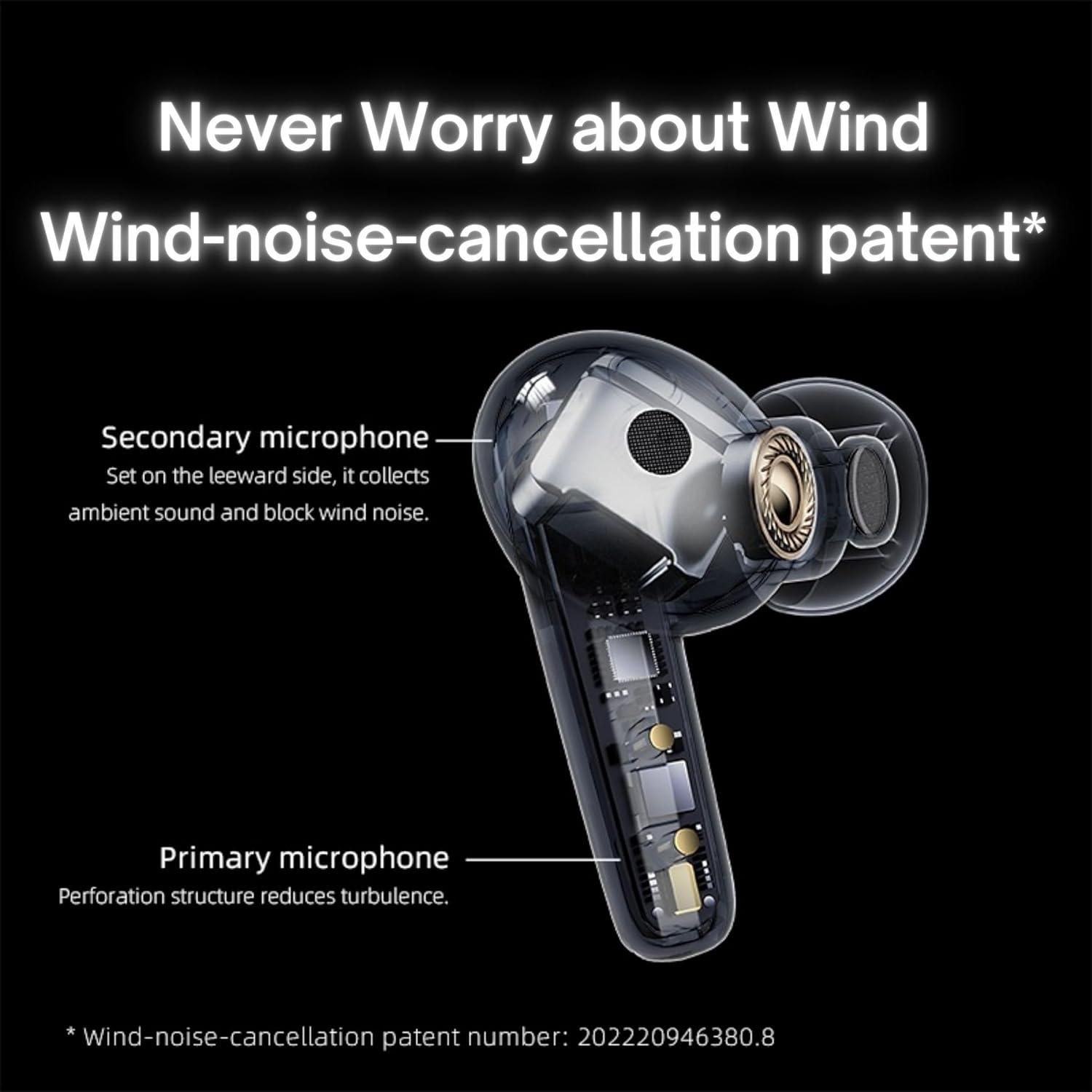
Image: QCY T13X Earbuds in their charging case, connected with a USB-C cable for charging. The image illustrates the charging process and the compact design of the case and earbuds.
1.3 Selecció de la punta de l'orella
For optimal sound quality and comfort, choose the eartips that best fit your ears. The package includes small, medium, and large sizes. The medium size is pre-installed. A proper seal is crucial for bass response and noise isolation.
1.4 Emparellament amb el dispositiu
- Assegureu-vos que els auriculars estiguin carregats i col·locats a l'estoig de càrrega.
- Obre la tapa de la funda de càrrega. Els auriculars entraran automàticament en mode d'emparellament.
- Al telèfon intel·ligent o al dispositiu amb Bluetooth, aneu a la configuració de Bluetooth.
- Cerca available devices and select "QCY T13X" from the list.
- Un cop connectat, sentiràs un to de confirmació.

Image: QCY T13X Earbuds and their charging case, highlighting the Bluetooth 5.3 connectivity. This image demonstrates the wireless technology used for pairing.
2. Funcionament dels auriculars
2.1 Encès/Apagat
- Encès: Open the charging case, and the earbuds will automatically power on. Alternatively, press and hold the touch panel on both earbuds for 1-2 seconds.
- Apagar: Place the earbuds back into the charging case and close the lid. They will automatically power off and begin charging. Alternatively, disconnect them from your device, and they will power off after a few minutes of inactivity.
2.2 Controls de reproducció de música
The QCY T13X earbuds feature touch controls for easy management of your audio:
- Reproduir/pausa: Double-tap the touch panel on either earbud.
- Pista següent: Toca tres vegades l'auricular dret.
- Pista anterior: Toca tres vegades l'auricular esquerre.

Image: A person wearing a QCY T13X earbud, demonstrating the discreet design and the area for touch controls. This image helps visualize how the earbuds are worn and interacted with.
2.3 Gestió de trucades
- Respondre/Finalitzar la trucada: Double-tap the touch panel on either earbud.
- Rebutja la trucada: Press and hold the touch panel on either earbud for 1.5 seconds.
2.4 Control de volum
Volume control is managed through the QCY application on your smartphone. Download the QCY app to customize settings and adjust volume levels directly.
2.5 QCY Application
For enhanced features and customization, download the official QCY app from your device's app store. The app allows you to:
- Ajustar el volum.
- Personalitza els controls tàctils.
- Select from various EQ presets (e.g., Pure Vocals, Boosted Original, Soft and Immersive).
- Actualitza el firmware.

Image: QCY T13X Earbuds with a graphic indicating three default EQ settings: Pure Vocals, Boosted Original, and Soft and Immersive. This highlights the sound customization options available through the app.
2.6 Connectivitat multidispositiu
The QCY T13X supports seamless switching between multiple paired devices. Once paired with several devices, the earbuds can intelligently connect to the active audio source.

Image: QCY T13X Earbuds shown connected to both a smartphone and a tablet, illustrating the multi-device connectivity feature. This image demonstrates the flexibility of using the earbuds with different devices.
3. Manteniment i cura
3.1 Càrrega dels auriculars i l'estoig
The charging case has a capacity of 350 mAh, with each earbud having a 45 mAh battery. A single charge provides up to 8 hours of playback, and the charging case extends total playback time to up to 30 hours. The earbuds support fast charging. Ensure regular charging if not used for extended periods.
3.2 Neteja
Regularly clean your earbuds and charging case to ensure optimal performance and hygiene. Use a soft, dry, lint-free cloth. For eartips, remove them and gently wipe with a damp drap i assequeu-lo bé abans de tornar-lo a enganxar.
3.3 Emmagatzematge
Store your QCY T13X earbuds in their charging case when not in use. Avoid exposing them to extreme temperatures, such as below 10 degrees Celsius (50°F) or above 60 degrees Celsius (140°F), to prevent battery damage and ensure longevity.
4. Solució De Problemes
4.1 Restabliment de fàbrica
If you experience persistent connection or functionality issues, a factory reset may resolve them:
- Delete the previous connection record for "QCY T13X" from your phone's Bluetooth settings.
- Col·loca els dos auriculars a l'estoig de càrrega i assegura't que s'estiguin carregant.
- Manteniu premut el botó de la caixa de càrrega durant 10 segons.
- The red and blue LED indicators will flash alternately 3 times, indicating a successful reset.
4.2 Problemes de connexió
- Assegureu-vos que el Bluetooth estigui habilitat al vostre dispositiu.
- Make sure the earbuds are charged and within the 10-meter Bluetooth range.
- Try restarting your device and the earbuds.
- Perform a factory reset as described above.
4.3 Problemes de so
- Check the volume levels on both your device and through the QCY app.
- Ensure the eartips provide a proper seal in your ear.
- Netegeu qualsevol residu dels altaveus dels auriculars.
- If only one earbud is working, try placing both back in the case, closing the lid, and then reopening to re-establish the connection between them.
5. Especificacions
| Característica | Especificació |
|---|---|
| Nom del model | T13X (BH23QT26A) |
| Mida del controlador | Controlador dinàmic de 7.2 mm |
| Micròfons | 4 (ENC Noise Reduction, Mic Amplification, Echo Cancellation) |
| Versió Bluetooth | 5.3 |
| Interval Bluetooth | Fins a 10 metres |
| Protocols compatibles | HFP/A2DP/AVRCP |
| Còdecs d'àudio | AAC, SBC |
| Capacitat de la bateria dels auriculars | 45 mAh (cada un) |
| Caixa de càrrega Capacitat de la bateria | 350 mAh |
| Temps total de reproducció | Fins a 30 hores (amb estoig de càrrega) |
| Single Use Playback Time | Fins a 8 hores |
| Temps de càrrega (cas) | Aprox. 120 minuts |
| Resistència a l'aigua | IPX5 |
| Pes (auricular) | 6.34 g |
| Total Weight (Case + Earbuds) | 48.15 g |
| Mètode de control | Toca |
| Control de soroll | Cancel·lació activa de soroll (ANC) |
| Resposta de freqüència | 20000 kHz |
| Sensibilitat | 105 dB |
| Impedància | 100 ohms |

Image: An exploded diagram of a QCY T13X earbud, illustrating the internal 7.2mm dynamic driver. This image provides insight into the audio technology within the earbud.

Image: A detailed diagram of a QCY T13X earbud, highlighting the placement of its multiple microphones for Environmental Noise Cancellation (ENC) and wind noise reduction. This image explains the technology behind clear calls.
6. Garantia i Suport
6.1 Garantia del fabricant
The QCY T13X Bluetooth Earbuds come with a Garantia del fabricant de 1 anys. Please retain your proof of purchase for any warranty claims. The warranty covers defects in materials and workmanship under normal use.
6.2 Atenció al client
For further assistance, technical support, or warranty inquiries, please visit the official QCY website or contact their customer service. You can also refer to the QCY app for additional resources and FAQs.