
1. Producte acabatview
The ChargeWorx Multi-Port USB Charger Tower (Model CX2107) is a versatile charging station designed to power up to six devices simultaneously. It features four USB-A ports and two USB-C ports, delivering a total of 40W for efficient and rapid charging. Its compact, vertical design helps reduce cable clutter, making it suitable for various environments such as homes and offices. The unit incorporates multiple safety protections, including overcharge, overtemperature, overvoltage, overcurrent, overload, and short-circuit protection, all housed within a fire-resistant shell.

Image 1.1: The ChargeWorx Multi-Port USB Charger Tower, a compact charging solution.

Image 1.2: Key features of the ChargeWorx 6-in-1 Charging Station, highlighting its port configuration, cable length, and safety design.
2. Instruccions de configuració
- Desembaleu el carregador: Carefully remove the ChargeWorx Multi-Port USB Charger Tower and its power cable from the packaging.
- Connectar l'alimentació: Insert the included power cable into the power input port located at the base of the charging tower.
- Connecteu-vos a la presa de corrent: Plug the other end of the power cable into a standard wall outlet. Ensure the outlet is easily accessible.
- Place the Charger: Position the charging tower on a stable, flat surface, such as a desk or nightstand, ensuring adequate ventilation.
Video 2.1: This video demonstrates the unboxing, power connection, and initial setup of the ChargeWorx Multi-Port USB Charger Tower, showing how to plug in the power cable and connect devices.

Imatge 2.2: Un primer pla view of the charging tower's ports, illustrating the arrangement of four USB-A and two USB-C connections.
3. Instruccions de funcionament
Once the ChargeWorx Multi-Port USB Charger Tower is connected to a power source, it is ready to charge your devices.
- Connecteu el vostre dispositiu: Use a compatible USB charging cable (not included) to connect your smartphone, tablet, headphones, or other USB-powered electronic device to any available USB-A or USB-C port on the charging tower.
- Comença a carregar: The device will automatically begin charging. The charging tower intelligently detects the connected device to deliver optimal power.
- Càrrega de diversos dispositius: You can connect up to six devices simultaneously to charge them all at once.
- Desconnexió: Once your device is fully charged or you wish to stop charging, simply disconnect the USB cable from your device and the charging tower.
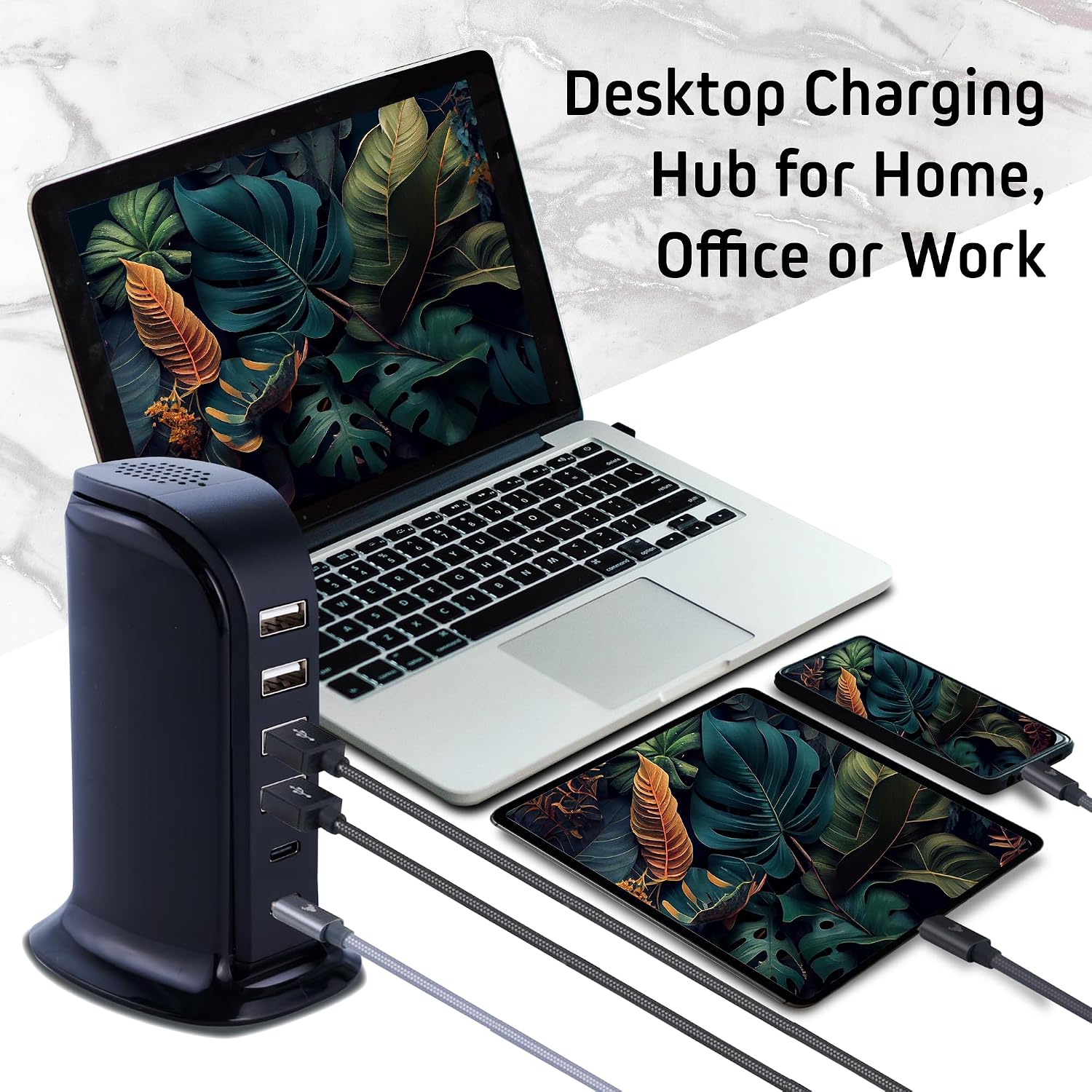
Image 3.1: The charging tower actively powering a variety of electronic devices, demonstrating its multi-device charging capability.

Image 3.2: An illustration of the charging tower providing fast charging to multiple devices, including a laptop and smartphone, simultaneously.
4. Informació de seguretat
The ChargeWorx Multi-Port USB Charger Tower is designed with integrated safety features to protect your devices and the charging station itself. These protections ensure a safe charging experience.
- Protecció de sobrecàrrega: Prevents devices from being overcharged, extending battery life.
- Protecció contra sobretemperatura: Monitors and regulates the internal temperature to prevent overheating.
- Overvoltage Protecció: Mesures de salvaguarda contra el volum excessiutage entrada.
- Protecció contra sobreintensitat: Protegeix contra el flux de corrent excessiu.
- Protecció de sobrecàrrega: Evita els danys causats per un excés de potència.
- Protecció contra curtcircuits: Talla automàticament l'alimentació en cas de curtcircuit.
- Fire-Resistant Shell: La c exteriorasing is constructed from fire-resistant materials for added safety.

Image 4.1: A visual representation of the various safety certifications and protections integrated into the charging station.
5. Manteniment
To ensure the longevity and optimal performance of your ChargeWorx Multi-Port USB Charger Tower, follow these simple maintenance guidelines:
- Neteja: Disconnect the charger from the power outlet before cleaning. Use a soft, dry cloth to wipe the exterior. Do not use liquid cleaners or abrasive materials.
- Emmagatzematge: Quan no l'utilitzeu, emmagatzemeu el carregador en un lloc fresc i sec, lluny de la llum solar directa i de temperatures extremes.
- Cura del cable: Avoid bending or crimping the power cable excessively. Ensure cables are not tangled to prevent damage.
- Ventilació: Do not block the ventilation openings on the charger. Ensure it is placed in an area with good airflow to prevent heat buildup.
6. Solució De Problemes
If you encounter issues with your ChargeWorx Multi-Port USB Charger Tower, please refer to the following common troubleshooting steps:
- Sense energia:
- Ensure the power cable is securely plugged into both the charging tower and the wall outlet.
- Verifiqueu que la presa de corrent funciona connectant-hi un altre dispositiu.
- El dispositiu no es carrega:
- Check if the USB cable connecting your device to the charger is securely plugged in at both ends.
- Try using a different USB cable to rule out a faulty cable.
- Attempt to charge a different device to determine if the issue is with the charger or the original device.
- Ensure your device is compatible with USB charging standards.
- Càrrega lenta:
- While the charger supports fast charging, actual charging speed can depend on your device's capabilities and the cable used. Ensure your device and cable support fast charging.
- Charging multiple devices simultaneously may distribute the total 40W output, potentially affecting individual port speeds.
- Sobreescalfament:
- Ensure the charger is placed in a well-ventilated area and its vents are not obstructed.
- If the charger feels excessively hot, disconnect it immediately and allow it to cool down before resuming use.
7. Especificacions
| Característica | Detall |
|---|---|
| Marca | CHARGEWORX |
| Número de model | CX2107 |
| Tipus de connector | USB Type A (4 ports), USB Type C (2 ports) |
| Ports USB totals | 6 |
| Wat totaltage | 40W |
| Entrada Voltage | 240 Volts |
| Vol. De sortidatage | 5 Volts |
| Ampedat | 6 Amps |
| Característica especial | Fast Charging, Surge Protection, Fire-Resistant Shell |
| Pes de l'article | 0.4 lliures |
| Dimensions | Disseny de torre compacta |
8. Garantia i Suport
This ChargeWorx Multi-Port USB Charger Tower (Model CX2107) comes with a Garantia del fabricant de 90 dies. Aquesta garantia cobreix els defectes de materials i de mà d'obra en ús normal.
For warranty claims, technical support, or any product-related inquiries, please contact the manufacturer, Chargeworx, directly. Refer to the product packaging or the official Chargeworx weblloc web per obtenir la informació de contacte més actualitzada.
Si us plau, conserveu el comprovant de compra per al servei de garantia.