
VIRAN d7a1caef-f423-4bf6-85f0-f23446f4122c
VIRAN Smartwatch User Manual
Model: d7a1caef-f423-4bf6-85f0-f23446f4122c
Introducció
Thank you for choosing the VIRAN Smartwatch. This manual provides essential information for setting up, operating, and maintaining your device. Please read it carefully to ensure optimal performance and longevity of your smartwatch.

Image: The VIRAN Smartwatch, showcasing both the vibrant orange and sleek black strap options. The watch face displays time, date, weather, and health metrics like heart rate and steps.
Contingut del paquet
Assegureu-vos que tots els elements siguin presents al paquet:
- VIRAN Smartwatch
- Cable de càrrega
- Watch Strap (Orange and Black included)
- Manual d'usuari (aquest document)
Configuració
1. Càrrega del rellotge intel·ligent
Abans del primer ús, carrega completament el teu rellotge intel·ligent. Connecta el cable de càrrega magnètic als punts de càrrega de la part posterior del rellotge i connecta l'extrem USB a un adaptador de corrent (no inclòs) o al port USB d'un ordinador.
- Temps de càrrega: Aproximadament 2 hores per a una càrrega completa.
- Battery Life: Up to 45 days standby, 5-10 days daily use, 3-5 days heavy use.

Image: The smartwatch display showing a charging icon, indicating the device is receiving power. This image illustrates the battery life capabilities.
2. Instal·lació i emparellament de l'aplicació
To unlock the full potential of your VIRAN Smartwatch, download and install the companion app on your smartphone. The app is compatible with both Android and iOS devices.
- Scan the QR code in the manual or on the watch screen (if available) or search for the app name (usually mentioned in the quick start guide) in your phone's app store.
- Instal·leu l'aplicació i creeu un compte si se us demana.
- Activa el Bluetooth al teu telèfon intel·ligent.
- Open the app and follow the on-screen instructions to search for and pair with your VIRAN Smartwatch. Ensure the watch is powered on and near your phone.
- Confirma la sol·licitud d'emparellament tant al telèfon com al rellotge intel·ligent.
Instruccions de funcionament
Navegació bàsica
- Botó d'encesa: Press and hold to power on/off. Short press to return to the watch face or wake the screen.
- Pantalla tàctil: Swipe left/right to navigate between main functions (e.g., health data, sports modes). Swipe up/down for quick settings or notifications. Tap to select.

Image: A close-up of the smartwatch's 1.96-inch AMOLED display, highlighting its vibrant colors and clear visibility. The screen shows various data points including time, date, temperature, steps, and heart rate.
Característiques clau
Trucades i notificacions per Bluetooth
Once paired, your smartwatch can make and receive calls directly. It also displays notifications from your smartphone applications.
- Contestar trucades: Tap the green phone icon on the watch screen when a call comes in.
- Fer trucades: Use the dial pad or contact list on the watch (synced from your phone) to initiate calls.
- Notificacions: Swipe down from the watch face to view recent messages and alerts.

Image: The smartwatch displaying an incoming call and message notifications from various social media and communication apps. This illustrates the Bluetooth call and smart notification capabilities.
Vigilància de la salut
The smartwatch continuously monitors various health metrics. For accurate readings, ensure the watch is worn snugly on your wrist.
- Freqüència cardíaca: Seguiment de la freqüència cardíaca en temps real.
- Oxigen en sang (SpO2): Mesura els nivells de saturació d'oxigen a la sang.
- Pressió arterial: Proporciona lectures estimades de la pressió arterial.
- Monitor de son: Tracks sleep patterns (deep sleep, light sleep, awake time) when worn during sleep.

Image: A visual representation of the smartwatch's 24/7 health monitoring capabilities, including heart rate, blood pressure, and blood oxygen. Below, a graphic illustrates the sleep monitoring function, showing deep sleep, light sleep, and awake periods.
Modes esportius
Select from over 100 sports modes to track your workouts accurately. The watch records data such as steps, calories burned, and distance.
- To start a workout: Navigate to the "Sports" section, select your activity, and tap to begin.
- To end a workout: Swipe or press the designated button (refer to on-screen prompts) to pause or end the activity.

Image: The smartwatch displaying various sports icons, representing the 100+ available sports modes. This image emphasizes the watch's ability to monitor scientific data for effective training.
Altres Funcions
- Assistent de veu AI: Interact with your watch using voice commands for tasks like checking weather or controlling music.
- Control de música: Controla la reproducció de música al teu telèfon intel·ligent directament des del rellotge.
- Pronòstic del temps: Rep actualitzacions meteorològiques en temps real.
- Despertador: Estableix alarmes per als recordatoris.
- Recordatori sedentari: Rep alertes quan hagis estat inactiu durant massa temps.
- Cerca el telèfon: Localitza el teu telèfon intel·ligent emparellat fent-lo sonar.
- Calculadora: Funcions aritmètiques bàsiques.

Image: The smartwatch screen showing a call interface and an AI voice assistant prompt. This highlights the convenience of Bluetooth calling and voice commands.
Manteniment
Neteja
- Netegeu el rellotge i la corretja regularment amb un drap suau i sec.amp tela.
- Eviteu utilitzar productes químics aggressivs o netejadors abrasius.
- Assegureu-vos que els contactes de càrrega estiguin nets i secs abans de carregar.
Resistència a l'aigua
The VIRAN Smartwatch is 5ATM and IP68 waterproof, designed to withstand splashes, rain, and short periods of submersion. It is suitable for swimming in shallow water but not for diving or high-pressure water activities.
- No accioneu els botons sota l'aigua.
- Asseca bé el rellotge després de l'exposició a l'aigua.
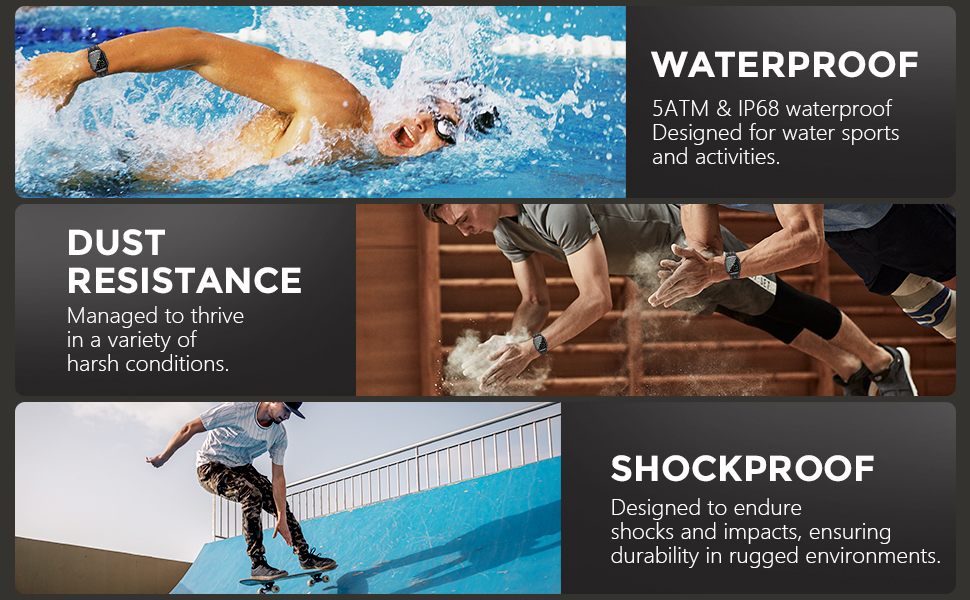
Image: Three panels illustrating the watch's durability: a swimmer demonstrating its waterproof capability, a person in a dusty environment for dust resistance, and a skateboarder for shockproof design. This highlights the watch's robust military-grade construction.
Resolució de problemes
| Problema | Possible solució |
|---|---|
| El rellotge no s'encén | Assegureu-vos que el rellotge estigui completament carregat. Premeu i manteniu premut el botó d'engegada durant uns segons. |
| No es pot emparellar amb el telèfon |
|
| Lectures de salut inexactes | Ensure the watch is worn snugly on your wrist, not too loose or too tight. Clean the sensor on the back of the watch. Note that these readings are for reference and not for medical diagnosis. |
| No apareixen notificacions |
|
| Durada de la bateria curta | Reduce screen brightness, disable unnecessary features (e.g., always-on display), and limit frequent health monitoring if not needed. |
Especificacions
| Característica | Detall |
|---|---|
| Número de model | d7a1caef-f423-4bf6-85f0-f23446f4122c |
| Mostra | 1.96-inch AMOLED HD Touchscreen (410 x 502 resolution) |
| Connectivitat | Bluetooth |
| Capacitat de la bateria | Polímer de liti de 350 mAh |
| Resistència a l'aigua | 5ATM & IP68 |
| Sistema operatiu | Android (compatible) |
| Característiques especials | Sleep Monitoring, Blood Pressure Monitor, Activity Tracker, Alarm Clock, Calorie Tracker, Heart Rate Monitor, Blood Oxygen Monitor, 100+ Sports Modes, Bluetooth Calling, AI Voice Assistant, Music Control, Weather Forecast, Calculator, Find Phone, Sedentary Reminder. |
| Durabilitat | Military-grade composite materials, shock-resistant hardened glass, dust-proof, anti-impact, -40°C to 70°C temperature resistance. |
Garantia i Suport
VIRAN is committed to providing high-quality products and excellent customer service.
- Garantia: VIRAN offers a 2-year warranty on this product. Please retain your proof of purchase for warranty claims.
- Atenció al client: For any questions or support needs, please contact VIRAN customer service via Amazon. We offer 24-hour online customer service.

Image: The smartwatch displaying a sports mode interface, indicating active tracking. This image represents the product's functionality and the brand's commitment to user experience.
Documents relacionatsd7a1caef-f423-4bf6-85f0-f23446f4122c


Ask a question about this manual
Ask about setup, troubleshooting, compatibility, parts, safety, or missing instructions. Manuals+ will review the question and use this page’s manual context to help answer it.