
1. Introducció
This manual provides detailed instructions for the assembly, operation, and maintenance of your FLEXISPOT Height-Adjustable Electric Desk, Model QS2LW-1811. Please read this manual thoroughly before use to ensure proper function and safety. This L-shaped desk features a robust 4-leg design with dual motors for stable height adjustment, offering a versatile workspace for various activities.

Figure 1: FLEXISPOT L-shaped Height-Adjustable Electric Desk.
2. Instruccions de seguretat
Per evitar lesions o danys al producte, seguiu les següents pautes de seguretat:
- Font d'alimentació: Use only AC100-240V, Frequency 50/60Hz.
- Entorn de funcionament: Suitable for indoor use only, within a temperature range of 0-40°C.
- Perill d'incendi: Keep the desk away from open flames and heat sources.
- Neteja: Always unplug the desk before cleaning. Use a damp cloth and avoid water entering electrical components. Regularly check and tighten all screws.
- Instal·lació: Ensure correct installation using only manufacturer-provided accessories. Maintain a safety gap around moving parts.
- Seguretat dels nens: Mantingueu les peces petites allunyades dels nens per evitar perills d'asfixia.
- Agents de neteja: Use only non-corrosive, non-abrasive cleaners.
- Embalatge: Handle packaging cautiously to avoid suffocation risks. Retain packaging for future reference.
- Transport: For transportation, secure all parts, unplug the desk, and use multiple people for lifting.

Figure 2: Important safety warnings in multiple languages.
3. Muntatge i muntatge
The FLEXISPOT Height-Adjustable Electric Desk is designed for quick and straightforward assembly. It comes with detailed step-by-step instructions and a complete set of tools. Pre-drilled holes simplify the process significantly.
3.1 Contingut del paquet
Before beginning assembly, ensure all components are present and undamaged. The package typically includes:
- Desktop sections (L-shaped)
- Lifting columns (4 legs)
- Feet for the lifting columns
- Components de la barra transversal/marc
- Caixa de control
- Hand control panel
- Adaptador d'alimentació i cables
- Ferramenteria de muntatge (cargols, perns, etc.)
- Eines per al muntatge
3.2 Passos de muntatge
Follow the included graphical instructions for precise assembly. A general overview del procés és el següent:
- Attach the feet to the bottom of each lifting column.
- Connect the lifting columns to the main crossbar and frame components.
- Secure the control box to the designated area on the frame.
- Carefully place the desktop sections onto the assembled frame and secure them using the provided screws and pre-drilled holes.
- Connect all necessary cables from the motors to the control box and then to the hand control panel.
- Mount the hand control panel in an easily accessible location on the desk.

Figure 3: Assembly diagram for the desk frame and desktop.
The desk features strong steel legs and a solid 4-leg structure, ensuring stability even at its highest settings.

Figure 4: Detail of the headphone hook and robust steel legs.

Figure 5: The desk's dual-stage legs provide continuous height adjustment.

Figure 6: The 4-leg solid structure ensures stability and safety, tested for over 20,000 cycles.
4. Instruccions de funcionament
Your FLEXISPOT electric desk offers flexible height adjustment and smart control features.
4.1 Ajust d'alçada
The desk's height can be adjusted from 72 cm to 117 cm (approximately 28.3 inches to 46 inches). This range allows for comfortable sitting or standing positions for various users and activities.
4.2 Smart Hand Control Panel
The intelligent hand control panel allows for precise height adjustments and memory presets.
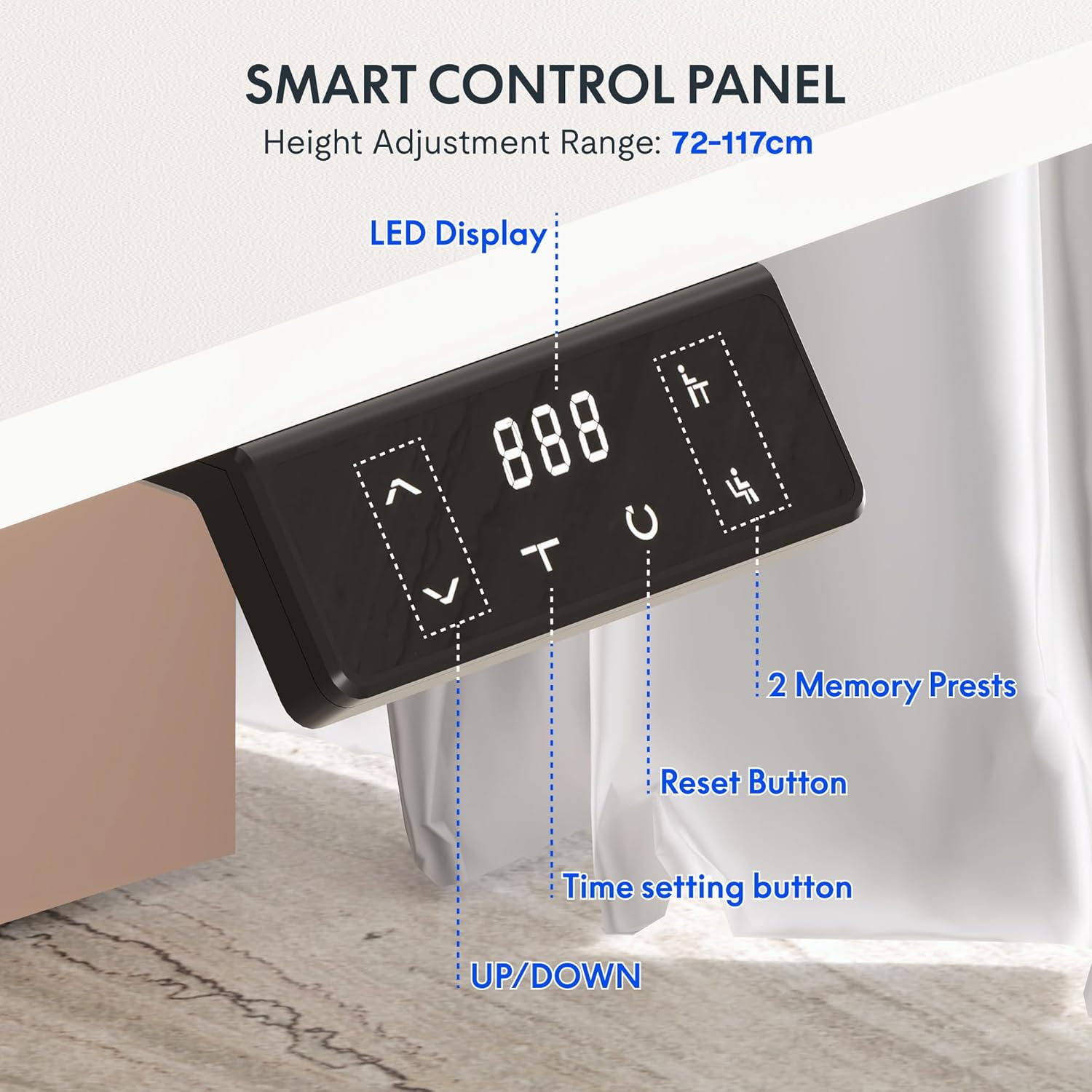
Figure 7: Smart Control Panel features.
- Pantalla LED: Mostra l'alçada actual de l'escriptori en centímetres.
- UP/DOWN Buttons (< / >): Press and hold to move the desk up or down to your desired height.
- Preajustos de memòria (1, 2): To save a preferred height, adjust the desk to the desired position, then press and hold one of the memory buttons (1 or 2) until the display flashes or beeps. To recall a saved height, simply press the corresponding memory button.
- Reset Button (C): Used to reset the desk to its lowest position or clear error codes. Typically, press and hold until the desk moves to its lowest point and resets.
- Time Setting Button (T): This button may be used for setting reminders to stand or sit, depending on the specific model's features. Refer to the detailed manual for specific time setting functions.
4.3 Dual Motor Stabilization
The desk is equipped with advanced dual motor technology, providing an impressive load capacity of up to 80 kg. This ensures smooth, even, and stable height adjustment, even when the desk is fully loaded with equipment.
5. Manteniment
Regular maintenance ensures the longevity and optimal performance of your electric desk.
- Neteja: Unplug the desk before cleaning. Use a soft, damp cloth to wipe down surfaces. Avoid harsh chemicals or abrasive cleaners.
- Estancament del cargol: Reviseu i estrenyeu periòdicament tots els cargols i perns per garantir la integritat estructural.
- Gestió de cables: Ensure all cables are neatly organized and not pinched or strained.
- Capacitat de pes: Do not exceed the maximum weight recommendation of 80 kg to prevent damage to the motors and frame.
The desktop features protective rounded edges, which also contribute to durability and user safety.

Figure 8: Protective rounded edges of the desktop.
6. Solució De Problemes
Si teniu problemes amb el vostre escriptori, consulteu els següents problemes i solucions habituals:
- L'escriptori no es mou:
- Comproveu si el cable d'alimentació està ben connectat tant a l'escriptori com a la presa de corrent.
- Assegureu-vos que tots els cables del motor estiguin connectats correctament a la caixa de control.
- Press the Reset button (C) and hold until the desk moves to its lowest position and resets.
- Moviment desigual:
- Perform a reset procedure as described above.
- Assegureu-vos que l'escriptori no estigui sobrecarregat i que el pes estigui distribuït uniformement.
- Codi d'error a la pantalla:
- Refer to the specific error code in the detailed manual provided with your product. Often, a reset (pressing and holding 'C') can clear minor errors.
- Unplug the desk for 10 minutes, then plug it back in and try again.
- Soroll durant el funcionament:
- A slight motor sound is normal during adjustment.
- If the noise is excessive or unusual, check for loose screws or obstructions.
If problems persist after attempting these solutions, please contact FLEXISPOT customer support.
7. Especificacions
| Característica | Especificació |
|---|---|
| Marca | FLEXISPOT |
| Número de model | QS2LW-1811 |
| Mida d'escriptori | 180 x 110 cm (L-shaped) |
| Interval d'alçada ajustable | 72 cm - 117 cm |
| Dimensions del producte (total) | 110 x 180 x 71 cm (a l'alçada més baixa) |
| Pes de l'article | 30 quilos |
| Recomanació de pes màxim | 80 quilos |
| Material base | Acer d'aliatge |
| Característiques especials | Electric Height Adjustment, Dual Motors, Memory Presets |
| Color | Blanc |
| Muntatge requerit | Sí |

Figure 9: Desk dimensions and adjustable height range.
8. Garantia i Suport
8.1 Informació de la garantia
For detailed warranty information, please refer to the warranty card included with your product or visit the official FLEXISPOT website. Warranty terms typically cover manufacturing defects and motor malfunctions under normal use conditions.
8.2 Atenció al client
If you have any questions, require technical assistance, or need to report an issue, please contact FLEXISPOT customer support through their official website or the retailer from whom you purchased the product. Please have your model number (QS2LW-1811) and purchase date ready when contacting support.