
Introducció
Thank you for choosing the Vivitar Singimals Kids Karaoke Speaker. This manual provides essential information for the safe and effective use of your new karaoke speaker. Please read it thoroughly before operation and retain it for future reference.
Què hi ha a la caixa:
- Singimals Kids Karaoke Speaker (Asher The Fox)
- Micròfon per cable
- Cable de càrrega
- Manual d'usuari
Producte acabatview
The Vivitar Singimals Kids Karaoke Speaker is designed for interactive fun, featuring a 5W speaker, Bluetooth v5.1 connectivity, and multicolor LED lighting. It offers up to 12 hours of playtime on a single charge.
Característiques principals:
- 5W Speaker: Delivers clear and crisp audio for an engaging karaoke experience.
- Bluetooth v5.1: Ensures stable and efficient wireless connection to compatible devices.
- Temps de joc de 12 hores: Enjoy extended entertainment with the built-in rechargeable battery.
- Il·luminació LED multicolor: Dynamic lights that pulse and dance to the music, enhancing the performance atmosphere.
- Disseny portàtil: Compact and lightweight for easy transport and use anywhere.
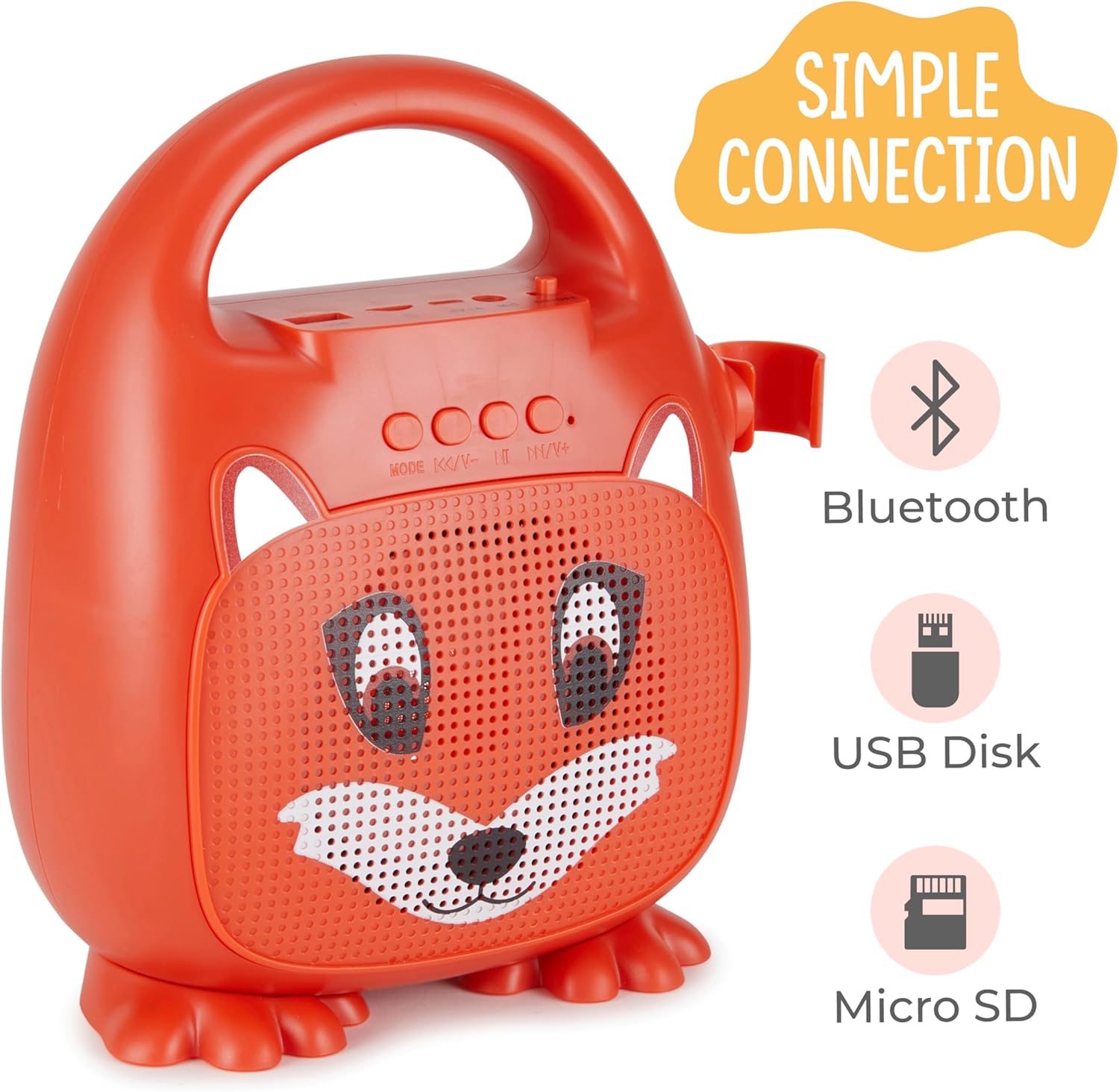
Figura 1: Frontal view of the Singimals Kids Karaoke Speaker (Asher The Fox).
Configuració
1. Càrrega de l'altaveu:
Before first use, fully charge the speaker. Connect the provided charging cable to the speaker's charging port (usually labeled "5V 1A" or similar) and the other end to a USB power adapter (not included) or a computer's USB port. The charging indicator light will show the charging status.
2. Connecting the Microphone:
Insert the microphone's plug into the MIC input port on the speaker. Ensure the microphone's ON/OFF switch is in the 'ON' position when in use.

Figure 2: Wired Microphone with ON/OFF switch.
3. Encendre/apagar:
Locate the ON/OFF switch on the speaker. Slide it to the 'ON' position to power on the device. Slide it to 'OFF' to power down.
4. Vinculació Bluetooth:
- Power on the karaoke speaker. It will automatically enter Bluetooth pairing mode, indicated by a flashing LED light.
- Al telèfon intel·ligent o a un altre dispositiu amb Bluetooth, aneu a la configuració de Bluetooth.
- Cerca available devices and select "Singimals" (or similar name) from the list.
- Once connected, the LED indicator on the speaker will stop flashing and remain solid, and you may hear an audible confirmation.
5. USB Disk and Micro SD Card Playback:
Inseriu una unitat flash USB o una targeta Micro SD (amb àudio precarregat) files) into the respective ports on the speaker. The speaker will automatically detect the media and begin playback. Use the 'MODE' button to switch between input sources (Bluetooth, USB, Micro SD).

Figure 3: Control panel and input ports.
Instruccions de funcionament
Botons de control:
| Botó | Funció |
|---|---|
| MODE | Switches between input modes (Bluetooth, USB, Micro SD). |
| Pista anterior / Baixada de volum | Premeu curt per anar a la pista anterior. Premeu llargament per baixar el volum. |
| Reproduir / Pausa | Plays or pauses the current audio track. |
| Següent seguiment / augment de volum | Premeu curt per a la següent pista. Premeu llargament per augmentar el volum. |
Il·luminació LED:
The speaker features multicolor LED lights that illuminate the speaker grille. These lights automatically pulse and change colors with the music. There is no separate control for the LED lighting; it operates automatically when the speaker is on.
Manteniment
- Neteja: Wipe the speaker and microphone with a soft, dry cloth. Do not use abrasive cleaners or solvents.
- Emmagatzematge: Guardeu el dispositiu en un lloc fresc i sec, allunyat de la llum solar directa i de temperatures extremes.
- Cura de la bateria: To prolong battery life, charge the speaker regularly, even if not in frequent use. Avoid fully discharging the battery for extended periods.
- Exposició a l'aigua: Aquest dispositiu no és impermeable. Mantingueu-lo allunyat de l'aigua i la humitat.
Resolució de problemes
| Problema | Solució |
|---|---|
| L'altaveu no s'encén. | Ensure the ON/OFF switch is in the 'ON' position. Charge the speaker if the battery is depleted. |
| No hi ha so del micròfon. | Check if the microphone is securely plugged into the MIC port. Ensure the microphone's ON/OFF switch is in the 'ON' position. |
| No es pot emparellar per Bluetooth. | Ensure the speaker is in Bluetooth mode (flashing LED). Turn off and on Bluetooth on your device. Move your device closer to the speaker. |
| Mala qualitat de so. | Ensure the audio source is of good quality. Adjust the volume on both the speaker and the connected device. Check for obstructions around the speaker grille. |
Especificacions
| Característica | Detall |
|---|---|
| Marca | Vivitar |
| Número de model | SNG200-FOX |
| Tecnologia de connectivitat | Bluetooth |
| Versió Bluetooth | v5.1 |
| Potència de sortidatage | 5 watts |
| Font d'alimentació | Funciona amb bateria |
| Dimensions de l'article (L x A x A) | 4.72 x 8.7 x 9.25 polzades |
| Pes de l'article | 0.94 quilos |
| Material | Plàstic |
| Entrada d'àudio | Microphone, USB, Micro SD |
Informació de seguretat
- No exposeu el dispositiu a temperatures extremes, llum solar directa ni humitat elevada.
- Mantingueu el dispositiu allunyat de l'aigua i altres líquids.
- No intenteu desmuntar ni modificar el dispositiu. Això anul·larà la garantia i pot causar danys.
- Utilitzeu només el cable de càrrega subministrat.
- Supervise young children during use to ensure safe operation.
- Eviteu escoltar música durant molt de temps a volums alts per evitar danys auditius.
Garantia i Suport
For warranty information and customer support, please refer to the warranty card included with your product or visit the official Vivitar weblloc web. Conserveu el rebut de compra com a comprovant de compra.
Fabricant: Sakar International, Inc.