
Introducció
This manual provides essential information for the proper use and maintenance of your realme 11 5G smartphone. Please read this guide thoroughly before using your device to ensure optimal performance and longevity. Keep this manual for future reference.
Contingut del paquet
Comproveu que el vostre paquet contingui els elements següents:
- Realme 11 5G Smartphone
- Carregador
- USB Type-C Cable (typically included with charger)
- SIM Ejector Tool (typically included)
- Guia d'inici ràpid (normalment inclosa)
- Safety Information and Warranty Card (typically included)
If any items are missing or damaged, please contact your retailer or realme customer support.
Disseny del dispositiu
Familiarize yourself with the physical components of your realme 11 5G.
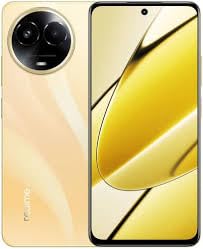
Imatge: Més deview of the realme 11 5G smartphone. This image displays the general form factor of the device, highlighting its sleek design. Note that this is a general representation; specific button and port placements are detailed below.
- Càmera frontal: Situat a la part superior central de la pantalla.
- Auricular: Positioned above the front camera.
- Botons de volum: Typically on the left side of the device.
- Botó d'encesa: Normalment al costat dret, sovint integrat amb el sensor d'empremtes dactilars.
- Safata de targeta SIM/microSD: Located on the side, accessible with the SIM ejector tool.
- Port USB tipus C: A la part inferior per a la càrrega i la transferència de dades.
- Ponent: Situat a la part inferior.
- Mòdul de càmera principal: On the rear, housing the 108MP primary and 2MP secondary cameras.
Configuració
1. Insert SIM and microSD Card
- Localitza la safata de la targeta SIM al lateral del dispositiu.
- Introduïu l'eina d'expulsió de la SIM al forat petit que hi ha al costat de la safata i premeu suaument fins que la safata surti.
- Col·loqueu la targeta (o targetes) nano-SIM i/o la targeta microSD a les ranures designades de la safata. Assegureu-vos que els contactes daurats estiguin mirant cap avall.
- Torneu a inserir la safata al telèfon amb cura.
2. Engegada inicial
- Mantingueu premut el botó d'engegada fins que aparegui el logotip de Realme.
- Seguiu les instruccions que apareixen a la pantalla per completar la configuració inicial, inclosa la selecció d'idioma, la connexió Wi-Fi, la configuració del compte de Google i la configuració de seguretat.
3. Carregant la bateria
- Connect the USB Type-C cable to the phone's charging port and the other end to the provided charger.
- Connecteu el carregador a una presa de corrent.
- L'indicador de càrrega apareixerà a la pantalla.
Instruccions de funcionament
Power On/Off/Restart
- Encès: Press and hold the Power button until the device vibrates and the realme logo appears.
- Apagar: Press and hold the Power button for a few seconds, then tap "Power off" on the screen.
- Reinicia: Press and hold the Power button for a few seconds, then tap "Restart" on the screen.
Reconeixement d'empremtes digitals
- To set up fingerprint unlock, go to Settings > Password & Security > Fingerprint.
- Seguiu les instruccions a la pantalla per registrar la vostra empremta digital.
- To unlock, place your registered finger on the fingerprint sensor (integrated with the Power button or in-display).
Ús de la càmera
- Obre l'aplicació Càmera des de la pantalla d'inici o des del calaix d'aplicacions.
- Seleccioneu el mode desitjat (Foto, Vídeo, Retrat, Nit, etc.).
- Toqueu el botó de l'obturador per capturar una foto o iniciar/aturar la gravació de vídeo.
- Use pinch-to-zoom gestures to adjust zoom levels.
- Tap the switch icon to toggle between front and rear cameras.
Connectivitat
- Wi-Fi: Vés a Configuració > Wi-Fi, turn on Wi-Fi, and select your network. Enter the password if required.
- Bluetooth: Vés a Configuració > Bluetooth, turn on Bluetooth, and pair with available devices.
- NFC: For contactless payments and data transfer, enable NFC in Settings > Connection & Sharing > NFC.
- Dades mòbils (5G/4G/3G): Assegureu-vos que la targeta SIM estigui activa i que les dades mòbils estiguin habilitades a Configuració > Xarxa mòbil.
Manteniment
Actualitzacions de programari
- Comproveu regularment si hi ha actualitzacions de programari per assegurar-vos que el dispositiu tingui les funcions i els pegats de seguretat més recents. Aneu a Configuració > Quant al dispositiu > Actualitzat.
- Connect to a stable Wi-Fi network and ensure sufficient battery charge before performing updates.
Neteja del teu dispositiu
- Feu servir un drap suau i sense borrissol per netejar la pantalla i la carcassa del telèfon.
- Eviteu l'ús de productes químics agressius, materials abrasius o aerosols.
- Per a taques persistents, lleugerament dampen el drap amb aigua.
Cura de la bateria
- Eviteu exposar el dispositiu a temperatures extremes.
- Feu servir només el carregador i el cable originals que s'inclouen amb el dispositiu.
- Do not fully discharge the battery frequently; partial charges are generally better for lithium-ion batteries.
Resolució de problemes
| Problema | Solució |
|---|---|
| El dispositiu no s'encén. | Ensure the battery is charged. Connect the charger and wait a few minutes before attempting to power on again. If unresponsive, try a forced restart (usually by holding Power and Volume Down buttons simultaneously for 10-15 seconds). |
| Les aplicacions es bloquegen o es congelen. | Tanca l'aplicació problemàtica i torna-la a obrir. Esborra la memòria cau de l'aplicació (Configuració > Aplicacions > [Nom de l'aplicació] > Emmagatzematge > Esborra la memòria cau). If the issue persists, restart the device. |
| Poor network signal or no connectivity. | Check if Airplane Mode is off. Ensure your SIM card is properly inserted. Try restarting the device. If the issue persists, contact your network provider. |
| El sensor d'empremtes dactilars no funciona. | Ensure your finger and the sensor are clean and dry. Re-register your fingerprint in settings. If the issue continues, try restarting the device. |
For further assistance, refer to the official realme support weblloc o contacteu amb el servei d'atenció al client.
Especificacions
| Característica | Detall |
|---|---|
| Model | realme 11 5G |
| Processador | Octa-core MediaTek Dimensity 6100+ |
| RAM | 8 GB |
| Emmagatzematge intern | 128GB (expandable via microSD with dedicated slot) |
| Mostra | 6.72-inch FHD+ (2400x1080) Touchscreen, 120 Hz Refresh Rate |
| Càmera posterior | 108-megapixel (f/1.75) primary + 2-megapixel (f/2.4) depth sensor |
| Càmera frontal | 16-megapixel (f/2.45) |
| Sistema operatiu | Android 13 with Realme UI 4.0 |
| Bateria | 5000 mAh de ions de liti |
| Suport SIM | Nano-SIM dual |
| Connectivitat | Wi-Fi, GPS, Bluetooth v5.20, NFC, USB Type-C, 3G, 4G, 5G |
| Sensors | Accelerometer, Ambient Light, Compass/Magnetometer, Gyroscope, Proximity, In-display Fingerprint |
| Dimensions (HxWxT) | 165.70 x 76.00 x 8.05 mm |
| Pes | 190 grams |
| Resistència a l'aigua | Resistent a l'aigua |
Informació de seguretat
Si us plau, observeu les següents pautes de seguretat per evitar danys al dispositiu o lesions personals:
- No desmunteu, repareu o modifiqueu el dispositiu.
- Feu servir només carregadors i accessoris aprovats per RealMe.
- Eviteu exposar el dispositiu a temperatures extremes, a la llum solar directa o al foc.
- No col·loqueu el dispositiu a prop de camps magnètics forts.
- Mantingueu el dispositiu i els seus accessoris fora de l'abast dels nens.
- Desfeu-vos del dispositiu i la bateria de manera responsable d'acord amb la normativa local.
Garantia i Suport
Your realme 11 5G device comes with a limited warranty. Please refer to the warranty card included in your package for detailed terms and conditions. You can also visit the official realme weblloc per obtenir informació sobre la garantia i registrar el vostre producte.
For technical support, troubleshooting, or service inquiries, please contact realme customer service through their official channels. You may need your device's serial number or proof of purchase.
Official realme Support: https://www.realme.com/in/support