
Introducció
This manual provides detailed instructions for the CUPEISI CP20 Android 15 Tablet. Please read this guide thoroughly before using your device to ensure proper operation and to maximize its features. Keep this manual for future reference.
Què hi ha a la caixa
Verifiqueu que tots els elements siguin presents al paquet:
- CUPEISI CP20 Android 15 Tablet
- Teclat Bluetooth
- Ratolí sense fil
- Foldable Protective Cover
- Stylus
- Cable tipus C
- Adaptador de corrent (carregador)
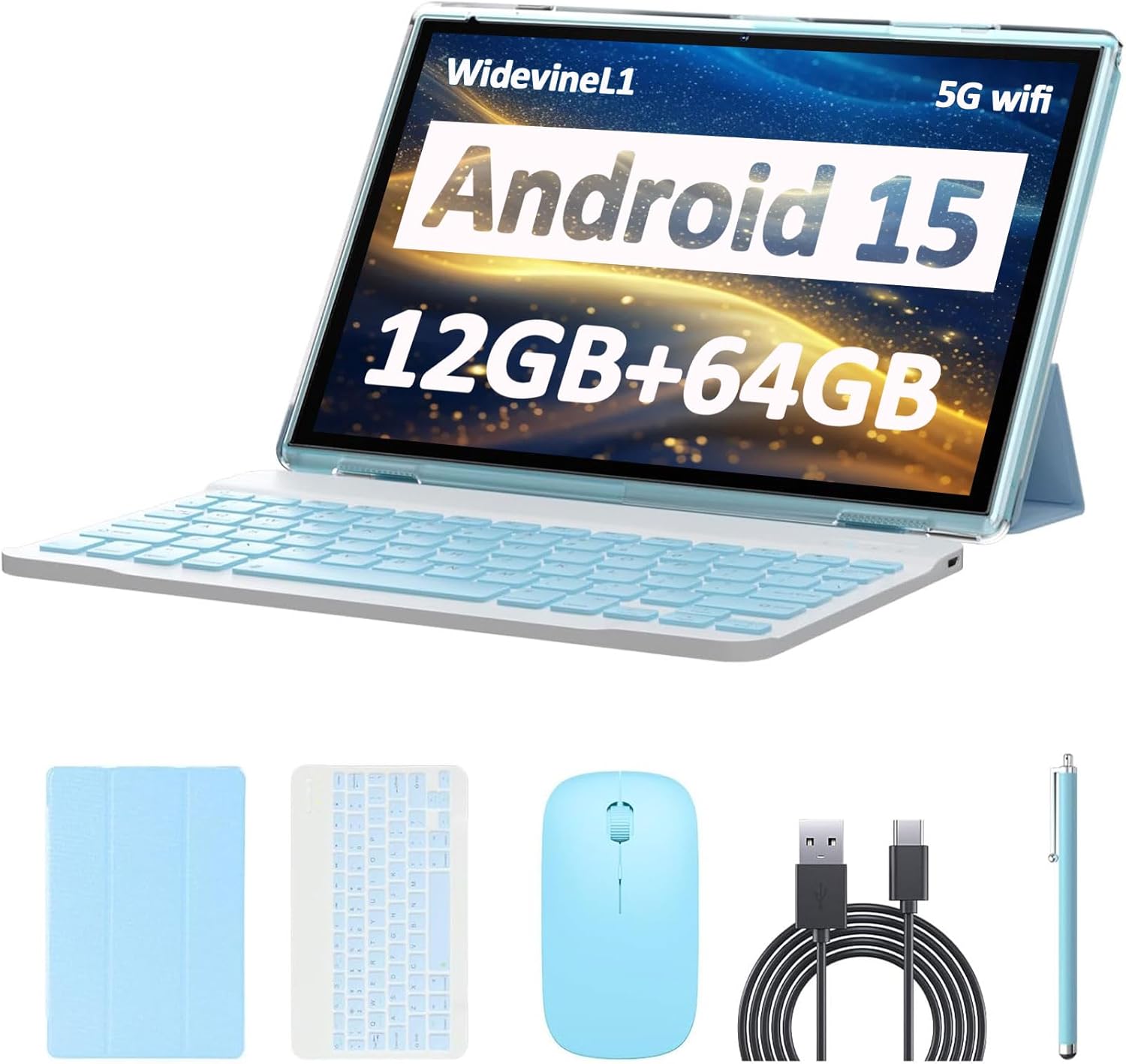
Image: CUPEISI CP20 Tablet shown with its included accessories: keyboard, mouse, stylus, and protective cover.
Producte acabatview
The CUPEISI CP20 tablet is designed for versatility and performance, offering a 2-in-1 experience with its included accessories. Key features include:
- Sistema operatiu Android 15: Experience improved running speeds and enhanced privacy protection.
- Pantalla tàctil IPS HD de 10.1 polzades: A 1280x800 resolution display provides a clear and immersive visual experience.
- Rendiment potent: Equipped with a 1.8GHz Quad-core CPU, 12GB RAM (4GB physical + 8GB expansion), and 64GB ROM, expandable up to 1TB via microSD card.
- Càmeres duals: Features an 8MP rear camera with autofocus and flash, and a 2MP front camera for video calls.
- Connectivitat: Supports 5G Wi-Fi 6 and Bluetooth 5.0 for fast and reliable connections.
- Llarga vida útil de la bateria: A 6000mAh battery provides approximately 6 hours of regular operation and up to 10 hours of standby time.
- Funcionalitat 2 en 1: Easily transform the tablet into a laptop or computer mode with the included Bluetooth keyboard, wireless mouse, and foldable protective case.

Image: Visual representation of the tablet highlighting Android 15, Wi-Fi 6, and Bluetooth 5.0 capabilities.

Image: The tablet in laptop mode with the Bluetooth keyboard and stylus, demonstrating its 2-in-1 functionality.
Configuració
- Carregueu la tauleta: Before first use, fully charge the tablet using the provided Type-C cable and power adapter. Connect the Type-C cable to the tablet's charging port and the adapter to a power outlet. The charging indicator will show the charging status.
- Encès: Press and hold the power button (usually located on the side or top edge) for a few seconds until the screen lights up.
- Configuració inicial: Follow the on-screen prompts to complete the initial setup, including selecting your language, connecting to a Wi-Fi network, and signing in with your Google account.
- Col·loqueu la coberta protectora: Place the tablet into the foldable protective cover for protection and to enable stand modes.
- Connect Bluetooth Keyboard:
- Turn on the Bluetooth keyboard (usually a switch on the keyboard).
- A la tauleta, aneu a Configuració > Dispositius connectats > Bluetooth.
- Assegureu-vos que el Bluetooth estigui habilitat. La tauleta cercarà els dispositius disponibles.
- Select the keyboard from the list of available devices and follow any pairing instructions.
- Connect Wireless Mouse:
- Insert the USB receiver (usually found in the mouse's battery compartment) into the tablet's USB port (you may need an OTG adapter, not specified if included).
- Turn on the wireless mouse. The tablet should automatically detect and connect to the mouse.
Video: A user demonstrating the process of connecting the Bluetooth keyboard to the tablet, showing the tablet's interface for pairing devices and the physical keyboard being turned on.
Instruccions de funcionament
Navegació per pantalla tàctil
- Toca: Touch the screen once to open an app, select an item, or press a button.
- Toca i mantén premut: Press and hold an item to access contextual menus or move items.
- Llisca: Arrossegueu el dit per la pantalla per desplaçar-vos per les llistes o canviar entre les pantalles d'inici.
- Pessigar: Feu servir dos dits per ampliar o reduir fotos, mapes o web pàgines.
Connectivitat Wi-Fi
- Vés a Configuració > Xarxa i Internet > Wi-Fi.
- Activa/desactiva el Wi-Fi On.
- Seleccioneu la xarxa desitjada de la llista i introduïu la contrasenya si se us demana.
Connectivitat Bluetooth
- Vés a Configuració > Dispositius connectats > Bluetooth.
- Commuta el Bluetooth On.
- The tablet will scan for nearby Bluetooth devices. Select the device you wish to pair and follow the on-screen instructions.
Ús de la càmera
- Obriu l'aplicació Càmera.
- Toqueu el botó de l'obturador per fer una foto.
- Canvieu entre la càmera frontal i la posterior mitjançant la icona de la càmera.
- Tap on the screen to focus on a specific area.

Image: A person using the tablet's camera to capture a photo, demonstrating the device's imaging capabilities.
Gestió d'emmagatzematge
- To expand storage, insert a microSD card into the designated slot.
- Vés a Configuració > Emmagatzematge a view internal and external storage usage.
Manteniment
- Cura de la bateria:
- Eviteu descarregar completament la bateria amb freqüència.
- No exposeu la tauleta a temperatures extremes.
- Feu servir només el carregador proporcionat o un carregador compatible certificat.
- Neteja:
- Feu servir un drap suau i sense borrissol per netejar la pantalla i la carcassa.
- No utilitzeu productes químics o materials abrasius.
- Actualitzacions de programari:
- Comproveu regularment si hi ha actualitzacions del sistema a Configuració > Sistema > Actualització del sistema per garantir un rendiment i una seguretat òptims.
Resolució de problemes
| Problema | Possible solució |
|---|---|
| La tauleta no s'encén. | Assegureu-vos que la bateria estigui carregada. Connecteu el carregador i espereu uns minuts abans d'intentar tornar-lo a engegar. |
| No es pot connectar a la Wi-Fi. | Check if Wi-Fi is enabled in settings. Verify the Wi-Fi password. Restart your router and the tablet. |
| Bluetooth accessories not pairing. | Ensure Bluetooth is enabled on both the tablet and the accessory. Make sure the accessory is in pairing mode. Restart both devices. |
| La tauleta va lenta o no respon. | Close unnecessary apps running in the background. Clear cache for frequently used apps. Restart the tablet. Consider a factory reset if issues persist (backup data first). |
| La bateria s'esgota ràpidament. | Reduce screen brightness. Disable Wi-Fi/Bluetooth when not in use. Close background apps. Check for apps consuming excessive power in battery settings. |
Especificacions
| Característica | Detall |
|---|---|
| Marca | CUPEISI |
| Nom del model | CP20 |
| Sistema operatiu | Android 15 |
| Processador | 1.8 GHz Quad-core ARM Cortex |
| RAM | 12 GB (4 GB físic + 8 GB d'expansió) |
| Emmagatzematge intern | 64 GB |
| Emmagatzematge ampliable | Fins a 1 TB mitjançant targeta microSD |
| Mida de la pantalla | 10.1 polzades |
| Resolució de visualització | 1280 x 800 IPS HD |
| Càmera posterior | 8 MP with Autofocus and Flash |
| Càmera frontal | 2 MP |
| Wi-Fi | 5G Wi-Fi 6 (802.11ax) |
| Bluetooth | Bluetooth 5.0 |
| Capacitat de la bateria | Polímer de liti de 6000 mAh |
| Durada de la bateria (mitjana) | 6 hores |
| Port de càrrega | Tipus-C |
| Dimensions (L x W x Thickness) | 6.5 cm de llargada x 9.5 cm d'amplada x 0.3 cm de gruix |
| Accessoris inclosos | Keyboard, Mouse, Foldable Protective Cover, Stylus, Type-C Cable |
Garantia i Suport
The CUPEISI CP20 Tablet comes with a Garantia limitada d'1 any des de la data de compra. Aquesta garantia cobreix els defectes de fabricació i la mà d'obra en condicions d'ús normal.
For warranty claims, technical support, or any inquiries regarding your CUPEISI CP20 Tablet, please contact CUPEISI customer service through the retailer where the product was purchased or refer to the contact information provided in the product packaging.
Si us plau, conserveu el comprovant de compra per validar la garantia.