
Star Micronics MCL32CBI
Manual d'usuari de la impressora tèrmica directa Star Micronics mC-Label3 MCL32CBI
Model: MCL32CBI
Introducció
Aquest manual proporciona informació essencial per a la configuració, el funcionament, el manteniment i la resolució de problemes de la impressora tèrmica directa Star Micronics mC-Label3 MCL32CBI. Llegiu atentament aquest manual abans d'utilitzar la impressora per garantir-ne un funcionament correcte i segur.
Contingut del paquet
Verifiqueu que tots els elements que s'enumeren a continuació s'inclouen al vostre paquet:
- Impressora multifuncional mC-Label3
- Adaptador de CA
- Cable d'alimentació
- Cables USB (CC 1.0 m i CA 1.8 m)
- Cable LAN (1 m)
- Guia de seguretat de la fitxa de configuració senzilla

Imatge: Frontal view de la impressora Star Micronics mC-Label3, mostraasingràcies al seu disseny compacte i a la ranura de sortida d'etiquetes.
Configuració
1. Connexió de la impressora
La impressora mC-Label3 MCL32CBI ofereix múltiples opcions de connectivitat:
- USB-C: Connecteu la impressora directament al vostre PC, dispositiu Android o iOS amb els cables USB-C a USB-C o USB-C a USB-A proporcionats.
- Ethernet (LAN): Per a la connectivitat de xarxa, connecteu la impressora al vostre encaminador o commutador de xarxa amb el cable LAN subministrat.
- Bluetooth: El model MCL32CBI admet connectivitat Bluetooth per a dispositius iOS i Android. Assegureu-vos que el Bluetooth estigui habilitat al dispositiu i emparelleu-lo amb la impressora.

Imatge: Part posterior view de la impressora mC-Label3, destacant els ports LAN, USB i d'alimentació per a diversos tipus de connexió.
2. Carregant suports
La impressora admet diversos tipus de suports, com ara etiquetes sense folre, etiquetes retallades, etiquetes contínues i paper tèrmic per a rebuts.
- Obriu la coberta superior de la impressora aixecant el pestell.
- Col·loqueu el rotlle de suport al compartiment de suport, assegurant-vos que la vora davantera surti des de la part superior.
- Estireu una petita quantitat de suport per sobre del capçal d'impressió i tanqueu la coberta superior de manera segura.
- Assegureu-vos que el suport estigui correctament alineat dins de les guies.

Imatge: De dalt a baix view de la impressora mC-Label3 amb la tapa oberta, que il·lustra el mecanisme intern per carregar paper tèrmic o rotlles d'etiquetes.
Instruccions de funcionament
1. Encès / apagat
Connecteu el cable d'alimentació a la impressora i a una presa de corrent. Premeu el botó d'engegada situat a la part frontal de la impressora per engegar-la. L'indicador lluminós d'estat s'il·luminarà.
2. Impressió d'etiquetes i rebuts
La impressora mC-Label3 MCL32CBI està dissenyada per a la impressió eficient d'etiquetes i rebuts. Admet diverses aplicacions i serveis al núvol.
- Compatibilitat del programari: Funciona perfectament amb aplicacions per a PC, Android i iOS.
- Serveis al núvol: Utilitzeu els serveis al núvol de Star Micronics per dissenyar i gestionar etiquetes.
- Etiqueta d'un sol toc: Aquesta funció permet emmagatzemar rebuts i etiquetes prefabricats per imprimir-los de manera ràpida i senzilla directament des de la impressora.
Imatge: Una mà prement el botó d'alimentació de la impressora mC-Label3, que demostra la impressió d'una etiqueta d'"Gràcies".

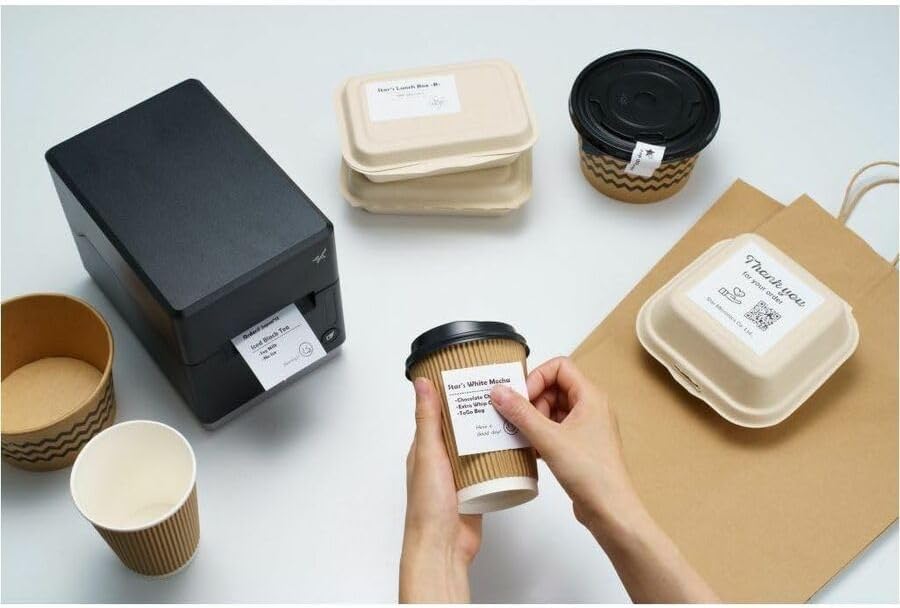
Imatge: La impressora mC-Label3 es mostra en un entorn pràctic, imprimint etiquetes per a envasos d'aliments i tasses de cafè, cosa que il·lustra la seva versatilitat.
Manteniment
1. Neteja de la impressora
Una neteja regular garanteix un rendiment òptim i allarga la vida útil de la impressora.
- Utilitzeu un drap suau i sense pelusa damphumitejat amb alcohol isopropílic per netejar el capçal d'impressió.
- Netegeu l'exterior de la impressora amb un drap suau i sec.
- Eviteu utilitzar netejadors abrasius o dissolvents.
2. Substitució de suports
Quan el rotlle de paper s'hagi esgotat, seguiu les instruccions de càrrega de paper de la secció Configuració per substituir-lo.
3. Reparacions sense esforç
L'mC-Label3 està dissenyada per a reparacions sense esforç, sense eines i amb un manteniment mínim, simplificant qualsevol substitució de components necessària.
Resolució de problemes
Aquesta secció ofereix solucions a problemes comuns que podeu trobar.
| Problema | Causa possible | Solució |
|---|---|---|
| La impressora no s'encén | Cable d'alimentació no connectat; Problema amb la presa de corrent | Assegureu-vos que el cable d'alimentació estigui ben connectat; proveu una altra presa de corrent. |
| Sense sortida d'impressió | Sense suport; Suport carregat incorrectament; Problema amb el controlador | Carregueu suports nous; Torneu a carregar els suports correctament; Torneu a instal·lar els controladors de la impressora. |
| Poca qualitat d'impressió | Capçal d'impressió brut; suports de baixa qualitat | Netegeu el capçal d'impressió; utilitzeu el suport tèrmic recomanat. |
| Problemes de connectivitat | Connexió de cable incorrecta; Bluetooth no emparellat; Configuració de xarxa | Comproveu els cables USB/Ethernet; Torneu a emparellar el Bluetooth; Verifiqueu la configuració de xarxa. |
Especificacions
| Característica | Detall |
|---|---|
| Nom del model | mC-Label3 |
| Número de model de l'article | MCL32CBI |
| Tecnologia d'impressió | Tèrmica directa |
| Sortida de la impressora | Monocrom |
| Velocitat màxima d'impressió en monocrom | 23 ppm |
| Resolució màxima d'impressió en blanc i negre | 203 DPI (203 x 203 DPI) |
| Mitjans impresos | Etiquetes (sense folre, troquelades, contínues), rebut tèrmic |
| Tecnologia de connectivitat | Bluetooth, Cablejat (USB, Ethernet) |
| Interfície del maquinari | USB, Ethernet |
| Dispositius compatibles | PC, Android, iOS |
| Tipus de controlador | iOS, Android |
| Dimensions del producte | 6.7" de profunditat x 5.6" d'amplada x 8.3" d'alçada (17.0 x 14.2 x 21.1 cm) |
| Pes de l'article | 7.2 lliures (3.27 kg) |
| Capacitat d'emmagatzematge de memòria | 64 MB |
| Color | Negre |
| Fabricant | STAR MICRONICS |
| País d'origen | Xina |
Informació de la garantia
La impressora Star Micronics mC-Label3 MCL32CBI inclou una garantia del fabricant. Per conèixer els termes i condicions específics, consulteu la targeta de garantia inclosa al paquet o visiteu el lloc web oficial de Star Micronics. weblloc.
Tipus de garantia: Fabricant
Suport
Per obtenir més ajuda, assistència tècnica o per descarregar els controladors i el firmware més recents, visiteu el lloc web oficial d'assistència de Star Micronics. weblloc o poseu-vos en contacte amb el seu servei d'atenció al client.
Oficial de Star Micronics Weblloc: www.starmicronics.com
Enllaç de suport: www.starmicronics.com/support
Documents relacionatsMCL32CBI


Ask a question about this manual
Ask about setup, troubleshooting, compatibility, parts, safety, or missing instructions. Manuals+ will review the question and use this page’s manual context to help answer it.