
Vrriis Wireless Extender 1TX+1 RX
Vrriis Wireless HDMI Transmitter and Receiver User Manual
1. Introducció
The Vrriis Wireless HDMI Transmitter and Receiver system provides a seamless solution for transmitting 4K video and audio wirelessly over long distances with minimal latency. Equipped with H.265 encoding technology, this system supports video input/output resolutions up to 4K@30Hz and a 60Mbps code rate, enabling a high-quality home theater experience or professional monitoring setup. Its plug-and-play design and dual-band 2.4/5GHz transmission ensure stable and smooth performance.
2. Llista d'embalatge
Si us plau, verifiqueu que tots els elements que s'enumeren a continuació estiguin inclosos al vostre paquet:
- Transmissor (TX) x 1
- Receptor (RX) x 1
- Cable USB-C x 2
- Adaptador d'alimentació x 2
- Antena x 4
- Manual d'usuari x 1

Figure 2.1: Package Contents - Transmitter, Receiver, Antennas, USB-C Cables, Power Adapters, and User Manual.
3. Guia de configuració
3.1. Instal·lació d'antenes
Before powering on the devices, securely screw the four antennas onto the designated ports on both the Transmitter (TX) and Receiver (RX) units. Ensure they are firmly attached for optimal signal transmission.
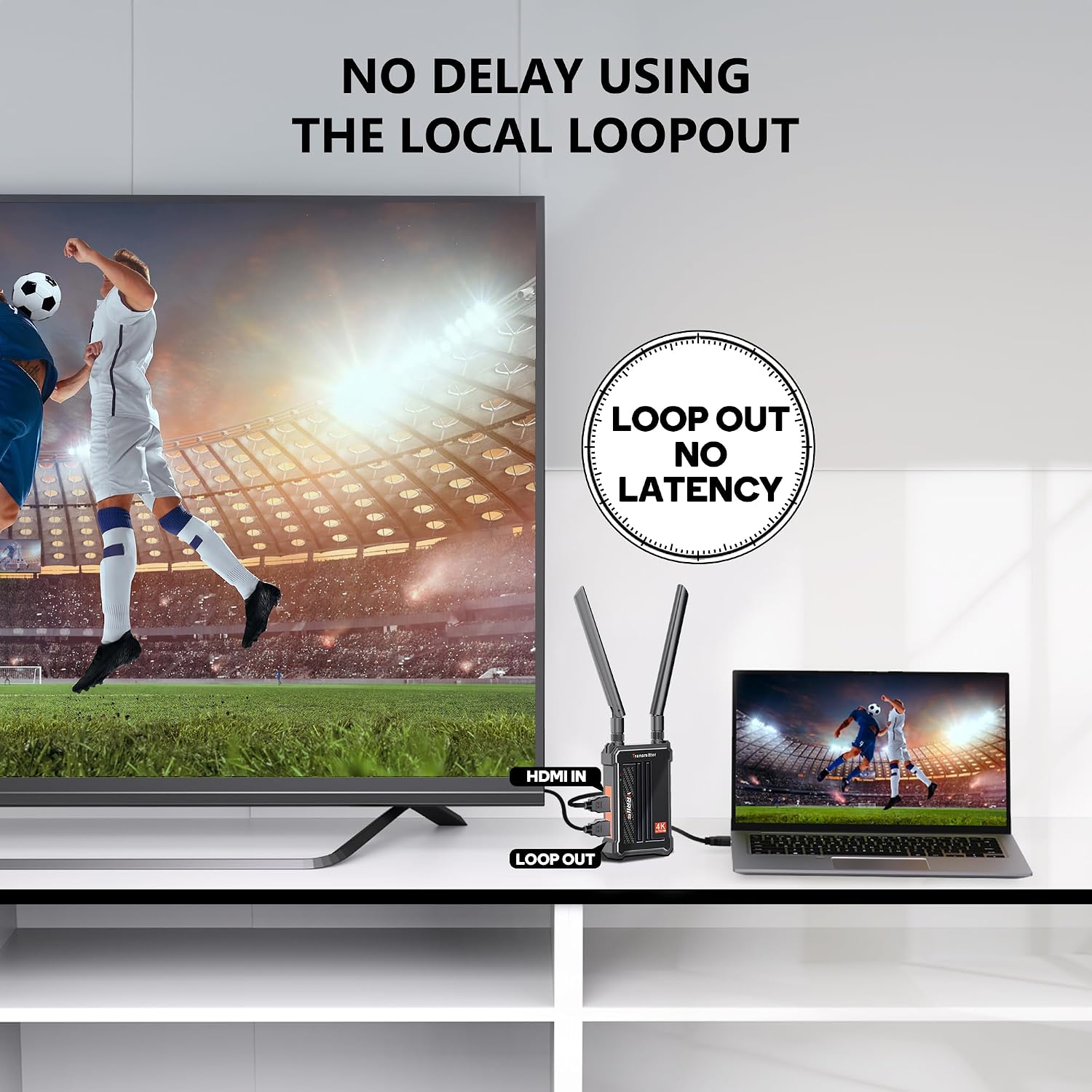
Figure 3.1: Transmitter and Receiver units with antennas attached.
3.2. Connecting the Transmitter (TX)
- Connect one of the provided USB-C cables to the 5V2A USB-C port on the Transmitter (TX) unit and the other end to a power adapter. Plug the adapter into a power outlet.
- Observe the link indicator light on the TX unit. It should turn green, indicating it is powered on and ready.
- Connect an HDMI cable from your signal source (e.g., laptop, camera, DVD player, set-top box) to the HDMI IN port on the Transmitter (TX).
- If you wish to monitor the source locally, connect another HDMI cable from the LOOP OUT port on the TX unit to a local display.

Figure 3.2: Transmitter with HDMI IN and Loop Out ports.
3.3. Connecting the Receiver (RX)
- Connect the second USB-C cable to the 5V2A USB-C port on the Receiver (RX) unit and the other end to its power adapter. Plug the adapter into a power outlet.
- Observe the link indicator light on the RX unit. It should turn green, indicating it is powered on and ready.
- Connect an HDMI cable from the HDMI OUT port (or either of the two HDMI OUT ports) on the Receiver (RX) to your display device (e.g., TV, monitor, projector).

Figure 3.3: Receiver with two HDMI OUT ports for connecting multiple displays.
3.4. Pairing and Operation
The Transmitter and Receiver units are pre-paired from the factory. Once both units are powered on and connected to their respective source and display, they should automatically establish a connection within seconds. The green link indicator lights on both units will flash during pairing and remain solid green once successfully linked.
Video 3.1: Demonstrates the setup process for the Vrriis Wireless HDMI Transmitter and Receiver, including antenna installation and cable connections.

Figure 3.4: Visual guide for the plug-and-play connection steps.
4. Instruccions de funcionament
4.1. Característiques clau
- UHD 4K Video Transmission: Supports video input/output resolution up to 4K@30Hz with H.265 encoding technology, delivering crisp and clear visuals.
- Extended Range & Low Latency: Transmits images and audio smoothly up to 490 feet (LOS - Line of Sight) with a latency as low as 0.1 seconds, ensuring real-time performance.
- Multi-Receiver Support: One Transmitter (TX) can be bound to up to four Receivers (RXs), allowing for simultaneous display on multiple screens. Note that transmission distance may decrease with more receivers connected (e.g., 1 TX to 1 RX up to 490FT; 1 TX to 4 RXs up to 65FT).
- Compatibilitat amb HDCP 1.4: Compatible with various streaming services and apps, including YouTube, Netflix, Sling, Sky Go, Prime Video, and Disney+.

Figure 4.1: Visual representation of Ultra HD 4K video quality.

Figure 4.2: Illustrates the long transmission range and low latency of the system.

Figure 4.3: One Transmitter (TX) supporting up to four Receivers (RXs).

Figure 4.4: Compatibility with popular streaming services via HDCP 1.4.
4.2. Escenaris d'ús
This wireless HDMI system is versatile and can be used in various settings:
- Entreteniment a casa: Extend your cable box or media player to a remote TV without running long HDMI cables.
- Presentacions professionals: Ideal for business meetings, lectures, and conferences to wirelessly project content from a laptop to a large screen.
- Filmmaking & Live Broadcasting: Provides a wireless monitoring solution for directors, producers, and filmmakers on set.
- Esdeveniments: Suitable for weddings, sports events, and advertising displays where flexible screen placement is required.

Figure 4.5: Diverse applications including filmmaking, live broadcasting, and business presentations.
5. Manteniment
To ensure the longevity and optimal performance of your Vrriis Wireless HDMI Transmitter and Receiver, follow these maintenance guidelines:
- Mantenir sec: Avoid exposing the devices to moisture, rain, or excessive humidity.
- Netegeu suaument: Feu servir un drap suau i sec per netejar l'exterior de les unitats. No utilitzeu netejadors líquids ni aerosols.
- Eviteu temperatures extremes: Do not operate or store the devices in extremely hot or cold environments.
- Ventilació adequada: Ensure adequate airflow around the units to prevent overheating, especially during prolonged use. Do not cover the devices.
- Manejar amb cura: Eviteu deixar caure les unitats ni sotmetre-les a impactes forts.
6. Solució De Problemes
If you encounter issues with your Vrriis Wireless HDMI system, refer to the following common problems and solutions:
6.1. No Signal / Disconnection
- Comproveu la potència: Ensure both the Transmitter (TX) and Receiver (RX) units are properly powered on and their link indicator lights are green.
- Verify HDMI Connections: Confirm that all HDMI cables are securely connected to the correct ports (HDMI IN on TX, HDMI OUT on RX, and respective source/display devices).
- Reemparella els dispositius: If the link indicator lights are not solid green or if disconnection occurs, try re-pairing the devices. Power off both TX and RX, then power them back on. Connect the HDMI IN on TX and HDMI OUT 1 on RX with an HDMI cable. After successful pairing, both green lights will flash. If pairing fails, reset and re-power, then re-plug the HDMI cable and try again. After pairing, disconnect the HDMI cable for normal use.
- Posició de l'antena: Adjust the position of the antennas on both units to improve signal strength. Ensure they are not obstructed.
- Obstruccions: Minimize physical obstructions (walls, furniture) between the transmitter and receiver, as these can reduce transmission range and signal quality.

Figure 6.1: Detailed steps for pairing the Transmitter and Receiver.
6.2. Sense àudio
- Check Source Audio: Ensure the audio is enabled and working on your source device (e.g., laptop volume is up).
- Configuració d'àudio de la pantalla: Verify that your display's audio input is correctly configured for the HDMI port being used.
- Power Source for TX: If powering the TX via a laptop's USB port, try using the dedicated power adapter instead, as some USB ports may not provide sufficient power for audio transmission.
6.3. Image Quality Issues (Flickering, Distortion)
- Reduir la distància: Move the transmitter and receiver closer to each other.
- Remove Interference: Keep the devices away from other wireless devices (Wi-Fi routers, cordless phones) that might cause interference.
- Check Resolution: Ensure your source device's output resolution is compatible with the system's supported resolutions (up to 4K@30Hz).
7. Especificacions
| Característica | Especificació |
|---|---|
| Marca | Vrriis |
| Nom del model | 4K UHD Streaming Device (Vrriis WL095) |
| Tecnologia de connectivitat | Sense fil |
| Tipus de connector | HDMI |
| Resolució | 4K@30Hz |
| Transmission Range (LOS) | Up to 490FT (1 TX to 1 RX) |
| Latència | 0.1 s |
| Multi-Receiver Support | Up to 1 Transmitter & 4 Receivers |
| Suport HDCP | HDCP 1.4 |
| Entrada de potència | 5V2A (USB-C) |
| Pes de l'article | 1.28 lliures |
| Dimensions del producte | 7099 x 6.02 x 2.28 polzades |
| Color | Negre |
| UPC | 749799681921 |
8. Garantia i Suport
The Vrriis Wireless HDMI Transmitter and Receiver comes with a one-year warranty from the date of purchase. If you have any questions, concerns, or require technical assistance, please contact Vrriis customer service. You can typically find contact information by clicking on the 'Vrriis' brand name in the product listing and selecting 'Ask a Question'. Our team aims to reply within 24 hours to assist you.
Documents relacionatsWireless Extender 1TX+1 RX


Ask a question about this manual
Ask about setup, troubleshooting, compatibility, parts, safety, or missing instructions. Manuals+ will review the question and use this page’s manual context to help answer it.