1. Introducció
The SHX SHXA700 Infrared Heating Panel is designed to provide efficient and comfortable heating for your living spaces. Featuring a modern, frameless design with a white carbon crystal surface, it seamlessly integrates into any room. This 700W panel offers WiFi connectivity, remote control operation, and a programmable thermostat for optimal energy saving and comfort. This manual provides essential information for the safe and effective use of your heating panel.

Figure 1: SHX SHXA700 700W WiFi Infrared Heating Panel, front view. A clean, white rectangular infrared heating panel, showcasing el seu disseny minimalista.
2. Instruccions de seguretat
Llegiu atentament totes les instruccions de seguretat abans de la instal·lació i l'ús. Si no seguiu aquestes instruccions, podeu patir descàrregues elèctriques, incendis o lesions personals.
- Assegureu-vos que la font d'alimentació voltagcoincideix amb l'etiqueta de classificació de l'aparell.
- Do not operate the heater with a damaged cord or plug. If the cord is damaged, it must be replaced by the manufacturer, its service agent, or similarly qualified persons to avoid a hazard.
- Do not cover the heater. Covering the heater can cause overheating.
- Maintain a minimum distance of 100 cm from the front of the heater to any objects, and 20 cm from the sides and top to walls or other surfaces.
- This appliance is rated IP44, making it suitable for use in bathrooms. However, it must not be installed directly above a bath, shower, or swimming pool.
- Do not insert any objects into the heater openings.
- The heater is equipped with overheating protection. If the heater overheats, it will automatically shut off. Unplug the heater and allow it to cool down before restarting.
- Mantingueu els nens i les mascotes allunyats de l'escalfador durant el funcionament.
- Always unplug the heater before cleaning or maintenance.
3. Contingut del paquet
Desembaleu la caixa amb cura i assegureu-vos que tots els articles hi siguin presents i no estiguin danyats. Si hi ha algun article que falti o que estigui danyat, poseu-vos en contacte amb el vostre distribuïdor.
- Panell de calefacció per infrarojos
- Manual d'usuari
- Control remot
- Screws and Dowels for wall mounting
- Optional Feet for freestanding placement
4. Característiques del producte
The SHX SHXA700 Infrared Heating Panel offers a range of features designed for convenience and efficiency:
- Potent sortida de 700 W: Provides effective heating for rooms up to 14 m².
- Integrated WiFi Functionality: Control your heater remotely via a smartphone app.
- Comandament a distància: Convenient operation with the included remote.
- Temporitzador de 24 hores: Program specific operating times for energy saving.
- Termostat ajustable: Maintain your desired room temperature.
- Protecció contra el sobreescalfament: Funció de seguretat millorada.
- Classificació IP44: Apte per al seu ús en damp ambients com els banys.
- Disseny modern: Frameless white carbon crystal surface for aesthetic integration.
- Pantalla LCD: Clear display for settings and status.

Figure 2: SHX Infrared Heating Panel features. An infographic highlighting the main features of the SHX SHXA700 infrared heating panel, including WiFi connectivity, remote control, 24-hour timer, adjustable thermostat, and overheating protection. It also indicates suitability for up to 14m² rooms.
5. Configuració i instal·lació
The SHX SHXA700 heating panel can be installed either wall-mounted or freestanding using the optional feet.
5.1 Muntatge a la paret
- Choose a suitable location on a wall, ensuring sufficient clearance from other objects (refer to Safety Instructions).
- Mark the drilling points on the wall using the provided template or by measuring the panel's mounting holes.
- Drill holes and insert the provided dowels.
- Fixeu els suports de muntatge a la paret amb els cargols proporcionats.
- Carefully hang the heating panel onto the mounting brackets, ensuring it is securely seated.
- Connecteu el cable d'alimentació a una presa de corrent adequada.
5.2 Col·locació independent
- Attach the optional feet to the bottom of the heating panel using the provided screws.
- Place the panel on a stable, level surface, ensuring it is not easily tipped over.
- Ensure sufficient clearance from other objects (refer to Safety Instructions).
- Connecteu el cable d'alimentació a una presa de corrent adequada.

Figure 3: SHX Infrared Heating Panel in various room settings. A collage of four images demonstrating the SHX infrared heating panel's versatile placement options in different rooms: a living room, a bedroom, a bathroom, and an office, illustrating its modern design integration.

Figure 4: SHX SHXA700 Infrared Heating Panel dimensions. A diagram illustrating the physical dimensions of the SHX SHXA700 infrared heating panel, showing its width (1200mm), height (500mm), and depth (45mm), along with its weight (2.9 kg).
6. Instruccions de funcionament
The heating panel can be operated using the integrated control panel on the back or the included remote control.
6.1 Tauler de control acabatview
The control panel is located on the back of the unit and includes buttons for power, WiFi, temperature adjustment, timer, and an LCD display.
6.2 Funcionament bàsic
- Encès/apagat: Premeu el botó d'engegada del tauler de control o del comandament a distància per encendre o apagar l'escalfador.
- Ajust de temperatura: Use the '+' and '-' buttons to set your desired temperature. The LCD display will show the current and target temperatures.
- Funció de temporitzador: Press the timer button to activate and set the 24-hour timer. Follow the on-screen prompts to program the desired operating duration.

Figure 5: SHX Infrared Heating Panel control panel and remote control. A close-up view of the heating panel's integrated control unit on the side, featuring power, WiFi, LCD display, 24-hour timer, and indicator light buttons, alongside the included remote control for easy operation.
7. WiFi Connectivity & App Control
The SHX SHXA700 heating panel features integrated WiFi, allowing for smart control via your smartphone.
- Descarrega l'aplicació: Download the "Tuya Smart" app from your smartphone's app store (available for iOS and Android).
- Registra't/Iniciar sessió: Crea un compte o inicia la sessió al teu compte existent de Tuya Smart.
- Afegeix un dispositiu: Follow the in-app instructions to add your SHX heating panel. This typically involves putting the heater into pairing mode (refer to the app's guide for specific steps, usually by holding the WiFi button on the control panel).
- Connecteu-vos a WiFi: Select your home WiFi network and enter the password.
- Control: Once connected, you can control the heater's power, temperature, timer, and other settings directly from the app.
- Integració de la llar intel·ligent: The Tuya Smart app supports integration with voice assistants like Amazon Alexa and Google Home, allowing for voice control of your heating panel.

Figure 6: SHX Infrared Heating Panel WiFi and integrated timer features. An image showing the heating panel's WiFi symbol and a smartphone displaying the "Tuya Smart" app interface, along with logos for Alexa and Google Home, indicating smart home compatibility and a 24-hour timer function.
8. Manteniment
Regular cleaning and maintenance will ensure the longevity and optimal performance of your heating panel.
- Neteja: Always unplug the heater and allow it to cool completely before cleaning. Wipe the surface with a soft, damp drap. No utilitzeu netejadors abrasius, dissolvents ni productes químics agressius, ja que poden danyar la superfície.
- Emmagatzematge: Si guardeu l'escalfador durant un període prolongat, assegureu-vos que estigui net i sec. Guardeu-lo en un lloc fresc i sec, preferiblement en el seu embalatge original.
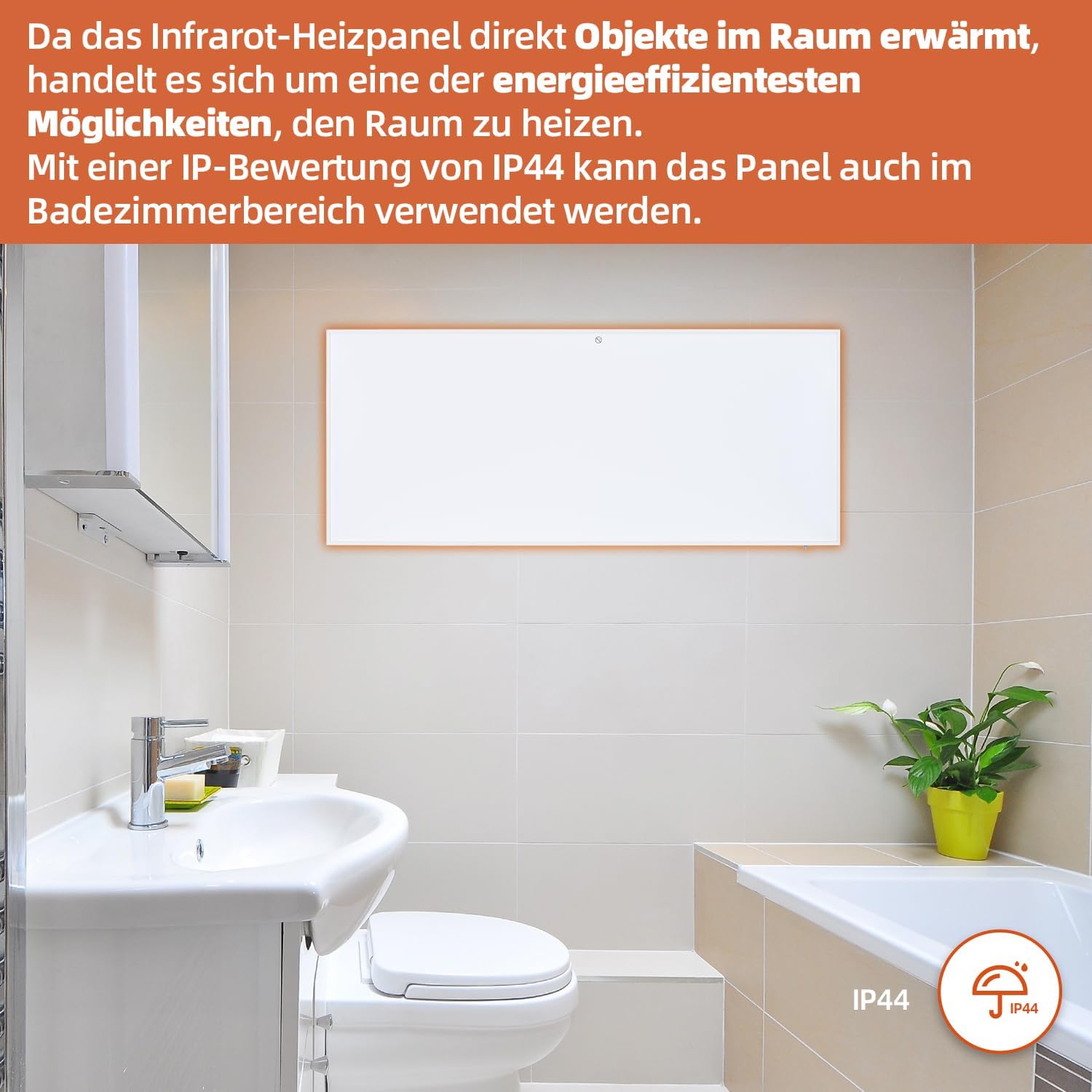
Figure 7: SHX Infrared Heating Panel with IP44 rating. The infrared heating panel mounted in a modern bathroom setting, emphasizing its IP44 water resistance rating, making it safe for use in damp ambients.
9. Solució De Problemes
If you encounter any issues with your SHX heating panel, refer to the following common problems and solutions:
| Problema | Causa possible | Solució |
|---|---|---|
| L'escalfador no s'encén. | No power supply. Overheating protection activated. | Check if the power cord is securely plugged in and the outlet is functional. Unplug the heater, allow it to cool for 30 minutes, then plug it back in. |
| La connexió WiFi falla. | Incorrect WiFi password. Heater not in pairing mode. Router issues. | Ensure correct WiFi password. Put the heater into WiFi pairing mode (refer to app instructions). Restart your WiFi router. Ensure the heater is within WiFi range. |
| El comandament a distància no funciona. | Batteries are dead or incorrectly inserted. Obstruction between remote and heater. | Replace the batteries in the remote control (requires 2 AAA batteries). Ensure there is a clear line of sight between the remote and the heater's receiver. |
| L'escalfador no escalfa eficaçment. | Temperature setting too low. Room size exceeds heater capacity. Drafts. | Increase the target temperature. Ensure the room size is within the recommended range (up to 14 m²). Seal any drafts in the room. |
10. Especificacions
| Especificació | Valor |
|---|---|
| Marca | SHX |
| Número de model | SHXA700-WiFi |
| Color | Blanc |
| Dimensions del producte (L x A x A) | 120 x 50 x 4.5 cm |
| Pes | 2.9 quilos |
| Poder | 700 watts |
| Voltage | 220 volts (CA) |
| Classe d'eficiència energètica | A a G |
| Nivell de soroll | 1 decibels |
| Característiques especials | WiFi Compatible, Overheating Protection, Programmable Thermostat, Remote Control, Energy Efficient |
| Font d'alimentació | Elèctric amb cable |
| Mètode de calefacció | Radiant |
| Ús recomanat | Interior, Llar |
| Tipus de muntatge | Wall Mount, Floor Mount (with optional feet) |
| Piles necessàries per al comandament a distància | 2 piles AAA |
| País d'origen | Xina |
11. Garantia i Suport
The SHX SHXA700 Infrared Heating Panel comes with a 2 any de garantia des de la data de compra. Si us plau, conserveu el comprovant de compra per a reclamacions de garantia.
For technical support, warranty claims, or any questions regarding your product, please contact your retailer or the manufacturer's customer service. Contact information can typically be found on the product packaging or the manufacturer's official weblloc.


