
OBDResource TD50
OBDResource TD50 Solar Wireless TPMS Instruction Manual
Marca: OBDResource | Model: TD50
1. Introducció
The OBDResource TD50 Solar Wireless Tire Pressure Monitoring System (TPMS) is designed to provide real-time monitoring of your vehicle's tire pressure and temperature, enhancing driving safety. This system features a unique detachable bracket for easy charging and settings adjustment, dual solar and USB charging capabilities, and multiple alarm modes to alert you to abnormal tire conditions.
2. Què hi ha a la caixa
Upon opening your OBDResource TD50 package, you will find the following components:
- TPMS Display Unit
- 4 External Wireless Sensors (labeled FL, FR, RL, RR for Front Left, Front Right, Rear Left, Rear Right)
- 4 Anti-theft Nuts
- 1 Small Wrench for sensor installation
- 1 cable de càrrega USB
- Adhesive Pads for mounting
- Manual d'usuari

Image: All components included in the OBDResource TD50 TPMS kit.
3. Especificacions
| Característica | Detall |
|---|---|
| Número de model | TD50 |
| Marca | OBDResource |
| Interval de mesura | 0-3.5 bar / 0-50 PSI |
| Font d'alimentació | Solar Power & USB Charging |
| Tipus de sensor | External Wireless Sensors |
| Classificació impermeable | IP68 (Sensors) |
| Tipus de visualització | Pantalla digital LCD |
| Bateria (inclosa) | 1 CR123A (for display unit) |
| Pes de l'article | 2.3 Grams (sensors) |
| Material | Rubber (sensors) |
| Tipus de muntatge | Flange Mount (display bracket) |
4. Configuració i instal·lació
The sensors are pre-programmed at the factory for ease of installation. Follow these steps for proper setup:
4.1. Initial Setup of Display Unit
- Encès: Long press the left button (power button) on the display unit to turn it on.
- Fixeu el suport: Secure the detachable bracket to the display unit.
- Muntar la pantalla: Fix the bracket to your vehicle's windshield or center console using the provided adhesive pads. The detachable design allows for easy removal for USB charging or settings adjustments.

Image: The detachable bracket allows for flexible positioning and easy removal of the display unit.
4.2. Instal·lació del sensor
Install the sensors one by one according to the indicated positions (FL, FR, RL, RR) on the side of each sensor. It is recommended to install them in the order of Front Left (FL) → Front Right (FR) → Rear Left (RL) → Rear Right (RR).
- Screw Valve Cap: Remove the original valve cap from the tire valve.
- Screw Anti-theft Nut: Screw the anti-theft nut onto the tire valve stem.
- Install Sensor: Screw the corresponding sensor onto the valve stem. Ensure it is tightened securely.
- Tighten Anti-theft Nut: Use the provided wrench to reverse rotate the anti-theft nut against the sensor, tightening it to prevent theft and ensure a secure fit.
- Comproveu si hi ha fuites: Apply soapy water around the sensor and valve stem to check for any air leaks. Bubbles indicate a leak, requiring further tightening or adjustment.

Image: Detailed steps for installing the external tire pressure sensors.
4.3. Pairing and Initial Readings
After installation, the display unit should automatically receive signals from the sensors. If readings do not appear immediately, drive the vehicle for a short period (e.g., above 20 KM/H) to activate the sensors and complete the pairing process.
Vídeo: Un overview of the OBDResource Solar Wireless Tire Pressure Monitoring System, including its components and basic functionality.
Video: A guide on how to use the solar tire pressure monitor, demonstrating key features and settings.
5. Instruccions de funcionament
5.1. Mostra mésview
The LCD display provides real-time information for all four tires:
- Tire Temperature: Displays the current temperature of each tire.
- Pressió dels pneumàtics: Shows the current pressure for each tire.
- Potència de la bateria: Indicates the battery level of the display unit.
- Unitat de pressió: Selectable between PSI and Bar.
- Unitat de temperatura: Selectable between Celsius (C) and Fahrenheit (F).
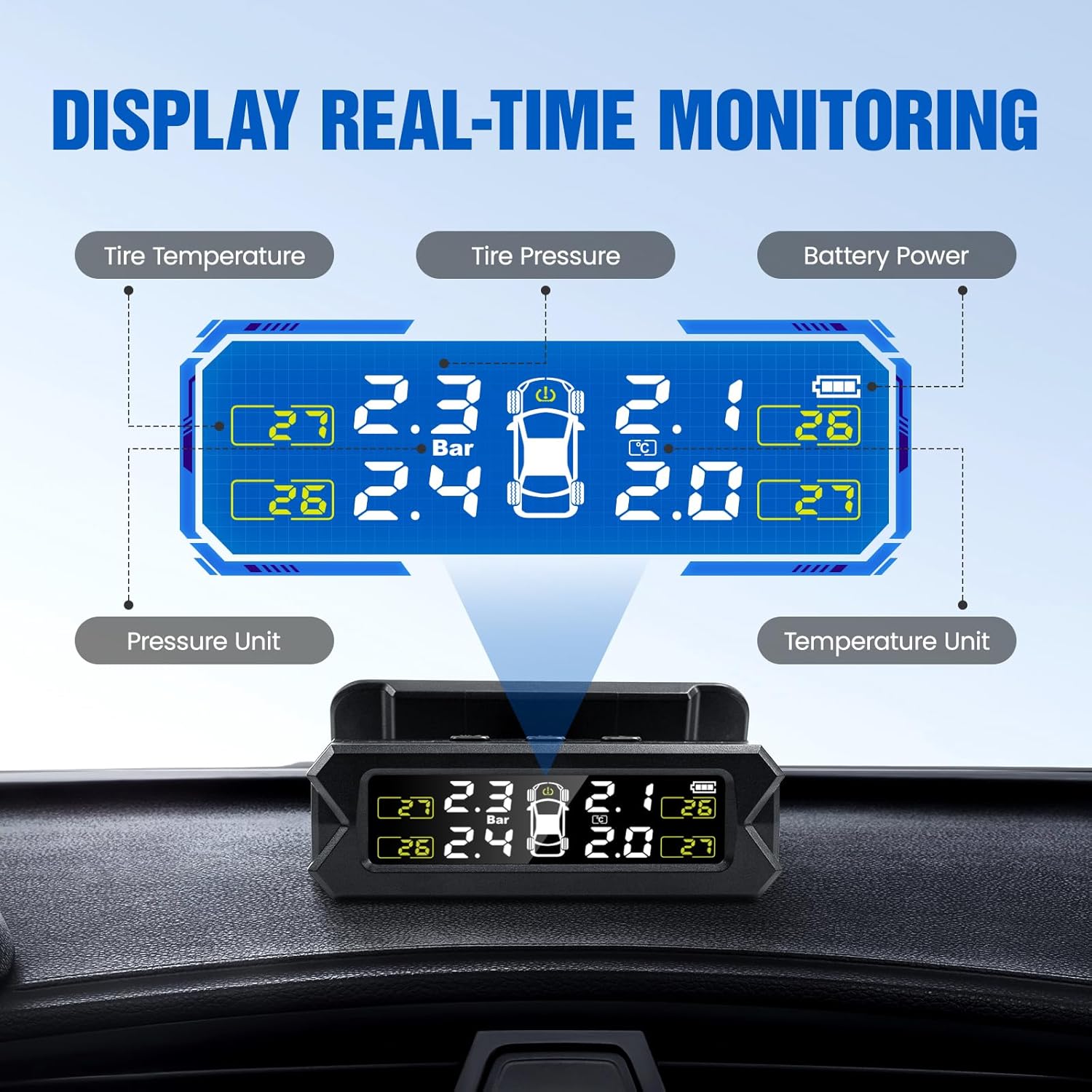
Image: Understanding the real-time data displayed on your TPMS unit.
5.2. Ajustar la configuració
To adjust units or alarm thresholds:
- In standby mode, long press the 'M' key for 3 seconds to enter the system setting state.
- Use the right selection key to navigate through different settings modes (e.g., unit selection, alarm thresholds).
- Use the left button to adjust values or select options.
- The system allows setting maximum and minimum alarm values for tire pressure and temperature according to your specific needs.
6. Alarm Modes
The TD50 TPMS is equipped with 6 safe and reliable alarm modes to promptly report abnormal tire conditions:
- Alarma d'alta pressió: Alerts when tire pressure exceeds the set maximum limit.
- Alarma de baixa pressió: Alerts when tire pressure falls below the set minimum limit.
- Alarma d'alta temperatura: Alerts when tire temperature exceeds a safe threshold.
- Fast Leak Alarm: Detects and alerts rapidly decreasinpressió dels pneumàtics g.
- Alarma d'error del sensor: Indicates a malfunction or communication issue with a sensor.
- Sensor Low Battery Alarm: Alerts when a sensor's battery is low and needs replacement.
In addition to visual alerts on the display, the system provides voice reminders for critical alarms.

Image: Visual representation of the various alarm types.
7. Càrrega
The TD50 TPMS offers dual charging methods to ensure continuous operation:
- Energia solar: The built-in solar lithium battery panel charges the unit automatically when exposed to sunlight.
- Càrrega USB: For cloudy or rainy weather, or when sunlight is insufficient, the unit can be charged via the provided USB cable. Simply detach the display unit from its bracket for convenient charging.

Image: Dual charging methods for all-weather monitoring.
8. Manteniment
- Keep the display unit clean and free from dust to ensure optimal solar charging and screen visibility.
- Regularly check the external sensors for any signs of damage or loose fitting.
- If a sensor battery is low, replace it promptly to maintain accurate readings.
9. Solució De Problemes
- No Readings on Display: Ensure the display unit is powered on. Drive the vehicle for a few minutes to allow sensors to activate and transmit data. If still no readings, check sensor installation and battery levels.
- Lectures inexactes: Verify that the sensors are installed on the correct tire positions (FL, FR, RL, RR). Compare readings with a reliable manual tire gauge. Allow some time for the system to stabilize after installation.
- Air Leakage After Installation: Re-tighten the sensor and anti-theft nut using the provided wrench. Apply soapy water to confirm the leak has stopped.
- Display Not Charging: Ensure the solar panel is exposed to direct sunlight. If using USB, confirm the cable and power source are functioning correctly.
- Dificultat per ajustar l'angle: The detachable bracket allows for angle adjustment. Ensure the unit is properly seated in the bracket and the adjustment mechanism is not overtightened.
10. Garantia i Suport
For warranty information, technical support, or any inquiries regarding your OBDResource TD50 TPMS, please refer to the contact details provided on the product packaging or visit the official OBDResource weblloc. Conserveu el rebut de compra per a reclamacions de garantia.
Ask a question about this manual
Ask about setup, troubleshooting, compatibility, parts, safety, or missing instructions. Manuals+ will review the question and use this page’s manual context to help answer it.