
Dardoo Cockpit -80-Black
Manual d'instruccions del suport per a volant de carreres Dardoo G920 F1 amb seient
Model: Cockpit -80-Black
Introducció
This manual provides detailed instructions for the assembly, operation, and maintenance of your Dardoo G920 F1 Racing Wheel Stand Cockpit with Seat. Designed for an immersive racing experience, this cockpit features a rugged aluminum profile construction and extensive adjustability. Please read this manual thoroughly before assembly and use to ensure proper setup and safe operation.
Informació de seguretat
- Ensure all components are securely fastened before use. Loose parts can cause instability and potential injury.
- No supereu la capacitat de càrrega màxima de 500 lliures.
- Mantingueu les mans i els dits allunyats de les peces mòbils durant l'ajust.
- This product is intended for adult use. Keep out of reach of small children.
- Regularly inspect the cockpit for any signs of wear, damage, or loose connections. Address any issues immediately.
- Use on a stable, level surface to prevent tipping.
Contingut del paquet
Si us plau, verifiqueu que tots els components que s'enumeren a continuació siguin presents al vostre paquet:
- High-strength aircraft aluminum profile components (40x80mm and other profiles)
- Black fabric racing seat with dual-rail and dual-glide design
- Steering wheel platform
- Pedal platform
- Shifter mount
- Assembly hardware (screws, nuts, washers, aluminum corner pieces)
- Required tools for assembly (e.g., Allen wrenches)

Description: This image illustrates the primary components of the cockpit, including the robust aluminum profiles, the impressive 500 lbs load-bearing capability, and a general representation of the assembly parts.
Muntatge i muntatge
Seguiu aquests passos amb cura per a un muntatge correcte. Es recomana que una segona persona us ajudi amb els components més grans.
1. Instal·lació del seient
The seat requires careful installation onto the main frame. Refer to the video below for a visual guide:
Description: This video demonstrates the step-by-step process for installing the black racing seat onto the cockpit frame, highlighting the adjustment lever and screw points.
- Prepare the Seat: Lift the adjusting lever upwards and pull the slide rail out to extend it.
- Install Front Screws: Align the front of the seat with the designated mounting points on the cockpit frame. Secure the two front screws firmly.
- Adjust and Install Rear Screws: Lift the adjusting lever upwards again and move the slide rail and seat bracket backward until the rear mounting points align. Secure the two rear screws.
2. Main Frame Assembly
Assemble the main aluminum profile frame using the provided hardware. The 40x80mm solid profiles and unique 4-hole long bar embedded with casting corner pieces ensure enhanced stability. Connect all horizontal and vertical profiles as per the included diagram (not provided in this text, refer to physical manual).

Description: This image displays the various aluminum profile components and the corner connection pieces, illustrating the robust construction of the cockpit frame.
3. Platform and Mount Installation
Attach the steering wheel platform, pedal platform, and shifter mount to the main frame. These components are designed for adjustability to suit various user preferences and equipment.

Description: A complete view of the assembled Dardoo F1 Racing Wheel Stand Cockpit with Seat, ready for peripheral attachment.
Funcionament i ajustos
The Dardoo F1 Racing Cockpit offers extensive adjustability to optimize your racing posture and comfort.
Característiques ajustables:
- Steering Wheel Platform: Adjust the angle from +35° to -20° for optimal hand positioning.
- Pedal Angle: The pedal platform can be adjusted from +30° to -30° to match your preferred foot angle.
- Shifter Lever: The shifter mount can be positioned for both left and right-hand driving configurations.
- Reclinació del seient: The professional gaming chair features a dual-rail and dual-glide design, allowing free adjustment from 65° (gaming mode) to 180° (rest mode).
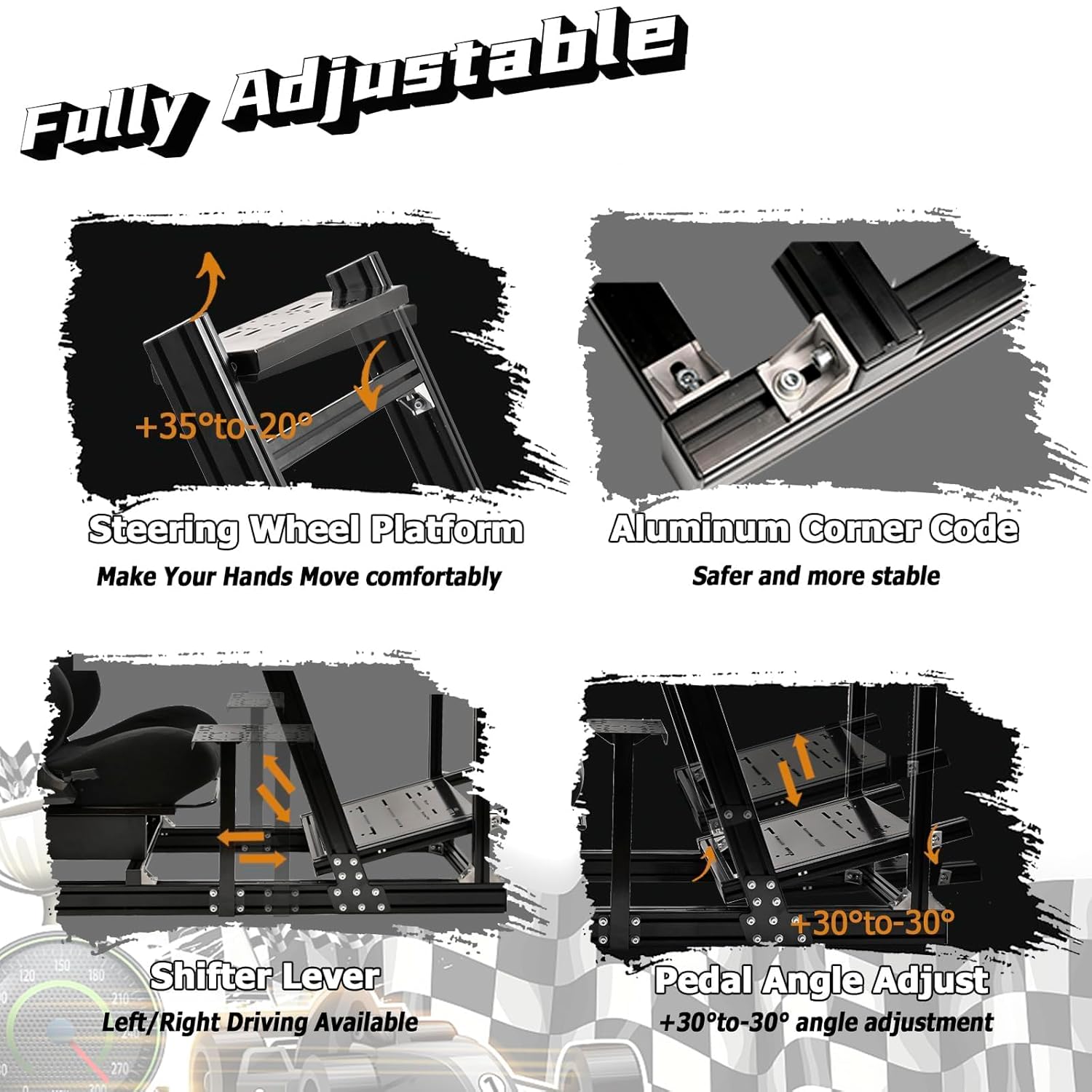
Description: This image highlights the key adjustable elements of the cockpit, such as the steering wheel platform tilt, pedal angle, and shifter position, along with the stable aluminum corner code.

Description: This image illustrates the adjustable recline angles of the racing seat, showing positions for gaming (90°), viewing (105°), and resting (135°).
Compatibilitat:
This racing simulator cockpit is designed to be compatible with a wide range of racing wheels, pedals, and shifters from major brands, as well as various gaming platforms.
- Compatible Racing Wheels: Logitech (e.g., G923), Thrustmaster, Fanatec, Ferrari 488GTB.
- Plataformes compatibles: Xbox, PlayStation, PC.
- Seat Fit: Suitable for all Dardoo seats and other seats with lengths from 8.66" to 17.32" and widths from 10.82" to 11.22".

Description: This image displays the wide compatibility of the cockpit with popular racing peripherals from Logitech, Thrustmaster, and Ferrari, as well as gaming consoles like Xbox, PlayStation, and PC.
Manteniment
To ensure the longevity and optimal performance of your Dardoo Racing Cockpit, follow these maintenance guidelines:
- Neteja: Wipe down aluminum surfaces with a soft, damp cloth. For the fabric seat, use a mild fabric cleaner if necessary. Avoid abrasive cleaners.
- Comprovació de fixació: Periodically check all screws and bolts to ensure they remain tight. Re-tighten as needed.
- Lubricació: If the seat slide rails become stiff, apply a small amount of silicone-based lubricant.
- Emmagatzematge: Store the cockpit in a dry environment, away from direct sunlight and extreme temperatures.
Resolució de problemes
If you encounter any issues with your racing cockpit, refer to the following common solutions:
- Cockpit feels unstable: Ensure all assembly screws are fully tightened. Verify that the cockpit is placed on a flat, stable surface.
- Seat not sliding smoothly: Check for any obstructions in the slide rails. Clean the rails and apply a small amount of lubricant if needed. Ensure the adjusting lever is fully engaged or disengaged.
- Peripherals not fitting: Double-check the mounting holes and ensure you are using the correct hardware for your specific racing wheel, pedal set, or shifter. Refer to the compatibility section.
- Difficulty adjusting platforms: Loosen the adjustment bolts slightly, make the adjustment, and then re-tighten firmly.
If problems persist, please contact Dardoo customer support for assistance.
Especificacions
| Característica | Especificació |
|---|---|
| Número de model | Cockpit -80-Black |
| Material | High-strength aircraft aluminum (40x80mm profile) |
| Dimensions del producte | 57.1 x 20 x 55 polzades |
| Pes de l'article | 105.7 lliures |
| Capacitat de càrrega | Fins a 500 lliures |
| Steering Wheel Platform Adjustment | +35° a -20° |
| Ajust de l'angle del pedal | +30° a -30° |
| Seat Recline Adjustment | 65° a 180° |
| Compatible Seat Dimensions | Length: 8.66"-17.32", Width: 10.82"-11.22" |
| Fabricant | Dardoo |
| País d'origen | Xina |
| Data de primera disponibilitat | 5 de setembre de 2023 |
Garantia i Suport
For information regarding warranty coverage, returns, or technical support, please refer to the product listing on Amazon or contact Dardoo directly through their official store page. Keep your purchase receipt as proof of purchase.
Dardoo Store Link: https://www.amazon.com/stores/Dardoo/page/EE2A208C-2857-4AE7-98E8-118D1A0CC101
Ask a question about this manual
Ask about setup, troubleshooting, compatibility, parts, safety, or missing instructions. Manuals+ will review the question and use this page’s manual context to help answer it.