
1. Introducció
This manual provides essential instructions for the safe and efficient use of your GOBOULT Z40 Pro Truly Wireless Stereo (TWS) Earbuds. Please read this manual thoroughly before using the product and retain it for future reference.
Contingut del paquet:
- GOBOULT Z40 Pro TWS Earbuds
- Estoig de càrrega
- Cable de càrrega ràpida tipus C
- Puntes d'orella (diverses mides)
- Manual d'usuari
- Targeta de garantia
2. Configuració
2.1 Càrrega inicial
Before first use, ensure the earbuds and charging case are fully charged. Remove any protective film from the charging contacts on the earbuds.
- Col·loqueu els auriculars a la caixa de càrrega.
- Connecteu el cable de càrrega tipus C al port de càrrega de la carcassa i a una font d'alimentació.
- The indicator light on the case will show charging status. A full charge takes approximately 90 minutes.

2.2 Vinculació amb un dispositiu
The GOBOULT Z40 Pro earbuds utilize Bluetooth 5.3 for a stable and efficient connection.
- Open the charging case lid. The earbuds will automatically enter pairing mode (indicated by flashing lights).
- Al dispositiu (telèfon intel·ligent, tauleta, ordinador portàtil), activeu el Bluetooth.
- Cerca available devices and select "GOBOULT Z40 Pro" from the list.
- Once connected, the earbuds will indicate successful pairing, and the indicator lights will turn off or show a steady light.

3. Instruccions de funcionament
3.1 Controls tàctils
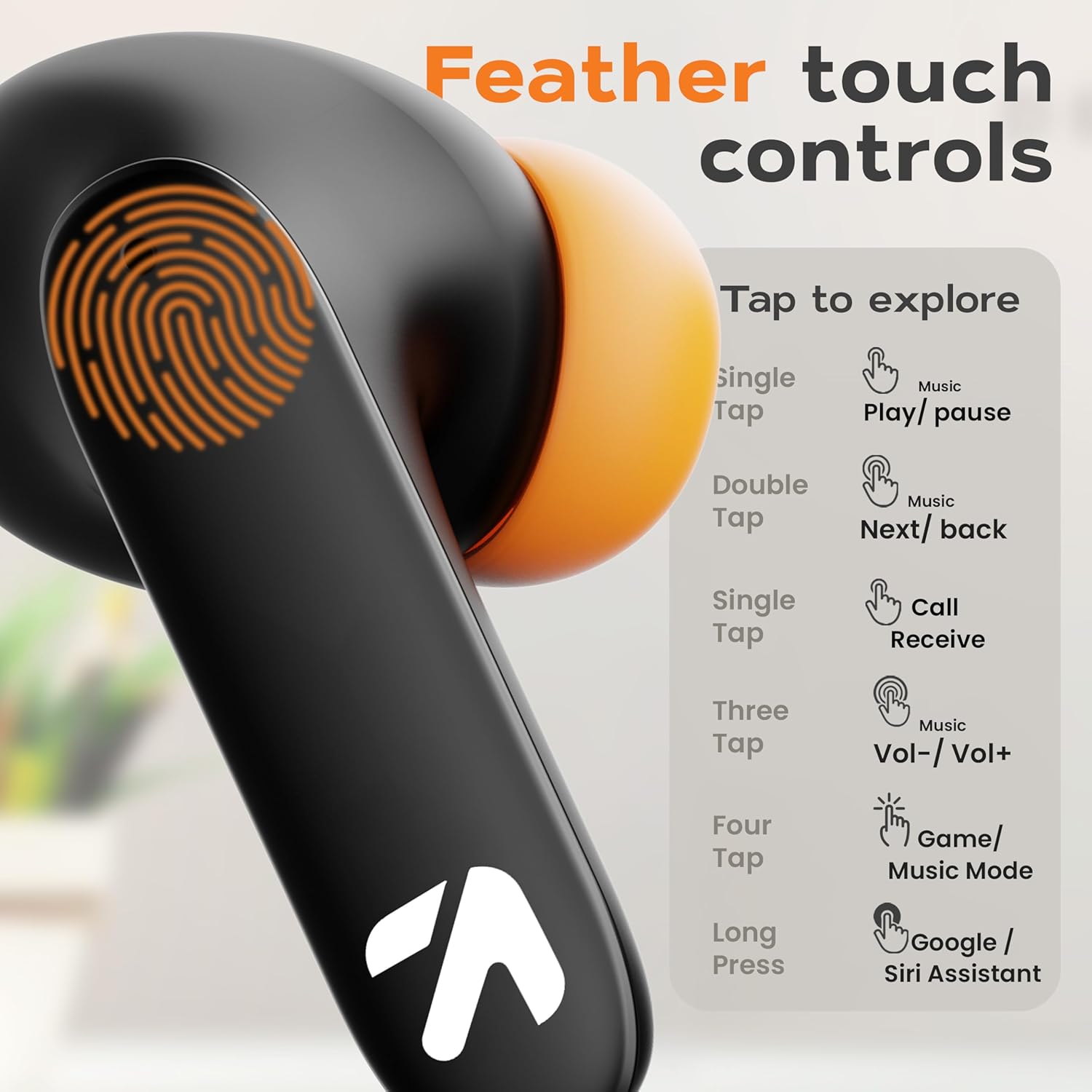
The GOBOULT Z40 Pro earbuds feature intuitive feather-touch controls on each earbud.
| Acció | Auricular esquerre | Auricular dret |
|---|---|---|
| Un sol toc | Music Play/Pause, Call Receive | Music Play/Pause, Call Receive |
| Fes doble toc | Cançó anterior | Següent Cançó |
| Toca tres vegades | Baixa el volum | Puja el volum |
| Quatre aixetes | Activa el mode de combat (mode de joc) | |
| Premsa llarga (2 s) | Activa l'assistent de veu (Google/Siri) | |
3.2 Gaming Mode (Combat Mode)
Activate Combat Mode for an ultra-low latency experience of 45ms, ideal for gaming. This synchronizes audio with visual action for a competitive edge.
- To activate: Tap either earbud four times.
- To deactivate: Tap either earbud four times again.

3.3 Assistent de veu
Access your device's voice assistant (Google Assistant or Siri) directly from the earbuds.
- To activate: Long press either earbud for 2 seconds.

3.4 Gestió de trucades
The Zen Quad Mic ENC (Environmental Noise Cancellation) technology ensures clear calls by minimizing background noise.
- Receive Call: Single tap either earbud.
- End Call: Single tap either earbud during a call.
- Reject Call: Long press either earbud for 2 seconds.

4. Manteniment
4.1 Neteja
- Netegeu regularment els auriculars i l'estoig de càrrega amb un drap suau, sec i sense borrissol.
- No utilitzeu netejadors abrasius, dissolvents ni aerosols.
- Assegureu-vos que els contactes de càrrega dels auriculars i de la funda estiguin lliures de pols ni de residus.
4.2 Resistència a l'aigua
The GOBOULT Z40 Pro earbuds are IPX5 rated, meaning they are resistant to sweat, splashes, and light rain. They are not designed for submersion in water.
- Avoid exposing the earbuds to strong jets of water or prolonged submersion.
- If wet, dry the earbuds thoroughly before placing them back in the charging case to prevent damage.

4.3 Emmagatzematge
Quan no els utilitzeu, guardeu els auriculars a la seva funda de càrrega per protegir-los i assegurar-vos que es mantinguin carregats.
5. Solució De Problemes
If you encounter issues with your GOBOULT Z40 Pro earbuds, refer to the following common solutions:
5.1 Problemes d'aparellament
- Auriculars que no s'aparellen amb el dispositiu: Ensure Bluetooth is enabled on your device. Make sure the earbuds are charged and within range. Try forgetting the device in your phone's Bluetooth settings and re-pairing.
- Només es connecta un auricular: Place both earbuds back into the charging case, close the lid for a few seconds, then open it again. This often resets the connection between the earbuds.
5.2 Problemes de so
- Sense so o volum baix: Check the volume levels on both your device and the earbuds. Ensure the earbuds are properly seated in your ears. Clean any debris from the earbud grilles.
- So intermitent: Assegureu-vos que no hi hagi obstacles entre el dispositiu i els auriculars. Acosteu-vos més al dispositiu. Eviteu entorns amb fortes interferències electromagnètiques.
5.3 Problemes de càrrega
- Auriculars que no es carreguen: Ensure the charging contacts on the earbuds and inside the case are clean and dry. Verify the charging cable and power adapter are working correctly.
- L'estoig no es carrega: Check the Type-C cable and power source. Ensure the cable is securely connected.
6. Especificacions
| Característica | Detall |
|---|---|
| Nom del model | AirBass |
| Tecnologia de connectivitat | Sense fil (Bluetooth 5.3) |
| Interval Bluetooth | 10 metres |
| Mida del controlador d'àudio | Controladors dinàmics de 13 mm |
| Resposta de freqüència | 20 Hz - 20,000 Hz |
| Sensibilitat | 115 dB |
| Impedància | 32 ohms |
| Durada de la bateria (total) | Fins a 100 hores (amb estoig de càrrega) |
| Temps de càrrega | Aprox. 90 minuts |
| Latència d'àudio | 45 Milliseconds (Combat Mode) |
| Control de soroll | Cancel·lació passiva de soroll, ENC de micròfon quàdruple |
| Nivell de resistència a l'aigua | IPX5 (Sweat and Splashproof) |
| Tipus de control | Toc, veu |
| Pes de l'article | 50 grams |
| Dimensions del producte | 6 x 2.7 x 4.8 cm |
| Material | Cautxú |
7. Garantia i Suport
7.1 Informació de la garantia
Your GOBOULT Z40 Pro earbuds come with a standard warranty. Please refer to the included Warranty Card in your package for detailed terms and conditions, including warranty period and coverage.
7.2 Atenció al client
For any product-related queries, technical assistance, or warranty claims, please contact the manufacturer:
- Fabricant: Exotic Mile Pvt. Ltd.
- Adreça: B67 Zona Industrial de Wazirpur, Nova Delhi 110052
- També podeu visitar l'oficial GOBOULT Store on Amazon per a més informació.