1. Introducció
Thank you for choosing the Billboard Chroma Clear Wireless Speaker, model BB-S11747. This portable speaker is designed to provide a clear audio experience with the added visual appeal of LED lights. It features Bluetooth wireless connectivity, an integrated FM radio, and an IPX4 water-resistant rating, making it suitable for various environments. This manual provides detailed instructions for the proper use and maintenance of your speaker.
2. Contingut del paquet
Si us plau, comproveu el paquet per veure si hi ha els elements següents:
- Billboard Chroma Clear Wireless Speaker (BB-S11747)
- Cable d'alimentació
- Manual d'usuari (aquest document)

Image: The Billboard Chroma Clear Wireless Speaker shown in its retail packaging, highlighting the brand and key features.
3. Producte acabatview
Familiaritzeu-vos amb els components i els controls de l'altaveu.

Imatge: Lateral view of the speaker, displaying the control panel with power, mode, light, volume up, and volume down buttons, along with the carrying strap.
- Botó d'encesa: Press and hold to turn on/off. Short press for play/pause.
- Botó de mode (M): Short press to switch between Bluetooth, FM Radio, and Micro SD modes.
- Botó de llum: Short press to cycle through LED light modes.
- Puja el volum (+): Short press to increase volume. Long press for next track (in Bluetooth/Micro SD mode) or next station (in FM mode).
- Baixar el volum (-): Short press to decrease volume. Long press for previous track (in Bluetooth/Micro SD mode) or previous station (in FM mode).
- Port de càrrega: Per connectar el cable d'alimentació.
- Ranura per a targetes Micro SD: Per reproduir música directament des d'una targeta Micro SD.
- Entrada AUX: For wired audio connection (3.5mm).
4. Configuració
4.1 Càrrega de l'altaveu
Abans del primer ús, carregueu completament l'altaveu.
- Connect the provided power cable to the speaker's charging port.
- Connecteu l'altre extrem del cable a un adaptador de corrent USB compatible (no inclòs) o al port USB d'un ordinador.
- El llum indicador de càrrega s'il·luminarà. S'apagarà o canviarà de color un cop finalitzada la càrrega.
- Una càrrega completa proporciona aproximadament 8 hores de reproducció.
4.2 Encès/Apagat
- Per encendre: premeu i manteniu premut el botó Botó d'engegada until you hear an audible prompt or see the LED lights activate.
- Per apagar: premeu i manteniu premut el botó Botó d'engegada again until the speaker powers down.
4.3 Vinculació Bluetooth
Per connectar l'altaveu a un dispositiu amb Bluetooth:
- Assegureu-vos que l'altaveu estigui encès i en mode Bluetooth. Si no, premeu breument el botó Botó de mode (M) fins que sentiu l'indicació d'emparellament Bluetooth. Els llums LED poden parpellejar per indicar el mode d'emparellament.
- Activeu el Bluetooth al dispositiu (telèfon intel·ligent, tauleta, ordinador).
- Cerca available Bluetooth devices. The speaker will appear as "Billboard Chroma Clear" or similar.
- Select the speaker from the list to pair. Once connected, you will hear a confirmation sound.
- L'altaveu intentarà tornar a connectar-se automàticament amb l'últim dispositiu emparellat quan s'engegui.
4.4 Funcionament de la ràdio FM
To use the integrated FM radio:
- Enceneu l'altaveu.
- Premeu breument Botó de mode (M) per canviar al mode de ràdio FM.
- Per escanejar automàticament i desar les emissores disponibles, manteniu premut el botó Botó d'engegada (Play/Pause button in this context). The speaker will scan and store stations.
- Per canviar entre les emissores desades, premeu llargament la tecla Puja el volum (+) or Baixar el volum (-) botons.
5. Instruccions de funcionament
5.1 Music Playback (Bluetooth/Micro SD)
- Reproduir/pausa: Premeu breument Botó d'engegada.
- Control de volum: Premsa curta Puja el volum (+) to increase, short press Baixar el volum (-) per disminuir.
- Pista següent: Premsa llarga Puja el volum (+).
- Pista anterior: Premsa llarga Baixar el volum (-).
5.2 modes de llum LED
The speaker features dynamic LED lights.
- Premeu breument Botó de llum to cycle through different light patterns and colors.
- Continue pressing to find your preferred light mode or to turn the lights off.

Image: The Billboard Chroma Clear Wireless Speaker illuminated with vibrant, multi-colored LED lights, showcasing its aesthetic feature.
5.3 Trucades de mans lliures
Quan es connecta mitjançant Bluetooth, l'altaveu es pot utilitzar per a trucades de mans lliures.
- Respon a la trucada: Premeu breument Botó d'engegada when an incoming call rings.
- Finalitzar la trucada: Premeu breument Botó d'engegada durant una trucada.
- Rebutja la trucada: Premeu llargament el botó Botó d'engegada when an incoming call rings.
6. Manteniment
6.1 Neteja
- Ensure the speaker is turned off and disconnected from any power source before cleaning.
- Netegeu l'exterior amb un suau, damp cloth. Do not use abrasive cleaners, alcohol, or solvents.
- Avoid getting moisture into any ports or openings.
6.2 Resistència a l'aigua (IPX4)
The speaker has an IPX4 rating, meaning it is resistant to splashing water from any direction.
- No submergiu l'altaveu a l'aigua.
- Assegureu-vos que totes les cobertes dels ports estiguin ben tancades per mantenir la resistència a l'aigua.
- If the speaker gets wet, wipe it dry thoroughly before charging or using it again.
6.3 Emmagatzematge
- Guardeu l'altaveu en un lloc fresc i sec, allunyat de la llum solar directa i de temperatures extremes.
- Si l'emmagatzemeu durant un període prolongat, carregueu la bateria periòdicament per mantenir-ne la vida útil.
7. Solució De Problemes
| Problema | Solució |
|---|---|
| L'altaveu no s'encén. | Ensure the battery is charged. Connect the speaker to a power source using the provided cable. |
| No es pot emparellar per Bluetooth. |
|
| Sense so o amb un volum baix. |
|
| La recepció de ràdio FM és deficient. |
|
8. Especificacions
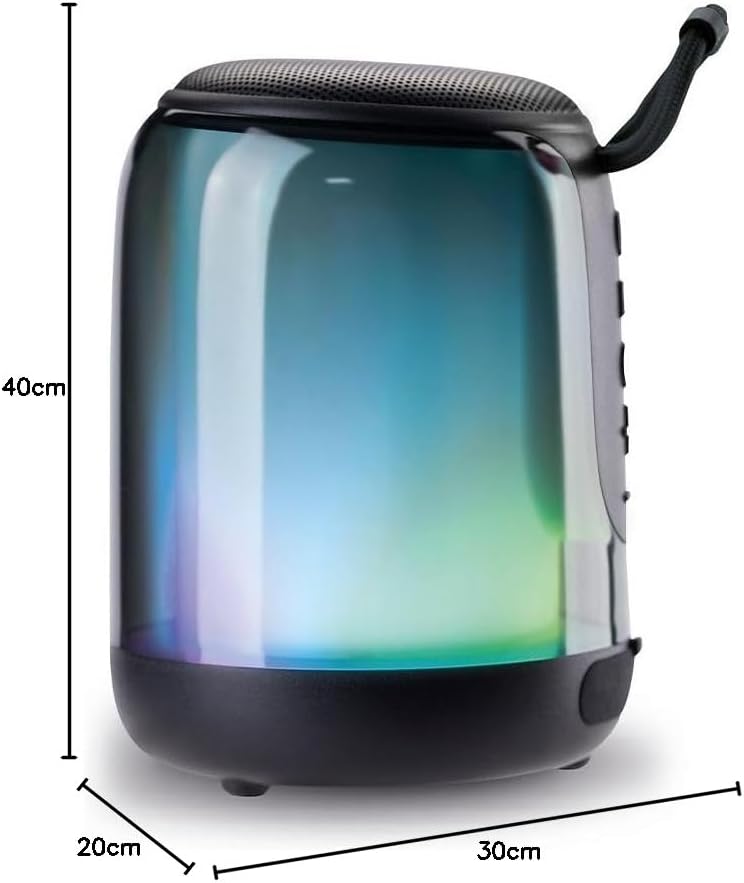
Image: The Billboard Chroma Clear Wireless Speaker with its approximate dimensions (40cm depth, 20cm width, 30cm height) indicated.
| Característica | Detall |
|---|---|
| Nom del model | BB-S11747 |
| Tipus d'altaveu | Atmosfèric |
| Característiques especials | Wireless Connectivity, Water Resistant (IPX4), LED Lights, FM Radio |
| Ús recomanat | Portàtil, a l'aire lliure |
| Color | Transparent |
| Dimensions (profunditat x amplada x alçada) | 40 cm x 20 cm x 30 cm |
| Classificació impermeable | IPX4 (resistent a esquitxades) |
| Mètode de control | Tactile Buttons |
| Tecnologia sense fils | Bluetooth |
| Font d'alimentació | Bateria |
| Durada mitjana de la bateria | 8 hores |
| Bandes de ràdio compatibles | FM |
| Material | Plastic or metal casing, synthetic components |
| Mode de sortida d'àudio | estèreo |
9. Garantia i Suport
The Billboard Chroma Clear Wireless Speaker BB-S11747 comes with a limited warranty. Please refer to the warranty card included in your package for specific terms and conditions.
For technical support, troubleshooting assistance, or warranty claims, please contact Billboard customer service through their official weblloc web o el venedor on es va comprar el producte.
Recursos en línia: For additional information and FAQs, visit the official Billboard product support page.