
AZIJYV P24
AZIJYV P24 OBD2+GPS Gauge Display User Manual
Model: P24
Marca: AZIJYV
1. Introducció
The AZIJYV P24 Heads Up Display is a versatile dual-system product integrating OBD, GPS, and a slope indicator. It is designed to provide real-time vehicle data, enhancing driving safety and convenience. Upon powering on, users will first select their preferred language, followed by the system mode (OBD or GPS).

Figure 1: The AZIJYV P24 OBD2+GPS Gauge Display unit.
2. Especificacions del producte
The P24 head-up display offers a comprehensive set of features and specifications:
- Visualització: 3.5-inch color LCD for clear font display.
- Unitat de velocitat: Freely switchable between MPH and KM/H.
- Idiomes: Supports 12 languages including English, Simplified Chinese, Traditional Chinese, Thai, Japanese, Korean, Russian, Arabic, Malay, Spanish, German, and French.
- Il·luminació ambiental: Customizable blue, red, purple, and other ambient light colors.
- Dimensions: 5 x 1.47 x 2.89 polzades (127 x 37 x 73 mm).
- Pes: 1.59 ounces (45 Grams).
- Material: Acrylonitrile Butadiene Styrene (ABS).

Figure 2: Product dimensions and interface details.
3. Configuració i instal·lació
The P24 display offers multiple installation methods for optimal viewi accessibilitat.
3.1 Contingut del paquet
- P24 Host Unit
- Suport ajustable
- Mat antilliscant
- Type-C OBD Cable
- Manual d'usuari (aquest document)

Figure 3: Included components in the P24 package.
3.2 Passos d'instal·lació
- Connect the OBD Cable: Locate your vehicle's OBD-II port, typically found under the dashboard on the driver's side. Connect the Type-C OBD cable to the P24 unit and then to the vehicle's OBD-II port.
- Posicioneu la pantalla: Place the P24 unit on your dashboard using the non-slip mat. The split bracket allows for 360° rotation to adjust the visual angle and height for optimal viewing.
- Encamina el cable: Carefully route the OBD cable to avoid interference with driving controls and to maintain a neat appearance.
- Encès: Once connected, the device will power on automatically when the vehicle is started.

Figure 4: Connecting the OBD cable to the vehicle's OBD-II port.
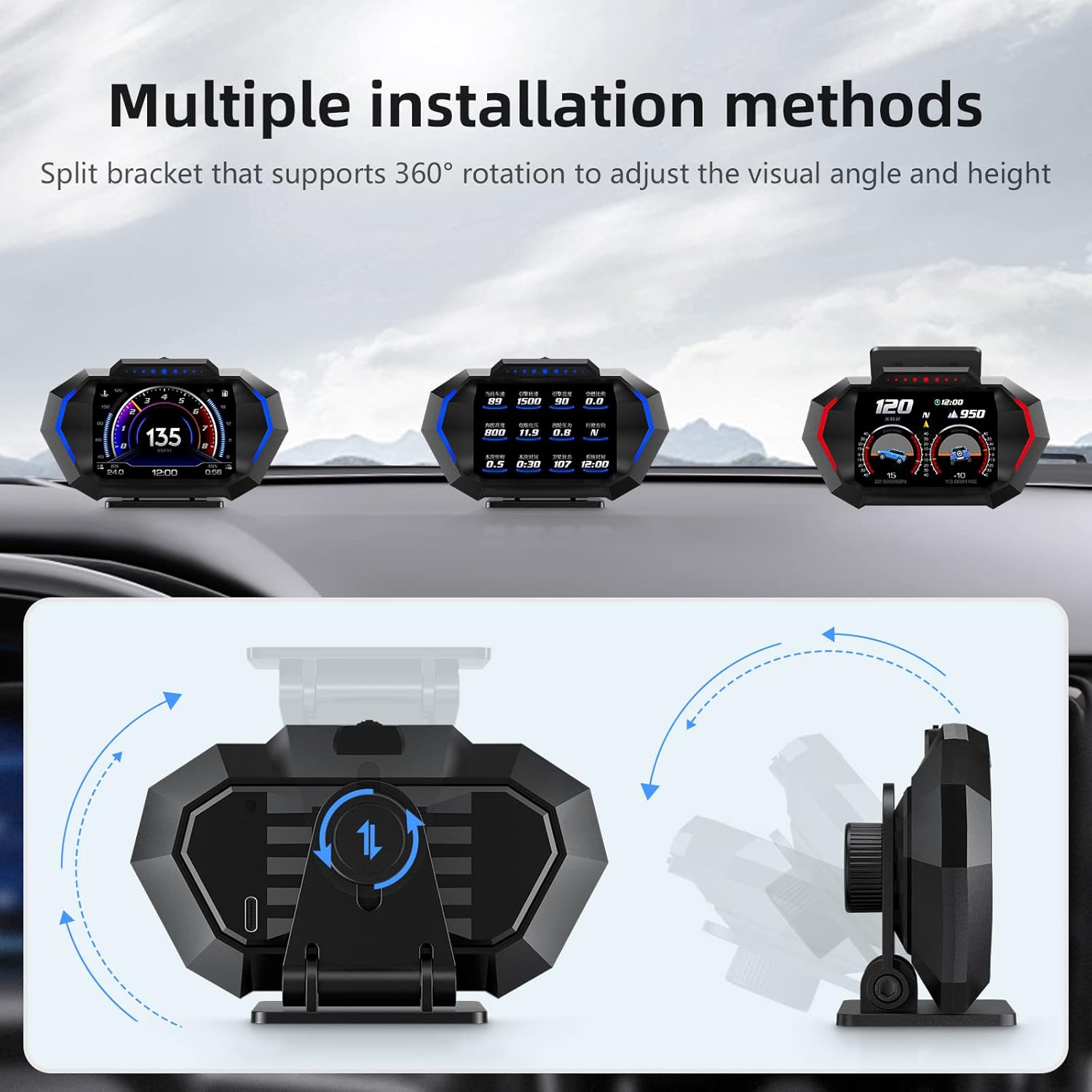
Figure 5: Various installation positions and bracket adjustability.

Figura 6: Example of cable routing for a tidy installation.
4. Modes i funcions de funcionament
The P24 offers two primary operating modes: OBD and GPS, along with various display functions.
4.1 Selecció del sistema
After powering on, the device will prompt for language selection, followed by system selection. Choose between OBD mode (for compatible vehicles) or GPS mode (universal compatibility).
- Mode OBD: Applicable to most gasoline vehicles manufactured after 2009. This mode directly reads data from the vehicle's original car system.
- Mode GPS: Applicable to any car. This mode relies on satellite signals to display data. If your car is not compatible with OBD protocol, switch to GPS mode within 5 seconds of startup.
4.2 Dades mostrades
| Mode | Dades mostrades |
|---|---|
| Mode OBD | Velocitat del vehicle, vol.tage, water temperature, RPM, fuel consumption, current time, single driving time, single mileage, total mileage, driving direction, intake pressure, oil temperature, air-fuel ratio, turbine pressure, intake temperature, oil pressure, throttle valve, engine load, transmission oil temperature, accelerometer, acceleration test, brake test. |
| Mode GPS | Velocitat del vehicle, vol.tage, satellite time, altitude, satellite quantity, driving direction, single mileage, driving time, up and down slope angle, left and right tilt angle, acceleration test, brake test. |

Figure 7: Comprehensive list of data points available on the P24 display.
4.3 Interfícies de visualització
The P24 offers 13 distinct display screens, allowing users to customize the information layout to their preference. These interfaces feature new designs with larger, clearer fonts for improved readability.

Figura 8: Examples of the 12 available display interfaces.
4.4 Funcions d'alarma
The device includes various alarm functions to alert the driver to potential issues or unsafe conditions. These alarms often trigger red flashing lights for immediate visual notification.
- Alarma de velocitat excessiva
- Alarma de velocitat
- Alarma de temperatura de l'aigua
- Voltage alarma
- Alarma d'inclinació
- Alarma RPM
- Turbo pressure alarm
- Gearbox oil temperature alarm
- Alarma de pressió d'oli
- Pitch angle alarm
- Roll angle alarm

Figure 9: Visual representation of various alarm indicators.
4.5 Il·luminació ambiental
The P24 features ambient lights that can be customized to various colors (blue, red, purple, etc.) to match user preference or vehicle interior. The lighting can also be linked to RPM or speed, or set to an always-on mode.

Figura 10: Examples of customizable ambient lighting themes.
4.6 Built-in Slope Gauge
For off-road or challenging terrain driving, the P24 includes a built-in slope gauge that displays real-time pitch and roll angles, helping drivers maintain awareness of the vehicle's attitude.

Figure 11: Display of pitch and roll angles for climbing, downhill, and tilting scenarios.
4.7 Vídeo de demostració del producte
Video 1: A short demonstration of the P24 Heads Up Display, showcasing its various display modes and features in action. This video provides a visual overview of the product's functionality and user interface.
5. Solució De Problemes
This section provides solutions to common issues encountered with the P24 display.
5.1 No Display After Power On
- Ensure the OBD cable is securely connected to both the P24 unit and the vehicle's OBD-II port.
- Verifiqueu que el contacte del vostre vehicle estigui engegat.
- If using OBD mode, confirm your vehicle is compatible (most gasoline vehicles after 2009). If not, try switching to GPS mode within 5 seconds of startup.
5.2 Inaccurate Speed Reading
- In GPS mode, ensure the device has a clear view del cel per adquirir senyals de satèl·lit.
- Check the speed unit setting (MPH/KM/H) to ensure it matches your preference.
- Perform a calibration if available in the device settings (refer to the on-screen menu for calibration options).
5.3 Device Freezes or Malfunctions
- Disconnect and reconnect the OBD cable to restart the device.
- If the issue persists, perform a factory reset through the device's settings menu (consult the on-screen instructions for this process).
6. Manteniment
Proper care and maintenance will ensure the longevity and optimal performance of your P24 display.
- Neteja: Use a soft, dry cloth to clean the display screen and the device body. Avoid using abrasive cleaners or solvents that could damage the surface.
- Temperatura: Do not expose the device to extreme temperatures (hot or cold) for extended periods, as this may affect its electronic components.
- Emmagatzematge: If storing the device for a long time, disconnect it from the vehicle and keep it in a cool, dry place.
7. Garantia i Suport
For any questions, technical assistance, or warranty inquiries regarding your AZIJYV P24 OBD2+GPS Gauge Display, please contact AZIJYV customer support. Refer to the product packaging or the official AZIJYV weblloc per obtenir informació de contacte.
També podeu consultar el document PDF oficial d'instruccions d'ús (IFU) per obtenir més informació: Instruccions d'ús (IFU) (PDF)
Documents relacionatsP24


Ask a question about this manual
Ask about setup, troubleshooting, compatibility, parts, safety, or missing instructions. Manuals+ will review the question and use this page’s manual context to help answer it.