
1. Producte acabatview
The HEXGAMING HYPER Wireless Controller is designed for PlayStation 4 gamers, offering enhanced customization and control. This controller features remappable back buttons, adjustable trigger stops, and interchangeable thumbsticks to optimize your gaming experience.

Imatge 1.1: Frontal view of the HEXGAMING HYPER Wireless Controller.

Imatge 1.2: Darrere view of the controller, highlighting the four remappable back buttons (K1, K2, K3, K4) and trigger stop mechanisms.
2. Configuració
2.1 Contingut del paquet
Verifiqueu que tots els elements siguin presents al paquet:
- HEXGAMING HYPER Controller
- Interchangeable Thumbsticks Set
- Manual d'usuari
Note: A charging cable and official charging station are not included and are not compatible with this controller.

Image 2.1: Contents of the HEXGAMING HYPER Controller package, including the controller, thumbstick set, and user manual.
2.2 Initial Pairing (Wireless)
- Assegura't que la teva consola PlayStation 4 estigui engegada.
- Press and hold the PS button and SHARE button on the controller simultaneously until the light bar begins to flash.
- On your PS4, navigate to Settings > Devices > Bluetooth Devices.
- Select the HEXGAMING HYPER Controller from the list of available devices to complete the pairing process.
2.3 Installing Interchangeable Thumbsticks
The controller includes a set of interchangeable thumbsticks with various heights and designs (domed, concave, concave widened) for personalized comfort and control. To change a thumbstick:
- Gently pull the existing thumbstick straight up to remove it from the controller.
- Select your desired thumbstick from the set.
- Align the new thumbstick with the base and push it down firmly until it clicks into place.

Image 2.2: The interchangeable thumbstick set, offering various shapes and heights for customization.
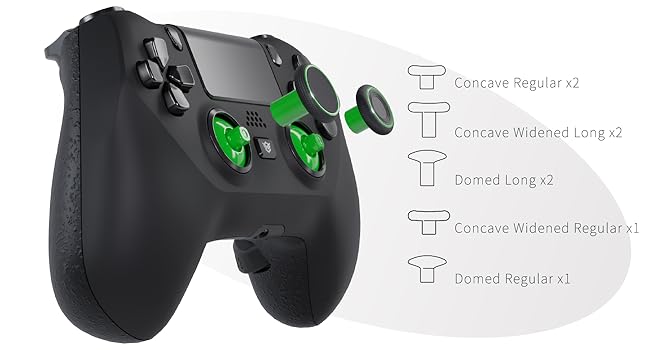
Image 2.3: Visual representation of the different thumbstick types included, illustrating their ergonomic designs.
2.4 Adjusting Trigger Stops
The controller features adjustable trigger stops to reduce trigger travel distance, which can be beneficial for certain game genres like first-person shooters (FPS). To adjust:
- Locate the trigger stop switches on the underside of the controller, near the L2 and R2 triggers.
- Toggle the switches to select between a short trip (reduced travel) or a long trip (full travel) for each trigger.

Image 2.4: Illustration of the trigger stop mechanism, showing the difference between short and long trigger travel settings.
3. Instruccions de funcionament
3.1 Button Remapping
The HEXGAMING HYPER Controller allows you to remap up to 14 buttons to the four back buttons (K1, K2, K3, K4). The remappable buttons include: X, O, Triangle, Square, Up, Down, Left, Right, L1, L2, R1, R2, L3, and R3.
To activate the remap program:
- Press and hold the program button (usually a small button on the back or bottom of the controller, near the indicator light) until the indicator light changes (e.g., starts blinking).
- Press the back button (K1, K2, K3, or K4) you wish to assign.
- Press the standard button (e.g., X, Square, L1) you want to map to the chosen back button.
- Release the program button to save the mapping. The indicator light should return to its normal state.
- Repeat for other back buttons as needed.

Image 3.1: Diagram illustrating the available mapping options for the back buttons and the location of the indicator light.
3.2 Wired and Wireless Play
The HEXGAMING HYPER Controller supports both wireless Bluetooth connectivity and wired play via a USB cable (not included). For wired play, simply connect the controller to your PlayStation 4 console using a compatible USB cable.
3.3 Button Remap Tutorial Video
Video 3.1: An official tutorial demonstrating the button remapping process for the HEXGAMING HYPER Controller. This video provides a visual guide to assigning functions to the back buttons.
4. Manteniment
4.1 Instruccions de neteja
To maintain the longevity and appearance of your controller, follow these cleaning guidelines:
- It is recommended to clean the controller with a wipe dampacabat amb aigua.
- If using alcohol, ensure it is less than 70% concentration. Dampen a wipe with the alcohol and clean the surface.
- After cleaning, place the controller in a well-ventilated area to dry completely.
- No ho facis spray water or alcohol directly onto the product surface.
- No ho facis use any other organic solvents for cleaning.

Image 4.1: Visual guide for cleaning plastic products, emphasizing the use of a damp wipe and proper drying.
5. Solució De Problemes
If you encounter issues with your HEXGAMING HYPER Controller, consider the following:
- Problemes de connectivitat: Ensure the controller is fully charged. Re-attempt the pairing process as described in Section 2.2. If using wired, ensure the USB cable is securely connected to both the controller and the console.
- Button Response: If a button is not responding, check if it has been remapped incorrectly. Refer to Section 3.1 for remapping instructions. Ensure the controller is clean and free from debris that might obstruct button movement.
- Controlador que no respon: Try resetting the controller. Locate the small reset button on the back of the controller (often recessed) and press it with a thin object (like a paperclip). Then, re-pair the controller with your PS4.
- Rendiment general: Ensure your PS4 system software is up to date.
For further assistance, please refer to the support resources mentioned in Section 7.
6. Especificacions
| Característica | Especificació |
|---|---|
| Nom del model | RM (HYPE42) |
| Marca | HEXGAMING |
| Dispositius compatibles | PlayStation 4 |
| Tipus de controlador | Gamepad |
| Tecnologia de connectivitat | USB, sense fil |
| Característiques addicionals | Ergonomic, Wireless, 4 Back Buttons, Trigger Stops, Interchangeable Thumbsticks |
| Quantitat de botons | 14 (remappable) |
| Plataforma de maquinari | PlayStation 4 |
| Font d'alimentació | Funciona amb bateria |
| Pes de l'article | 255 grams |
| Dimensions de l'article | 6.3 x 3.94 x 1.97 polzades |
| Color | Zombie Blood |
7. Garantia i Suport
7.1 Informació de la garantia
For detailed warranty information regarding your HEXGAMING HYPER Controller, please refer to the documentation provided with your purchase or visit the official HEXGAMING weblloc web. Els termes i condicions de la garantia poden variar segons la regió i el distribuïdor.
7.2 Atenció al client
For additional support, frequently asked questions (FAQs), and video guides, please visit the HEXGAMING official support resources:
- Knowledge Base and Guides: hexgaming.com/guide
- Preguntes freqüents (FAQ): hexgaming.com/faq
These resources are regularly updated to provide comprehensive assistance for HEXGAMING products.