
1. Introducció
Thank you for choosing the VENTION 16-in-1 USB C Docking Station. This versatile docking station is designed to expand the connectivity of your USB-C or Thunderbolt 3/4 enabled laptop, providing multiple ports for displays, data transfer, network, and power delivery. Please read this manual carefully before use to ensure proper operation and maximize the product's potential.

Image: The VENTION 16-in-1 USB C Docking Station shown with its included USB-C cable, highlighting its compact design and various ports.
2. Informació de seguretat
- No exposeu el dispositiu a l'aigua, la humitat ni a temperatures extremes.
- Eviteu deixar caure o sotmetre el dispositiu a forts impactes.
- No intenteu desmuntar ni reparar el dispositiu vosaltres mateixos. Poseu-vos en contacte amb personal de servei qualificat.
- Use only the provided USB-C cable or a certified USB-C 4.0 cable for optimal performance.
- Ensure proper ventilation around the docking station during operation.
3. Contingut del paquet
- 1 x VENTION 16-in-1 USB C Docking Station
- 1 x USB-C 4.0 Cable (1.5 ft)
- 1 x Manual d'usuari
Nota: L'adaptador de corrent no està inclòs.

Image: Illustration showing the contents included in the package: the docking station, USB-C cable, and user manual.
4. Producte acabatview i Ports
The VENTION 16-in-1 Docking Station offers a comprehensive array of ports to meet diverse connectivity needs:
- Panell frontal:
- 1 x SD Card Slot (90MB/s)
- 1 x TF Card Slot (90MB/s)
- 1 x USB 3.0 Type-A Port (5Gbps)
- 1 x USB 3.2 Gen 1 Type-C Port (5Gbps)
- 2 x USB 3.2 Gen 2 Type-A Ports (10Gbps)
- 1 x 3.5mm TRRS Audio Jack (Microphone/Audio)
- Panell posterior:
- 1 x PD (Power Delivery) Port (100W Max Input)
- 1 x PC HOST Port (Connects to Laptop, 85W Max Output)
- 2 x USB 2.0 Type-A Ports (480Mbps)
- 2 x HDMI 2.0 Ports (4K@60Hz)
- 1 x DisplayPort 1.4 (4K a 60 Hz)
- 1 x RJ45 Gigabit Ethernet Port (10/100/1000Mbps)

Image: Detailed diagram illustrating all 16 ports on the VENTION docking station, including their types and maximum speeds/resolutions.
5. Guia de configuració
5.1 Connexió inicial
- Connect the provided USB-C 4.0 cable from the "PC HOST" port on the docking station to a full-featured USB-C or Thunderbolt 3/4 port on your laptop.
- (Optional) For power delivery to your laptop, connect a USB-C power adapter (not included) to the "PD" port on the docking station. The docking station supports up to 100W power input, delivering up to 85W to your laptop.
- The docking station is plug-and-play for most operating systems and does not require driver installation.

Image: Visual guide on how to identify a compatible full-featured USB-C or Thunderbolt port on your laptop for proper functionality.
5.2 Connexió de perifèrics
Once the docking station is connected to your laptop, you can connect various peripherals:
- Monitors: Connect up to three external monitors using the HDMI and DisplayPort outputs.
- Dispositius USB: Connect USB flash drives, external hard drives, keyboards, mice, and other USB devices to the available USB-A and USB-C data ports.
- Xarxa: Connect an Ethernet cable to the RJ45 port for a stable wired network connection.
- Àudio: Connecteu uns auriculars o altaveus al connector d'àudio de 3.5 mm.
- Targetes de memòria: Inseriu targetes SD o TF a les ranures respectives per accedir a les dades.
5.3 Display Configuration (Windows & macOS)
The docking station supports triple monitor display. Configuration varies slightly between Windows and macOS:
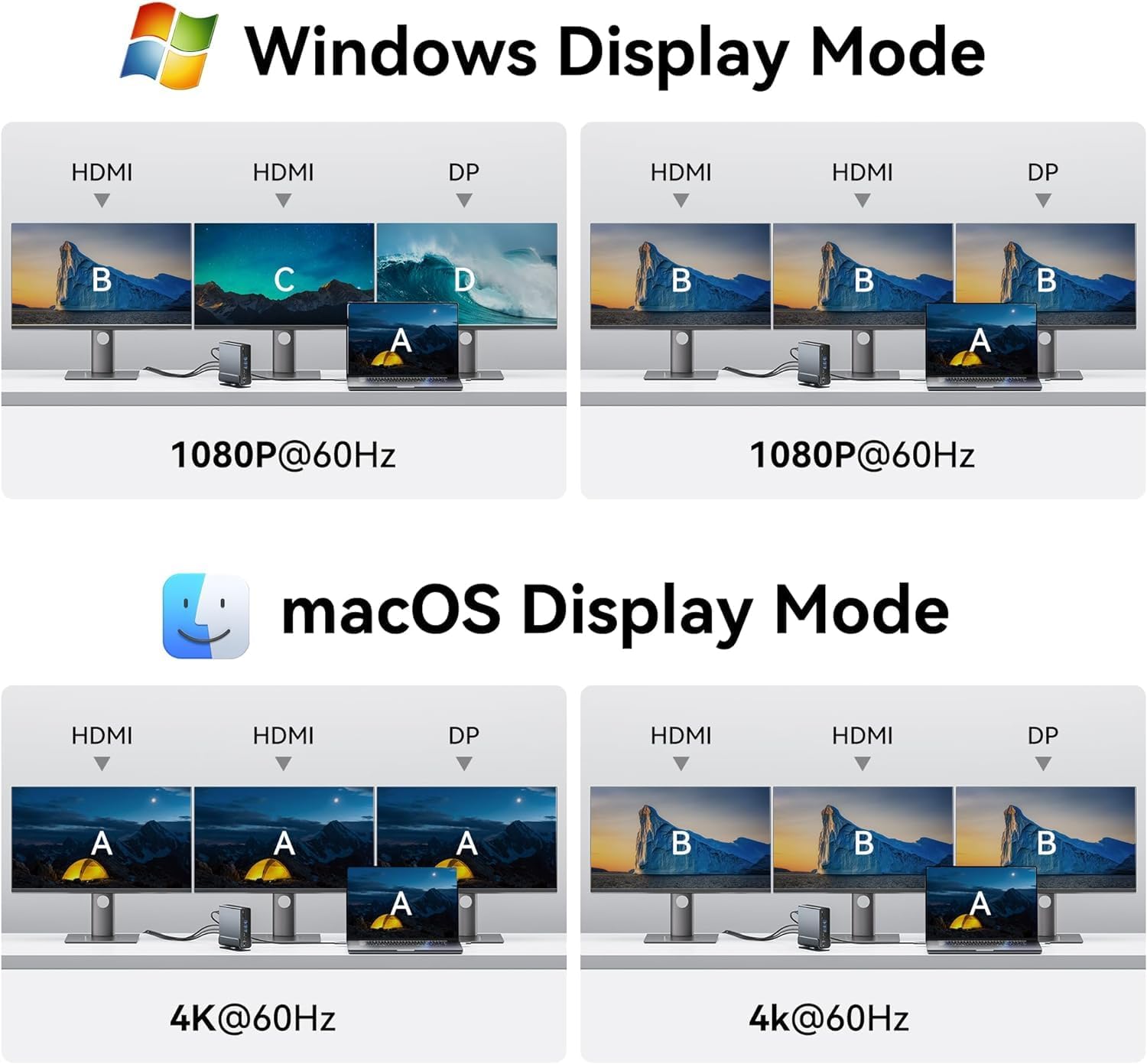
Image: Diagrams illustrating various display configurations for Windows (Extend/Mirror) and macOS (Mirror only for extended displays).
Sistema Windows:
- Configuració del monitor dual: Supports 4K@30Hz for two extended monitors.
- Triple Monitor Setup: Supports 1080P@60Hz for three extended monitors.
- You can configure display modes (Extend, Duplicate, Second screen only) via Windows Display Settings.

Image: A laptop connected to three external monitors, demonstrating the triple display setup for Windows operating systems.

Image: A laptop connected to two large 4K monitors, showcasing the stunning 4K display capabilities of the docking station.
Sistema macOS:
- macOS laptops only support SST (Single Stream Transport) mode. All external monitors will mirror the desktop interface (A-AAA or A-BBB mode).
- Highest resolution for single, dual, or triple monitors is 4K@60Hz.
| OS | Monitors | Resolució més alta | Modes de visualització | Tipus de port |
|---|---|---|---|---|
| Windows | Pantalla única | 4K a 60 Hz màxim | A-A / A-B | HDMI / DP |
| Pantalla dual | 4K a 30 Hz màxim | A-AB / A-BB / A-AA | HDMI / DP | |
| Visualització triple | 1080P@60Hz Max | A-ABC / A-BBB / A-AAA | HDMI / DP | |
| macOS | Pantalla única | 4K a 60 Hz màxim | A-A / A-B | HDMI / DP |
| Pantalla dual | 4K a 60 Hz màxim | A-BB / A-AA | HDMI / DP | |
| Visualització triple | 4K a 60 Hz màxim | A-BBB / A-AAA | HDMI / DP |
6. Instruccions de funcionament
6.1 Transferència de dades d'alta velocitat
The docking station features multiple high-speed USB ports for efficient data transfer:
- USB 3.2 Gen 2 Type-A & Type-C: Up to 10Gbps for rapid file transfers with compatible devices like SSDs.
- USB 3.0 Type-A & USB 3.2 Gen 1 Type-C: Up to 5Gbps for general data transfer.
- USB 2.0 tipus A: 480Mbps, ideal for connecting keyboards, mice, and other low-bandwidth devices.
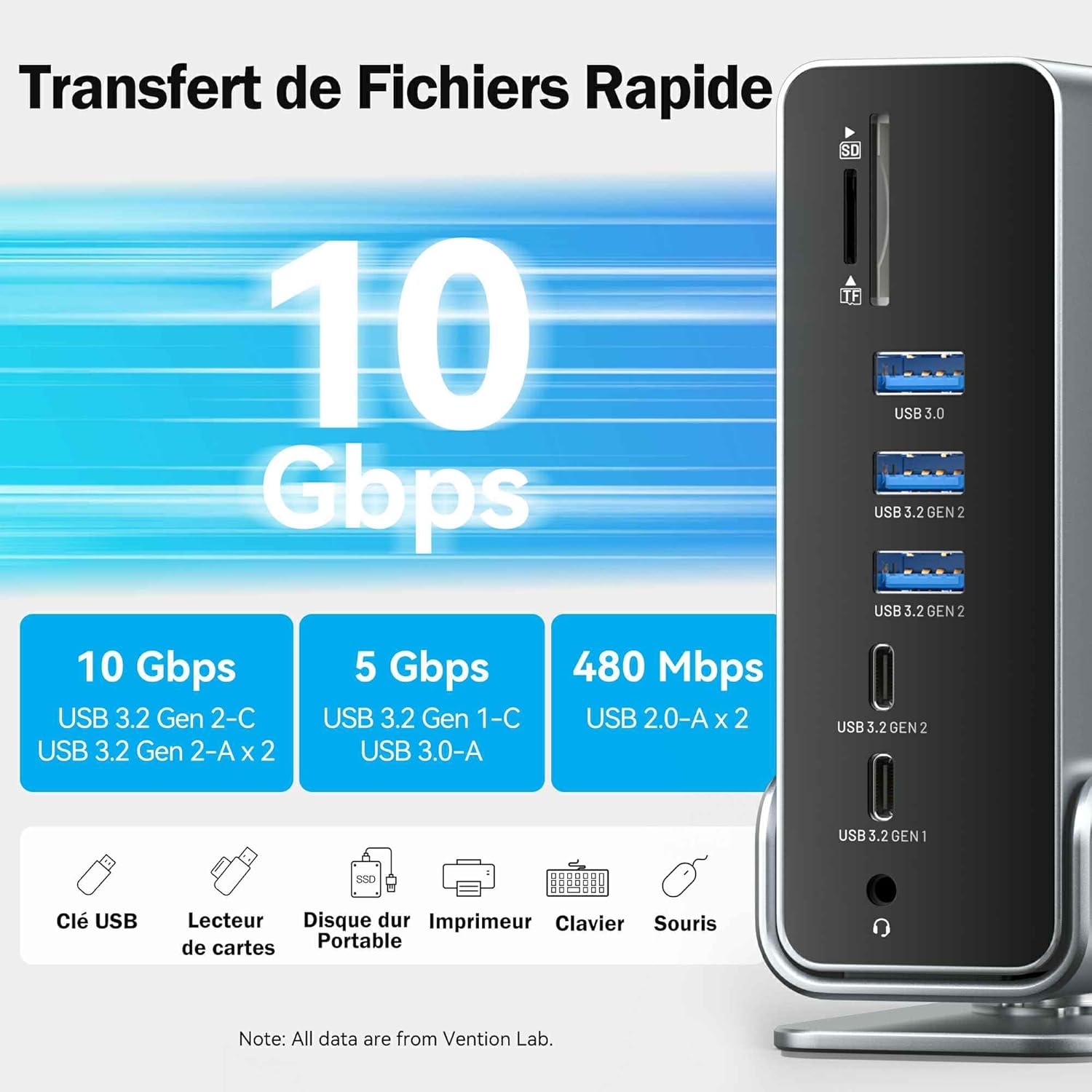
Image: Visual representation of different USB port speeds (10Gbps, 5Gbps, 480Mbps) and examples of devices that can be connected, such as USB drives, card readers, and printers.

Image: A laptop connected to the docking station, demonstrating high-speed data transfer with external devices like an SSD, showing files transferring in seconds.
6.2 Lliurament de potència (PD)
The PD port supports up to 100W power input, allowing the docking station to charge your laptop with up to 85W output. This eliminates the need for a separate laptop charger, simplifying your workspace.

Image: The VENTION docking station connected to a laptop and a power adapter, illustrating its 100W fast charging capability.
Connexió Ethernet de 6.3 Gigabit
The integrated RJ45 Gigabit Ethernet port provides a stable and fast wired network connection, supporting speeds of 10/100/1000Mbps. This is ideal for online gaming, streaming, and large file downloads where Wi-Fi might be unstable.

Image: A laptop connected to the docking station, which is then connected to an Ethernet cable, demonstrating a fast and stable 1Gbps network connection.
7. Manteniment
- Clean the docking station with a soft, dry cloth. Do not use liquid cleaners or aerosols.
- Keep the ports free of dust and debris. Use compressed air if necessary.
- Guardeu el dispositiu en un lloc fresc i sec quan no l'utilitzeu.
- The aluminum alloy shell and cutting-edge chip design ensure optimal heat dissipation, preventing overheating during prolonged use.

Image: Features of the docking station including optimal heat dissipation through its aluminum shell, anti-slip pads for stability, and a detachable/rotatable U-shaped stand for vertical or horizontal placement.
8. Solució De Problemes
| Problema | Causa possible | Solució |
|---|---|---|
| No display on external monitor(s). | Laptop USB-C port does not support DisplayPort Alternate Mode; incorrect cable connection; monitor input not selected. | Ensure your laptop's USB-C port is full-featured (supports video output). Check all cable connections. Select the correct input source on your monitor. Restart your laptop. |
| External monitors are mirroring on macOS. | This is expected behavior for macOS. | macOS only supports SST (Single Stream Transport) for extended displays via this docking station. All external monitors will show the same content. |
| Dispositius USB no reconeguts. | Loose connection; insufficient power; driver issue. | Reconnect the USB device. Ensure the docking station is powered (if using PD). Try a different USB port. Update USB drivers on your laptop. |
| Velocitats de transferència de dades lentes. | Device connected to a lower speed port; cable quality. | Ensure high-speed devices are connected to 10Gbps or 5Gbps ports. Use high-quality USB cables. |
| Network connection unstable or not working. | Loose Ethernet cable; network driver issue; router problem. | Check Ethernet cable connection. Restart your router/modem. Update network drivers on your laptop. |
9. Especificacions
- Model: TPUH0
- Ports: 2x HDMI 2.0, 1x DisplayPort 1.4, 1x USB-C 10Gbps, 2x USB-A 10Gbps, 1x USB-C 5Gbps, 1x USB-A 5Gbps, 2x USB-A 480Mbps, 1x RJ45 Gigabit Ethernet, 1x 3.5mm Audio, 1x SD Card, 1x TF Card, 1x PD 100W Input, 1x PC Host Output
- Sortida de vídeo:
- Single Display: Up to 4K@60Hz (HDMI/DP)
- Dual Display (Windows): Up to 4K@30Hz
- Triple Display (Windows): Up to 1080P@60Hz
- Dual/Triple Display (macOS): Up to 4K@60Hz (Mirrored)
- Velocitat de transferència de dades: Up to 10Gbps (USB 3.2 Gen 2), 5Gbps (USB 3.0/3.2 Gen 1), 480Mbps (USB 2.0)
- Subministrament d'energia: 100W Max Input (85W Max Output to Laptop)
- Ethernet: 10/100/1000 Mbps Gigabit Ethernet
- Lector de targetes: SD/TF (90 MB/s)
- Material: Carcassa d'aliatge d'alumini
- Compatibilitat: Laptops with full-featured USB-C or Thunderbolt 3/4 ports (Windows, macOS, Linux, Android, iPadOS)
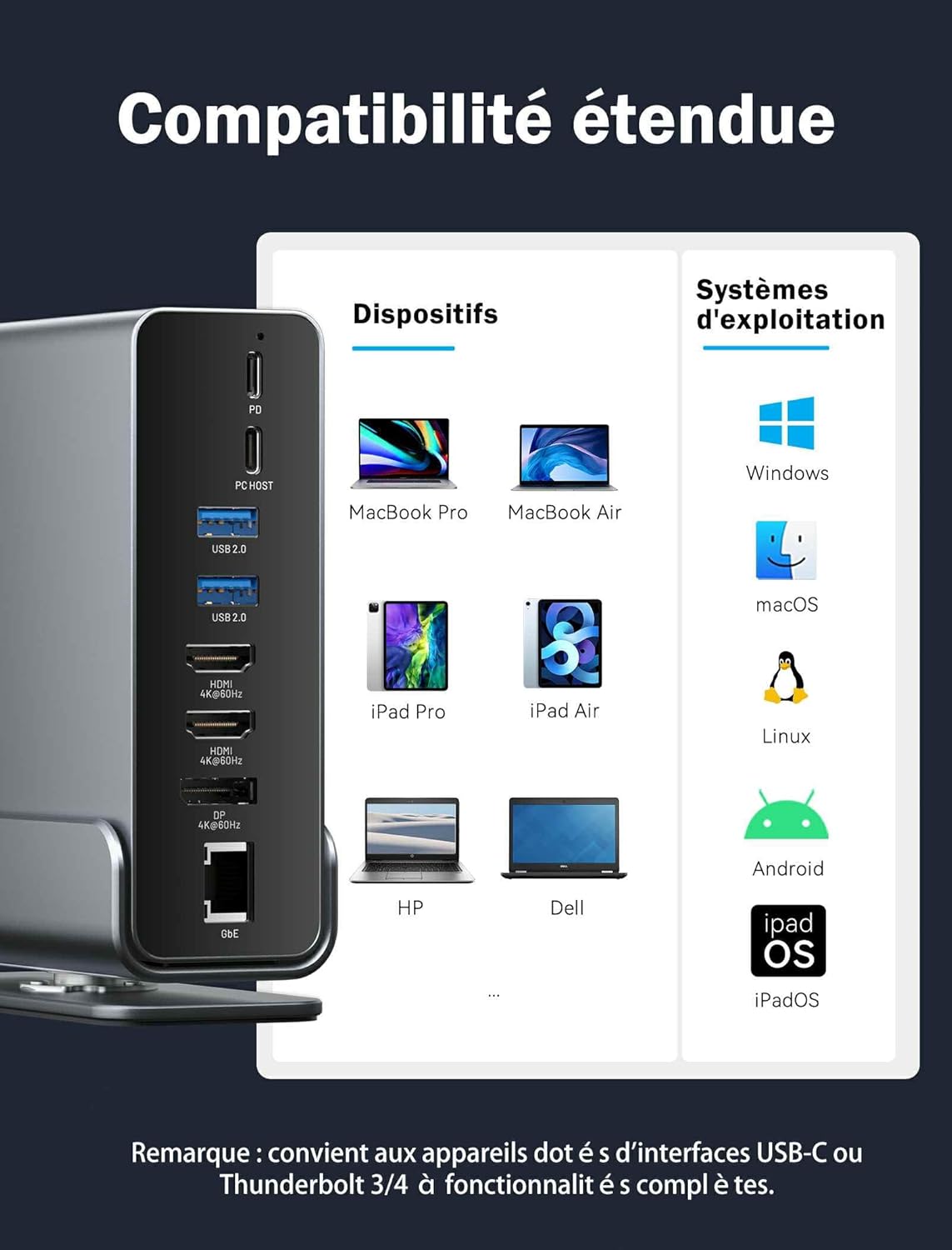
Image: A comprehensive compatibility chart showing various compatible devices (MacBook Pro/Air, iPad Pro/Air, HP, Dell) and operating systems (Windows, macOS, Linux, Android, iPadOS).
10. Garantia i Suport
VENTION provides a 12-month warranty for this product. If you encounter any issues or have questions, please contact VENTION customer support through the retailer where you purchased the product or visit the official VENTION weblloc d'assistència.
Correu electrònic d'atenció al client: [Refer to retailer or official VENTION weblloc]
Weblloc: www.vention.cn
Note: Please retain your purchase receipt for warranty claims.