
ANCHEER TR5993-121-1
ANCHEER Under Desk Treadmill User Manual
Model: TR5993-121-1
Marca: ANCHEER
Introducció
Thank you for choosing the ANCHEER Under Desk Treadmill. This manual provides essential information for the safe and efficient operation, setup, maintenance, and troubleshooting of your new treadmill. Please read this manual thoroughly before using the product and retain it for future reference.

Figure 1: ANCHEER Under Desk Treadmill in a home setting.
Informació de seguretat
To ensure safe operation, please adhere to the following guidelines:
- Col·loqueu sempre la cinta de córrer sobre una superfície plana i estable.
- Mantingueu els nens i les mascotes lluny de la cinta de córrer durant el funcionament.
- Assegureu-vos que hi hagi un espai lliure suficient al voltant de la cinta de córrer (almenys 2 cm a tots els costats).
- No utilitzeu la cinta de córrer si està danyada o no funciona correctament.
- Utilitzeu calçat esportiu adequat durant l'ús.
- No supereu la capacitat màxima de pes de l'usuari de 300 lliures.
- Desendolleu la cinta de córrer de la presa de corrent quan no l'utilitzeu o abans de netejar-la/fer-ne el manteniment.
- Avoid placing the treadmill in direct sunlight or in areas with high humidity.
Contingut del paquet
Verifiqueu que tots els components siguin presents al paquet:
- Electric Treadmill (x1)
- Manual d'usuari (x1)
- Comandament a distància (x1)
- Lubricant Oil (x2 bottles)
- Clau anglesa (x1)

Figure 2: Included components of the ANCHEER Under Desk Treadmill package.
Configuració
The ANCHEER Under Desk Treadmill comes fully assembled, requiring minimal setup before first use.
- **Unpacking:** Carefully remove the treadmill from its packaging.
- **Placement:** Place the treadmill on a flat, hard surface. Ensure there is enough space for safe operation.
- **Adjusting Stability:** The rear of the walking treadmill is designed with adjustable height swivel feet. Adjust these feet to ensure the treadmill remains stable and balanced on uneven surfaces.
- **Power Connection:** Connect the power cord to the treadmill and then to a grounded electrical outlet.
- **Remote Control:** The remote control is essential for operating the treadmill. Ensure it is easily accessible. The treadmill features a dedicated remote control storage slot.

Figure 3: Adjustable height swivel foot for stability.
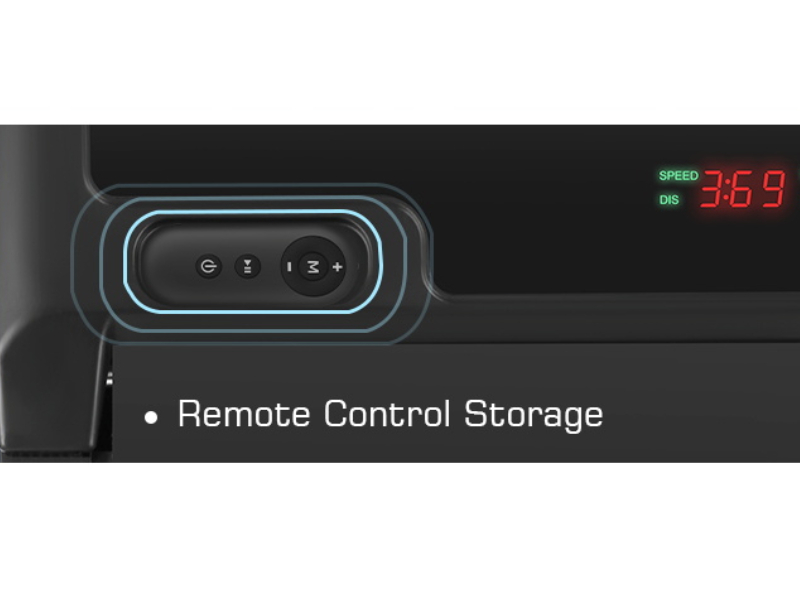
Figure 4: Remote control storage for convenience.
The compact design and built-in transport wheels allow for easy movement and storage under a sofa, bed, or desk when not in use.

Figure 5: Portability and storage options for the treadmill.
Instruccions de funcionament
Your ANCHEER Under Desk Treadmill is designed for simple and intuitive operation using the remote control.
Funcions de control remot

Figura 6: Mésview dels botons del comandament a distància.
- **Power Button:** Press to turn the treadmill ON or OFF.
- **Start/Pause Button:** Press to start or pause the treadmill.
- **Speed + / - Buttons:** Adjust the walking/running speed. The maximum speed is 4 MPH.
- **Mode (M) Button:** Activate goal-setting modes (time, distance, calories).
Pantalla LED
The multi-functional LED display clearly shows real-time exercise data:
- Temps transcorregut
- Calories cremades
- Velocitat actual
- Distància recorreguda

Figure 7: Treadmill LED display and remote control.
Començar un entrenament
- Ensure the treadmill is plugged in and the power switch (if present) is ON.
- Stand on the treadmill belt.
- Press the Power button on the remote control to turn on the display.
- Press the Start/Pause button to begin the belt movement. The treadmill will start at a low speed.
- Use the Speed + / - buttons to adjust to your desired walking or jogging pace.
The treadmill features a powerful 2.5HP quiet motor, ensuring a smooth and stable workout experience with low noise levels (below 45 dB).

Figure 8: Quiet operation for an undisturbed environment.
Goal Setting Mode
The treadmill includes a goal-setting mode to help you achieve specific workout targets:
- Press the "M" (Mode) button on the remote control.
- Cycle through the available goal settings: Time, Distance, and Calories.
- Once a goal type is selected, use the Speed + / - buttons to set your desired value.
- Press Start/Pause to begin your goal-oriented workout.

Figure 9: Customized goal countdown design for targeted workouts.
Finalització d'un entrenament
To stop the treadmill, press the Start/Pause button on the remote control. The belt will gradually slow down and stop. For safety, always step off the treadmill once the belt has come to a complete stop.
Escenaris d'ús
The 2-in-1 design allows for versatile use, whether for walking under a standing desk or for general exercise.

Figure 10: Using the treadmill as an under-desk walking pad.
Video 1: Demonstration of the 2-in-1 walking pad treadmill for home and office use, showcasing its compact design and ease of setup and use for both walking and jogging, as well as under a standing desk.
Manteniment
Un manteniment regular garanteix la longevitat i el rendiment òptim de la cinta de córrer.
Neteja
- Netegeu la cinta de córrer amb anuncisamp drap després de cada ús per eliminar la suor i la pols.
- No utilitzeu netejadors abrasius ni dissolvents.
- Keep the area around the treadmill clean and free of obstructions.
Lubricació
The running belt requires periodic lubrication to reduce friction and extend its lifespan. Use the provided lubricant oil.
- Desendolleu la cinta de córrer de la presa de corrent.
- Aixeca la vora de la cinta de córrer.
- Apply a small amount of lubricant oil evenly along the center of the deck, underneath the belt.
- Plug in the treadmill and run it at a low speed (e.g., 1 MPH) for 2-3 minutes to distribute the oil.
- Lubricate every 3-6 months depending on usage frequency.
Resolució de problemes
Aquesta secció tracta els problemes habituals que podeu trobar amb la vostra cinta de córrer.
| Problema | Causa possible | Solució |
|---|---|---|
| La cinta de córrer no s'encén. | Power cord not properly connected; Power switch OFF; Circuit breaker tripped. | Ensure power cord is securely plugged in. Turn power switch ON. Check household circuit breaker. |
| La corretja s'atura o rellisca durant l'ús. | Belt needs lubrication; Belt is too loose; Overload (user weight exceeds limit). | Lubricate the running belt. Refer to maintenance section. Reduce user weight. |
| Soroll estrany de la cinta de córrer. | Loose parts; Lack of lubrication; Treadmill not on a level surface. | Check for and tighten any loose screws. Lubricate the belt. Adjust swivel feet to level the treadmill. |
| El comandament a distància no respon. | Battery low or dead; Remote control out of range or obstructed. | Replace remote control battery. Ensure direct line of sight to the treadmill's receiver. |
If the problem persists after attempting these solutions, please contact ANCHEER customer support for assistance.
Especificacions
| Característica | Detall |
|---|---|
| Marca | ANCHEER |
| Nom del model | TR5993-121-1 |
| Color | Grey white |
| Dimensions del producte (LxWxH) | 45.27 "P x 20" W x 4.17" H |
| Pes de l'article | 40 lliures |
| Material | Acer d'aliatge |
| Velocitat màxima | 4 milles per hora |
| Velocitat mínima | 0.6 milles per hora |
| Potència màxima | 2.5 cavalls de potència |
| Recomanació de pes màxim | 300 lliures |
| Longitud de coberta | 40 polzades |
| Amplada de la coberta | 15 polzades |
| Tipus de visualització | LED |
| Font d'alimentació | Elèctric amb cable |
| Muntatge obligatori | No |
Garantia i Suport
ANCHEER offers a 1-year warranty for this product. For any issues, replacement parts, or support inquiries, please contact ANCHEER customer service. Your satisfaction is our top priority.
For additional support and product information, you may visit the official ANCHEER Store on Amazon: ANCHEER Store
Ask a question about this manual
Ask about setup, troubleshooting, compatibility, parts, safety, or missing instructions. Manuals+ will review the question and use this page’s manual context to help answer it.