
FLEXISPOT ET365W
FLEXISPOT E6 Essential Dual Motor Standing Desk Frame User Manual
Model: ET365W (White Frame, 3 Stag(e Lite Leg)
Informació important de seguretat
Si us plau, llegiu i comprengui totes les instruccions abans del muntatge i l'ús. Si no segueix aquestes instruccions, pot causar lesions o danys al producte.
- Seguiu sempre atentament les instruccions de muntatge per garantir l'estabilitat.
- No supereu el límit màxim de pes de 220 lliures (100 kg).
- Keep the desk and its electrical components away from water and other liquids.
- Always turn off and unplug the desk when not in use or when leaving the room.
- Keep the desk area clear of obstacles to prevent tripping or collision.
- Always supervise children when using the desk.
- Assegureu-vos que tots els cargols estiguin ben ajustats abans d'utilitzar-los.
Producte acabatview
The FLEXISPOT E6 Essential Dual Motor Standing Desk Frame provides a versatile and ergonomic workspace solution. Featuring a robust 3-stage lift system and quiet dual motors, it allows for seamless transitions between sitting and standing positions.
Característiques principals:
- 3-Stage Lift System: Offers a wide height adjustment range from 23.6 inches to 48.8 inches, accommodating various user heights.
- Quiet Dual Motors: Operates with less than 50 dB noise level and supports a weight capacity of up to 220 lbs (100 kg).
- Controlador programable: Features a convenient control panel with four memory presets for quick height adjustments.
- Construcció duradora: Built with a strong metal base for stability and longevity.

Image: The FLEXISPOT E6 Essential Dual Motor Standing Desk Frame in white, featuring the integrated control panel.
Contingut del paquet
Si us plau, verifiqueu que tots els components siguin presents i no estiguin danyats abans de començar el muntatge. Si hi ha alguna peça que falti o estigui danyada, poseu-vos en contacte amb el servei d'atenció al client.
- 1. Side bracket x2
- 2. Left beam x2
- 3. Right beam x2
- 4. Columna x2
- 5. Teclat x1
- 6. Adaptador de corrent x1
- 7. Pedestal x2
- 8. Cable d'alimentació CA x1
- 9. Cable d’extensió x1
- 10. Clip de cable x4
- 11. T-Socket Wrench x1
- 12. Adapter bracket x1

Image: All frame components laid out for inspection.
Instruccions de muntatge
Follow these steps carefully to assemble your FLEXISPOT E6 Essential Standing Desk Frame. It is recommended to have two people for assembly.
Video: Official FLEXISPOT E6 Essential Standing Desk Installation Guide. This video provides a visual walkthrough of the assembly process.
Step 1: Assemble the Cross Beams
Connect the left and right beams (parts 2 and 3) using the provided screws (C) and the T-Socket Wrench (11). Ensure screws are aligned with square holes and pressed tightly. The length of the cross beams can be adjusted to fit a desktop of 51-59 inches (1300-1500mm).

Image: Illustration showing the connection of the left and right beams.
Step 2: Attach Columns to Cross Beams
Attach the two columns (part 4) to the assembled cross beams using screws (A) and the T-Socket Wrench (11). Pre-tighten all screws for the cross beams, then tighten them simultaneously for a secure fit. Prioritize installing diagonal screws first.

Image: Visual guide for attaching the columns to the cross beams.
Step 3: Install Pedestals
Secure the pedestals (part 7) to the bottom of the columns using screws (E) and the T-Socket Wrench (11).

Image: Diagram showing the attachment of the pedestals to the columns.
Step 4: Attach Adapter Bracket and Keypad
Mount the adapter bracket (part 12) and the keypad (part 5) to the underside of your chosen desktop. Ensure the curved edge of the keypad is flush with the edge of the table top. Use screws (F) and a drill for this step. Make sure the keypad is on the same side as the adapter bracket.

Image: Illustration of attaching the adapter bracket and keypad to the desktop.
Pas 5: connecteu el cablejat
Connect all necessary cables: the keypad to the control box, the motors to the control box, the power adapter (part 6) to the control box, and the AC power cable (part 8) to the power adapter. Use cable clips (part 10) to manage and secure the cables neatly under the desktop.

Image: Diagram showing the proper routing and connection of all electrical cables.
Instruccions de funcionament
The FLEXISPOT E6 Essential features an intuitive programmable controller for easy height adjustment.

Image: The intelligent keypad with LED display and buttons for height adjustment and memory presets.
Funcions del controlador:
- Fletxes amunt/avall (▲ / ▼): Press and hold to manually adjust the desk height up or down. The LED display will show the current height.
- Preajustos de memòria (1, 2, 3, 4): El controlador permet desar fins a quatre configuracions d'alçada preferides.
- Ajusteu l'escriptori a l'alçada desitjada utilitzant les fletxes amunt/avall.
- Press the "M" button. The display will show "S-".
- Immediately press one of the number buttons (1, 2, 3, or 4) to save the current height to that preset.
- Per recuperar una alçada desada, només cal que premeu el botó numèric corresponent.
- Funció anticol·lisió: The desk is equipped with an anti-collision system. If the desktop encounters an obstacle while moving, it will automatically stop and reverse slightly to prevent damage.
Especificacions del producte
| Característica | Detall |
|---|---|
| Número de model | ET365W |
| Marca | FLEXISPOT |
| Color | Marc blanc |
| Product Dimensions (Frame) | 43.3"D x 23.6"W x 23.6"H (Adjustable width for desktop) |
| Interval d'ajust d'altura | 23.6 inches (Minimum) to 48.8 inches (Maximum) |
| Mecanisme d'elevació | Electric Dual Motor, 3-Stage Lift System |
| Capacitat màxima de pes | 220 lliures (100 kg) |
| Nivell de soroll | Menys de 50 dB |
| Material base | Metall |
| Components inclosos | Installation Tools and Wire |
| UPC | 810072845221 |
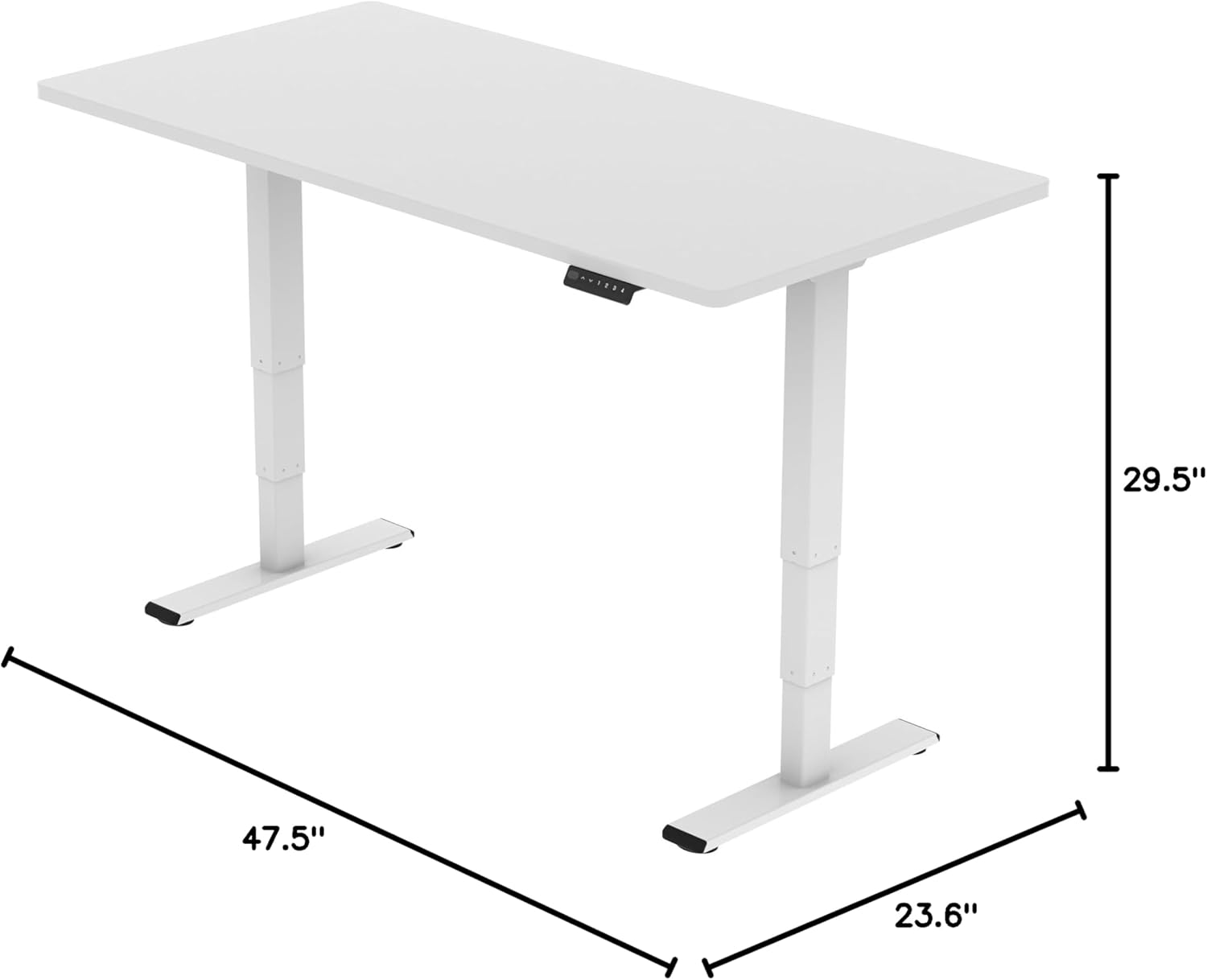
Image: Diagram illustrating the adjustable dimensions of the desk frame.
Manteniment
Un manteniment regular garanteix la longevitat i el rendiment òptim de l'estructura del vostre escriptori de peu.
- Neteja: Netegeu el marc de l'escriptori amb un drap suauamp drap. Eviteu utilitzar productes químics agressius o netejadors abrasius que puguin danyar l'acabat.
- Gestió de cables: Periodically check that all cables are securely fastened and not pinched or tangled. Re-organize with cable clips if necessary.
- Elements de fixació: Occasionally check all screws and bolts to ensure they are tight. Re-tighten if any feel loose.
- Comprovació d'obstruccions: Ensure there are no obstructions in the path of the desk's movement, especially underneath the desktop.
Resolució de problemes
If you encounter any issues with your FLEXISPOT E6 Essential Standing Desk Frame, refer to the common problems and solutions below.
- Desk not moving or unresponsive:
- Comproveu totes les connexions dels cables per assegurar-vos que estiguin ben connectades.
- Verify that the power adapter is correctly connected to a working power outlet.
- Perform a reset: Unplug the desk from the power outlet for 10-15 seconds, then plug it back in.
- Ajust d'alçada desigual:
- Assegureu-vos que l'escriptori estigui col·locat en una superfície plana.
- Check for any obstructions under the desk that might impede one leg's movement.
- Contact customer support if the issue persists after checking connections and obstructions.
- Desk stops unexpectedly during movement:
- This may be the anti-collision feature activating. Check for any obstacles in the desk's path.
- Ensure the weight on the desk does not exceed the maximum capacity of 220 lbs.
Garantia i Suport
FLEXISPOT is committed to providing high-quality products and excellent customer service.
- Cobertura de la garantia: Enjoy peace of mind with our Cobertura de 5 anys on the desk frame and motor, and Protecció de 2 anys on the control panel and electronics.
- Atenció al client: For any questions, assistance with assembly, troubleshooting, or warranty claims, please visit the official FLEXISPOT weblloc web o contacteu directament amb el seu servei d'atenció al client.
- Recursos en línia: Additional resources, including FAQs and detailed video tutorials, may be available on the FLEXISPOT Store.
Video: "Welcome to FLEXISPOT'S Mega Factory" - Showcasing the manufacturing process and commitment to quality.
Ask a question about this manual
Ask about setup, troubleshooting, compatibility, parts, safety, or missing instructions. Manuals+ will review the question and use this page’s manual context to help answer it.