
1. Introducció
This user manual provides comprehensive instructions for the Bewinner 16:10 Portable Monitor. Designed for versatility and high performance, this 18-inch display offers a 2.5K Ultra HD resolution and a 144Hz refresh rate, making it ideal for gaming, professional work, and multimedia consumption. Its portable design, multiple connectivity options, and built-in dual speakers ensure a seamless and immersive user experience across various devices.
2. Característiques del producte
- Pantalla d'alta resolució: Experience sharper and more detailed visuals with 2.5K (2560x1600) resolution, enhancing movies, games, and digital content.

Image: Visual comparison demonstrating the clarity of 2.5K (QHD) resolution versus Full HD (FHD).
- Alta taxa d'actualització: A 144Hz refresh rate provides smooth visuals, reducing screen lag and drag, particularly beneficial for fast-paced gaming.
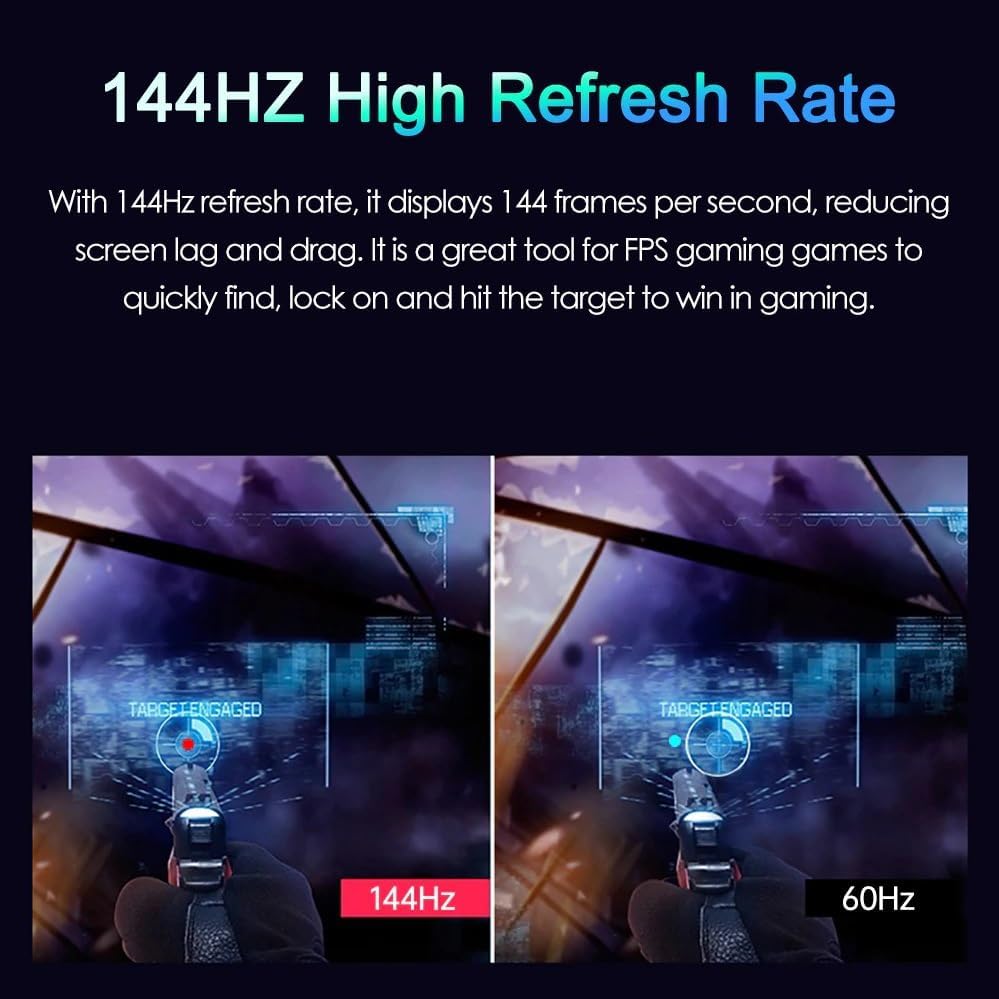
Image: Illustrates the difference in smoothness between 144Hz and 60Hz refresh rates, highlighting reduced motion blur.
- Gamma de colors àmplia: The display supports 100% DCI-P3 wide color gamut, providing vibrant and accurate color reproduction for a richer visual experience.

Image: Shows the enhanced color depth and accuracy provided by 100% DCI-P3 wide color gamut compared to standard color profiles.
- Connectivitat versàtil: Equipped with a MINI HD multimedia interface, a 3.5mm headphone jack, and two Type-C ports for broad compatibility with laptops, smartphones, tablets, and gaming consoles.
- Altaveus duals: Built-in dual speakers deliver clear audio, eliminating the need for external speakers for an integrated audio-visual experience.
- Disseny portàtil i durador: Lightweight metal casing ensures easy portability and long-lasting durability, making it an ideal companion for on-the-go use.
- Muntatge a la paret: Supports VESA wall mounting for flexible viewing angles and customizable setup.
- Modes de paisatge i retrat: Easily switch between horizontal and vertical orientations to suit different applications, from data visualization to media consumption.
- Phone Screen Scaling: Extend or mirror your smartphone screen, transforming it into a larger display for productivity or entertainment.
3. Contingut del paquet
Si us plau, verifiqueu que tots els elements siguin presents al paquet abans de continuar amb la configuració.
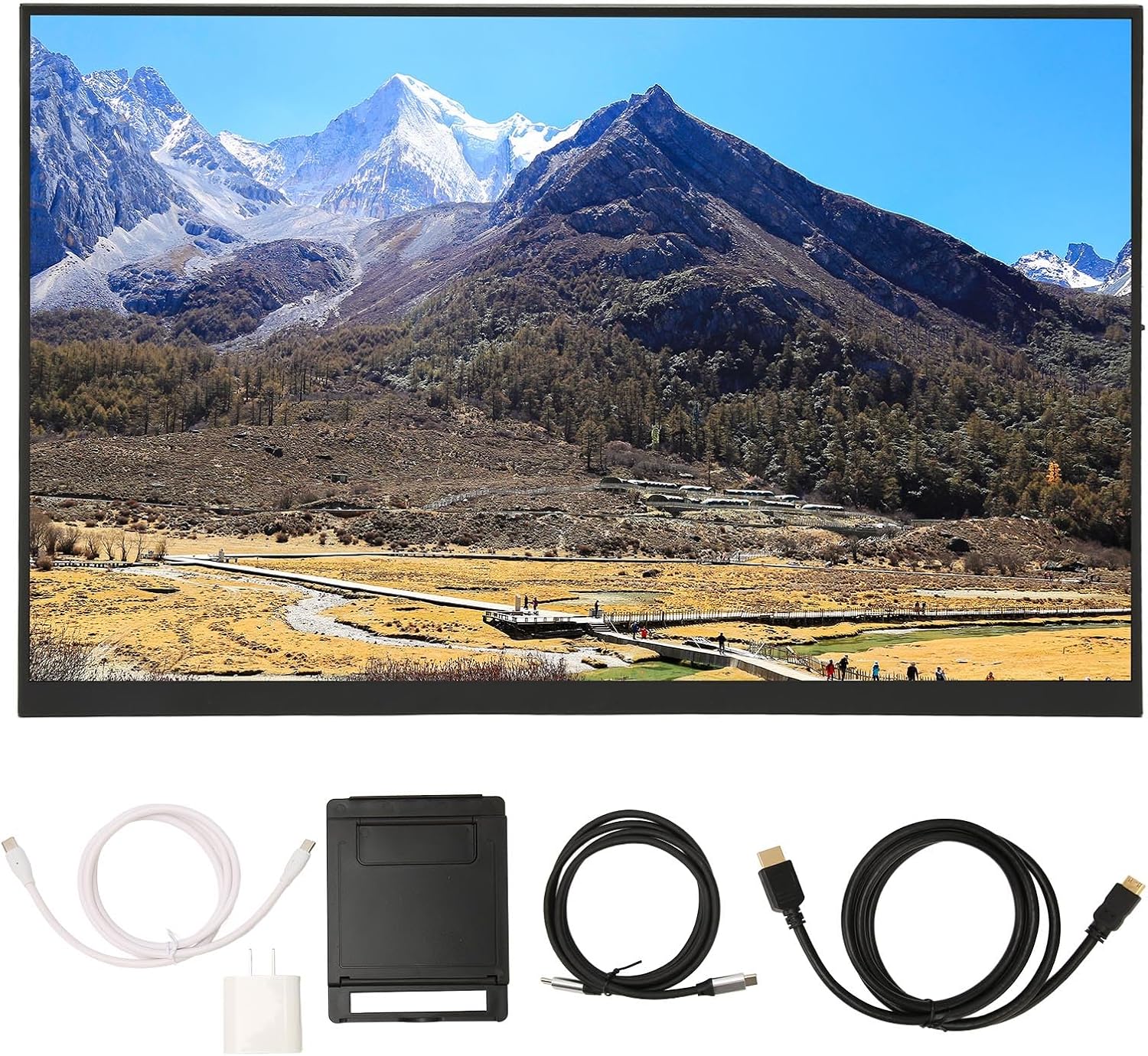
Image: The Bewinner Portable Monitor shown with its included accessories, including various cables and a foldable stand.
- Bewinner 16:10 Portable Monitor
- Cable HDMI
- USB-C to USB-C Cable (for power and video)
- Cable d'alimentació USB-A a USB-C
- Adaptador de corrent (endoll dels EUA)
- Foldable Stand/Cover
- Manual d'usuari (aquest document)
4. Guia de configuració
4.1 Connexió a dispositius
The monitor offers multiple ways to connect to your devices. Ensure the monitor is powered before connecting.
- Using USB-C (Full-featured): If your device (laptop, smartphone) has a full-featured USB-C port that supports video output (DisplayPort Alternate Mode) and power delivery, you can use a single USB-C to USB-C cable to connect. This cable will provide both power and video signal to the monitor.
- Using HDMI and USB-C (Power):
- Connect the HDMI cable from your device's HDMI output to the monitor's MINI HD multimedia interface.
- Connect the USB-A to USB-C power cable from a power source (e.g., wall adapter, laptop USB-A port) to one of the monitor's Type-C ports for power.
- Sortida d'àudio: For external audio, connect headphones or external speakers to the 3.5mm headphone jack on the monitor.

Imatge: Primer pla view of the monitor's side, showing the various input ports including HDMI and USB-C.
4.2 Alimentació del monitor
The monitor can be powered via a full-featured USB-C connection from a compatible device or by using the included power adapter and USB-A to USB-C cable. Ensure the power source provides sufficient wattage for stable operation.
4.3 VESA Wall Mounting
The monitor supports VESA wall mounting for flexible placement. Locate the VESA mounting holes on the back of the monitor. Use compatible VESA mounting hardware (not included) to secure the monitor to a wall mount or arm. Refer to your VESA mount's instructions for proper installation.
5. Instruccions de funcionament
5.1 Menú de visualització en pantalla (OSD)
The monitor features an OSD menu for adjusting various settings such as brightness, contrast, color temperature, input source, and audio volume. Typically, buttons on the side or back of the monitor are used to navigate and select options within the OSD menu. Consult the quick start guide for specific button functions.
5.2 Landscape and Portrait Modes
The monitor automatically detects orientation when connected to compatible devices that support display rotation. You can also manually adjust the display orientation through your connected device's display settings (e.g., Windows Display Settings, macOS Display Preferences, Android/iOS display settings).

Image: Demonstrates the monitor being used in both landscape and portrait orientations, showcasing its versatility for different tasks.
5.3 Phone Screen Extension/Mirroring
Connect your smartphone to the monitor via a full-featured USB-C cable. Your phone's display can be mirrored or extended to the monitor, allowing for a larger viewing area for apps, media, or mobile gaming. Some smartphones may offer a "Desktop Mode" for a PC-like experience.

Image: Illustration of a smartphone connected to the portable monitor, demonstrating both "Desktop Mode" and "Phone Mode" for extended or mirrored display.
5.4 Rendiment de joc
The 144Hz refresh rate provides a smoother gaming experience. Ensure your connected device and game settings are configured to utilize the monitor's full refresh rate capabilities for optimal performance.
Video: Demonstrates the 4K Ultra-HD screen in use, showcasing its visual quality during gameplay and general usage.
Vídeo: Acabatview of the 16:10 Portable Monitor, highlighting its features and applications in a concise manner.
6. Manteniment
- Neteja de la pantalla: Utilitzeu un drap suau i sense pelusa lleugerament dampNetegeu-ho amb aigua o una solució netejadora de pantalles. Eviteu productes químics agressius o materials abrasius.
- Neteja de la Casing: Wipe the monitor's metal casinamb un drap suau i sec.
- Emmagatzematge: When not in use, store the monitor in a cool, dry place, ideally in its original packaging or a protective case to prevent dust and scratches.
- Eviteu condicions extremes: No exposeu el monitor a temperatures extremes, a la llum solar directa durant períodes prolongats ni a una humitat elevada.
7. Solució De Problemes
| Problema | Causa possible | Solució |
|---|---|---|
| No signal/No display | Incorrect input source selected; Loose cable connection; Insufficient power. |
|
| No hi ha so dels altaveus | Monitor volume too low/muted; Device audio output not set to monitor; External speakers/headphones connected. |
|
| Flickering screen/Unstable display | Faulty cable; Graphics driver issues; Power fluctuations. |
|
8. Especificacions
| Característica | Detall |
|---|---|
| Marca | Guanyador |
| Número de model | 367964b4-46aa-4e74-b74e-57b5a93a177b |
| Mida de la pantalla | 18 polzades |
| Relació d'aspecte | 16:10 |
| Resolució | 2560 x 1600 (2.5K QXGA Wide) |
| Freqüència d'actualització | 144 Hz |
| Superfície de la pantalla | brillant |
| Connectivitat | MINI HD Multimedia Interface, 2x Type-C Ports, 3.5mm Headphone Jack |
| Àudio | Altaveus duals integrats |
| Muntatge | Compatible VESA |
| Pes de l'article | 4.33 lliures |
| Dimensions del paquet | 17.28 x 11.1 x 2.64 polzades |
| País d'origen | Xina |
9. Garantia i Suport
Bewinner is committed to providing quality products and a pleasant shopping experience. This product comes with a standard manufacturer's warranty. For specific warranty details, including duration and coverage, please refer to the warranty card included in your product packaging or contact Bewinner customer support directly.
For technical assistance, troubleshooting, or any inquiries regarding your Bewinner Portable Monitor, please visit the official Bewinner website or contact their customer service team. Contact information can typically be found on the product packaging or the brand's official online presence.
També podeu visitar el Botiga Bewinner a Amazon per obtenir més informació i recursos de suport.