
LMT-M-F8-hei
Manual d'usuari dels auriculars sense fil Bluetooth M-F8 amb control tàctil
Model: M-F8 (LMT-M-F8-hei)
Marca: Genèrica
Introducció
Gràcies per la compraasing the Generic M-F8 Bluetooth Earphones. These wireless headphones are designed to provide a superior audio experience with powerful bass, clear vocals, and crisp highs, thanks to advanced chip technology and high-intensity magnetic drivers. Featuring intuitive touch controls and an ergonomic design, they offer comfort and convenience for various activities. Please read this manual carefully before using the product to ensure proper operation and to maximize its lifespan.
Informació important de seguretat
Please read and follow these safety guidelines to prevent damage to the device or injury to yourself:
- Do not expose the earphones to extreme temperatures, humidity, or corrosive substances.
- Eviteu deixar caure, colpejar o desmuntar el dispositiu.
- Mantenir fora de l'abast dels nens i mascotes.
- Do not use the earphones while driving or in situations where you need to be aware of your surroundings.
- Clean the earphones with a soft, dry cloth only. Do not use liquids or abrasive cleaners.
- Eliminar el producte de manera responsable segons la normativa local.
Contingut del paquet
Assegureu-vos que tots els elements siguin presents al paquet:
- Generic M-F8 Bluetooth Earphones (Left and Right)
- Estoig de càrrega
- Cable de càrrega USB
- Manual d'usuari
- Multiple sizes of ear tips (typically 3 sizes)
Producte acabatview
The M-F8 earphones feature an ergonomic design with ear hooks for a secure and comfortable fit. Each earbud includes a touch control area and an LED indicator.

This image displays the black Generic M-F8 Bluetooth Earphone, highlighting its ear hook design for secure wear and a visible blue LED indicator on the earbud body.
Configuració
1. Càrrega dels auriculars i l'estoig
Abans del primer ús, carregueu completament els auriculars i l'estoig de càrrega.
- Connect the USB charging cable to the charging port on the case and a power source (e.g., computer USB port, wall adapter).
- Els indicadors lluminosos de la caixa de càrrega mostraran l'estat de càrrega.
- Col·loca els auriculars a l'estoig de càrrega. Començaran a carregar-se automàticament.
- A full charge typically takes approximately 1.5 hours for the case and earphones.

This image illustrates the M-F8 earphone and its charging case, indicating battery life and charging times: 1.5 hours for a full charge, 20 hours of continuous use, and 200 hours of standby time.
2. Emparellament amb el dispositiu
The M-F8 earphones feature one-step auto pairing for convenience.
- Assegureu-vos que el Bluetooth del dispositiu estigui activat.
- Open the charging case and take out both earphones. They will automatically power on and enter pairing mode.
- On your device's Bluetooth settings, search for "M-F8" or a similar name and select it to connect.
- Once connected, you will hear a confirmation tone, and the earphone's LED indicator may change.
- After the initial pairing, the earphones will automatically connect to the last paired device when taken out of the case.

This image shows the M-F8 earphone next to a smartphone, illustrating the automatic connection process via Bluetooth after initial pairing.
Instruccions de funcionament
1. Com posar-se els auriculars
The M-F8 earphones are designed for a secure and comfortable fit, especially during movement.
- Identifica els auriculars esquerre (E) i dret (R).
- Gently place the earbud into your ear canal and rotate it slightly to ensure the ear hook sits comfortably and securely over your ear.
- Adjust the earphone until it feels snug and stable without causing pressure.

This image shows a person wearing the M-F8 earphone, highlighting its ergonomic design that ensures a comfortable and secure fit within the ear.

Aquesta imatge ofereix un primer pla view of the M-F8 earphone's ergonomic design, emphasizing how it is shaped to fit securely around the ear and prevent accidental drops.
2. Toqueu Controls
Each earbud features a touch-sensitive area for easy control of music and calls.
| Acció | Funció |
|---|---|
| Un sol toc | Reproducció/pausa de música |
| Doble toc (auricular dret) | Pista següent |
| Doble toc (auricular esquerre) | Respondre/Finalitzar la trucada |
| Toc triple (auricular dret) | Pista anterior |
| Toc tres vegades (auricular esquerre) | Activa l'Assistent de veu |
| Premsa llarga (2 segons) | Rebutja la trucada |
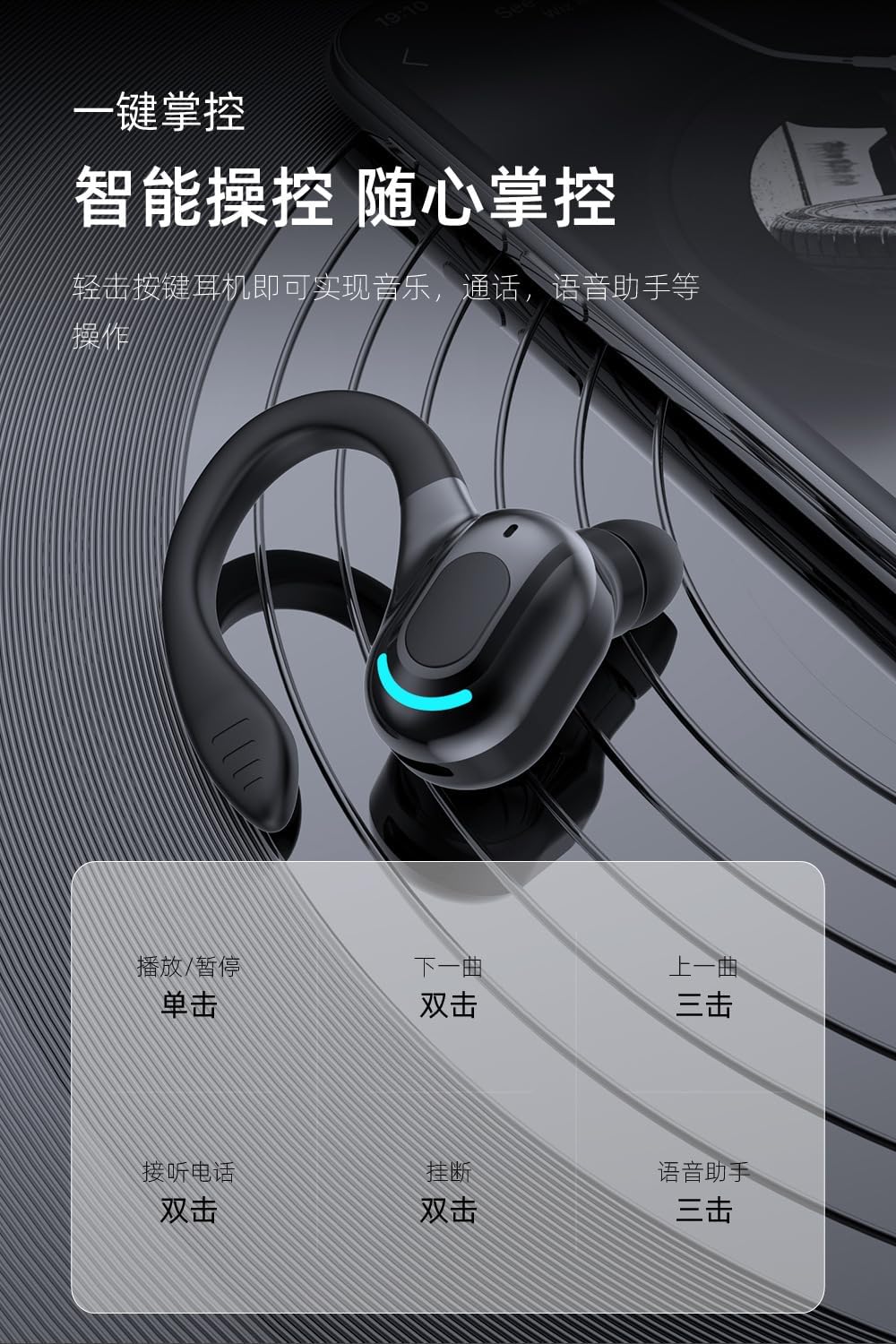
This image provides a visual guide to the M-F8 earphone's touch controls, detailing actions like single tap for play/pause, double tap for next track or answering calls, and triple tap for previous track or voice assistant activation.
Manteniment
To ensure the longevity and optimal performance of your M-F8 earphones, follow these maintenance tips:
- Neteja: Regularly clean the earbuds, ear tips, and charging contacts with a soft, dry, lint-free cloth. Do not use harsh chemicals or abrasive materials.
- Emmagatzematge: Quan no els utilitzeu, guardeu els auriculars a la seva funda de càrrega per protegir-los de la pols i els danys.
- Cura de la bateria: Eviteu descarregar completament la bateria amb freqüència. Carregueu els auriculars regularment, fins i tot si no els feu servir durant períodes prolongats, per mantenir la bateria en bon estat.
- Eviteu l'aigua: While designed for active use, avoid submerging the earphones in water or exposing them to heavy rain.
Resolució de problemes
If you encounter issues with your M-F8 earphones, refer to the following common problems and solutions:
| Problema | Possible solució |
|---|---|
| Els auriculars no s'emparellan | Ensure earphones are charged. Turn off and on Bluetooth on your device. Forget "M-F8" from your device's Bluetooth list and re-pair. |
| Només funciona un auricular | Place both earbuds back into the charging case, close the lid, wait a few seconds, then take them out again. Ensure both are charged. |
| Sense so ni volum baix | Check the volume on both your device and the earphones. Ensure the earphones are properly connected. Clean any debris from the earbud mesh. |
| Problemes de càrrega | Ensure the charging cable is securely connected. Clean the charging contacts on both the earphones and the case. Try a different charging cable or power source. |
| Poor call quality / Noise reduction | Ensure the microphone is not obstructed. Move closer to your connected device. The earphones feature intelligent noise reduction for clearer calls. |

This image visually represents the noise reduction capabilities of the M-F8 earphone, showing a comparison of sound waves before and after noise cancellation, indicating improved clarity.
Especificacions
Technical specifications for the Generic M-F8 Bluetooth Earphones:
- Marca: Genèric
- Model: M-F8 (LMT-M-F8-hei)
- Connectivitat: Bluetooth 5.2
- Voltage: 5 volts (CC)
- Durada de la bateria (auriculars): Approximately 20 hours (single use)
- Temps d'espera: Aproximadament 200 hores
- Temps de càrrega: Aproximadament 1.5 hores
- Interval sense fil: Fins a 10 metres (33 peus)
- Característiques: Touch Control, Auto Pairing, HiFi Sound, Noise Reduction, Ergonomic Design

This image highlights the Bluetooth 5.2 upgrade for the M-F8 earphone, emphasizing low latency, stable signal, and efficient power consumption, along with a transmission distance of 25 meters.
Garantia i Suport
For warranty information or technical support, please refer to the retailer or contact the manufacturer directly. Keep your purchase receipt as proof of purchase.
For further assistance, please visit the official Generic weblloc o poseu-vos en contacte amb el seu servei d'atenció al client.
Ask a question about this manual
Ask about setup, troubleshooting, compatibility, parts, safety, or missing instructions. Manuals+ will review the question and use this page’s manual context to help answer it.