
1. Introducció
Gràcies per triar els auriculars de joc amb cable Havit H2038U RGB. Aquest manual proporciona informació essencial per configurar, utilitzar i mantenir els auriculars. Llegiu-lo atentament per garantir un rendiment òptim i una llarga durada del producte.
Informació important de seguretat:
- Eviteu escoltar música durant molt de temps a volums alts per evitar danys auditius.
- No exposeu els auriculars a temperatures extremes, humitat ni substàncies corrosives.
- Mantingueu els auriculars allunyats de l'aigua i dels líquids.
- No intenteu desmuntar ni modificar els auriculars. Això anul·larà la garantia.
2. Producte acabatview
2.1 Contingut del paquet
- Auriculars de joc amb cable Havit H2038U RGB
- Micròfon desmuntable
- Manual d'usuari (aquest document)
2.2 Components dels auriculars
Els auriculars Havit H2038U presenten un disseny supraaural còmode amb orelleres suaus i una diadema ajustable. Inclouen un micròfon desmuntable per a una comunicació clara i il·luminació RGB integrada per a una experiència de joc millorada.

Figura 2.1: Davant view dels auriculars de joc amb cable Havit H2038U RGB. Aquesta imatge mostra els auriculars supraaurals blancs amb elements d'il·luminació RGB als auriculars i la diadema ajustable.
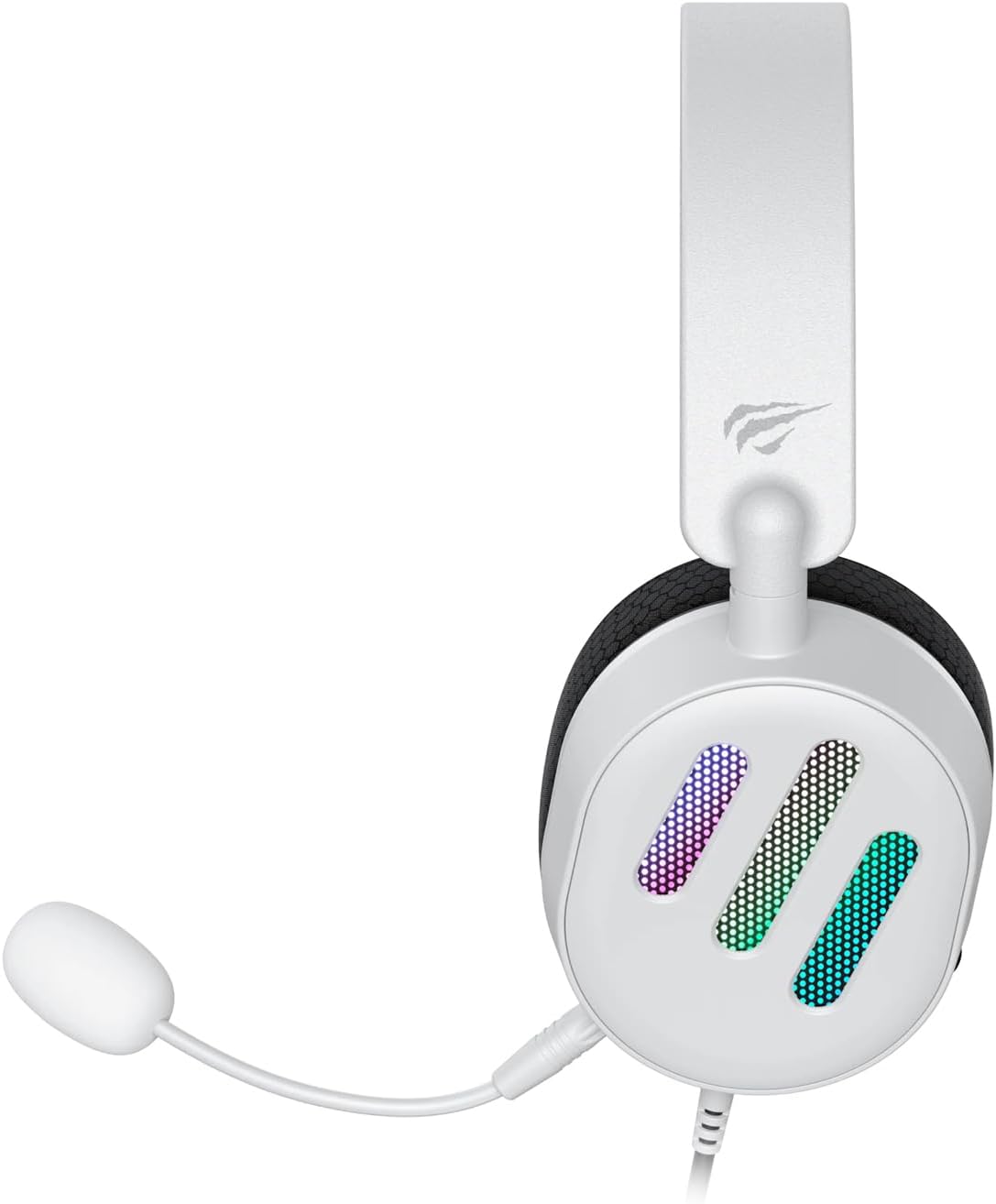
Figura 2.2: lateral view dels auriculars de joc amb cable Havit H2038U RGB, que mostren el micròfon desmuntable connectat a l'auricular esquerre. La roda de control de volum també és visible a l'auricular.

Figura 2.3: A dalt view dels auriculars de joc amb cable Havit H2038U RGB, que destaquen la diadema ajustable i els auriculars suaus i transpirables.
3. Configuració
Els auriculars Havit H2038U utilitzen un sistema de doble connexió per a una funcionalitat completa: un connector de 3.5 mm per a àudio i una connexió USB per a il·luminació RGB i so envoltant virtual 7.1.

Figura 3.1: Primer pla view il·lustrant la connexió del micròfon desmuntable (connector de 3.5 mm) i la connexió USB per als auriculars Havit H2038U. Aquesta imatge també indica la direcció del so de 360 graus i la connectivitat USB 7.1.
- Connecteu el micròfon: Inseriu el micròfon desmuntable al connector de micròfon de 3.5 mm situat a l'auricular esquerre fins que encaixi. Assegureu-vos que estigui ben connectat.
- Connecta't per a l'àudio: Connecteu el connector d'àudio de 3.5 mm dels auriculars al port de sortida d'àudio corresponent de l'ordinador, la consola de jocs o el dispositiu mòbil.
- Connecteu-vos per a la il·luminació RGB i el so envoltant 7.1: Connecteu el connector USB dels auriculars a un port USB disponible de l'ordinador o de la consola de jocs. Aquesta connexió alimenta la il·luminació RGB i habilita la funció de so envoltant virtual 7.1.
- Ajustar l'ajust dels auriculars: Ajusteu la diadema per garantir un ajust còmode i segur sobre les orelles. Els auriculars han d'envoltar completament les orelles per a un aïllament òptim del so.
- Configuració del sistema (per a PC):
- Sortida d'àudio: Aneu a la configuració de so del vostre sistema operatiu i assegureu-vos que el Havit H2038U estigui seleccionat com a dispositiu de reproducció predeterminat.
- Entrada de micròfon: A la configuració de so, seleccioneu el Havit H2038U com a dispositiu de gravació predeterminat.
- 7.1 So envoltant: Si escau, instal·leu els controladors necessaris del lloc web oficial de Havit. weblloc per habilitar i configurar la funció de so envoltant virtual 7.1.
4. Instruccions de funcionament
4.1 Control de volum
Els auriculars tenen una roda de control de volum integrada, que normalment es troba a l'auricular esquerre o en línia amb el cable. Gireu la roda per augmentar o disminuir el volum de l'àudio.
4.2 Ús del micròfon
El micròfon desmuntable es pot posicionar per a una captació de veu òptima. Ajusteu el braç flexible per apropar el micròfon a la boca i garantir una comunicació clara. Per a la privadesa, podeu silenciar el micròfon mitjançant la configuració del programari del dispositiu si no hi ha cap botó físic de silenci als auriculars.
Il·luminació RGB 4.3
La il·luminació RGB dels auriculars s'alimenta mitjançant la connexió USB. Un cop connectada, la il·luminació s'activarà automàticament. Hi ha opcions de control específiques per a patrons d'il·luminació o colors disponibles mitjançant un programari dedicat, si Havit el proporciona.

Figura 4.1: Els auriculars de joc amb cable Havit H2038U RGB es mostren amb la seva funció d'il·luminació RGB activa.asinels auriculars il·luminats.
So envoltant virtual 4.4 7.1
Quan es connecten mitjançant USB, els auriculars admeten so envoltant virtual 7.1. Aquesta funció millora la perspicàcia espacial de l'àudio en jocs i contingut multimèdia. Assegureu-vos que els controladors pertinents estiguin instal·lats i configurats a través de la configuració de so del vostre sistema o del programari de Havit per obtenir una experiència òptima.

Figura 4.2: Una imatge il·lustrativa que demostra la capacitat de so envoltant virtual 7.1 dels auriculars Havit H2038U, que millora les experiències d'àudio immersives.
5. Manteniment
5.1 Neteja
- Feu servir un drap suau i sec per netejar les superfícies exteriors dels auriculars.
- Per als auriculars, netegeu suaument amb un drap lleugerament damp drap i deixeu-lo assecar completament a l'aire abans d'usar-lo.
- No utilitzeu productes químics agressius, dissolvents ni netejadors abrasius.
5.2 Emmagatzematge
Quan no els utilitzeu, guardeu els auriculars en un lloc net i sec, allunyats de la llum solar directa i de temperatures extremes. Eviteu enredar els cables per evitar que es facin malbé.
6. Solució De Problemes
| Problema | Causa possible | Solució |
|---|---|---|
| No hi ha àudio dels auriculars | El connector de 3.5 mm no està completament inserit; la sortida d'àudio està incorrecta; el volum és massa baix. | Assegureu-vos que el connector de 3.5 mm estigui completament connectat. Comproveu la configuració de so del sistema per seleccionar el Havit H2038U com a dispositiu de reproducció predeterminat. Augmenteu el volum amb la roda de control dels auriculars i el volum del sistema. |
| El micròfon no funciona | Micròfon no completament inserit; dispositiu d'entrada incorrecte seleccionat; micròfon silenciat. | Assegureu-vos que el micròfon estigui ben connectat. Comproveu la configuració de so del sistema per seleccionar el Havit H2038U com a dispositiu de gravació predeterminat. Activeu el silenci del micròfon a la configuració del programari. |
| La il·luminació RGB no funciona | Cable USB no connectat; port USB defectuós. | Assegureu-vos que el cable USB estigui ben connectat a un port USB que funcioni. Proveu-ho amb un altre port USB. |
| So envoltant 7.1 no actiu | Cable USB no connectat; controladors no instal·lats/configurats. | Assegureu-vos que el cable USB estigui connectat. Instal·leu i configureu els controladors necessaris del lloc web oficial de Havit. weblloc. |
7. Especificacions
| Característica | Especificació |
|---|---|
| Model | H2038U |
| Tecnologia de connectivitat | Amb cable (connector de 3.5 mm + USB) |
| Factor de forma dels auriculars | Sobre l'orella |
| Impedància | 24 ohms |
| Resposta de freqüència | 20 Hz - 20 kHz |
| Sensibilitat | 114 dB |
| Tipus de control | Control de volum, botó |
| Material | Plàstic |
| Pes de l'article | 550 g |
| Dimensions del producte | 11.2 x 21.9 x 28.5 cm |
| Color | Blanc |
| Característiques especials | Il·luminació RGB, micròfon desmuntable, so envoltant virtual 7.1 |
8. Garantia i Suport
Els productes Havit estan dissenyats per a la fiabilitat i el rendiment. Per obtenir informació sobre la cobertura de la garantia, l'assistència tècnica o el servei tècnic, consulteu la targeta de garantia inclosa amb el producte o visiteu el lloc web oficial de Havit. weblloc web. Conserveu el rebut de compra com a comprovant de compra per a reclamacions de garantia.
Informació de contacte:
- Havit oficial Weblloc: www.havit.com (Si us plau, consulteu les regions) webllocs web per a suport específic)


