
1. Introducció
This manual provides essential information for the safe and effective use of your Connex Connect CC-S2000 Smart WiFi Rechargeable Motion Sensor. Please read this manual thoroughly before installation and operation, and retain it for future reference. The CC-S2000 is a wireless device designed to detect motion and integrate with your smart home system, enabling automated actions such as triggering alarms or controlling other smart devices.
2. Informació de seguretat
Observeu les següents precaucions de seguretat per evitar danys al dispositiu o lesions personals:
- No exposeu el dispositiu a temperatures extremes, llum solar directa ni humitat.
- Eviteu deixar caure o sotmetre el dispositiu a forts impactes.
- No intenteu desmuntar ni reparar el dispositiu vosaltres mateixos. Encarregueu tot el manteniment a personal qualificat.
- Use only the specified charging cable and power adapter to charge the device.
- Mantingueu el dispositiu fora de l'abast dels nens.
3. Contingut del paquet
Verifiqueu que tots els elements siguin presents al paquet:
- Connex Connect CC-S2000 Smart WiFi Rechargeable Motion Sensor
- Suport de muntatge
- Cargols de muntatge i tacs de paret
- Cable de càrrega USB
- Manual d'usuari (aquest document)
4. Producte acabatview
Familiarize yourself with the components of your motion sensor.

Figura 4.1: Davant view of the Connex Connect CC-S2000 Smart WiFi Rechargeable Motion Sensor. The sensor is white, spherical, and mounted on a small base, with the Connex Connect logo visible on the front.

Figura 4.2: lateral view of the Connex Connect CC-S2000 Smart WiFi Rechargeable Motion Sensor. This view shows the curved profile of the sensor and a small grille on the side, likely for a speaker or microphone.
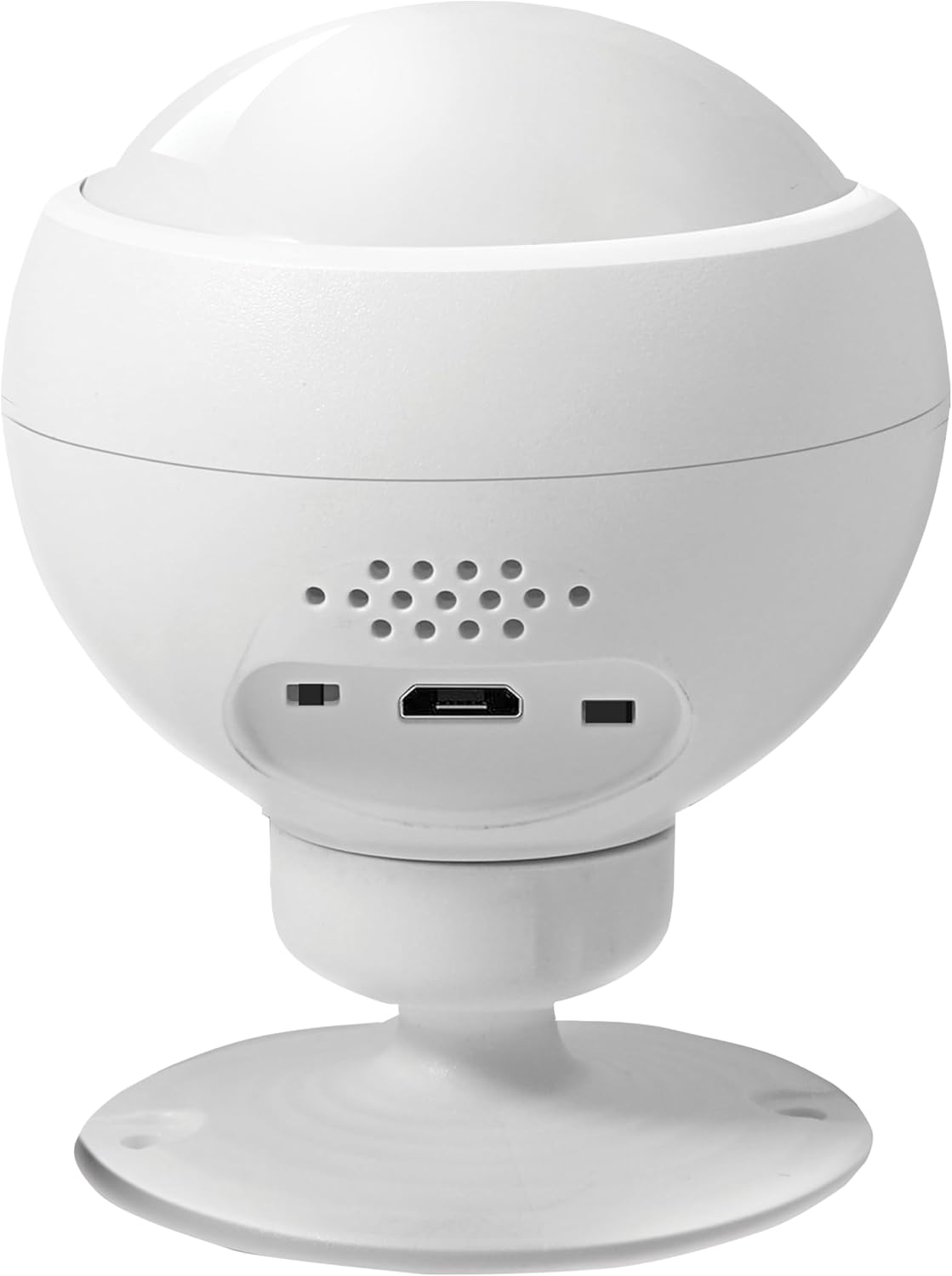
Figura 4.3: Enrere view of the Connex Connect CC-S2000 Smart WiFi Rechargeable Motion Sensor. This image highlights the micro-USB charging port and possibly a reset button or indicator lights on the rear of the device.
5. Configuració
5.1 Càrrega del dispositiu
Before initial use, fully charge the motion sensor. Connect the provided USB charging cable to the micro-USB port on the back of the sensor and plug the other end into a compatible USB power adapter (not included). The charging indicator light will illuminate during charging and turn off when fully charged. A full charge can last up to 6 months, depending on usage.
5.2 Connecting to Wi-Fi and the Connex Connect App
The Connex Connect CC-S2000 requires a 2.4GHz Wi-Fi network for operation. Ensure your smartphone is connected to a 2.4GHz Wi-Fi network before proceeding.
- Descarrega't el Aplicació Connex Connect from your smartphone's app store (available for iOS and Android).
- Register or log in to your Connex Connect account.
- Power on the motion sensor. The indicator light should begin to flash, indicating it is in pairing mode. If not, refer to the device's reset instructions (usually a small button on the back).
- In the Connex Connect App, tap the "+" icon to add a new device.
- Select "Motion Sensor" from the list of available devices.
- Follow the on-screen instructions in the app to connect the sensor to your Wi-Fi network. This typically involves confirming the Wi-Fi network and entering the password.
- Once connected, the indicator light on the sensor will stop flashing and remain solid, or turn off, depending on the device's status.
5.3 Muntatge del sensor
Choose a suitable location for mounting the sensor. Consider the detection range (up to 6 meters) and the area you wish to monitor. Avoid placing it near heat sources, direct sunlight, or areas with frequent air currents, which could cause false triggers.
- Attach the mounting bracket to the desired surface using the provided screws and wall plugs.
- Securely attach the motion sensor to the mounting bracket. The sensor's spherical design allows for adjustment of the detection angle.
- Ensure the sensor is firmly in place and has a clear line of sight to the area it will monitor.
6. Instruccions de funcionament
6.1 Detecció de moviment
The CC-S2000 uses an infrared sensor to detect motion. When motion is detected within its range, it will send a notification to your Connex Connect App and can trigger pre-configured smart home automations.
6.2 Ajust de la sensibilitat
To minimize false alarms, the sensor's sensitivity can be adjusted through the Connex Connect App. Navigate to the device settings for your CC-S2000 sensor within the app and locate the sensitivity adjustment option. Experiment with different settings to find the optimal level for your environment.
6.3 Integration with Smart Home Devices and Automated Rules
The sensor can be integrated with other Connex Connect smart home devices, such as alarms, lights, and sirens. This allows you to create automated rules (scenes or automations) within the Connex Connect App. For exampLI:
- Motion Detected, Turn on Lights: When motion is detected by the CC-S2000, automatically turn on specific smart lights.
- Motion Detected, Sound Alarm: If motion is detected during specific hours (e.g., at night), trigger a smart siren.
- Motion Detected, Send Notification: Receive a push notification on your smartphone when motion is detected.
Refer to the Connex Connect App's help section for detailed instructions on creating and managing automated rules.
7. Manteniment
7.1 Durada i recàrrega de la bateria
The CC-S2000 is equipped with a rechargeable Lithium Ion battery that can last up to 6 months on a single charge. When the battery level is low, you will receive a notification via the Connex Connect App. Recharge the device using the provided USB cable as described in Section 5.1.
7.2 Neteja
To clean the sensor, gently wipe the exterior with a soft, dry cloth. Do not use abrasive cleaners, solvents, or spray liquids directly onto the device.
8. Solució De Problemes
If you encounter issues with your Connex Connect CC-S2000 motion sensor, refer to the following common problems and solutions:
| Problema | Possible solució |
|---|---|
| El dispositiu no es connecta a la Wi-Fi |
|
| Falses alarmes freqüents |
|
| Sense detecció de moviment |
|
| La bateria s'esgota ràpidament |
|
For further assistance, contact Connex Connect customer support.
9. Especificacions
| Característica | Detall |
|---|---|
| Número de model | CC-S2000 |
| Marca | Connex Connect |
| Connectivitat | Smart WiFi (2.4GHz only) |
| Tipus de detecció | Infrarojos (PIR) |
| Interval de detecció | Fins a 6 metres |
| Font d'alimentació | Rechargeable Lithium Ion Battery (1 included) |
| Durada de la bateria | Fins a 6 mesos amb una única càrrega |
| Port de càrrega | Micro USB |
| Color | Blanc |
| Pes | 0.1 quilograms (100 g) |
| Dimensions del paquet | 14.8 x 9 x 8.6 cm |
| Fabricant | Connex Connect |
| Data de primera disponibilitat | 28 de setembre de 2023 |
10. Garantia i Suport
10.1 Garantia del fabricant
The Connex Connect CC-S2000 Smart WiFi Rechargeable Motion Sensor comes with a 1 anys de garantia limitada from the manufacturer. This warranty covers defects in materials and workmanship under normal use. It does not cover damage caused by misuse, accident, unauthorized modification, or external causes.
Conserveu el vostre comprovant de compra per a reclamacions de garantia.
10.2 Atenció al client
For technical support, warranty inquiries, or further assistance, please visit the official Connex Connect website or contact their customer service department. Contact information can typically be found on the product packaging or the Connex Connect weblloc.