
Cleyver ODTALK54
Cleyver Talk 54 Professional Walkie Talkies User Manual
Model: ODTALK54
1. Introducció
The Cleyver Talk 54 is a robust, license-free PMR446 walkie-talkie designed for reliable communication in various environments. This manual provides essential information for the safe and effective use of your device, covering setup, operation, maintenance, and troubleshooting.
2. Producte acabatview
2.1 Contingut del paquet
Assegureu-vos que tots els elements estiguin presents al vostre paquet:
- 2 x Cleyver Talk 54 Walkie Talkies
- 2 x Belt Clips (Motorola-compatible)
- 2 x Micro-USB Charging Cables (charging cable only, no desktop charger)
- 2 x Rechargeable Li-ion Battery Packs
- Documentació d'usuari
2.2 Característiques clau
- PMR446 License-Free Communication: Operates on 16 channels for free calls.
- Protecció IP54: Dust and splash water resistant for use in challenging conditions.
- Llarga vida útil de la bateria: 1800mAh Li-ion battery provides up to 12 hours of average use.
- Botó d'emergència SOS: Per a situacions urgents.
- Llanterna integrada: Proporciona il·luminació quan cal.
- CTCSS/DCS: Continuous Tone-Coded Squelch System / Digital Coded Squelch for interference reduction.
- Funció d'escaneig: Automatically scans for active channels.
- Funció VOX: Voice Operated Exchange for hands-free communication.
- Alerta de bateria baixa: Notifies you when the battery is low.
- Connectivitat: Micro-USB for charging and 2.5mm jack for audio accessories.
- Compatibilitat d'accessoris: Compatible with Motorola T82 accessories.

Figura 1: Frontal view of two Cleyver Talk 54 walkie-talkies, showing the display and main control buttons.
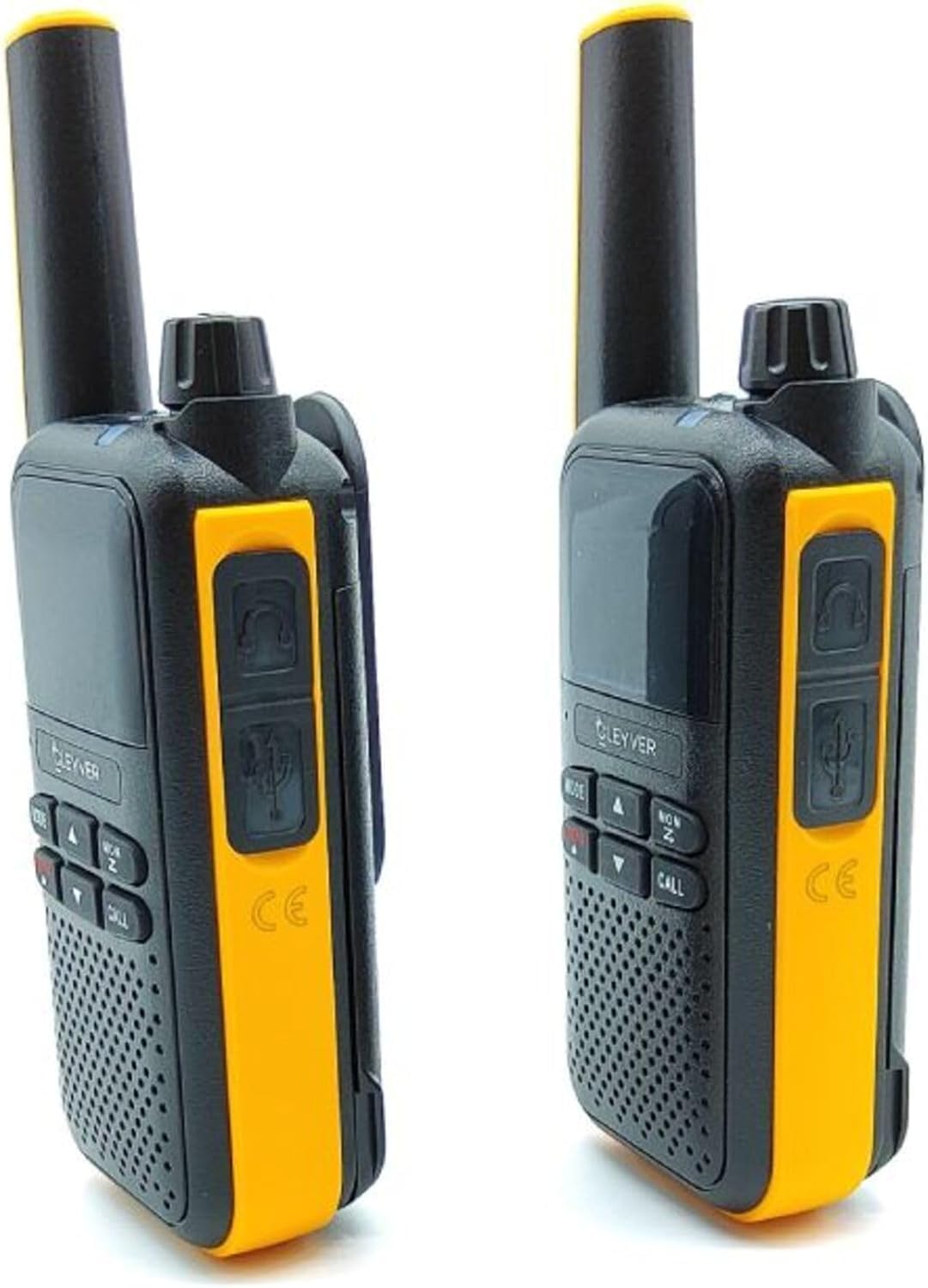
Figura 2: lateral view of two Cleyver Talk 54 walkie-talkies, highlighting the headset and USB charging ports.

Figure 3: Other side view of two Cleyver Talk 54 walkie-talkies, showing the Push-to-Talk (PTT) and SOS buttons.
3. Configuració
3.1 Instal·lació de la bateria
- Assegureu-vos que el walkie-talkie estigui apagat.
- Localitzeu la tapa del compartiment de la bateria a la part posterior del dispositiu.
- Slide the cover down or unclip it to open the compartment.
- Insert the Li-ion battery pack, ensuring the contacts align correctly.
- Substituïu la tapa del compartiment de la bateria i fixeu-la.
3.2 Càrrega de la bateria
- Connect the Micro-USB charging cable to the charging port on the side of the walkie-talkie.
- Connecteu l'altre extrem del cable a un adaptador de corrent USB compatible (no inclòs) o a un port USB de l'ordinador.
- El llum indicador de càrrega s'il·luminarà, normalment en vermell, durant la càrrega.
- Once fully charged, the indicator light may change color (e.g., green) or turn off. A full charge takes approximately 3-4 hours.
3.3 Col·locació del clip de cinturó
- Align the belt clip with the designated slots on the back of the walkie-talkie.
- Slide the clip upwards until it locks securely into place.
- Per treure-la, premeu la pestanya d'alliberament (si n'hi ha) i feu lliscar el clip cap avall.

Figure 4: Cleyver Talk 54 walkie-talkies shown with the included belt clips, Micro-USB charging cables, and battery packs.
4. Funcionament
4.1 Encès/Apagat
- Per encendre: Rotate the On/Off/Volume knob clockwise until you hear a click and the display illuminates.
- Per apagar: Rotate the On/Off/Volume knob counter-clockwise until you hear a click and the display turns off.
4.2 Ajust de volum
Gireu el botó d'encesa/apagada/volum en sentit horari per augmentar el volum i en sentit antihorari per disminuir-lo.
4.3 Selecció de canals
- Premeu el botó MODE/MENÚ button to enter channel selection mode. The channel number on the display will flash.
- Utilitza el Amunt (▲) i BAIX (▼) arrow buttons to select one of the 16 available PMR446 channels.
- Premeu el botó MODE/MENÚ de nou o espereu uns segons que es confirmi la selecció.
4.4 Transmissió i recepció
- Per transmetre: Manteniu premut el botó PTT (Prem per parlar) button located on the side of the walkie-talkie. Speak clearly into the microphone. Release the PTT button when finished speaking.
- Per rebre: Ensure the PTT button is not pressed. The walkie-talkie will automatically receive transmissions on the selected channel.
4.5 Funció de llanterna
Premeu el botó dedicat Llanterna button (often marked with a lightbulb icon) to turn the flashlight on or off.
Botó d'emergència SOS 4.6
Manteniu premut el botó SOS button (usually located on the side, near the PTT button) to activate the emergency alert. This will transmit an audible alarm signal to other walkie-talkies on the same channel.
4.7 VOX (centralita operada per veu)
VOX allows for hands-free transmission. When activated, the walkie-talkie will transmit automatically when it detects your voice.
- Premeu el botó MODE/MENÚ button repeatedly until the VOX setting appears on the display.
- Utilitza el Amunt (▲) i BAIX (▼) arrow buttons to select the VOX sensitivity level (e.g., 1-3, with 3 being most sensitive) or to turn VOX off.
- Premeu MODE/MENÚ per confirmar.
4.8 Funció d'escaneig
The scan function allows the walkie-talkie to automatically search for active channels.
- Premeu el botó MON / SCAN button to activate the scan function. The walkie-talkie will cycle through channels.
- Quan es detecta un senyal actiu, l'escaneig es pausarà en aquest canal.
- Premeu el botó MON / SCAN botó de nou per aturar l'escaneig.
4.9 Tons CTCSS/DCS
CTCSS (Continuous Tone-Coded Squelch System) and DCS (Digital Coded Squelch) tones help filter out unwanted conversations on a busy channel. Only transmissions with the same tone setting will be heard.
- Premeu el botó MODE/MENÚ button repeatedly until the CTCSS or DCS setting appears.
- Utilitza el Amunt (▲) i BAIX (▼) arrow buttons to select a tone code. Ensure all walkie-talkies in your group use the same channel and tone code.
- Premeu MODE/MENÚ per confirmar.

Figura 5: Primer pla view of the Cleyver Talk 54 display, showing channel number and icons, along with the MODE, UP, DOWN, MON/SCAN, and CALL buttons.
5. Manteniment
5.1 Neteja
- Netegeu el dispositiu amb un suau, damp tela. No utilitzeu productes químics aggressivs ni netejadors abrasius.
- Ensure the charging port and accessory jacks are free from dust and debris.
5.2 Cura de la bateria
- Per allargar la durada de la bateria, eviteu descarregar-la completament amb freqüència.
- Charge the battery regularly, even if the device is not in use for extended periods.
- No exposeu les piles a temperatures extremes.
5.3 Emmagatzematge
- Guardeu el walkie-talkie en un lloc fresc i sec, allunyat de la llum solar directa i de temperatures extremes.
- If storing for an extended period, remove the battery pack.
6. Solució De Problemes
| Problema | Causa possible | Solució |
|---|---|---|
| Sense poder | La bateria està baixa o no està instal·lada correctament. | Carregueu la bateria. Assegureu-vos que la bateria estigui inserida correctament. |
| No es pot transmetre ni rebre | Incorrect channel or tone code. Out of range. Battery low. | Verify both walkie-talkies are on the same channel and tone code. Move closer to the other unit. Charge the battery. |
| Mala qualitat d'àudio | Weak signal. Obstructions. Volume too low. | Move to an open area. Adjust volume. Check for interference. |
| La llanterna no funciona | Battery low. Faulty button. | Carregueu la bateria. Si el problema persisteix, contacteu amb el servei d'assistència. |
| VOX not activating | VOX sensitivity too low. Background noise. | Increase VOX sensitivity. Reduce background noise. |
7. Especificacions
| Característica | Especificació |
|---|---|
| Marca | Cleyver |
| Model | ODTALK54 |
| Tecnologia del sintonitzador | PMR446 |
| Canals | 16 |
| Classificació IP | IP54 (resistent a la pols i a les esquitxades d'aigua) |
| Tipus de bateria | Ió de liti (1800 mAh) |
| Durada mitjana de la bateria | 12 hores |
| Dimensions del producte | 4 x 6 x 13 cm |
| Pes del producte | 500 g (approximate, for the pair) |
| Port de càrrega | Micro-USB |
| Jack d'àudio | 2.5 mm |
8. Garantia i Suport
The Cleyver Talk 54 walkie-talkies come with a 2 any de garantia. For technical support, warranty claims, or further assistance, please refer to the contact information provided in your purchase documentation or visit the official Cleyver weblloc.
Ask a question about this manual
Ask about setup, troubleshooting, compatibility, parts, safety, or missing instructions. Manuals+ will review the question and use this page’s manual context to help answer it.