
CIRCOOTER Raptor Pro
Circooter Raptor Pro Electric Scooter User Manual
Model: Raptor Pro
Marca: CIRCOOTER
1. Producte acabatview
The Circooter Raptor Pro is a high-performance electric scooter designed for both off-road exploration and daily commuting. It features dual motors, a long-range battery, and a comprehensive lighting system for enhanced safety and visibility.

Image: Circooter Raptor Pro Electric Scooter, showcasing its sleek design, included storage bag, and dual chargers.
2. Configuració
2.1 Unboxing i muntatge
Carefully remove all components from the packaging. The scooter comes partially assembled. Follow these steps to complete the setup:
- Aixequeu la tija del manillar a la posició vertical fins que sentiu un clic per encaixar-la fermament al seu lloc.
- Secure the handlebar assembly by tightening the locking mechanism.
- Connect any loose cables from the handlebar to the main stem, ensuring they are properly seated.
- Attach any accessories, such as the storage bag, to the designated areas.
2.2 Càrrega inicial
Before first use, fully charge the scooter's battery. The Raptor Pro includes two chargers and dual charging ports to reduce charging time.
- Locate the charging ports on the scooter's deck.
- Plug the chargers into a standard power outlet.
- Connect the charging cables to the scooter's charging ports.
- The charging indicator on the charger will change color (typically red to green) when fully charged.
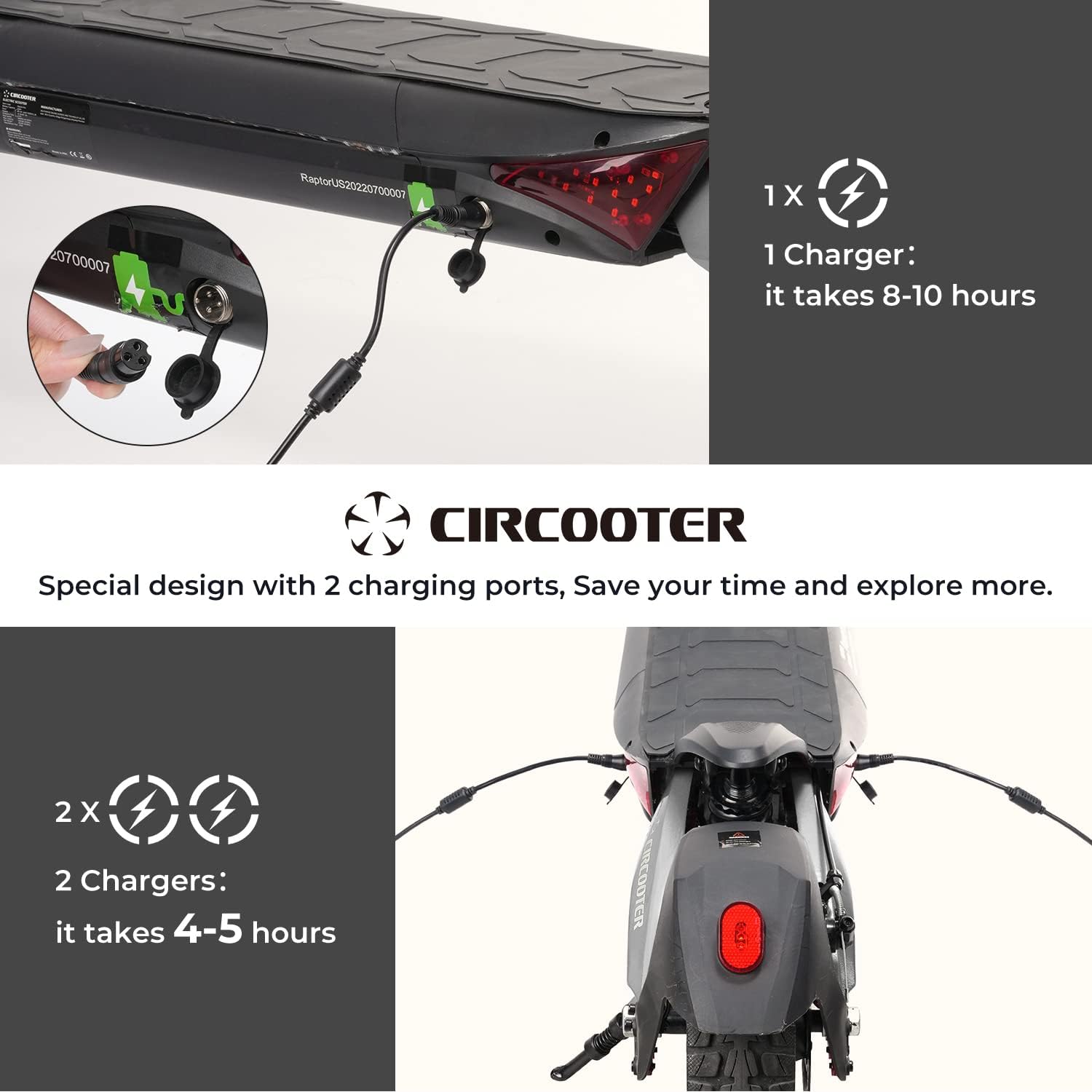
Image: Close-up of the Circooter Raptor Pro's dual charging ports, illustrating the use of two chargers for faster charging (4-5 hours).
3. Instruccions de funcionament
3.1 Controls i pantalla
The scooter features an intuitive control panel and a clear display to monitor your ride.
- Botó d'encesa: Turns the scooter on/off.
- Botó de mode: Cycles through different riding modes (ECO, Standard, Turbo).
- Botó de fars: Activates the dual headlights and side moonlights.
- Botó de trompa: Sounds the horn.
- Senyals de gir: Front and rear turn signals are integrated into the deck for visibility.
- Visualització: Shows speed, battery level, trip mileage, and temperature.

Image: The Circooter Raptor Pro's comprehensive 360-degree lighting system, including dual headlights, side moonlights, and integrated turn signals.
3.2 Modes de conducció
The Raptor Pro offers multiple riding modes to suit different terrains and preferences:
- Mode ECO: Maximizes battery range, suitable for casual rides.
- Mode estàndard: Balanced performance for everyday use.
- Mode turbo: Unleashes full power for maximum speed (up to 28 MPH) and acceleration.
3.3 Connectivitat de l'aplicació
Connect your Raptor Pro scooter to your smartphone via the dedicated app for additional controls and ride data.
- Monitor single and total mileage.
- Lock/unlock the scooter for security.
- Control headlights and cruise mode.
- Adjust start mode (push-start vs. immediate throttle).
Video: A detailed product introduction, demonstrating the scooter's features and app connectivity.
4. Manteniment
4.1 Atenció general
- Regularly inspect tires for wear and proper inflation (though solid tires reduce this need).
- Mantingueu el patinet net i lliure de brutícia i deixalles.
- Check all bolts and fasteners periodically to ensure they are tight.
4.2 Cura de la bateria
- Always use the original chargers provided.
- Eviteu esgotar completament la bateria abans de tornar-la a carregar.
- Store the scooter in a cool, dry place when not in use, and ensure the battery is partially charged (around 50-70%) for long-term storage.

Image: The Circooter Raptor Pro demonstrating its IPX4 waterproof rating, indicating resistance to water splashes from any direction.
5. Solució De Problemes
If you encounter issues with your Circooter Raptor Pro, please refer to the following common solutions:
- El patinet no s'encén: Ensure the battery is charged and the power button is pressed firmly. Check all cable connections.
- Loss of power/speed: This may indicate a low battery. Recharge the scooter fully. Performance may also decrease in extreme temperatures or on steep inclines.
- Problemes de frenada: Check brake cables for proper tension. Ensure brake pads are not excessively worn.
- Problemes de connectivitat de l'aplicació: Ensure Bluetooth is enabled on your device and the scooter is powered on. Try restarting both the app and the scooter.
Per a problemes persistents, poseu-vos en contacte amb l'atenció al client.
Video: A detailed riding experience video, which may offer insights into common operational scenarios and performance.
6. Especificacions
| Característica | Especificació |
|---|---|
| Marca | CIRCOOTER |
| Nom del model | T8 (Raptor Pro) |
| Potència del motor | Dual 800W brushless hub motors (1600W total) |
| Velocitat màxima | 28 MPH |
| Interval de distància màxim | 31 Miles (with 48V 20Ah battery) |
| Capacitat de la bateria | 48 V 20 Ah |
| Temps de càrrega | 4-5 hours (with 2 chargers) |
| Límit de pes | 440 lliures |
| Mida de la roda | 10 Inches off-road solid tires |
| Tipus de suspensió | Suspensió dual |
| Estil de fre | Dual Braking Systems (EBS) |
| Material del marc | Alumini |
| Característiques especials | 2 Chargers, 2 Charging ports, Dual Motors, 1600W, 360-degree lighting system |
7. Garantia i Suport
7.1 Informació de la garantia
Circooter offers a limited warranty for the Raptor Pro Electric Scooter:
- 12 months and 365 days for various accessories (e.g., rear fender, throttle, disc brake).
- 180 days for motor & battery.
Conserveu el vostre comprovant de compra per a reclamacions de garantia.
7.2 Atenció al client
For any inquiries, technical assistance, or warranty claims, please contact Circooter customer support:
- Correu electrònic: hola@circooter.com
- Seller: CIRCOOTER DIRECT
Documents relacionatsRaptor Pro


Ask a question about this manual
Ask about setup, troubleshooting, compatibility, parts, safety, or missing instructions. Manuals+ will review the question and use this page’s manual context to help answer it.