
1. Introducció
Thank you for choosing the Juice BoomPRO-XL Wireless Bluetooth Speaker. This manual provides essential information for the safe and efficient use of your device. Please read it thoroughly before operation and retain it for future reference. The Juice BoomPRO-XL is designed to deliver powerful, 360-degree sound with its dual 10W speakers, offering an immersive audio experience. Its IPX5 splash-resistant rating makes it suitable for various environments, both indoors and outdoors.

Imatge 1.1: The Juice BoomPRO-XL speaker presented in its retail packaging. The packaging emphasizes key features such as 18 hours of playtime, a 10-meter Bluetooth range, and dual 10-watt speakers. It also highlights that the packaging is 100% recyclable.
2. Informació de seguretat
- No exposeu l'altaveu a temperatures extremes, llum solar directa ni flames obertes.
- While the speaker is IPX5 splash-resistant, do not submerge it in water.
- Eviteu deixar caure o sotmetre l'altaveu a forts impactes.
- No intenteu desmuntar, reparar o modificar l'altaveu vosaltres mateixos. Això anul·larà la garantia.
- Feu servir només el cable de càrrega proporcionat o un equivalent certificat.
- Mantenir fora de l'abast dels nens.
3. Contingut del paquet
Si us plau, comproveu que tots els elements siguin presents al paquet:
- Juice BoomPRO-XL Wireless Bluetooth Speaker
- Charging Cable (USB-C to USB-A, typical for modern devices)
- Manual d'usuari (aquest document)
4. Producte acabatview
Familiaritzeu-vos amb els components i els controls de l'altaveu.
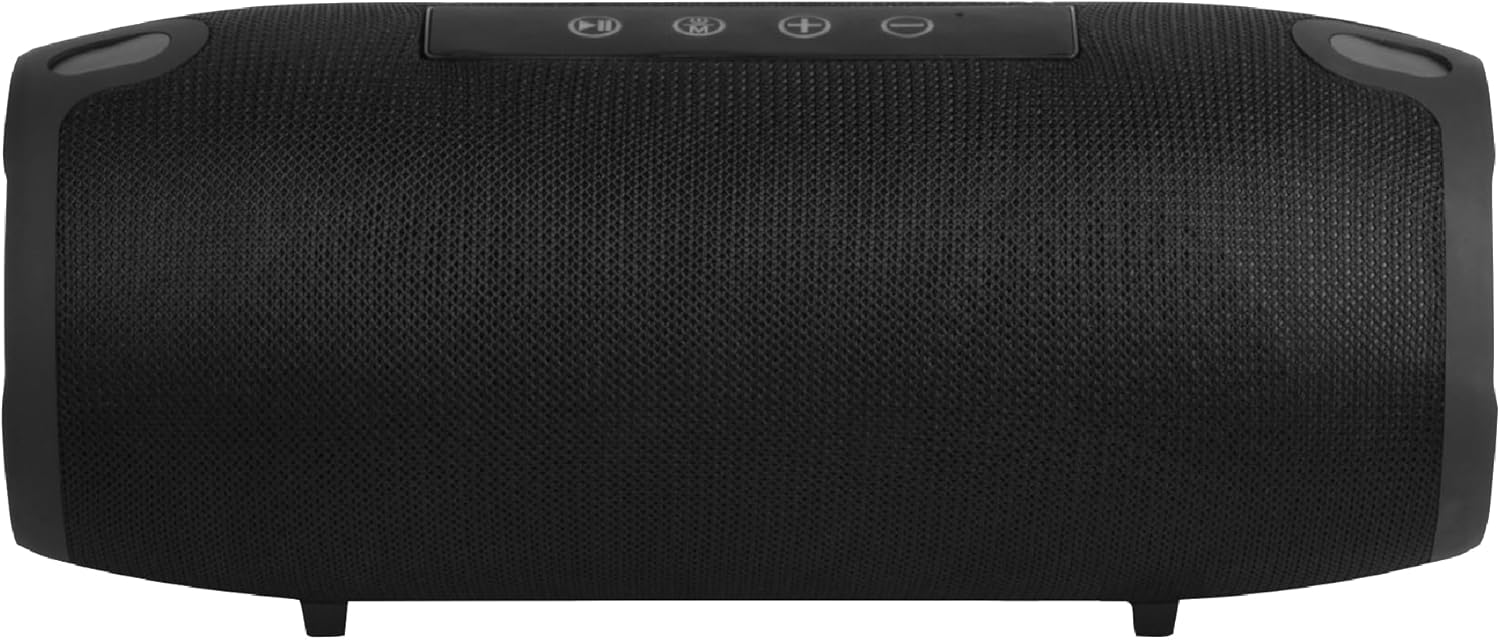
Imatge 4.1: Davant view of the Juice BoomPRO-XL speaker. The main speaker grille covers the front, and the control panel is visible on the top surface.
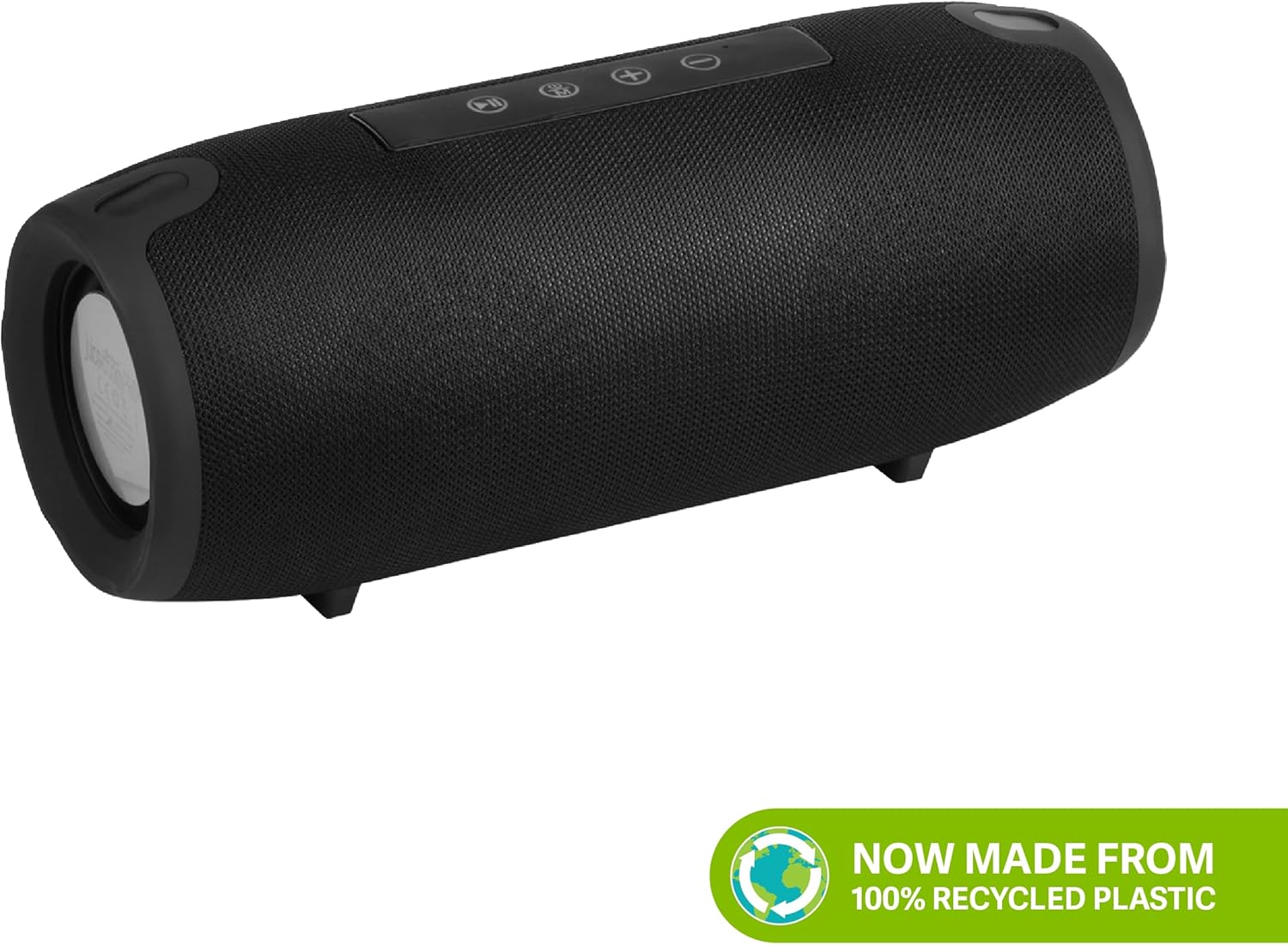
Imatge 4.2: lateral view of the Juice BoomPRO-XL speaker. This view typically shows the passive radiators on the ends and may reveal the location of input ports (AUX, USB, Micro SD) under a protective flap.
Tauler de control (superior)
- Botó d'encesa: Manteniu premut per activar/desactivar.
- Botó Reproduir/Pausa: Premeu per reproduir o posar en pausa la música.
- Botó de mode (M): Press to switch between Bluetooth, AUX, Micro SD, and USB-A input modes.
- Puja el volum (+): Press to increase volume. Hold to skip to the next track.
- Baixar el volum (-): Press to decrease volume. Hold to go to the previous track.
Input Ports (Rear/Side, under protective flap)
- Port de càrrega USB-C: Per carregar l'altaveu.
- Entrada AUX (3.5 mm): Per a la connexió per cable a dispositius d'àudio.
- Ranura per a targetes Micro SD: Per reproduir música directament des d'una targeta Micro SD.
- Port USB-A: For playing music directly from a USB flash drive. Can also function as a power bank for emergency charging of other devices.
5. Configuració
5.1 Càrrega de l'altaveu
- Locate the USB-C charging port, usually found under a protective rubber flap on the side or rear of the speaker.
- Connecteu el cable de càrrega USB-C proporcionat al port de càrrega de l'altaveu.
- Connect the other end of the USB-A cable to a suitable USB power adapter (not included) or a computer's USB port.
- The charging indicator light (location varies, typically near the charging port or on the control panel) will illuminate to show charging status.
- Una càrrega completa triga aproximadament 4 hores. El llum indicador canviarà o s'apagarà un cop finalitzada la càrrega.
Note: For optimal battery life, fully charge the speaker before first use.
5.2 Vinculació Bluetooth
- Assegureu-vos que l'altaveu estigui completament carregat.
- Press and hold the Power button to turn on the speaker. A sound prompt will indicate it's powered on, and the Bluetooth indicator light will flash, signifying it's in pairing mode.
- On your mobile device (smartphone, tablet, etc.), go to the Bluetooth settings.
- Cerca available devices. You should see "Juice BoomPRO-XL" in the list.
- Select "Juice BoomPRO-XL" to connect. Once paired, the speaker will emit a confirmation sound, and the Bluetooth indicator light will stop flashing and remain solid.
- The speaker will automatically attempt to reconnect to the last paired device when powered on, if that device is within range and has Bluetooth enabled.
Tip: The Bluetooth range is approximately 10 meters (33 feet) in an open environment. Obstacles may reduce this range.
5.3 Connecting via AUX, Micro SD, or USB-A
The Juice BoomPRO-XL supports multiple input methods:
- Entrada AUX: Connect a 3.5mm audio cable (not included) from your audio device's headphone jack to the speaker's AUX port. Press the 'M' (Mode) button until the speaker switches to AUX mode.
- Targeta micro SD: Insert a Micro SD card (up to 32GB, formatted to FAT32) containing MP3 audio files into the Micro SD card slot. The speaker will automatically switch to Micro SD mode and begin playback, or you may need to press the 'M' button.
- USB-A Drive: Insert a USB flash drive (up to 32GB, formatted to FAT32) containing MP3 audio files into the USB-A port. The speaker will automatically switch to USB mode and begin playback, or you may need to press the 'M' button.
6. Instruccions de funcionament
6.1 Encès/Apagat
- Per encendre: Press and hold the Power button for approximately 2-3 seconds until you hear a power-on sound.
- Per apagar: Press and hold the Power button for approximately 2-3 seconds until you hear a power-off sound.
6.2 Control de reproducció de música
- Reproduir/pausa: Premeu el botó Reproduir/Pausa una vegada.
- Pista següent: Premeu i manteniu premut el botó de pujar el volum (+).
- Pista anterior: Premeu i manteniu premut el botó per baixar el volum (-).
6.3 Ajust de volum
- Augmenta el volum: Press the Volume Up (+) button repeatedly.
- Disminueix el volum: Press the Volume Down (-) button repeatedly.
6.4 Call Handling (via Bluetooth)
When connected via Bluetooth, the speaker can manage phone calls:
- Respon a la trucada: Premeu el botó Reproduir/Pausa una vegada.
- Finalitzar la trucada: Premeu el botó Reprodueix/Pausa una vegada durant una trucada.
- Rebutja la trucada: Manteniu premut el botó Reproduir/Pausa durant 2 segons.
7. Manteniment
7.1 Neteja
- Assegureu-vos que l'altaveu estigui apagat i desconnectat de qualsevol font d'alimentació abans de netejar-lo.
- Netegeu l'exterior amb un suau, damp drap. No utilitzeu productes de neteja abrasius, alcohol ni dissolvents químics.
- No permeteu que l'aigua entri a cap obertura.
7.2 Emmagatzematge
- Guardeu l'altaveu en un lloc fresc i sec, allunyat de la llum solar directa i de temperatures extremes.
- Si l'emmagatzemeu durant un període prolongat, carregueu la bateria aproximadament al 50% cada 3-6 mesos per preservar-ne l'estat.
7.3 Cura de la bateria
- Eviteu descarregar completament la bateria amb freqüència.
- Do not leave the speaker connected to a charger for excessively long periods after it is fully charged.
- If the battery performance significantly degrades, contact customer support.
8. Solució De Problemes
| Problema | Causa possible | Solució |
|---|---|---|
| L'altaveu no s'encén. | Bateria baixa. | Carregueu l'altaveu durant almenys 30 minuts. |
| No es pot emparellar per Bluetooth. | L'altaveu no està en mode d'emparellament; el dispositiu està massa lluny; hi ha un dispositiu prèviament emparellat connectat. | Ensure speaker is in pairing mode (flashing blue light). Move device closer. Disconnect from other devices. Turn Bluetooth off/on on your device. |
| Sense so. | Volume too low; incorrect input mode; audio source issue. | Increase speaker and device volume. Press 'M' button to select correct input mode (Bluetooth, AUX, SD, USB). Check audio source. |
| Distorsió del so. | Volume too high; low battery; poor signal. | Reduce volume. Charge the speaker. Move device closer to speaker. |
| L'altaveu no carrega. | Cable/adaptador defectuós; problema amb el port de càrrega. | Prova un cable USB-C i un adaptador de corrent diferents. Assegura't que el port de càrrega estigui net i lliure de residus. |
9. Especificacions
| Nom del model: | Juice BoomPRO-XL |
| Número de model: | JUI-SPKER-BMPROXL-BLK |
| Versió Bluetooth: | (Not specified, assuming standard modern version) |
| Rang Bluetooth: | Fins a 10 metres (33 peus) |
| Sortida de l'altaveu: | 2 x 10 W (Total 20 W) |
| Canals d'àudio: | 2.0 Surround Sound Configuration |
| Tipus de bateria: | 1 bateria de liti-ió (inclosa) |
| Temps de joc: | Fins a 18 hores (amb un 50% de volum) |
| Temps de càrrega: | Aproximadament 4 hores |
| Resistència a l'aigua: | IPX5 (resistent a les esquitxades) |
| Ports d'entrada: | AUX (3.5mm), Micro SD Card Slot, USB-A Port |
| Dimensions (L x A x A): | 28 x 12 x 12 cm (11.02 x 4.72 x 4.72 polzades) |
| Pes: | 1.115 kg (2.46 lliures) |
| Mètode de control: | Tactile Buttons |
10. Garantia i Suport
10.1 Informació de la garantia
The Juice BoomPRO-XL Wireless Bluetooth Speaker comes with a 1-year Juice warranty from the date of purchase. This warranty covers manufacturing defects and workmanship under normal use. It does not cover damage caused by misuse, accidents, unauthorized modifications, or normal wear and tear. Please retain your proof of purchase for warranty claims.
10.2 Atenció al client
For technical assistance, warranty claims, or any questions regarding your Juice BoomPRO-XL speaker, please contact Juice customer support. Refer to the official Juice weblloc web o la documentació de compra per obtenir la informació de contacte més actualitzada.